Angular-auth-oidc-client: Silent renew outside of i-frame.
Describe the bug
We sometimes get the following error: Error: "codeFlowCodeRequest incorrect state"
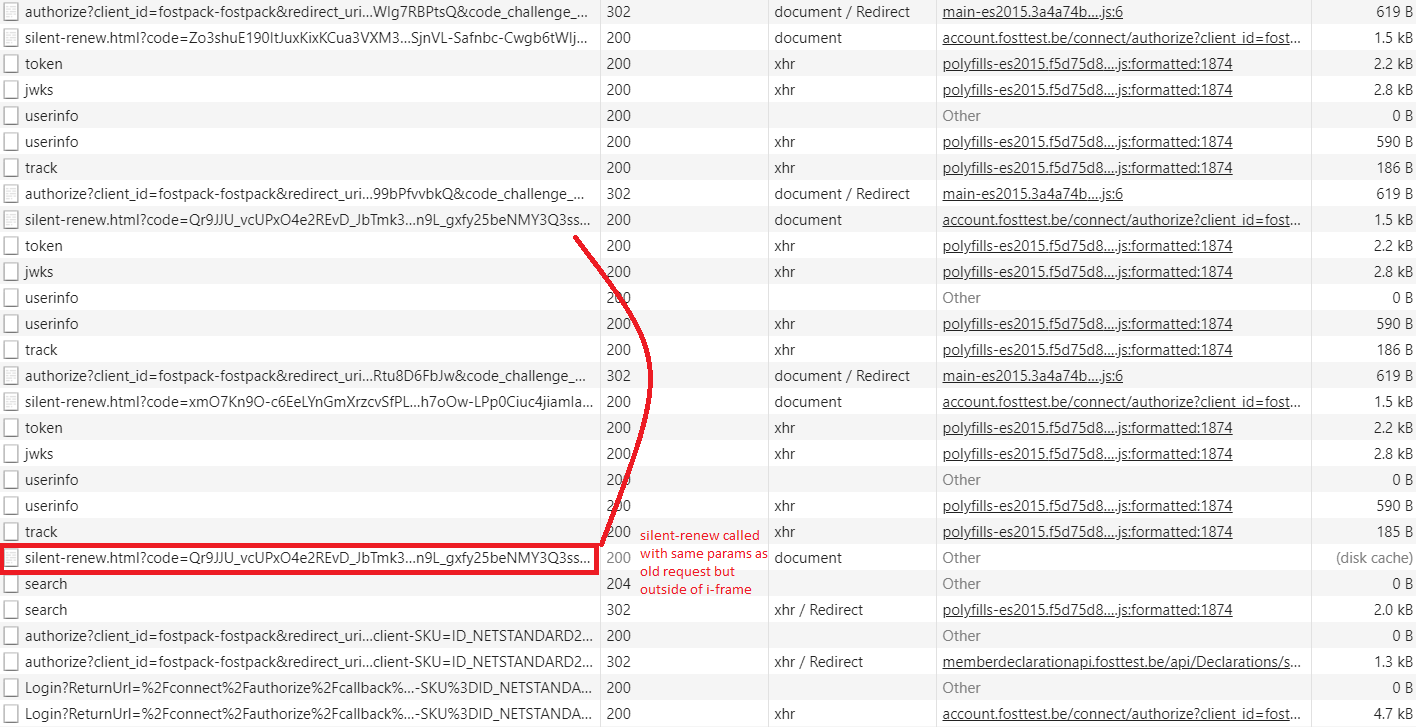
After investigation we noticed a request to the silent renew page outside of the i-frame. The browser is serving this request from the cache since all request parameters resembles (same code, ...) an old request to the silent renew. (mostly not the previous one but the one before)
This request causes the error and the error causes the removal of all data from the session storage.
This is what we see in the Network tab.
First there are 3 valid request from the i-frame. the calls the authorize and then there is a redirect to the silent-renew page.
The fourth silent-renew seems t come from nowhere...
To Reproduce
We where unable to reproduce this. It just happens from time to time.
Expected behavior
We expected no call to silent renew. the time for the next silent renew was 2 min later.
Screenshots
If applicable, add screenshots to help explain your problem.
Desktop (please complete the following information):
- OS: Widows 10
- Browser: chrome
- Version: 86
 DieterDS1983
All 2 comments
Update.
We where able to reproduce the problem.
It is related to the browsers history. We noticed that when the silent renew happens, an item is added to the browsers history.
When we stay on the same page without any actions, the browser history is filling up with a new item on every silent renew.
When we press back and the previous item in the history was added by a silent-renew, than it is requesting the previous silent-renew with an old code. => error
This will also set al values in session storage to null, so new request will get an unauthorized.
steps to reproduce:
- Login to the application
- Navigate to a page (you will see the browser history is updated)
- Wait for the silent renew to happen (This should also update the browser history)
- After the silent renew click "back" in the browser. (or do a window.history.back();)
- now you should have an "incorrect state" error in the console.
tested with version 11.1.2 and 11.2.0.
Also tested with the older 10.0.15 version. Here we have the same behavior, but session storage is not reset.
So the next requests will still work.
DieterDS1983
on 20 Oct 2020
We also have a possible workaround.
We changed our silent renew page to remove the iframe after the request.
The next silent-renew will than add a new iframe. This avoids the creation of history items.
````javascript
window.onload = function () {
/* The parent window hosts the Angular application /
var parent = window.parent;
/ Send the id_token information to the oidc message handler */
var event = new CustomEvent('oidc-silent-renew-message', { detail: window.location });
parent.dispatchEvent(event);
  var frame = window.parent.document.getElementById("myiFrameForSilentRenew");
  frame.parentNode.removeChild(frame);
};
```
DieterDS1983
on 20 Oct 2020
Related issues
 hannesrohde
·
3Comments
hannesrohde
·
3Comments
 Expelz
·
4Comments
Expelz
·
4Comments
 cgatian
·
4Comments
cgatian
·
4Comments
 toddtsic
·
4Comments
toddtsic
·
4Comments
 JohnGalt1717
·
3Comments
JohnGalt1717
·
3Comments
Most helpful comment
We also have a possible workaround.
We changed our silent renew page to remove the iframe after the request.
The next silent-renew will than add a new iframe. This avoids the creation of history items.
````javascript
window.onload = function () {
/* The parent window hosts the Angular application /
var parent = window.parent;
/ Send the id_token information to the oidc message handler */
var event = new CustomEvent('oidc-silent-renew-message', { detail: window.location });
parent.dispatchEvent(event);
```