Androidpdfviewer: app:transformNativeLibsWithStripDebugSymbolForDebug
hi, i use this lib in my app and compile ... but when run app send this error
Error:Execution failed for task ':app:transformNativeLibsWithStripDebugSymbolForDebug'.
java.lang.NullPointerException (no error message)
when remove this package ... project has run (without any problems)
i need help for fix and open PDF file !
thank's
 ghasem110deh
All 7 comments
i would post some code as it states there is a null exception
 1stmetro
on 26 Apr 2018
1stmetro
on 26 Apr 2018
I got similar stacktrace. I am trying to solve it in my machine. It looks like an ndk problem...
org.gradle.api.tasks.TaskExecutionException: Execution failed for task ':app:transformNativeLibsWithStripDebugSymbolForDebug'.
    at org.gradle.api.internal.tasks.execution.ExecuteActionsTaskExecuter.executeActions(ExecuteActionsTaskExecuter.java:100)
    at org.gradle.api.internal.tasks.execution.ExecuteActionsTaskExecuter.execute(ExecuteActionsTaskExecuter.java:70)
    at org.gradle.api.internal.tasks.execution.SkipUpToDateTaskExecuter.execute(SkipUpToDateTaskExecuter.java:63)
    at org.gradle.api.internal.tasks.execution.ResolveTaskOutputCachingStateExecuter.execute(ResolveTaskOutputCachingStateExecuter.java:54)
    at org.gradle.api.internal.tasks.execution.ValidatingTaskExecuter.execute(ValidatingTaskExecuter.java:58)
    at org.gradle.api.internal.tasks.execution.SkipEmptySourceFilesTaskExecuter.execute(SkipEmptySourceFilesTaskExecuter.java:88)
    at org.gradle.api.internal.tasks.execution.ResolveTaskArtifactStateTaskExecuter.execute(ResolveTaskArtifactStateTaskExecuter.java:52)
    at org.gradle.api.internal.tasks.execution.SkipTaskWithNoActionsExecuter.execute(SkipTaskWithNoActionsExecuter.java:52)
    at org.gradle.api.internal.tasks.execution.SkipOnlyIfTaskExecuter.execute(SkipOnlyIfTaskExecuter.java:54)
    at org.gradle.api.internal.tasks.execution.ExecuteAtMostOnceTaskExecuter.execute(ExecuteAtMostOnceTaskExecuter.java:43)
    at org.gradle.api.internal.tasks.execution.CatchExceptionTaskExecuter.execute(CatchExceptionTaskExecuter.java:34)
    at org.gradle.execution.taskgraph.DefaultTaskGraphExecuter$EventFiringTaskWorker$1.run(DefaultTaskGraphExecuter.java:248)
    at org.gradle.internal.progress.DefaultBuildOperationExecutor$RunnableBuildOperationWorker.execute(DefaultBuildOperationExecutor.java:336)
    at org.gradle.internal.progress.DefaultBuildOperationExecutor$RunnableBuildOperationWorker.execute(DefaultBuildOperationExecutor.java:328)
    at org.gradle.internal.progress.DefaultBuildOperationExecutor.execute(DefaultBuildOperationExecutor.java:197)
    at org.gradle.internal.progress.DefaultBuildOperationExecutor.run(DefaultBuildOperationExecutor.java:107)
    at org.gradle.execution.taskgraph.DefaultTaskGraphExecuter$EventFiringTaskWorker.execute(DefaultTaskGraphExecuter.java:241)
    at org.gradle.execution.taskgraph.DefaultTaskGraphExecuter$EventFiringTaskWorker.execute(DefaultTaskGraphExecuter.java:230)
    at org.gradle.execution.taskgraph.DefaultTaskPlanExecutor$TaskExecutorWorker.processTask(DefaultTaskPlanExecutor.java:124)
    at org.gradle.execution.taskgraph.DefaultTaskPlanExecutor$TaskExecutorWorker.access$200(DefaultTaskPlanExecutor.java:80)
    at org.gradle.execution.taskgraph.DefaultTaskPlanExecutor$TaskExecutorWorker$1.execute(DefaultTaskPlanExecutor.java:105)
    at org.gradle.execution.taskgraph.DefaultTaskPlanExecutor$TaskExecutorWorker$1.execute(DefaultTaskPlanExecutor.java:99)
    at org.gradle.execution.taskgraph.DefaultTaskExecutionPlan.execute(DefaultTaskExecutionPlan.java:625)
    at org.gradle.execution.taskgraph.DefaultTaskExecutionPlan.executeWithTask(DefaultTaskExecutionPlan.java:580)
    at org.gradle.execution.taskgraph.DefaultTaskPlanExecutor$TaskExecutorWorker.run(DefaultTaskPlanExecutor.java:99)
    at org.gradle.internal.concurrent.ExecutorPolicy$CatchAndRecordFailures.onExecute(ExecutorPolicy.java:63)
    at org.gradle.internal.concurrent.ManagedExecutorImpl$1.run(ManagedExecutorImpl.java:46)
    at java.util.concurrent.ThreadPoolExecutor.runWorker(ThreadPoolExecutor.java:1142)
    at java.util.concurrent.ThreadPoolExecutor$Worker.run(ThreadPoolExecutor.java:617)
    at org.gradle.internal.concurrent.ThreadFactoryImpl$ManagedThreadRunnable.run(ThreadFactoryImpl.java:55)
    at java.lang.Thread.run(Thread.java:745)
Caused by: org.gradle.process.internal.ExecException: A problem occurred starting process 'command '/Users/ferrannp/Development/Extras/android-sdk-macosx/ndk-bundle/toolchains/mips64el-linux-android-4.9/prebuilt/darwin-x86_64/bin/mips64el-linux-android-strip''
    at org.gradle.process.internal.DefaultExecHandle.execExceptionFor(DefaultExecHandle.java:220)
    at org.gradle.process.internal.DefaultExecHandle.setEndStateInfo(DefaultExecHandle.java:204)
    at org.gradle.process.internal.DefaultExecHandle.failed(DefaultExecHandle.java:340)
    at org.gradle.process.internal.ExecHandleRunner.run(ExecHandleRunner.java:86)
    at org.gradle.internal.operations.BuildOperationIdentifierPreservingRunnable.run(BuildOperationIdentifierPreservingRunnable.java:39)
    ... 6 more
Caused by: net.rubygrapefruit.platform.NativeException: Could not start '/Users/ferrannp/Development/Extras/android-sdk-macosx/ndk-bundle/toolchains/mips64el-linux-android-4.9/prebuilt/darwin-x86_64/bin/mips64el-linux-android-strip'
    at net.rubygrapefruit.platform.internal.DefaultProcessLauncher.start(DefaultProcessLauncher.java:27)
 ferrannp
on 14 Jun 2018
ferrannp
on 14 Jun 2018
I have the same problem. Did you find a solution?
 The-Redhat
on 6 Aug 2018
The-Redhat
on 6 Aug 2018
How to downgrade your NDK to v16.
Download Android NDK, Revision 16b base on your platform here:
https://developer.android.com/ndk/downloads/older_releases
Windows:
Go to the root directory of your ndk-bundle. By default -> see the first step
cd ~\AppData\Local\Androidunzip ~\Downloads\android-ndk-r16b-windows-x86_64.zipmv ndk-bundle ndk-bundle-v17mv android-ndk-r16b ndk-bundle
Mac OS X:
Go to the root directory of your ndk-bundle. By default -> see the first step
cd ~/Library/Androidunzip ~/Downloads/android-ndk-r16b-darwin-x86_64.zipmv ndk-bundle ndk-bundle-v17mv android-ndk-r16b ndk-bundle
Happy coding!
 hunwalk
on 27 Aug 2018
hunwalk
on 27 Aug 2018
I also have the same problem..
 Krishna-Vyas
on 10 Sep 2018
Krishna-Vyas
on 10 Sep 2018
@Krishna-Vyas please verify your NDK version in android studio.
You can do it this way:
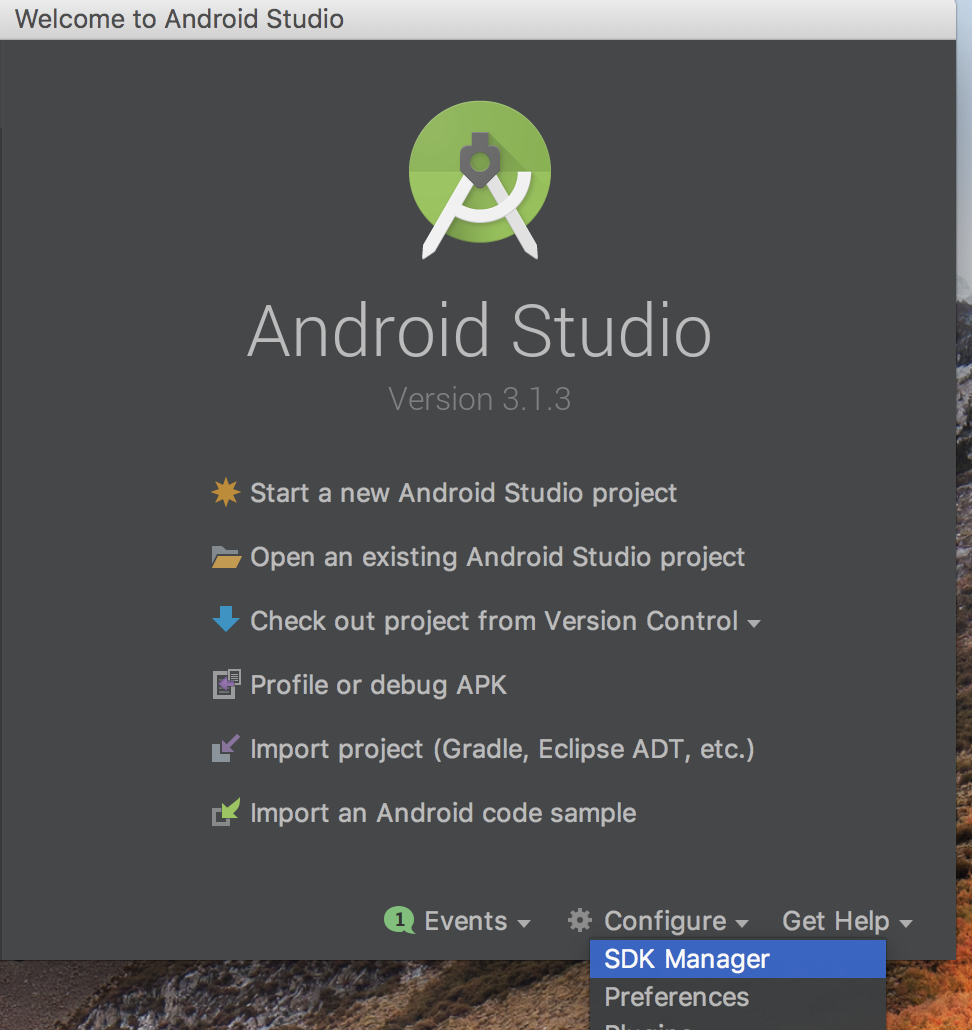

If your ndk version is later then v16 then check out my comment about downgrading your ndk to v 16.
If you use the proper version of NDK then you might have a problem with another dependency. Check your error log.
hunwalk
on 10 Sep 2018
How to downgrade your NDK to v16.
Download Android NDK, Revision 16b base on your platform here:
https://developer.android.com/ndk/downloads/older_releasesWindows:
Go to the root directory of your ndk-bundle. By default -> see the first step
1. `cd ~\AppData\Local\Android`

2. `unzip ~\Downloads\android-ndk-r16b-windows-x86_64.zip`

3. `mv ndk-bundle ndk-bundle-v17`

4. `mv android-ndk-r16b ndk-bundle`
Mac OS X:
Go to the root directory of your ndk-bundle. By default -> see the first step
1. `cd ~/Library/Android`

2. `unzip ~/Downloads/android-ndk-r16b-darwin-x86_64.zip`

3. `mv ndk-bundle ndk-bundle-v17`

4. `mv android-ndk-r16b ndk-bundle`
Happy coding!
Thank you very much. Your solution helped me fix my app not compiling native library. Thank you.
 blasius
on 11 Aug 2019
blasius
on 11 Aug 2019
Related issues
 GoltsevEugene
·
6Comments
GoltsevEugene
·
6Comments
 Atlas789
·
8Comments
Atlas789
·
8Comments
 peshkira
·
11Comments
peshkira
·
11Comments
 Mahive
·
8Comments
Mahive
·
8Comments
 arsalanengr
·
5Comments
arsalanengr
·
5Comments
Most helpful comment
How to downgrade your NDK to v16.
Download Android NDK, Revision 16b base on your platform here:
https://developer.android.com/ndk/downloads/older_releases
Windows:
Mac OS X:
Happy coding!