Android: Location sometimes updated with old data
Home Assistant Android version:
2.3.3-full
Android version:
10
Phone model:
Google Pixel 3a
Home Assistant version:
0.114.4
Last working Home Assistant release (if known):
Don't know, started using Android app just recently
Description of problem:
I noticed that sometimes while arriving at a zone, that location suddenly is overwritten by the location a few kilometers away, where I was ~10-15 minutes ago. After some time the location is correctly updated with my recent location again.
I just moved from iOS app to Android so I don't know if the issue was introduced with the location updates in 2.3.3 or was present earlier.
Traceback (if applicable):
N/A
Screenshot of problem:

Arriving at zone at 12:06. At 12:09 my location was reverted to an old location. Then updated with the correct location at 12:18.
Additional information:
Phone was locked the whole time, app open. App is excluded from battery optimizations and data management.
Background location & Zone Location: Enabled.
 rs443
rs443
All 56 comments
I can confirm the bug. In my case it all happens within 1-5 seconds of entering a zone defined in home assistant. but location remains stable thereafter. The states can change sometimes 15 times before settling. Sometimes it doesn't happen at all. GPS coordinates for the old incorrect data don't change while fluttering between the two values.
- Phone: Moto G5 Plus
- Android version: 8.1.0
- App version: 2.3.3-full
- Hass version: 0.114.0
2 September 2020
9:23:44 Moto G (5) Plus is at home
9:23:44 Moto G (5) Plus is away
9:23:44 Moto G (5) Plus is at home
9:23:44 Moto G (5) Plus is away
9:23:44 Moto G (5) Plus is at home
Issue started for me after 2.3.0/
Geolocation is turned off, Zones turned off, but background location turned on. Excluded from battery optimization, no background data restrictions.
 eyager1
on 2 Sep 2020
eyager1
on 2 Sep 2020
Here are some nice logs together with a screenshot (_arrived home at 15:58:01_):
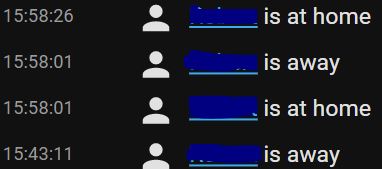
In this case the coordinates was spammed so its not exactly the same scenario as first bug report where the location updates was several minutes apart. Note row 4 where the location is is a less recent one.
2020-09-06 13:57:12 DEBUG (MainThread) [homeassistant.components.mobile_app.webhook] Received webhook payload for type update_location: {'location_name': '', 'gps': [N.2608657, E.3067748], 'gps_accuracy': 3, 'speed': 11, 'altitude': 36, 'course': 107, 'vertical_accuracy': 0}
2020-09-06 13:57:38 DEBUG (MainThread) [homeassistant.components.mobile_app.webhook] Received webhook payload for type update_location: {'location_name': '', 'gps': [N.2611634, E.3116452], 'gps_accuracy': 3, 'speed': 11, 'altitude': 37, 'course': 91, 'vertical_accuracy': 0}
2020-09-06 13:58:01 DEBUG (MainThread) [homeassistant.components.mobile_app.webhook] Received webhook payload for type update_location: {'location_name': '', 'gps': [N.2604197, E.3157102], 'gps_accuracy': 3, 'speed': 4, 'altitude': 47, 'course': 159, 'vertical_accuracy': 0}
2020-09-06 13:58:01 DEBUG (MainThread) [homeassistant.components.mobile_app.webhook] Received webhook payload for type update_location: {'location_name': '', 'gps': [N.2608126, E.315426], 'gps_accuracy': 3, 'speed': 5, 'altitude': 44, 'course': 160, 'vertical_accuracy': 0} <<< This is the location that was "older" than the above
2020-09-06 13:58:26 DEBUG (MainThread) [homeassistant.components.mobile_app.webhook] Received webhook payload for type update_location: {'location_name': '', 'gps': [N.259532, E.3163882], 'gps_accuracy': 3, 'speed': 3, 'altitude': 46, 'course': 158, 'vertical_accuracy': 0}
2020-09-06 13:58:34 DEBUG (MainThread) [homeassistant.components.mobile_app.webhook] Received webhook payload for type update_location: {'location_name': '', 'gps': [N.2594817, E.3164024], 'gps_accuracy': 3, 'speed': 2, 'altitude': 46, 'course': 198, 'vertical_accuracy': 0}
2020-09-06 13:58:34 DEBUG (MainThread) [homeassistant.components.mobile_app.webhook] Received webhook payload for type update_sensor_states: []
2020-09-06 13:58:39 DEBUG (MainThread) [homeassistant.components.mobile_app.webhook] Received webhook payload for type update_sensor_states: []
2020-09-06 13:58:44 DEBUG (MainThread) [homeassistant.components.mobile_app.webhook] Received webhook payload for type update_sensor_states: []
2020-09-06 13:59:24 DEBUG (MainThread) [homeassistant.components.mobile_app.webhook] Received webhook payload for type update_location: {'location_name': '', 'gps': [N.2594586, E.3161605], 'gps_accuracy': 14, 'speed': 0, 'altitude': 80, 'course': 0, 'vertical_accuracy': 16}
2020-09-06 13:59:24 DEBUG (MainThread) [homeassistant.components.mobile_app.webhook] Received webhook payload for type update_location: {'location_name': '', 'gps': [N.2594586, E.3161605], 'gps_accuracy': 14, 'speed': 0, 'altitude': 80, 'course': 0, 'vertical_accuracy': 16}
2020-09-06 13:59:24 DEBUG (MainThread) [homeassistant.components.mobile_app.webhook] Received webhook payload for type update_location: {'location_name': '', 'gps': [N.2594586, E.3161605], 'gps_accuracy': 14, 'speed': 0, 'altitude': 80, 'course': 0, 'vertical_accuracy': 16}
2020-09-06 13:59:45 DEBUG (MainThread) [homeassistant.components.mobile_app.webhook] Received webhook payload for type update_sensor_states: []
2020-09-06 13:59:45 DEBUG (MainThread) [homeassistant.components.mobile_app.webhook] Received webhook payload for type update_location: {'location_name': '', 'gps': [N.2594275, E.3162143], 'gps_accuracy': 3, 'speed': 1, 'altitude': 76, 'course': 175, 'vertical_accuracy': 6}
2020-09-06 13:59:45 DEBUG (MainThread) [homeassistant.components.mobile_app.webhook] Received webhook payload for type update_sensor_states: []
2020-09-06 13:59:45 DEBUG (MainThread) [homeassistant.components.mobile_app.webhook] Received webhook payload for type update_sensor_states: []
2020-09-06 13:59:45 DEBUG (MainThread) [homeassistant.components.mobile_app.webhook] Received webhook payload for type update_sensor_states: []
2020-09-06 13:59:45 DEBUG (MainThread) [homeassistant.components.mobile_app.webhook] Received webhook payload for type update_sensor_states: []
2020-09-06 13:59:45 DEBUG (MainThread) [homeassistant.components.mobile_app.webhook] Received webhook payload for type update_sensor_states: []
2020-09-06 13:59:45 DEBUG (MainThread) [homeassistant.components.mobile_app.webhook] Received webhook payload for type update_sensor_states: []
2020-09-06 13:59:45 DEBUG (MainThread) [homeassistant.components.mobile_app.webhook] Received webhook payload for type update_sensor_states: []
2020-09-06 13:59:45 DEBUG (MainThread) [homeassistant.components.mobile_app.webhook] Received webhook payload for type update_location: {'location_name': '', 'gps': [N.2594529, E.3162193], 'gps_accuracy': 3, 'speed': 0, 'altitude': 78, 'course': 257, 'vertical_accuracy': 4}
2020-09-06 13:59:45 DEBUG (MainThread) [homeassistant.components.mobile_app.webhook] Received webhook payload for type update_location: {'location_name': '', 'gps': [N.2594529, E.3162193], 'gps_accuracy': 3, 'speed': 0, 'altitude': 78, 'course': 257, 'vertical_accuracy': 4}
2020-09-06 13:59:56 DEBUG (MainThread) [homeassistant.components.mobile_app.webhook] Received webhook payload for type update_location: {'location_name': '', 'gps': [N.2593723, E.3162126], 'gps_accuracy': 3, 'speed': 0, 'altitude': 79, 'course': 221, 'vertical_accuracy': 4}
Im still at 2.3.3-full. I am driving with Android Auto and Waze active.
rs443
on 6 Sep 2020
Getting another close looks today at the logs it seems the issue might be the zone geofencing.
Arriving at the exact outer border at a zone (home, work or another) I get a location update that i have arrived at the zone. Sometimes a few seconds later I get an old location update that I am outside the zone again and have not yet arrived into the zone. And again half a minute later I have entered the zone again.
The location updates and entering geofence updates maybe needs to have some additional logic to handle these.
Maybe this will fix #937 that has already been closed, perhaps wrongfully.
rs443
on 21 Sep 2020
Is this possibly an issue too 👍

I get this if I haven't been to work (office 15 miles away) for 3 or 4 days. If I go to work then I flit from home to work randomly. I am wondering if it's assuming because it doesn't think I'm in my Home geofence then I must be at the last one I was at....
Only a possibility I know. My phone knows exactly where it is using Google Maps, so a bit confused as to why my location is "Unknown" - unless the aliens keep abducting me ;-)
 Thrasher2020
on 22 Sep 2020
Thrasher2020
on 22 Sep 2020
@Thrasher2020 thats the geocoded sensor and not the device tracker so different issue. Also the unknown shows up if the geocoded location could not be translated by Googles API.
 dshokouhi
on 22 Sep 2020
dshokouhi
on 22 Sep 2020
Just wanted to confirm that I also see this issue with my phone.
Phone: Google Pixel 3a
Android version: 11
App version: 2.3.3-full
Home Assistant version: 0.115.2
Here's a screenshot of the coordinates sent by the app:
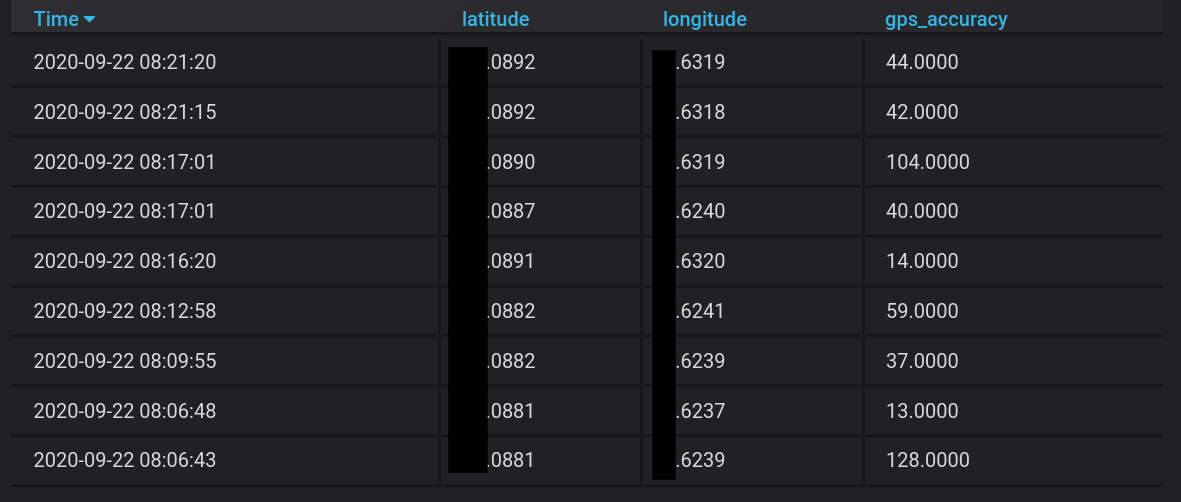
At 08:16:00, I arrived at home (defined zone in HA, coordinates .0891 / .6320)
At 08:17:01, the app briefly places me at coordinates .0887 / .6240, which happens to be within another zone that I was in shortly before (just a coincidance?)
Immediately after, it changes back to coordinates .0890 / .6319, again at home.
This is how it looks like in the HA frontend:
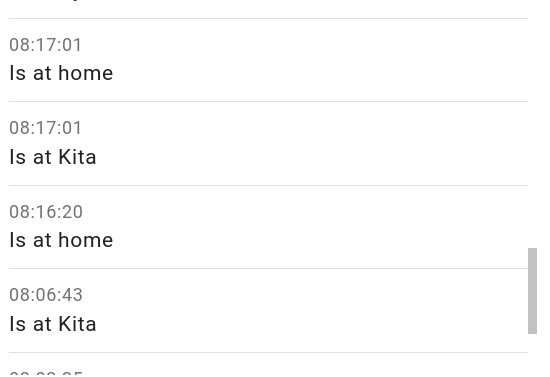
Note that this is with geofencing disabled. Enabling it does not make a difference.
 Tho85
on 22 Sep 2020
Tho85
on 22 Sep 2020
@Tho85 by geofencing you mean with zone tracking enabled?
dshokouhi
on 22 Sep 2020
@Tho85 by geofencing you mean with zone tracking enabled?
I think so, I can't infer the correct name from the German locale. The sensor with unique id location_background is enabled, the sensor with unique id zone_background is disabled.
Tho85
on 22 Sep 2020
Here's another example, and this time I managed to pull an ADB log.
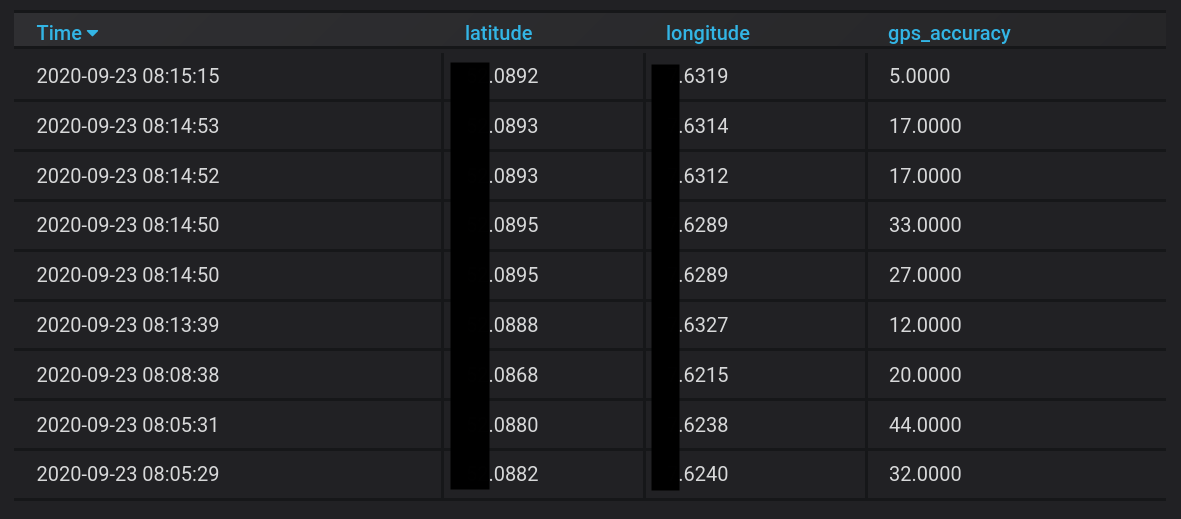
ADB log (anonymized): https://gist.github.com/Tho85/2be7414792c83e978d4a9e97fc6be82c
At about 08:13:30, I entered my home zone defined in HA.
At 08:14:50, the app incorrectly places me at .0895, .6289 for 2 seconds. This is not a location of a cell tower (accuracy doesn't match too)
~At 08:14:52, the app places me at the correct coordinates (at home).~
Correction: At 08:14:52 and 08:14:53, the app places me at a location roughly where I entered my home zone.
At 08:15:15, the app places me at the correct coordinates (at home).
As before, location_background is enabled, geocoded_location is enabled, and zone_background is disabled. Nonetheless, looking at the ADB log, the app seems to receive and react to a geofence trigger at 08:13:38 and 08:14:52.
Hope this helps.
Edit: Forgot to mention, I'm on companion app version beta-383-debeadb-full now.
Tho85
on 23 Sep 2020
I'm having same issues.
Same phone one is Tado and one is HA both home radius is the same 400m
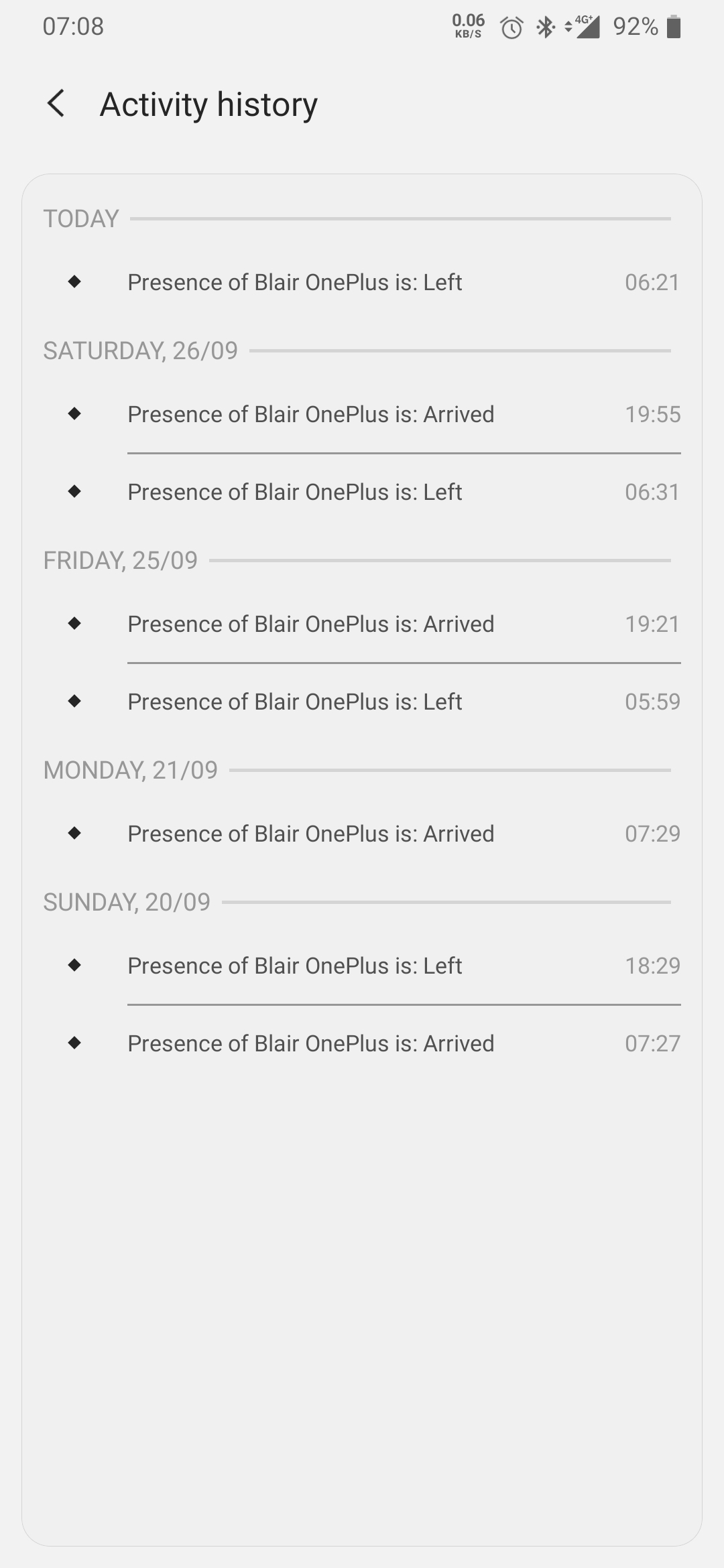
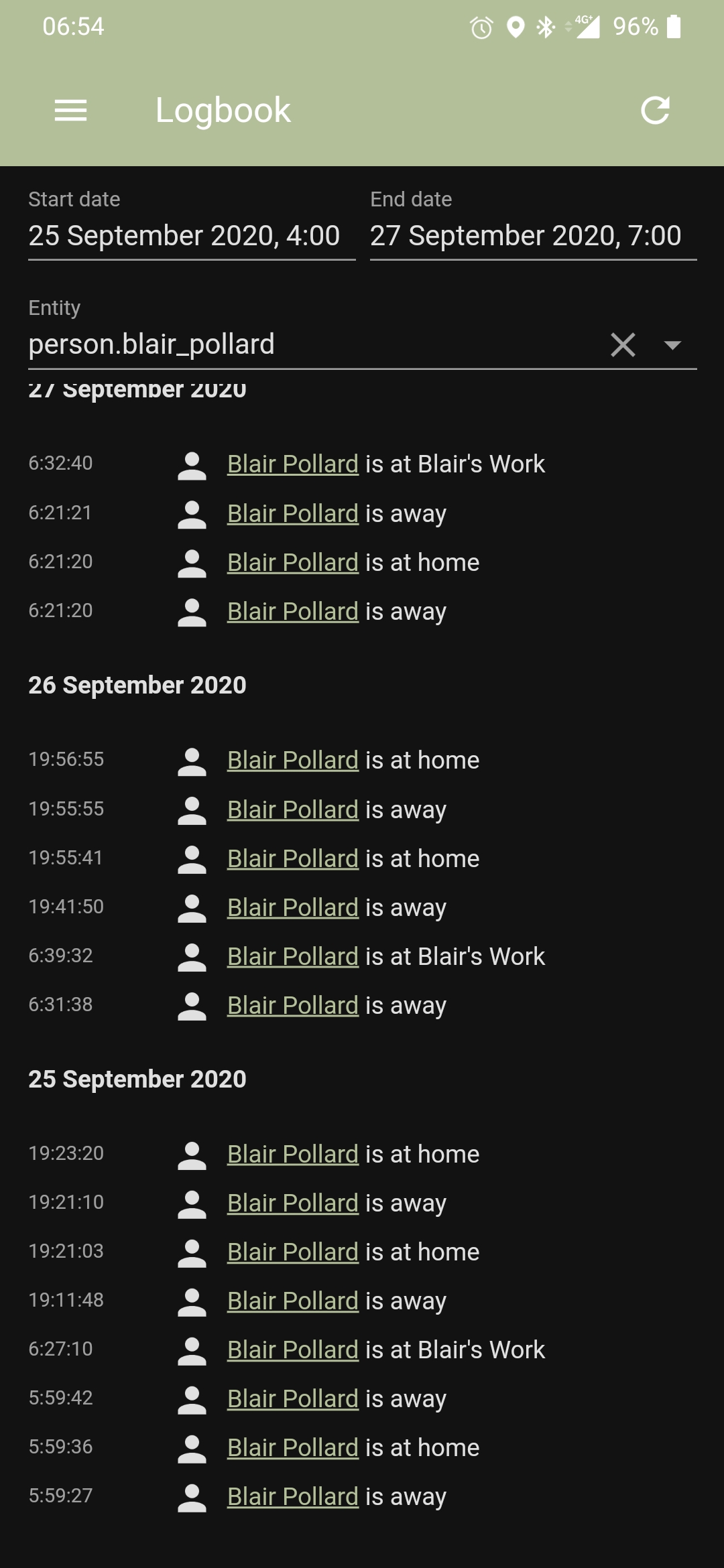
 blair287
on 28 Sep 2020
blair287
on 28 Sep 2020
This was worst day I'd ever seems it
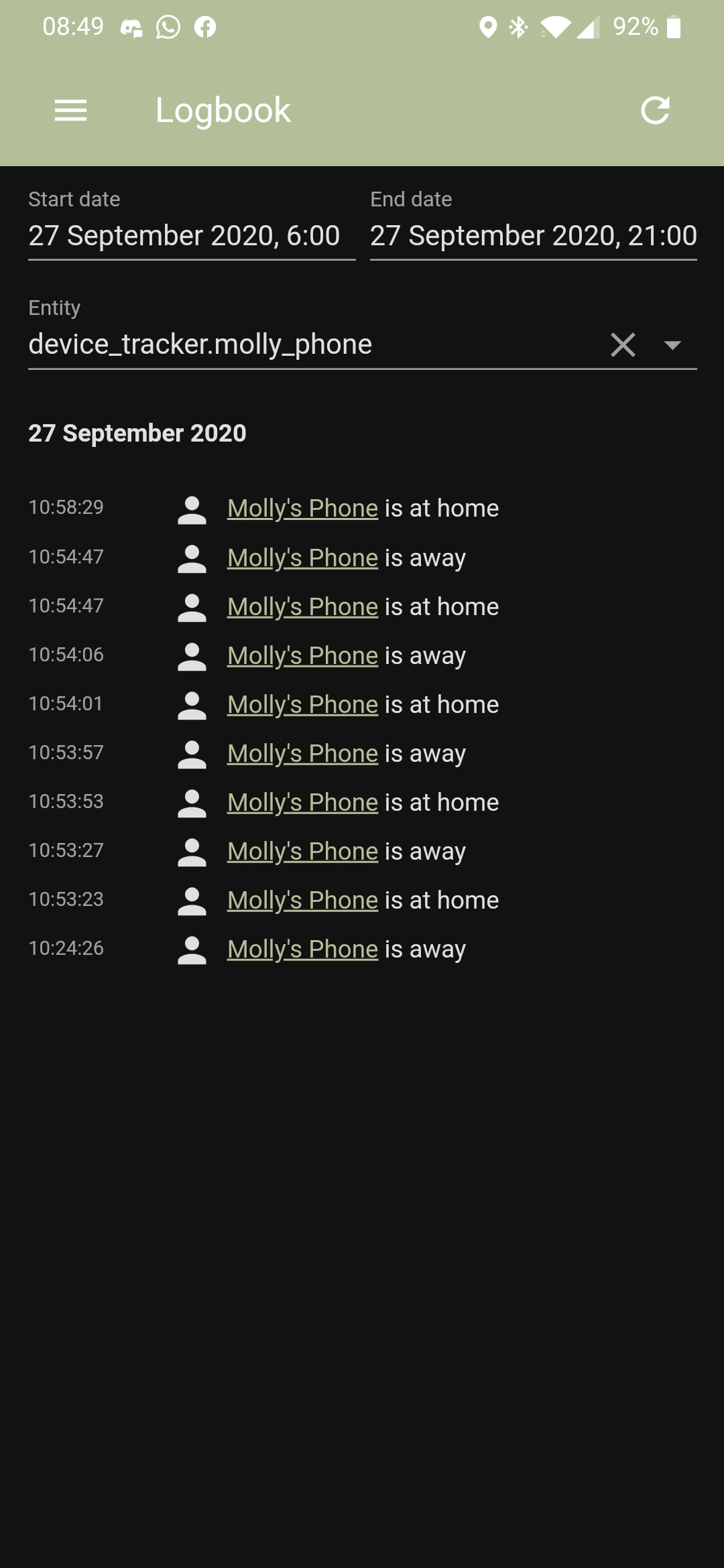
blair287
on 29 Sep 2020
I've had to stop using location tracking in the HA app it's just gone nuts flip flopping between states every minute it's unusable. :(
blair287
on 29 Sep 2020
I seem to have this problem as well. In my case, it was flipping between my "Home" zone and another zone that I had defined. Anecdotally, it didn't seem to be flipping in and out of my "Home" zone until I arrived at my destination within another zone defined in Home Assistant and pushed into the app. I do have "Location Zone" switch turned on.
 lmamakos
on 2 Oct 2020
lmamakos
on 2 Oct 2020
No fix?
blair287
on 9 Oct 2020
I seem to have this problem as well. In my case, it was flipping between my "Home" zone and another zone that I had defined. Anecdotally, it didn't seem to be flipping in and out of my "Home" zone until I arrived at my destination within another zone defined in Home Assistant and pushed into the app. I do have "Location Zone" switch turned on.
Identical behaviour to mine :(
Thrasher2020
on 9 Oct 2020
Guys I understand that this issue can be frustrating but comments like no fix? are not really helpful. As of now we are unable to reproduce this issue ourselves. We are aware that this is impacting some users so why don't we try and find out the similarities between everyone having this issue.
So far I see a wide variety of phones having this issue so it does not seem to be manufacturer specific. But what about the carrier and device location? Can you guys comment back with more details on your device please?
- Device model
- Android version (including custom ROM)
- Country location
- Carrier
- Device location settings like if GPS is enabled
- Google Play Services version
- Have you checked the following: https://companion.home-assistant.io/docs/troubleshooting/faqs/#location-is-not-updating-in-android-app
- Anything else to help us determine the pattern
dshokouhi
on 9 Oct 2020
Pixel 3
Android 10 and Android 11
UK - Northamptionshire
Three
GPS is enabled
It only happens if I go to another defined zone. It will then spam me for about 3 days with location changes. Then it will stop and not reoccur until I go that zone again. It does not happen if I go hundreds of miles from home as long as I don't hit a defined zone. It's very very odd!
Thrasher2020
on 9 Oct 2020
Model: OnePlus 6T
Android Version 10 (stock vendor-provided OS)
Google System update 292700300
Google Play system update 2020-07-01
Kernel version 4.9.179-perf+ #1 Fri Jun 17 19:30:50 CST 2020
Country: US
Carrier: T-Mobile
Device Location Settings:
Wi-Fi and Bluetooth scanning on
Emergency Location Service On
Google Location Accuracy On
I have app permissions set for Location access as "Allow all the time"
App Battery optimization set to "Don't optimize"
Within the app, in the "Location Sensors" application configuration,
Single Accurate Location: enabled
Background Location: enabled
Location zone: enabled
As @Thrasher2020 mentioned, this seems to happen when, for example, I leave the "Home" zone and arrive within a different named zone. When this happens again, I'll see if I can capture the state changes in the logbook to see if the specific intervals between the changes might be meaningful.
lmamakos
on 9 Oct 2020
Hey everyone wanted to give an update on this. Today we have merged #1048 which is live in the beta (Build 444) found on github, play store will get it tonight but it may get held up in review. With this change we are doing several different things some of which is to help investigate and possibly fix some of the issues here. Hopefully some of you guys are on the beta or don't mind joining the beta to provide faster feedback on this.
- We now fire an event when your device enters/exits a zone along with all location data including the triggering zone, location data can be helpful also to adjust the zone accuracy setting. This event gets sent BEFORE the application decides to send the data to HA given that minimum accuracy is met, so you may get an event but not see a location update in HA as a result. This should help us identify where this issue is coming. Is it coming from a zone event or is it just data that Google sends to us because there is a difference. Its important to also know if we are getting multiple incorrect events. Such as, are we getting 2 entry events before an exit event for a zone.
- I noticed based on some of the logs here we were getting updates within seconds of each other. Based on some testing I have done alongside the zone events it seemed that we were still getting location updates as we were getting a zone update. So now if we get a location update and it is within 5 seconds of the last one and it is not a zone event we will skip it. This should, hopefully, stop the immediate teleporting we are seeing.
- We now properly remove geofences if you turn off zone tracking
- We only register for geofences once
I don't believe this will solve all the issues here but we do need feedback in order to continue applying additional fixes. So if you can please update and let us know how things look and if anything seems out of the ordinary.
Docs for new zone events: https://companion.home-assistant.io/docs/integrations/app-events
dshokouhi
on 15 Oct 2020
Thanks for this excellent update. This is why i love HA.
I will install it as soon as its available. If we can replicate the issue, what data do you want to troubleshoot this further. Any logs to enable?
 praveen12bnitt
on 15 Oct 2020
praveen12bnitt
on 15 Oct 2020
@praveen12bnitt just let us know if the WRONG event came from a zone event or not. The location data provided in the event itself (which is identical to the device tracker) should help us understand whats going on. You don't need any logs for this as location updates come from 2 places:
- Zone events
- Googles data
We basically need to understand where the bad events are coming from, if they still show up.
dshokouhi
on 15 Oct 2020
Updated to the latest beta. I'm not sure what's going on but since I did my phone now insists I am at work. Even Google maps is now placing me there and I am not teleporting back despite pressing the centre on GPS icon. I haven't been there for weeks. I have disabled Location Zone.
It's almost as if the new app is placing my phone in a zone (even though they are disabled). Accuracy is set to 20 .... and this zone is about 10 miles away :(
Thrasher2020
on 22 Oct 2020
@Thrasher2020 if your accuracy is set to 20 then you are getting rid of many events some of which may be valid. You need to play with that setting to find out what works for you. The lower the number the less reports that get sent to HA. That setting by default is 200......HA home zones default is 100m.
dshokouhi
on 22 Oct 2020
Hi,
I have put it back to 200 - rebooted. Nothing has changed. I'm going to uninstall the app just to check it's not forcing my phone to think it's somewhere else as this only happened after updating to the latest beta earlier today.
Thrasher2020
on 22 Oct 2020
The app does not set that data, that is not how the API works. We just request an update with a few parameters and as we get them we do our own logic. What you get from Google Maps is typically what we see in the app. This does not sound like something caused by the app. All of the changes done had to do with the logic that we send to HA from the events that google sends to us. Also just setting the value and rebooting does not mean you will get a request right away. Requests come in as google sends them to us. Do you have Single Accurate Location enabled? Maybe try and just enable all 3 with default settings to see if it changes. But again if google maps is placing you somewhere then that is an entirely separate issue unrelated to the app. Both apps use the data provided by Google services.
dshokouhi
on 22 Oct 2020
@dshokouhi - after uninstalling Google has magically dropped me back off at home. I will experiment some more. It's most curious.
Thrasher2020
on 22 Oct 2020
Did the beta app make it to play store.? I did not get the new beta app yet..
praveen12bnitt
on 23 Oct 2020
its still held up in review, thats why we post the APKs on github so you can get them faster
dshokouhi
on 23 Oct 2020
Hi,
Some further info/feedback. If I leave my "home" - I am marked as away. As soon as I get back to my "home" - it starts flitting from home to work again- favouring work which is much further away from "home" than home!
Thrasher2020
on 23 Oct 2020
@Thrasher2020 did you check the zone events like I had asked up above?? Can you confirm the beta version you are on?
dshokouhi
on 23 Oct 2020
Latest Beta. I'll check them shortly, just leaving for Brands Hatch ....... !
Thrasher2020
on 23 Oct 2020
Can you please be specific about the beta version? When you check the zone events also let us know the accuracy setting you have for zone tracking.
dshokouhi
on 23 Oct 2020
Hey . I am on the latest beta and this issue happened again just now..
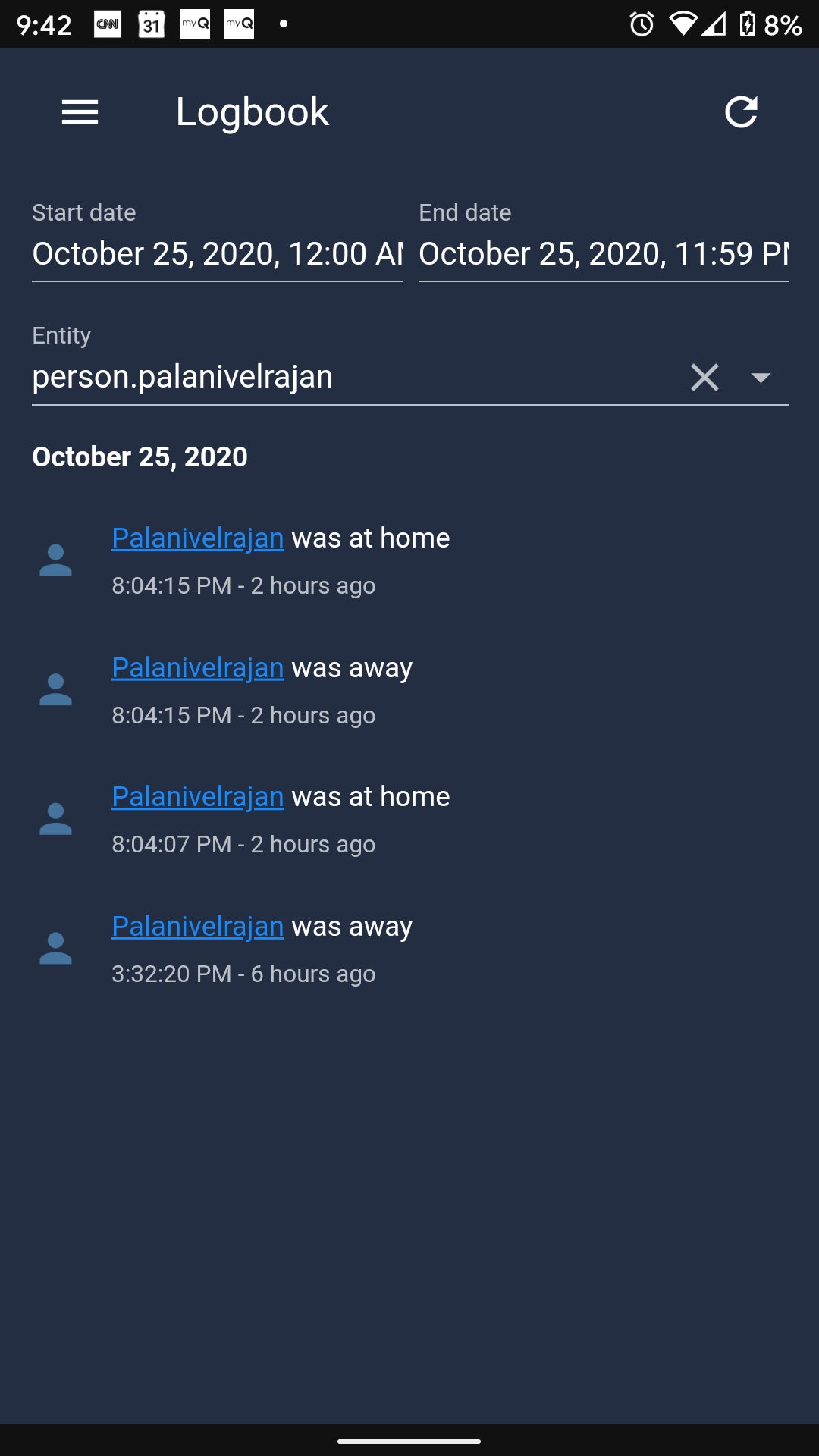
Can u let me know what data u are looking for ? I will upload them . @dshokouhi
praveen12bnitt
on 26 Oct 2020
Can u let me know what data u are looking for ? I will upload them
@praveen12bnitt I mentioned that in here: https://github.com/home-assistant/android/issues/871#issuecomment-709379007
dshokouhi
on 26 Oct 2020
Hi, version is beta-467-1fbde71-full.
Accuracy is 200. Here are some events:
`(8315502, 'android.zone_entered', '{\"accuracy\": 20.0, \"altitude\": 0.0, \"bearing\": 0.0, \"latitude\": 52.3314878, \"longitude\": -0.8971347, \"provider\": \"fused\", \"time\": 1603435952409, \"vertical_accuracy\": 0, \"zone\": \"zone.work_pccs\", \"device_id\": \"49135c75a009656b\"}', 'REMOTE', '2020-10-23 06:52:33', '2020-10-23 06:52:33', '8d07dcdc067874dd536ece552149082f', '8be2ca6fb1934a7f81aa1a0be2a6f0ec', NULL),
(8336608, 'android.zone_entered', '{\"accuracy\": 87.6, \"altitude\": 203.5, \"bearing\": 0.0, \"latitude\": 52.3052431, \"longitude\": -1.0222228, \"provider\": \"fused\", \"time\": 1603443843035, \"vertical_accuracy\": 2, \"zone\": \"zone.home\", \"device_id\": \"49135c75a009656b\"}', 'REMOTE', '2020-10-23 09:04:08', '2020-10-23 09:04:08', 'c9d541b04f751ac5bc3a5dada8c8db64', '8be2ca6fb1934a7f81aa1a0be2a6f0ec', NULL),`
Hope these are ok, I have a lot more. Please note at no point have I entered the zone.work_pccs recently.
Thrasher2020
on 26 Oct 2020
Ok.. i have setup my nodered to capture these events. I will upload them once i have them ready,
praveen12bnitt
on 26 Oct 2020
@Thrasher2020 so if I am understanding the data correctly you were at zone.home and then instead of getting first a android.zone_exited event you got a android.zone_entered event for zone.work_pccs? Or did you only subscribe to the android.zone_entered event? If you can see we are trying to see if the data is coming in as we expect, logically speaking.
dshokouhi
on 26 Oct 2020
Hi, this is the complete list of events :
(8315502, 'android.zone_entered', '{\"accuracy\": 20.0, \"altitude\": 0.0, \"bearing\": 0.0, \"latitude\": 52.3314878, \"longitude\": -0.8971347, \"provider\": \"fused\", \"time\": 1603435952409, \"vertical_accuracy\": 0, \"zone\": \"zone.work_pccs\", \"device_id\": \"49135c75a009656b\"}', 'REMOTE', '2020-10-23 06:52:33', '2020-10-23 06:52:33', '8d07dcdc067874dd536ece552149082f', '8be2ca6fb1934a7f81aa1a0be2a6f0ec', NULL),
(8315737, 'android.zone_entered', '{\"accuracy\": 20.0, \"altitude\": 0.0, \"bearing\": 0.0, \"latitude\": 52.3314878, \"longitude\": -0.8971347, \"provider\": \"fused\", \"time\": 1603436073307, \"vertical_accuracy\": 0, \"zone\": \"zone.work_pccs\", \"device_id\": \"49135c75a009656b\"}', 'REMOTE', '2020-10-23 06:54:34', '2020-10-23 06:54:34', 'd41d2f0d4af6cdaf6c225c8469e232b5', '8be2ca6fb1934a7f81aa1a0be2a6f0ec', NULL),
(8316201, 'android.zone_exited', '{\"accuracy\": 331.361, \"altitude\": 154.323974609375, \"bearing\": 284.49112, \"latitude\": 52.3052039, \"longitude\": -1.0226135, \"provider\": \"fused\", \"time\": 1603436311661, \"vertical_accuracy\": 32, \"zone\": \"zone.work_pccs\", \"device_id\": \"49135c75a009656b\"}', 'REMOTE', '2020-10-23 06:58:40', '2020-10-23 06:58:40', '40ff963ce1e7d8576b0fdf3dd41b6a82', '8be2ca6fb1934a7f81aa1a0be2a6f0ec', NULL),
(8316635, 'android.zone_entered', '{\"accuracy\": 19.296, \"altitude\": 198.4625244140625, \"bearing\": 105.033806, \"latitude\": 52.3052343, \"longitude\": -1.0222594, \"provider\": \"fused\", \"time\": 1603436519430, \"vertical_accuracy\": 12, \"zone\": \"zone.home\", \"device_id\": \"49135c75a009656b\"}', 'REMOTE', '2020-10-23 07:02:07', '2020-10-23 07:02:07', '6e3d858b767543d1575bf9d992f460bd', '8be2ca6fb1934a7f81aa1a0be2a6f0ec', NULL),
(8318406, 'android.zone_exited', '{\"accuracy\": 180.0, \"altitude\": 203.5, \"bearing\": 0.0, \"latitude\": 52.3314888, \"longitude\": -0.8971346, \"provider\": \"fused\", \"time\": 1603437294024, \"vertical_accuracy\": 2, \"zone\": \"zone.home\", \"device_id\": \"49135c75a009656b\"}', 'REMOTE', '2020-10-23 07:14:54', '2020-10-23 07:14:54', 'fbef82d902c12993a59ee40a067a542a', '8be2ca6fb1934a7f81aa1a0be2a6f0ec', NULL),
(8325850, 'android.zone_entered', '{\"accuracy\": 20.0, \"altitude\": 0.0, \"bearing\": 0.0, \"latitude\": 52.3314875, \"longitude\": -0.8971349, \"provider\": \"fused\", \"time\": 1603439820609, \"vertical_accuracy\": 0, \"zone\": \"zone.work_pccs\", \"device_id\": \"49135c75a009656b\"}', 'REMOTE', '2020-10-23 07:57:01', '2020-10-23 07:57:01', 'a65de0d4804e425b3ff84b9c8cfd60df', '8be2ca6fb1934a7f81aa1a0be2a6f0ec', NULL),
(8327712, 'android.zone_entered', '{\"accuracy\": 20.0, \"altitude\": 0.0, \"bearing\": 182.18726, \"latitude\": 52.3314872, \"longitude\": -0.8971347, \"provider\": \"fused\", \"time\": 1603440449391, \"vertical_accuracy\": 0, \"zone\": \"zone.work_pccs\", \"device_id\": \"49135c75a009656b\"}', 'REMOTE', '2020-10-23 08:07:30', '2020-10-23 08:07:30', '558fd3729c985d18781afd41faf7e81c', '8be2ca6fb1934a7f81aa1a0be2a6f0ec', NULL),
(8336608, 'android.zone_entered', '{\"accuracy\": 87.6, \"altitude\": 203.5, \"bearing\": 0.0, \"latitude\": 52.3052431, \"longitude\": -1.0222228, \"provider\": \"fused\", \"time\": 1603443843035, \"vertical_accuracy\": 2, \"zone\": \"zone.home\", \"device_id\": \"49135c75a009656b\"}', 'REMOTE', '2020-10-23 09:04:08', '2020-10-23 09:04:08', 'c9d541b04f751ac5bc3a5dada8c8db64', '8be2ca6fb1934a7f81aa1a0be2a6f0ec', NULL),
(8337038, 'android.zone_entered', '{\"accuracy\": 21.6, \"altitude\": 0.0, \"bearing\": 0.0, \"latitude\": 52.3314879, \"longitude\": -0.8971352, \"provider\": \"fused\", \"time\": 1603444032353, \"vertical_accuracy\": 0, \"zone\": \"zone.work_pccs\", \"device_id\": \"49135c75a009656b\"}', 'REMOTE', '2020-10-23 09:07:18', '2020-10-23 09:07:18', '92e4fcd95535735cf6fad1654137678f', '8be2ca6fb1934a7f81aa1a0be2a6f0ec', NULL),
(8338278, 'android.zone_exited', '{\"accuracy\": 135.6, \"altitude\": 0.0, \"bearing\": 0.0, \"latitude\": 52.305244, \"longitude\": -1.0222249, \"provider\": \"fused\", \"time\": 1603444553271, \"vertical_accuracy\": 0, \"zone\": \"zone.work_pccs\", \"device_id\": \"49135c75a009656b\"}', 'REMOTE', '2020-10-23 09:15:54', '2020-10-23 09:15:54', '7eb45bf72a66c7a7c72eb887d9b4424b', '8be2ca6fb1934a7f81aa1a0be2a6f0ec', NULL),
(8339680, 'android.zone_entered', '{\"accuracy\": 20.0, \"altitude\": 0.0, \"bearing\": 0.0, \"latitude\": 52.3314871, \"longitude\": -0.8971337, \"provider\": \"fused\", \"time\": 1603445150200, \"vertical_accuracy\": 0, \"zone\": \"zone.work_pccs\", \"device_id\": \"49135c75a009656b\"}', 'REMOTE', '2020-10-23 09:25:51', '2020-10-23 09:25:51', 'b63be71d05f3e5430902f6219fa51b94', '8be2ca6fb1934a7f81aa1a0be2a6f0ec', NULL),
(8339686, 'android.zone_entered', '{\"accuracy\": 20.0, \"altitude\": 0.0, \"bearing\": 0.0, \"latitude\": 52.3314871, \"longitude\": -0.8971337, \"provider\": \"fused\", \"time\": 1603445150200, \"vertical_accuracy\": 0, \"zone\": \"zone.work_pccs\", \"device_id\": \"49135c75a009656b\"}', 'REMOTE', '2020-10-23 09:25:53', '2020-10-23 09:25:53', 'b81ed49312ddbb2d6fcd6179401616d8', '8be2ca6fb1934a7f81aa1a0be2a6f0ec', NULL),
(8349598, 'android.zone_entered', '{\"accuracy\": 20.0, \"altitude\": 0.0, \"bearing\": 0.0, \"latitude\": 52.3314073, \"longitude\": -0.8969162, \"provider\": \"fused\", \"time\": 1603448993938, \"vertical_accuracy\": 0, \"zone\": \"zone.work_pccs\", \"device_id\": \"49135c75a009656b\"}', 'REMOTE', '2020-10-23 10:33:03', '2020-10-23 10:33:03', '25ae39b4650b02479f57ec9d6524f24e', '8be2ca6fb1934a7f81aa1a0be2a6f0ec', NULL),
(8355005, 'android.zone_entered', '{\"accuracy\": 20.0, \"altitude\": 0.0, \"bearing\": 0.0, \"latitude\": 52.3314872, \"longitude\": -0.8971347, \"provider\": \"fused\", \"time\": 1603451307360, \"vertical_accuracy\": 0, \"zone\": \"zone.work_pccs\", \"device_id\": \"49135c75a009656b\"}', 'REMOTE', '2020-10-23 11:09:43', '2020-10-23 11:09:43', '62e64c22c3e1ee4d745e8fdb0bce0bd5', '8be2ca6fb1934a7f81aa1a0be2a6f0ec', NULL),
(8355295, 'android.zone_entered', '{\"accuracy\": 20.0, \"altitude\": 0.0, \"bearing\": 0.0, \"latitude\": 52.3314872, \"longitude\": -0.8971347, \"provider\": \"fused\", \"time\": 1603451437474, \"vertical_accuracy\": 0, \"zone\": \"zone.work_pccs\", \"device_id\": \"49135c75a009656b\"}', 'REMOTE', '2020-10-23 11:11:35', '2020-10-23 11:11:35', 'ce68c997b795858bd075848862c1e3f6', '8be2ca6fb1934a7f81aa1a0be2a6f0ec', NULL),
(8356690, 'android.zone_exited', '{\"accuracy\": 362.03867, \"altitude\": 244.0, \"bearing\": 163.0, \"latitude\": 52.305012345314026, \"longitude\": -1.0223668813705444, \"provider\": \"gps\", \"time\": 1603452051000, \"vertical_accuracy\": 0, \"zone\": \"zone.work_pccs\", \"device_id\": \"49135c75a009656b\"}', 'REMOTE', '2020-10-23 11:20:52', '2020-10-23 11:20:52', '6a7fb9aca6ce2235a6857c2bf3914e4b', '8be2ca6fb1934a7f81aa1a0be2a6f0ec', NULL),
(8367687, 'android.zone_entered', '{\"accuracy\": 3.216, \"altitude\": 204.866943359375, \"bearing\": 227.15161, \"latitude\": 52.305325, \"longitude\": -1.0219251, \"provider\": \"fused\", \"time\": 1603457509000, \"vertical_accuracy\": 4, \"zone\": \"zone.home\", \"device_id\": \"49135c75a009656b\"}', 'REMOTE', '2020-10-23 12:51:59', '2020-10-23 12:51:59', 'a18302639ae6b62108ce25716404e003', '8be2ca6fb1934a7f81aa1a0be2a6f0ec', NULL),
(8368499, 'android.zone_entered', '{\"accuracy\": 21.6, \"altitude\": 0.0, \"bearing\": 0.0, \"latitude\": 52.3314879, \"longitude\": -0.8971352, \"provider\": \"fused\", \"time\": 1603457843493, \"vertical_accuracy\": 0, \"zone\": \"zone.work_pccs\", \"device_id\": \"49135c75a009656b\"}', 'REMOTE', '2020-10-23 12:57:24', '2020-10-23 12:57:24', '8f47754a0d4916ccfc3eaa76a413f5a1', '8be2ca6fb1934a7f81aa1a0be2a6f0ec', NULL),
(8372666, 'android.zone_entered', '{\"accuracy\": 20.0, \"altitude\": 0.0, \"bearing\": 0.0, \"latitude\": 52.3314868, \"longitude\": -0.8971328, \"provider\": \"fused\", \"time\": 1603459513391, \"vertical_accuracy\": 0, \"zone\": \"zone.work_pccs\", \"device_id\": \"49135c75a009656b\"}', 'REMOTE', '2020-10-23 13:25:39', '2020-10-23 13:25:39', '8db1a4fbeed803440fa488970b684071', '8be2ca6fb1934a7f81aa1a0be2a6f0ec', NULL),
(8375460, 'android.zone_entered', '{\"accuracy\": 20.0, \"altitude\": 0.0, \"bearing\": 298.6112, \"latitude\": 52.3314875, \"longitude\": -0.8971349, \"provider\": \"fused\", \"time\": 1603460607442, \"vertical_accuracy\": 0, \"zone\": \"zone.work_pccs\", \"device_id\": \"49135c75a009656b\"}', 'REMOTE', '2020-10-23 13:46:12', '2020-10-23 13:46:12', '80ef493d661844fdb0200935b64c3db4', '8be2ca6fb1934a7f81aa1a0be2a6f0ec', NULL),
(8382020, 'android.zone_entered', '{\"accuracy\": 33.459, \"altitude\": 0.0, \"bearing\": 90.0, \"latitude\": 52.3314881, \"longitude\": -0.8971344, \"provider\": \"fused\", \"time\": 1603463219577, \"vertical_accuracy\": 0, \"zone\": \"zone.work_pccs\", \"device_id\": \"49135c75a009656b\"}', 'REMOTE', '2020-10-23 14:30:44', '2020-10-23 14:30:44', '4621191caa32ad974ee2b945fccc0eb6', '8be2ca6fb1934a7f81aa1a0be2a6f0ec', NULL),
(8386723, 'android.zone_entered', '{\"accuracy\": 20.0, \"altitude\": 0.0, \"bearing\": 0.0, \"latitude\": 52.3314859, \"longitude\": -0.8971322, \"provider\": \"fused\", \"time\": 1603465204969, \"vertical_accuracy\": 0, \"zone\": \"zone.work_pccs\", \"device_id\": \"49135c75a009656b\"}', 'REMOTE', '2020-10-23 15:00:07', '2020-10-23 15:00:07', '15f483be77b7ddaf6b3711639235cbe7', '8be2ca6fb1934a7f81aa1a0be2a6f0ec', NULL),
(8387072, 'android.zone_entered', '{\"accuracy\": 13.507, \"altitude\": 191.6627197265625, \"bearing\": 202.13962, \"latitude\": 52.3053957, \"longitude\": -1.0223115, \"provider\": \"fused\", \"time\": 1603465355938, \"vertical_accuracy\": 24, \"zone\": \"zone.home\", \"device_id\": \"49135c75a009656b\"}', 'REMOTE', '2020-10-23 15:02:41', '2020-10-23 15:02:41', 'ce4527b42522396711e472d5795ab524', '8be2ca6fb1934a7f81aa1a0be2a6f0ec', NULL),
(8387213, 'android.zone_entered', '{\"accuracy\": 3.216, \"altitude\": 207.7484130859375, \"bearing\": 183.085, \"latitude\": 52.3052179, \"longitude\": -1.0223529, \"provider\": \"fused\", \"time\": 1603465406000, \"vertical_accuracy\": 4, \"zone\": \"zone.home\", \"device_id\": \"49135c75a009656b\"}', 'REMOTE', '2020-10-23 15:03:37', '2020-10-23 15:03:37', '7d069907a852c45002bdb86420dd969c', '8be2ca6fb1934a7f81aa1a0be2a6f0ec', NULL),
(8387306, 'android.zone_exited', '{\"accuracy\": 5.0, \"altitude\": 197.0, \"bearing\": 214.0, \"latitude\": 52.30397164821625, \"longitude\": -1.022801399230957, \"provider\": \"gps\", \"time\": 1603465445000, \"vertical_accuracy\": 0, \"zone\": \"zone.home\", \"device_id\": \"49135c75a009656b\"}', 'REMOTE', '2020-10-23 15:04:10', '2020-10-23 15:04:10', '490663b054bda98f04ba91d84499d6b4', '8be2ca6fb1934a7f81aa1a0be2a6f0ec', NULL),
Thrasher2020
on 26 Oct 2020
Here it is an an attachement!
events.list.txt
Thrasher2020
on 26 Oct 2020
@Thrasher2020 were you at home the entire time for all these events? These events span more than 8 hours so its impossible for me to tell whats going on. Also this doesn't tell me if the wrong event that came to HA was from a zone event or a normal update. That is really what we are after right now. You will have to look at the event time stamps and line them up to when you were incorrectly marked away in HA so we can determine where the event came from.
dshokouhi
on 26 Oct 2020
Hi,
None of the work.pccs events happened. Any exits or entries between 9pm and 9am did not happen either as I was at home. Between 12 noon and 2.30pm I was out (i.e. I was not at .home or .work).
Thrasher2020
on 26 Oct 2020
Actually it's doing it right now, so I'll get those events for you.
Thrasher2020
on 26 Oct 2020
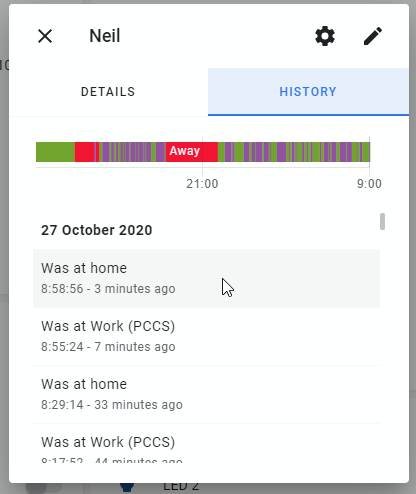
I can't seem to find the raw data for the logs since I turned off 'Location Zone' - where should I be looking? In the night this was the frontend result - as you can see it was teleporting me all night :( It only seems to be doing this when I am in the "home" zone if that helps.
Thrasher2020
on 27 Oct 2020
I am not seeing the same behavior for sure. When I don't go out, HA does not do anything. Only when I go out and come back home, I see this behavior where as soon as I reach I get 1 "at home" followed by "away". Then after say 2 min or so I get a final "at home".
praveen12bnitt
on 27 Oct 2020
And its not consistent. Yesterday when I went outside, I did not see this behavior and everything worked perfectly.
praveen12bnitt
on 27 Oct 2020
I can't seem to find the raw data for the logs since I turned off 'Location Zone' - where should I be looking?
We fire events specifically for zone tracking. So if you have that off then this suggests it is coming from Background Location and not Zone Tracking.
Also you may want to consider deleting your post with the states since it seems you have kept your host name.
dshokouhi
on 27 Oct 2020
@dshokouhi Hey.. i saw a behavior today and wanted to let you know. I did not go out of my home today, however HA changed my state to "away" and after a minute or so, i changed my state back to "home".
Since i had my nodered track my android.zone_exited and android.zone_entered , i went to see if it was triggered by a zone event and it was empty. So this happened from a different source.
I am on android version : beta-467-1fbde71-full
praveen12bnitt
on 28 Oct 2020
Thanks @praveen12bnitt that is helpful. In your case would you consider the zone events more reliable? The other source you see is actually from the Fused Location Provider which is part of Play Services.
dshokouhi
on 28 Oct 2020
i will go out today. I will see if the zone events are more accurate. Just curious, so if the Play Services Fused Location Provider teleported me, do you consider that as a bug in the android os? or does HA have any role to play here?
praveen12bnitt
on 28 Oct 2020
and if it was coming from android, then can i enable some logs to determine where it teleported me to, basically my new latitude longitude ? that can give us some clue on what happened.
praveen12bnitt
on 28 Oct 2020
do you consider that as a bug in the android os?
Yes and no, they warn a little bit in the documentation about it.
does HA have any role to play here?
We can definitely do more filtering of location updates to limit the teleportation. We have already talked about a couple ideas internally about what we can do help thanks to the data people have been providing.
can i enable some logs to determine where it teleported me to
Your Home Assistant DB will have the raw data in the database about where it teleported you to. It's not always the nicest to pull out of the database though.
 JBassett
on 28 Oct 2020
JBassett
on 28 Oct 2020
Ok, updated to beta-482 a few days ago, and this far I have only seen clean zone entering and exiting. Seen both provider fused and gps. Hoping to have this issue reproduced so I can upload some logs.
Btw, I noticed that on the lovelace map card you can enable tracking lines to show your updates on the map (hours_to_show). That way you can easily see if there are some wonky location updates going on or if the zone was not optimally set up.
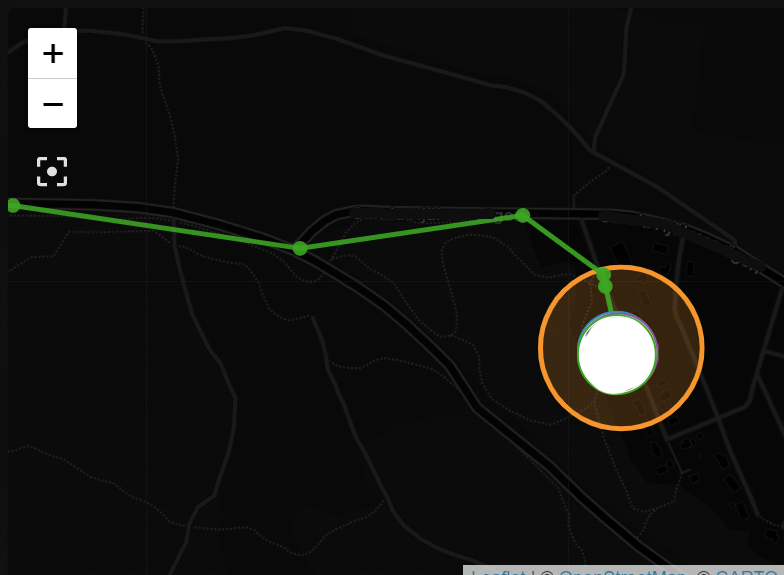
Example lovelace card:
type: map
entities:
  - entity: device_tracker.device1
  - entity: device_tracker.device2
  - entity: zone.home
  - entity: zone.work
hours_to_show: 1
Please make sure you all update to at least BETA 484 or later to report any location issues. The latest APK can be found on the github releases section. 🤞
dshokouhi
on 29 Oct 2020
so far so good!
praveen12bnitt
on 31 Oct 2020
Updated to Beta 484 on all three devices in the household, and this far I have only seen flawless updates and zone entering/exiting. Great work @dshokouhi!
rs443
on 1 Nov 2020
Looking good here too :)
Thrasher2020
on 1 Nov 2020
Related issues
 make-all
·
3Comments
make-all
·
3Comments
 aleksandrov1995
·
4Comments
dshokouhi
·
3Comments
aleksandrov1995
·
4Comments
dshokouhi
·
3Comments
 Hypfer
·
3Comments
Hypfer
·
3Comments
 Bruceforce
·
3Comments
Bruceforce
·
3Comments
Most helpful comment
Updated to Beta 484 on all three devices in the household, and this far I have only seen flawless updates and zone entering/exiting. Great work @dshokouhi!