Android: Some issues with geo location sensor
**Home Assistant Android version: 2.3.3-full
**Android version: 10
**Phone model: OnePlus 5T
**Home Assistant version: HassOS 4.12 HA version 0.144.4
**Last working Home Assistant release (if known): all
**Description of problem: geo sensor is stuck in home location. Compass phone is blocked. No geo data send to HA
Traceback (if applicable):
```
Screenshot of problem:
**Additional information: I've switch off geolcation location, backgroud and zone location and compass is turned on. Sometime need to reboot phone to read this geo informations
 sajikur
All 30 comments
And I've told many times to either increase MINIMUM_ACCURACY or make it user configurable...
MINIMUM_ACCURACY = 200 is too low to accept cell-tower based geolocation updates.
This way we mainly receive only
- GPS-based updates - only when a GPS navigation app is opened
- Wi-Fi-based updates - only when ( Wi-Fi is on OR background Wi-Fi tracking is enabled ) AND there are Wi-Fi APs known by Google nearby
No GPS & no Wi-Fi APs nearby = FAIL.
 anyuta1166
on 2 Sep 2020
anyuta1166
on 2 Sep 2020
And I've told many times to either increase MINIMUM_ACCURACY or make it user configurable...
MINIMUM_ACCURACY = 200 is too low to accept cell-tower based geolocation updates.
This way we mainly receive only GPS-based updates (only when a GPS navigation app is opened) and Wi-Fi-based updates (only when ( Wi-Fi is on or background Wi-Fi tracking is enabled ) and there are Wi-Fi APs known by Google nearby).
No GPS & no Wi-Fi APs nearby = FAIL.
perfect! Well, how many meters are the right value?
sajikur
on 2 Sep 2020
perfect! Well, how many meters are the right value?
It is discussable. I've set it to 5000 for sure. My family often travel to a rural area and accuracy values of 2-3 km are common there.
Anyway, the accuracy threshold is not user configurable now. I've built my own build with manual code changes.
anyuta1166
on 2 Sep 2020
I take advantage of your availability. Can the google maps component on HA
conflict with geo location on ANDROID APP? Thanx
In data 2 settembre 2020 11:07:33 Anna Tikhomirova
notifications@github.com ha scritto:
>
perfect! Well, how many meters are the right value?
It is discussable. I've set it to 5000 for sure. My family often travel to
a rural area and accuracy values of 2-3 km are common there.
Anyway, the accuracy threshold is not user configurable now. I've built my
own build with manual code changes.
—
You are receiving this because you authored the thread.
Reply to this email directly, view it on GitHub, or unsubscribe.
sajikur
on 2 Sep 2020
So this bug report is for a HA integration? The logs suggest its not the app but the Google Maps integration which is not the same thing. These 2 integrations are completely separate.
 dshokouhi
on 2 Sep 2020
dshokouhi
on 2 Sep 2020
I've both. So I thought could be a conflict between two requests on Google api
In data 2 settembre 2020 14:43:37 Daniel Shokouhi
notifications@github.com ha scritto:
So this bug report is for a HA integration? The logs suggest its not the
app but the Google Maps integration which is not the same thing. These 2
integrations are completely separate.—
You are receiving this because you authored the thread.
Reply to this email directly, view it on GitHub, or unsubscribe.
sajikur
on 2 Sep 2020
There is no conflict.
Obviously you are not getting location info from Home Assistant app because accuracy is above the threshold.
And logs from HA integration confirm that.
anyuta1166
on 2 Sep 2020
So at one point there was a proposal to allow the user to configure the minimum accuracy: https://github.com/home-assistant/android/pull/168
The decision instead was to implement a more sane default value at the time: https://github.com/home-assistant/android/pull/181
Maybe its time we make this configurable?
FWIW the minimum accuracy we see is actually double that of the default radius in HA. On top of that when we check the final location we double it again to 400m, at least for the device tracker. It might be a good value to lets users adjust for their own location. The issue originally was that no accuracy was used and users in California were being marked as in the US, and you can imagine that is not good either. Sometimes I would get teleported from my own house to 2 miles away and that was also not good.
Maybe a smarter approach would be to disregard the accuracy check if the last reported location was close to what we currently got? This way if you are at home (and we all know GPS isn't good indoors) it will continue to send frequent updates instead of waiting a long time for the accuracy to get better. I noticed myself sometimes my accuracy is at 20 then it jumps to 342 then it jumped again 80000 (yes 80k) its very very jumpy but its also the data we get back from Google.
@sajikur can you please update your post and remove the traceback and instead supply a screenshot or some data from the android app? That way this issue doesnt get moved/closed on accident.
dshokouhi
on 2 Sep 2020
...
@sajikur can you please update your post and remove the traceback and instead supply a screenshot or some data from the android app? That way this issue doesnt get moved/closed on accident.
done! ;)
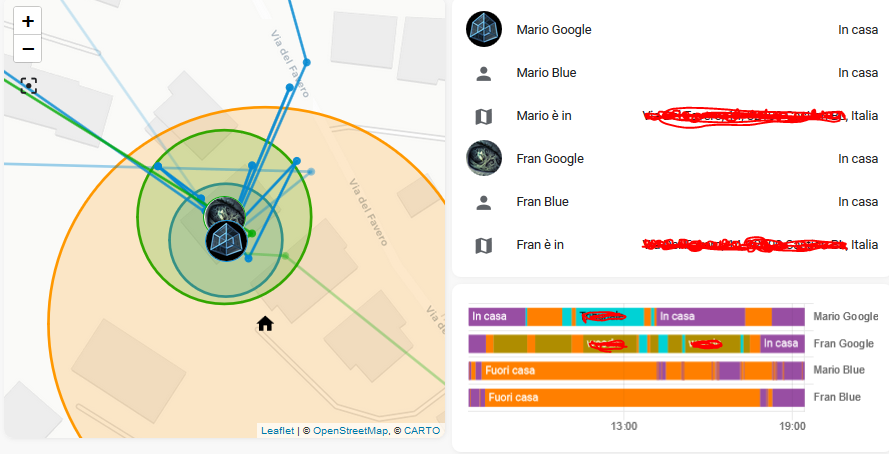
in this moment app works correctly, Geolocation from app and add on sharing google position are the same (I've both)
sajikur
on 2 Sep 2020
This is to be expected. Both Google Maps and the Android app uses the fused location provider. Anytime any location request is sent to the phone all of them get the update. That is why if you use google maps navigation you get near real time updates into HA because its the same location data.
dshokouhi
on 2 Sep 2020
The decision instead was to implement a more sane default value at the time
The default is not sane for me. Even in the city with Wi-Fi turned off I see accuracy values of 500-1000 m.
Maybe its time we make this configurable?
I hope so.
the minimum accuracy we see is actually double that of the default radius in HA.
I wish the radius of the default location in HA would be configurable too, but that the question to the core, not android app.
anyuta1166
on 2 Sep 2020
I wish the radius of the default location in HA would be configurable too, but that the question to the core, not android app.
It most certainly is for any zone: https://www.home-assistant.io/integrations/zone/#home-zone and https://www.home-assistant.io/integrations/zone/#radius
dshokouhi
on 2 Sep 2020
It most certainly is for any zone: https://www.home-assistant.io/integrations/zone/#home-zone
have a radius of 100 meters. To override this, create a zone configuration and name it ‘Home’.
Oh, I didn't know that I can override the default radius for the Home zone. I thought it is impossible. Thank you very much for the hint!
anyuta1166
on 2 Sep 2020
This is to be expected. Both Google Maps and the Android app uses the fused location provider. Anytime any location request is sent to the phone all of them get the update. That is why if you use google maps navigation you get near real time updates into HA because its the same location data.
so what's your advice? Disable google maps sharing with google and HA accounts?
sajikur
on 2 Sep 2020
Its up to you on what works best for your situation. One thing you can do with the google maps integration today is to set a custom accuracy, thats something we dont currently offer in the app.
https://www.home-assistant.io/integrations/google_maps/#max_gps_accuracy
dshokouhi
on 2 Sep 2020
I've an automation that informs with telegram msg when a family smartphone
reach or leave a zone. Many times we have a msg bombing (reach leave reach
leave reach leave...). Any ideas?
In data 2 settembre 2020 22:29:30 Daniel Shokouhi
notifications@github.com ha scritto:
>
Its up to you on what works best for your situation. One thing you can do
with the google maps integration today is to set a custom accuracy, thats
something we dont currently offer in the app.
https://www.home-assistant.io/integrations/google_maps/#max_gps_accuracy
—
You are receiving this because you were mentioned.
Reply to this email directly, view it on GitHub, or unsubscribe.
sajikur
on 3 Sep 2020
Regarding the topic - is there any chance for phone location to have 'keepalive' and make it's location unavailable in HA?
Example: phone is at home, report it's location and goes off/airplane mode.
In HA all automations will act as it's owner is still there, even if it's not.
 andriej
on 3 Sep 2020
andriej
on 3 Sep 2020
I think it's impossible to do
In data 3 settembre 2020 09:25:47 Andrzej notifications@github.com ha
scritto:
>
Regarding the topic - is there any chance for phone location to have
'keepalive' and make it's location unavailable in HA?
Example: phone is at home, report it's location and goes off/airplane mode.
In HA all automations will act as it's owner is still there, even if it's not.—
You are receiving this because you were mentioned.
Reply to this email directly, view it on GitHub, or unsubscribe.
sajikur
on 3 Sep 2020
I think so too. Goes off/airplane mode means no internet connection. But we need internet connection to send the state to HA.
anyuta1166
on 3 Sep 2020
So it's something to be implemented for mobile_app on HA's side (HA didn't receive updates in regular interval - make sensor unavailable)
andriej
on 3 Sep 2020
HA didn't receive updates in regular interval - make sensor unavailable
This currently may happen if you left the phone intact for some time and it goes into doze mode. Than updates are sent at irregular intervals until you wake up the phone by grabbing and unlocking it.
@dshokouhi made an attempt to make updates to be regular by adding a foreground notification, but it seems that it doesn't work, at least for me and my phone.
So we can't implement this logic -- HA didn't receive updates in regular interval - make sensor unavailable -- until updates will always be regular and reliable. Otherwise the sensor will be available while you sleep or just left the phone intact somewhere.
anyuta1166
on 3 Sep 2020
This is the problem. Sharing position out from HA is correct. With ha
automation creates msg bombing with 2 last position, home and work
In data 3 settembre 2020 09:44:32 Anna Tikhomirova
notifications@github.com ha scritto:
>
HA didn't receive updates in regular interval - make sensor unavailable
This currently may happen if you left the phone intact for some time and it
goes into doze mode. Than updates are sent at irregular intervals until you
wake up the phone by grabbing and unlocking it.
@dshokouhi made an attempt to make updates to be regular by adding a
foreground notification, but it seems that it doesn't work, at least for me
and my phone.
—
You are receiving this because you were mentioned.
Reply to this email directly, view it on GitHub, or unsubscribe.
sajikur
on 3 Sep 2020
So it's something to be implemented for mobile_app on HA's side (HA didn't receive updates in regular interval - make sensor unavailable)
That's probably something that would need to be added at the device_tracker level for all device trackers to optionally take advantage of.
This is the problem. Sharing position out from HA is correct. With ha automation creates msg bombing with 2 last position, home and work In data 3 settembre 2020 09:44:32 Anna Tikhomirova notifications@github.com ha scritto:
…
HA didn't receive updates in regular interval - make sensor unavailable This currently may happen if you left the phone intact for some time and it goes into doze mode. Than updates are sent at irregular intervals until you wake up the phone by grabbing and unlocking it. @dshokouhi made an attempt to make updates to be regular by adding a foreground notification, but it seems that it doesn't work, at least for me and my phone. — You are receiving this because you were mentioned. Reply to this email directly, view it on GitHub, or unsubscribe.
Not saying we shouldn't attempt to fix, but https://www.home-assistant.io/blog/2020/07/22/release-113/#automations--scripts-bonus-cool-down might help.
 JBassett
on 3 Sep 2020
JBassett
on 3 Sep 2020
That's probably something that would need to be added at the device_tracker level for all device trackers to optionally take advantage of.
Only after updates from app will always be regular and reliable.
As I said earlier if you leave the phone intact for some time it goes into doze mode. Than updates are sent at irregular intervals until you wake up the phone by grabbing and unlocking it. If you implement this logic (HA didn't receive updates in regular interval - make sensor unavailable) - it will flap between available and unavailable all night. _This affects only Android 9+ (or may be 8+ -- I don't have Oreo devices to test)._
Unfortunately, sensor worker with foreground notifications didn't help. The phone still doesn't trigger periodic work every 15 minutes as it should when it sleeps.
May be a service with a permanent foreground notification could help?
Or abuse alarms as other applications do? ;-)
anyuta1166
on 3 Sep 2020
The phone still doesn't trigger periodic work every 15 minutes as it should when it sleeps.
Its not designed to trigger exactly at every 15 minutes, its up to the device on when it wants to allow it given defined conditions. Its just that after 15 minutes its ready for the next update.
Periodic work is intended for use cases where you want a fairly consistent delay between consecutive runs, and you are willing to accept inexactness due to battery optimizations and doze mode

The interval period is defined as the minimum time between repetitions. The exact time that the worker is going to be executed depends on the constraints that you are using in your WorkRequest object and on the optimizations performed by the system.
Its not designed to trigger exactly at every 15 minutes, its up to the device on when it wants to allow it given defined conditions. Its just that after 15 minutes its ready for the next update.
So my device wants to trigger it in up to 2 hours intervals when it sleeps. How will it work with this logic (HA didn't receive updates in regular interval - make sensor unavailable)? As I said it will flap between available and unavailable all night.
anyuta1166
on 3 Sep 2020
Theres a separate feature request to set all entities to unknown or unavailable if we didn't receive updates but I think that should be handled in mobile_app and not the app.
dshokouhi
on 3 Sep 2020
Theres a separate feature request to set all entities to unknown or unavailable if we didn't receive updates but I think that should be handled in
mobile_appand not the app.
Yes, I know. And I repeat, it will not work correctly while the app sends the updates at irregular intervals - from 15 minutes up to 2 hours.
anyuta1166
on 3 Sep 2020
The problem is this: the following two automations are used to detect the entry or exit from a zone. The GOOGLE MAPS addon correctly indicates the position (sometimes with delay) and for this you see it in the code. If I enter the position given by the app in the code, the sms bombing starts. So I think it's an app bug
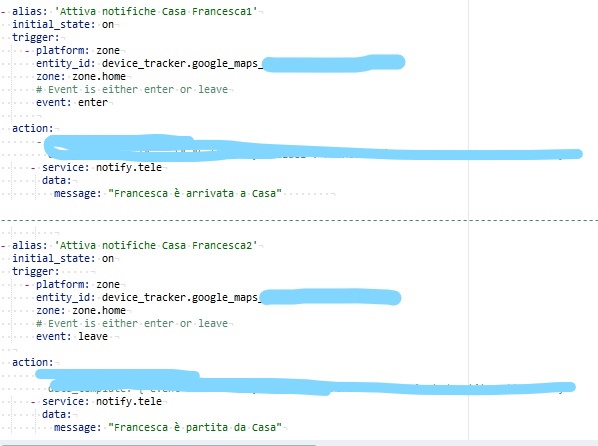
These automations detected on the position of our mobile phones by google allow a series of automations (turning on cameras, checking the closure of doors and lights, etc.). The bug does not allow at this time to manage the automations with the position detected by the app
sajikur
on 3 Sep 2020
@rs443 we double it when our last attempt:
dshokouhi
on 6 Sep 2020
Related issues
 tiagofreire-pt
·
3Comments
andriej
·
4Comments
tiagofreire-pt
·
3Comments
andriej
·
4Comments
 Anonym-tsk
·
3Comments
Anonym-tsk
·
3Comments
 Nik71git
·
4Comments
Nik71git
·
4Comments
 make-all
·
3Comments
make-all
·
3Comments