Android: Dark mode is enabled even if light mode was selected
Home Assistant Android version: 2.2.0
Android version: 10
Phone model: Google Pixel 3
Home Assistant version: 0.114.1
Last working Home Assistant release (if known): None
Description of problem:
Dark mode is enabled even if light mode was selected
Traceback (if applicable):
Screenshot of problem:

Additional information:
 Santobert
All 13 comments
Having the same issue on my S20+. The app is taking the dark mode setting from the phone's overall dark mode setting under display, with no option to override within the app itself. The only way to get light mode in the app is to change the phone settings.
 seanb-uk
on 16 Aug 2020
seanb-uk
on 16 Aug 2020
I can reproduce this issue. I will have a closer look at this soon.
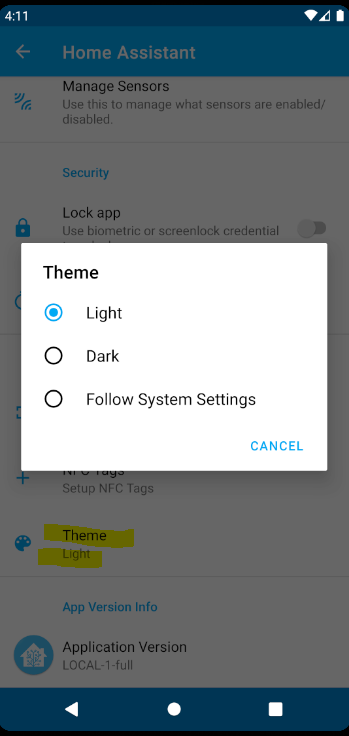
At least i have something ready to workaround this issue:
 chriss158
on 16 Aug 2020
chriss158
on 16 Aug 2020
That's exactly the approach that Google's own apps take - for example, under theme in Gmail general settings it has options for "Light", "Dark" and "System Default". Seems like the right way to do it, and I wouldn't consider that a workaround.
seanb-uk
on 16 Aug 2020
If you look at the screenshot of @Santobert, you see that the dark mode of home assistant is forced, even he set it to light. This should not be the case. But this is now fixed.
Additionally we will be able to overwrite the dark mode (theme) settings of the system in the app itself.
chriss158
on 16 Aug 2020
Yes, I realised that, I assumed it was behaviour that required a setting in the app - i.e. that Android itself was setting dark mode because it was a global setting and required an app level setting to override a flag somewhere. If it can be fixed to respect the profile setting, I'm not sure an app setting is needed.
It could be confusing to users to have two places that manage the theme - what would happen if they set light mode in the profile and dark mode in the app setting or vice versa?
seanb-uk
on 16 Aug 2020
Its not 2 places, its technically 3.
1 for system wide setting, 2 for app setting and 3 for HA frontend setting. We need to account for all 3 it seems?
In this particular case the user wants their system theme to remain dark and they want HA to remain in light. We need to do the override as the settings impact the whole app.
We also need to account for users who want things to remain on the day/night schedule. A lot to consider here. I think allowing the user to override it for the whole app is the correct approach.
Personally I just want everything in dark mode :)
 dshokouhi
on 16 Aug 2020
dshokouhi
on 16 Aug 2020
Having profile theme set to light on a phone which has dark mode set can also lead to some problems with PNG images - on the left is my avatar with the light/dark mismatch, on the right is the same but with the profile set to dark to match the phone:
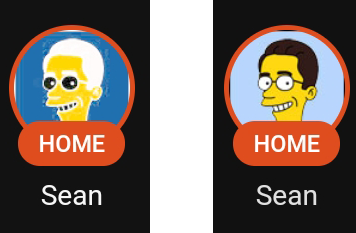
I haven't done anything with backend themes, but I would guess that anyone using a custom theme would probably want it to appear the same on all devices?
seanb-uk
on 16 Aug 2020
I think wee need the theme selection in the app itself, because we cannot set the app configuration theme by a custom theme set in HA. For example: Some users using a custom light theme, and maybe they also want to use a light theme for the app configuration.
@seanb-uk Do you use the current beta of the app?
chriss158
on 16 Aug 2020
No, I'm on 2.2.0-269-full, but happy to try the beta
Edit: Just switched to the tester programme and now have 2.2.0-4-g47a8800-273-full
seanb-uk
on 16 Aug 2020
The light/dark mismatch should be also fixed with #780
If this gets merged, you can test again.
chriss158
on 16 Aug 2020
Thanks, I'll test when I get the update
seanb-uk
on 16 Aug 2020
theres a debug APK that can be tested now :)
https://github.com/home-assistant/android/actions/runs/211188422
it installs as a separate app for quick tests like this....just remember logging into HA will create a new integration with the name of your device but once you install the app just remove that new integration....so make sure you know the name of it...if you rename your existing one it will be easier to tell the difference

dshokouhi
on 16 Aug 2020
Just tested the debug APK - looks good:
Phone theme dark, profile theme light, app theme system default - HA interface is light, app menu remains dark, as expected - respects profile theme for the main interface, but the app itself has dark theme.
Phone theme dark, profile theme auto, app theme system default - both HA and app menu are dark, as expected.
Phone theme dark, profile theme auto, app theme light - all elements light, as expected.
Impressed with how quickly this has been sorted out, all looks good to me.
seanb-uk
on 17 Aug 2020
Related issues
 Knoxie
·
5Comments
Knoxie
·
5Comments
 simbesh
·
3Comments
dshokouhi
·
3Comments
simbesh
·
3Comments
dshokouhi
·
3Comments
 Bruceforce
·
3Comments
Bruceforce
·
3Comments
 ofalvai
·
5Comments
ofalvai
·
5Comments
Most helpful comment
Just tested the debug APK - looks good:
Phone theme dark, profile theme light, app theme system default - HA interface is light, app menu remains dark, as expected - respects profile theme for the main interface, but the app itself has dark theme.
Phone theme dark, profile theme auto, app theme system default - both HA and app menu are dark, as expected.
Phone theme dark, profile theme auto, app theme light - all elements light, as expected.
Impressed with how quickly this has been sorted out, all looks good to me.