n Gmail and Material Files (from F-Droid) for example, when you scroll down, the whole header bar hides, and shows again when you scroll up a bit. This gives you a lot of space for your files and is really nice.
 tobiasKaminsky
All 5 comments
What do you like more when scrolling up?
Only search bar is gone vs everything vanishes (right)

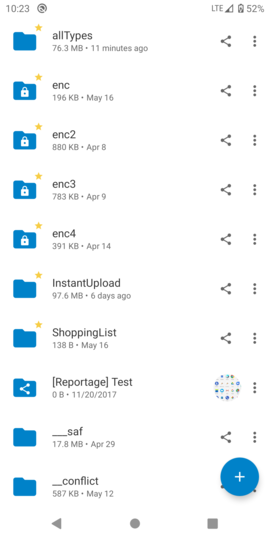
A video: https://nextcloud.kaminsky.me/s/DHGpNgMcZooF4Dy
@jancborchardt @AndyScherzinger @JorisBodin @Shagequi
tobiasKaminsky
on 9 Jun 2020
I'd vote for everything vanished (like GDrive also)
 AndyScherzinger
on 9 Jun 2020
AndyScherzinger
on 9 Jun 2020
What ever you like :)
BTW @tobiasKaminsky you can use native software for screenrecord :D
Directly in gif for github
https://reactnativeforyou.com/how-to-screen-record-and-take-screenshots-from-android-emulator-without-using-android-studio/
or
https://developer.android.com/studio/debug/am-video
 JorisBodin
on 9 Jun 2020
JorisBodin
on 9 Jun 2020
I'd vote for everything vanished (like GDrive also)
+1
 szaimen
on 9 Jun 2020
szaimen
on 9 Jun 2020
I'd vote for everything vanished (like GDrive also)
Yep – the reasoning here being that the sorting and grid toggle is definitely not more important than menu / search / account switcher. So the whole top block can vanish. :)
 jancborchardt
on 10 Jun 2020
jancborchardt
on 10 Jun 2020
Related issues
 JSoko
·
3Comments
JSoko
·
3Comments
 markbryanduncan
·
3Comments
markbryanduncan
·
3Comments
 Shagequi
·
3Comments
JSoko
·
3Comments
Shagequi
·
3Comments
JSoko
·
3Comments
 ezaquarii
·
3Comments
ezaquarii
·
3Comments
Most helpful comment
I'd vote for everything vanished (like GDrive also)