Android: Please add web page dark mode
Please add web page dark mode like opera browser, dark mode will reduce eye stress.

 rogerxed
All 13 comments
Hi @cmonfortep I would love to work on this enhancement request.
 KelvnPere
on 26 May 2020
KelvnPere
on 26 May 2020
Hi @KelvnPere, thanks for offering yourself to work on this. First, let me ask our product team about introducing this enhancement, and if they agree is something we can introduce I will ping you here.
@rogerxed just to clarify, we are talking about forcing the website to use dark mode when dark mode is enabled in our app, right?
 cmonfortep
on 26 May 2020
cmonfortep
on 26 May 2020
That would be great @cmonfortep. Are they some minor fixes that help is needed. If any kindly drop a link. Thanks
KelvnPere
on 26 May 2020
Hi @KelvnPere, thanks for offering yourself to work on this. First, let me ask our product team about introducing this enhancement, and if they agree is something we can introduce I will ping you here.
@rogerxed just to clarify, we are talking about forcing the website to use dark mode when dark mode is enabled in our app, right?
Yes, Of course.
rogerxed
on 26 May 2020
Hi there @KelvnPere and others. I've been sharing this proposal with other members of the team and we need to explore this a bit more.
Basically, there are some sites where users could choose their own theme from the website settings, and we don't want to override those settings forcing the webview to use dark theme in some scenarios. A real example is DDG, users that visit our website, they can configure their them from https://duckduckgo.com/settings#theme
We are open for suggestions about how to solve that usecase, I haven't had time to explore if there's any way to avoid webview overriding website settings.
cmonfortep
on 4 Jun 2020
😱 Completely missed this issue before trying something out I opened a PR with a GIF showcasing it in case anyone wants to play around https://github.com/duckduckgo/Android/pull/848
Regarding your comment @cmonfortep it is a good point (although I haven't personally faced it due to not using Themes on my end). When I had some issues with DarkMode on Kiwi Browser I just tend to remove it for that page the same way I would remove an Adblocker or use the allowlist feature from duckduckgo.
Instead of just being a switch in settings it could be a separate page to include exceptions and also extend from On/Off to also include Automatic so it changes at night (same with the light/dark theme).

 sanogueralorenzo
on 6 Jun 2020
sanogueralorenzo
on 6 Jun 2020
Hey @sanogueralorenzo, I've just tried kiwi browser on Android: I can change the theme but webview is not changing for me, am I missing something? Neither I see any allow/deny list to introduce any rules on where to apply themes per site.
Related to your PR I will comment directly there with more details, but our priority is to keep any preference set by the user on any websites. In any case, I may use your PR to try it and see if there's any workaround to keep the folowwing priority: first website theme, second browser theme.
cmonfortep
on 8 Jun 2020
@cmonfortep in Kiwi it is in the top-level menu as "Turn on Night mode"
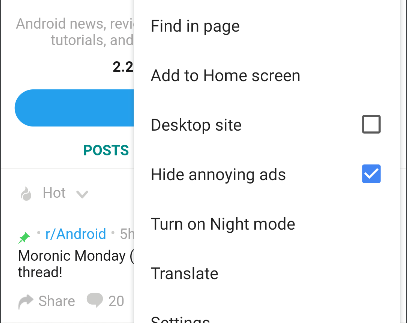
Regarding the website theme I'm not sure how that is possible. When I mentioned the Allow/Deny list it is something I haven't seen implemented for Dark Mode (since you can just turn it off if something doesn't look right).
I was comparing it to the Allow/Deny list you have for Tracking for example. It would be a matter of extracting the domain of the URL to invert the theme if dark theme is enabled.
Not sure how many people would use that though, does the retain original website themes in darkmode have more weight than enabling the option (opt-in through settings) of dark mode?
sanogueralorenzo
on 8 Jun 2020
Thanks for clarifying how to enable that option in kiwi browser. I played with it and I didn't like how some websites are rendered when forcing them to use dark theme. That means we can't automatically force the webview to be dark based on the app theme.
Most probably we will need to let the user decide in the same way as kiwi does it, with an option in the overflow menu, or like your proposed (inside settings), or any other way. That increases our initial scope, and it will involve product decisions and reviews. I will try to follow up this with them, to see if I can get some opinions around what's the preferred way to present this to users.
In any case, worth saying that we already have a project scoped to improve Dark theme experience in our backlog, but it's not on our top priorities right now. That could change if we see many users requesting this feature.
cmonfortep
on 9 Jun 2020
https://chrome.google.com/webstore/detail/dark-reader/eimadpbcbfnmbkopoojfekhnkhdbieeh is IMHO the best implementation of darkening of web content. It has multiple modes that can be set per site, and also allows for skipping darkening altogether for some sites. I'd advise considering this as a main source of inspiration as opposed to the opera or kiwi alternatives.
 ejortegau
on 16 Aug 2020
ejortegau
on 16 Aug 2020
Thanks for sharing @ejortegau, that's a very nice and advanced extension I didn't know about.
cmonfortep
on 23 Aug 2020
Sadly, I've been reviewing what's the current status of WebView to support Dark mode, and testing it within our app, and WebView does not correctly supports dark mode according to our requirements. They do for Chromium.
Currently, WebView let you force dark theme on websites but in a way that doesn't respect the site's branding colors or selected theme.
I was going to open them an issue but found a few ones related:
https://bugs.chromium.org/p/chromium/issues/detail?id=1061152
https://bugs.chromium.org/p/chromium/issues/detail?id=964594
We have documented this WebView limitation to review it in the future. For now, I will close this issue until Webview provides us a way for changing to dark mode honoring website's dark theme.
cmonfortep
on 8 Jan 2021
Is there any update from WebView side? @cmonfortep
 oldphones68
on 3 Apr 2021
oldphones68
on 3 Apr 2021
Related issues
 christophergeiger3
·
5Comments
christophergeiger3
·
5Comments
 WillHick
·
3Comments
WillHick
·
3Comments
 arunsathiya
·
3Comments
arunsathiya
·
3Comments
 jfitie
·
4Comments
jfitie
·
4Comments
 xfarrow
·
4Comments
xfarrow
·
4Comments