Android: After a few days sensors stop reporting updates until app is force closed and reopened
Home Assistant Android version:
1.8.0-159
Android version:
10
Phone model:
Pixel 4 XL
Home Assistant version:
0.108.2
Last working Home Assistant release (if known):
N/A
Description of problem:
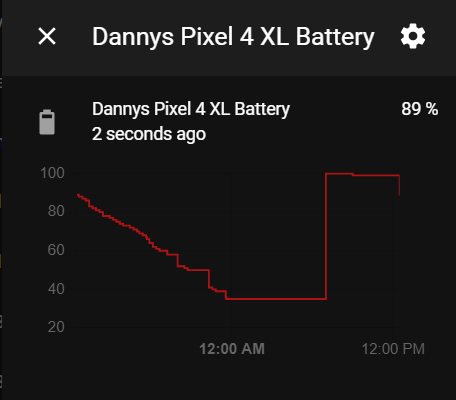
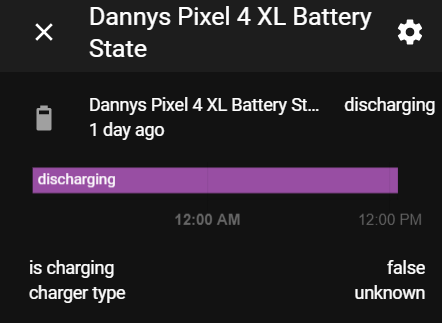
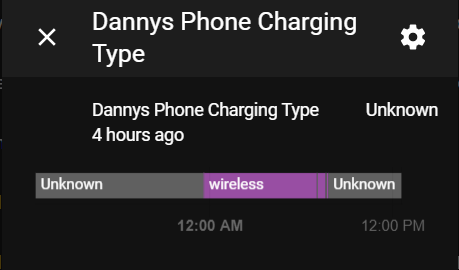
After a few days of uptime I noticed that my sensor stopped updating randomly. I tried to open the app but the sensor did not update. I then force closed the app and reopened it and the sensors updated as expected. I charged my phone over night and we can see that the battery state and battery level sensor stopped updating. We don't even see a gradual incline in battery life over night as I usually see, it randomly jumped to the top. Surprisingly the charger_type attribute still updated as expected but battery state nor battery level itself did not update as expected. Maybe the service is getting stuck or something?
Traceback (if applicable):
Screenshot of problem:
Additional information:
 dshokouhi
All 15 comments
I've noticed this on multiple devices, and the only thing that appeared to fix the error was a force stop and reopen.
 boonhapus
on 12 Jun 2020
boonhapus
on 12 Jun 2020
I've noticed this on multiple devices, and the only thing that appeared to fix the error was a force stop and reopen.
I noticed that when I do the force stop sometimes itll last a while and sometimes itll be less than a day before it stops reporting. I found restarting the phone at that point increases the timeframe of having to force stop the app. My wifes phone dies on a near daily basis due to battery life so she never sees this lol.
dshokouhi
on 12 Jun 2020
I just reset one of my devices (Pixel 2XL) and exhausted literally every option (device admin, background data on, clean install) to get these stats to appear. The last one I tried was force stopping the app and reopening, and this was the only solution.
It's hard to tell how long it'll last for, but hopefully this helps debug the issue.
boonhapus
on 12 Jun 2020
Yea next time this happens if I remember I will try to check the ADB logs, that may hold the key here.
Going to post the commands here too so maybe our logs can show the answer. It almost sounds like the service crashes or gets in a weird state requiring the app to be killed and restarted.
In an ADB shell we run this to get the app logs:
logcat | grep io.homeassistant.companion.android
I have the same issue. sensors won't update if the app is not in the foreground. I have to open the app to update the sensors.
 engrbm87
on 25 Aug 2020
engrbm87
on 25 Aug 2020
@engrbm87 you have battery optimization turned off for the app right? I know some devices are more aggressive in killing background services than others. My sensors on my phone always update given the app didn't get killed, my wifes phone the app gets killed pretty quickly. I think we may need a foreground service for the sensor worker to prevent this.
dshokouhi
on 25 Aug 2020
@engrbm87 you have battery optimization turned off for the app right? I know some devices are more aggressive in killing background services than others. My sensors on my phone always update given the app didn't get killed, my wifes phone the app gets killed pretty quickly. I think we may need a foreground service for the sensor worker to prevent this.
Yes I have it off. My phone is Oneplus and sometimes the app stops updating and even notifications get delayed.
engrbm87
on 25 Aug 2020
@engrbm87 you have battery optimization turned off for the app right? I know some devices are more aggressive in killing background services than others. My sensors on my phone always update given the app didn't get killed, my wifes phone the app gets killed pretty quickly. I think we may need a foreground service for the sensor worker to prevent this.
Yes I have it off. My phone is Oneplus and sometimes the app stops updating and even notifications get delayed.
can you try to "lock" the app? if you go into overview of all apps open you can long press it and choice "lock"
 bruvv
on 25 Aug 2020
bruvv
on 25 Aug 2020
So personally speaking on all of my android devices I no longer see this issue after the foreground service was introduced. I think it may be time to close this issue. I will leave this open for a few more days to see if anyone else who is on 2.4.x still has issues where the sensor completely stops reporting for a long time.
dshokouhi
on 19 Sep 2020
As I mention in #976 - I still have this issue.
Yesterday I uninstalled the application and installed the application again (2.5.0). Battery optimizations are disabled. I didn't disabled the sensors worker.
The application stops reporting states after few hours - it looks the limit is 7 hours.
 kukulich
on 30 Sep 2020
kukulich
on 30 Sep 2020
@kukulich what sensors do you have enabled? Can you share a graph of one where the sensor stopped reporting?
dshokouhi
on 30 Sep 2020
I enabled:
- Battery level
- Battery state
- Charging
- Geolocation
- All location sensors
- Wifi connection
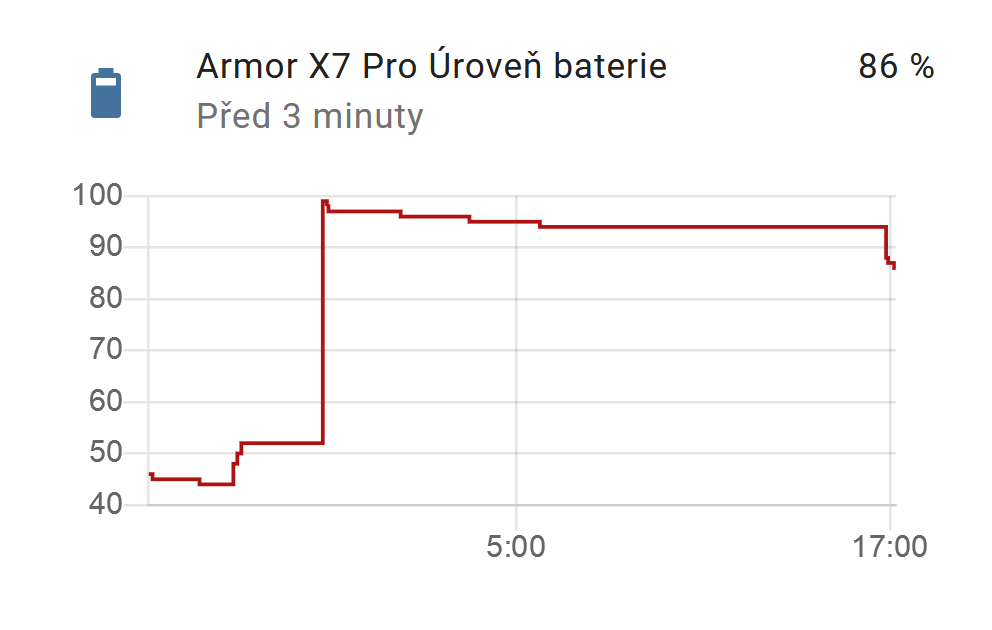
In the screenshot:
- The peek (around midnight) - that is the new installation yesterday
- Then you see that the battery level goes down a few hours (about 7 hours)
- Then no update
- At the end you can see update at 17:00 when I open the application
kukulich
on 30 Sep 2020
Can you double check for things like background restrictions and other settings? I noticed you have a Ulefone Armor X7 Pro device which I have personally not heard of but its possible there are still some type of restrictions going on that particular device. See if the steps on this website are helpful: https://dontkillmyapp.com/general
You mentioned that not even notifications show up and this suggests that something on your device is killing the app which would definitely stop the sensor worker and other things.
dshokouhi
on 30 Sep 2020
It looks I've finally found the problem. There are two other places where I have to disable battery optimization. It looks ok now! :)
kukulich
on 5 Oct 2020
@kukulich thanks for reporting back!!!
I am going to close this issue now as this was the only report I heard in the past couple weeks and turning off battery optimizations is all it needs to make things better.
dshokouhi
on 5 Oct 2020
Related issues
 Knoxie
·
5Comments
Knoxie
·
5Comments
 jokerigno
·
4Comments
jokerigno
·
4Comments
 andriej
·
4Comments
andriej
·
4Comments
 kmlucy
·
3Comments
kmlucy
·
3Comments
 Nik71git
·
4Comments
Nik71git
·
4Comments