Android: "Photos" menu item is always empty on Samsung Galaxy S10+ (SM-G975F)
Steps to reproduce
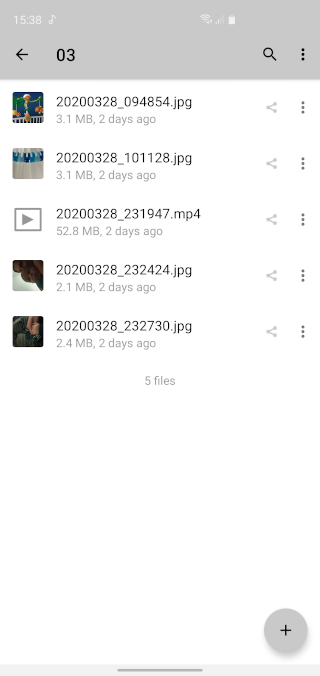
- Upload photos both explicitly (e.g. by sharing from Android's any gallery app) and via auto-upload.
- Make sure photos are visible in Android Nextcloud app's "All files" menu item. Also make sure photos are visible via Web interface's Gallery.
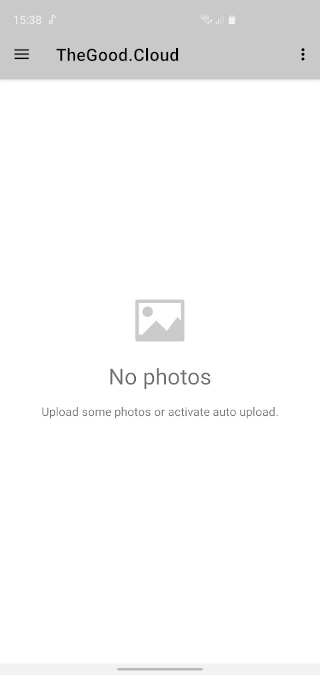
- Open "Photos" menu item in Android app. "No photos... Upload some photos or activate auto upload" message will be shown.
Expected behaviour
- "Photos" menu item in Android Nextcloud app shoud show photos.
Actual behaviour
- "Photos" menu item in Android Nextcloud app shows "No photos... Upload some photos or activate auto upload" text and no photos. Clearing cache and reinstalling application (with phone reboot in the middle) does not help.
Can you reproduce this problem on https://try.nextcloud.com?
- As far as I understand, try.nextcloud.com is not available for Android Nextcloud application. Application could not find neither "try.nextcloud.com", nor "demo02.nextcloud.com" (which I was redirected to in web browser).
Environment data
Android version: 10
Device model: Samsung Galaxy S10+ (SM-G975F)
Stock or customized system:
- Stock.
- One UI 2.0.
- No Samsung Knox is used.
- Kernel 4.14.113-17806689.
- March 1, 2020 Android security patch level.
Nextcloud app version: 3.11.0
Nextcloud server version: At least 2 different version of hosted solutions (TheGood.Cloud and Webo).
 nduhovnijs
All 7 comments
As far as I understand, try.nextcloud.com is not available for Android Nextcloud application. Application could not find neither "try.nextcloud.com", nor "demo02.nextcloud.com" (which I was redirected to in web browser).
@nduhovnijs you can create a Nextcloud instance via try.nextcloud.com and use the created one for testing.
 AndyScherzinger
on 6 Apr 2020
AndyScherzinger
on 6 Apr 2020
@nduhovnijs you can create a Nextcloud instance via try.nextcloud.com and use the created one for testing.
@AndyScherzinger , could you give more details on this?
1) I'm creating an instance via try.nextcloud.com
2) In the Settings->Mobile & Desktop I get Server Settings (demo01.nextcloud.com).
3) If I enter this server address in Nextcloud Android app, I get "Could not find host".
Thanks!
nduhovnijs
on 6 Apr 2020
It seems the service just went down at this very moment :/
AndyScherzinger
on 6 Apr 2020
@AndyScherzinger
It may be permanently not working for Android app. Here's why I think so:
1) I still successfully browse created "demo01.nextcloud.com" via Web Interface.
2) While browsing, I've retried to connect Android app number of times, every time getting "Could not find host" (while I use same Android app to successfully work with hosted Nextcloud solution).
3) When I initially created this bug report - I encountered exactly same problem with Android app not being able to use try.nextcloud.com (I had "demo02.nextcloud.com" host at the time).
nduhovnijs
on 6 Apr 2020
Well, the server shown to me is rather demo1 (no zero in the subdomain) and my device connects just fine. So this seems rather strange.
Other than that displaying the images view works fine on my device with my server :(
Android app not being able to use try.nextcloud.com
Which is correct since that page is just to provision a user/server combination which is then used
I still successfully browse created "demo01.nextcloud.com" via Web Interface.
I can't even access it via desktop browser!
AndyScherzinger
on 6 Apr 2020
@AndyScherzinger , I mixed "demo01" with "demo1". Thanks for pointing out.
Now I could try reproducing the problem on "try.nextcloud.com".
Result: I cannot reproduce it, "Photos" menu item in Android app works just fine.
Therefore, closing the bug.
Thank you!
nduhovnijs
on 6 Apr 2020
Glad I could help. Unfortunately I don't now why it doesn't work with your 2 instances, but my personal instance (which I used to test) and try.nextcloud both run the latest release 18.0.x (not sure if this info is of any help though).
AndyScherzinger
on 6 Apr 2020
Related issues
 Shagequi
·
3Comments
Shagequi
·
3Comments
 JSoko
·
3Comments
JSoko
·
3Comments
 tobiasKaminsky
·
3Comments
JSoko
·
3Comments
tobiasKaminsky
·
3Comments
JSoko
·
3Comments
 rainer042
·
3Comments
rainer042
·
3Comments