These are some possible design polishing items we could do – some more easy and some more difficult. :) What we assume to be quick wins are marked with ⚡
(No mockups yet as it’s just a quick list, and as it can mostly be seen by just checking out Gmail and Google Drive.)
- [x] ⚡ Splash screen polishing: During the splash screen, the status bar on top and the controls bar on the bottom is black. Can we make it blue as well? Will make it look much less boxed in. :) https://github.com/nextcloud/android/pull/5229
- [x] ⚡ Colorless header bar: The new material design doesn’t have colored header bars or status bars. The branding would only be via FAB and folder icons, which is fine. :)
- [x] ⚡ Slight rounding of the file previews: Some very slight rounded corners on the image file previews just like we do on server, makes it appear much friendlier. https://github.com/nextcloud/android/pull/5231
- [x] Get rid of 3-dot menu in top right: The "Refresh account" option can go away (right?) :D. The Sort as well as Grid view can go below the search field in a specific row, just like Google Drive does.
- [x] Add sort / switch list view to ReceiveExternalFiles and Trashbin
[x] Account switcher in top right: Again, same as Gmail and other Google Apps, we show the avatar in the top right instead of the drawer.
[x] Search bar open by default: Just like Gmail as well, the bar could be there by default and say Search in Nextcloud. When you are in a subfolder, it would change "Nextcloud" to the subfolder name
- [x] use new header in subfolders
- [x] ⚡ Use bottom sheet for actions menu: Instead of the small popover we can use the proper bottom sheet which is nicely reachable with the thumb. It should of course show the file in question on top so you know what the action will be carried out on.
- [x] ⚡ Transparent bottom bar: The Home/Back/Switcher bar on the bottom currently has a black background. If we make it transparent like in Gmail, it will look much lighter and like "more space for your own stuff"
- [x] ⚡ Hide header bar on scrolling: In Gmail and Material Files (from F-Droid) for example, when you scroll down, the whole header bar hides, and shows again when you scroll up a bit. This gives you a lot of space for your files and is really nice.
- [x] centralize fonts, e.g. difference between switch account popup and drawer
- [x] FirstRunActivity (and follow up while login): white navigation bar, should be blue
- [x] header in e.g. Activities/Notifications looks old, what can we do about it?
- [x] add new header to trash bin, sort is then a filter as sever does not support searching in trash bin
- [x] preview image: white navigation bar
Discussed with @tobiasKaminsky @Shagequi, cc @AndyScherzinger :) What do you think? Other quick things?
 jancborchardt
All 28 comments
Sounds good (all of it). Only thing a found:
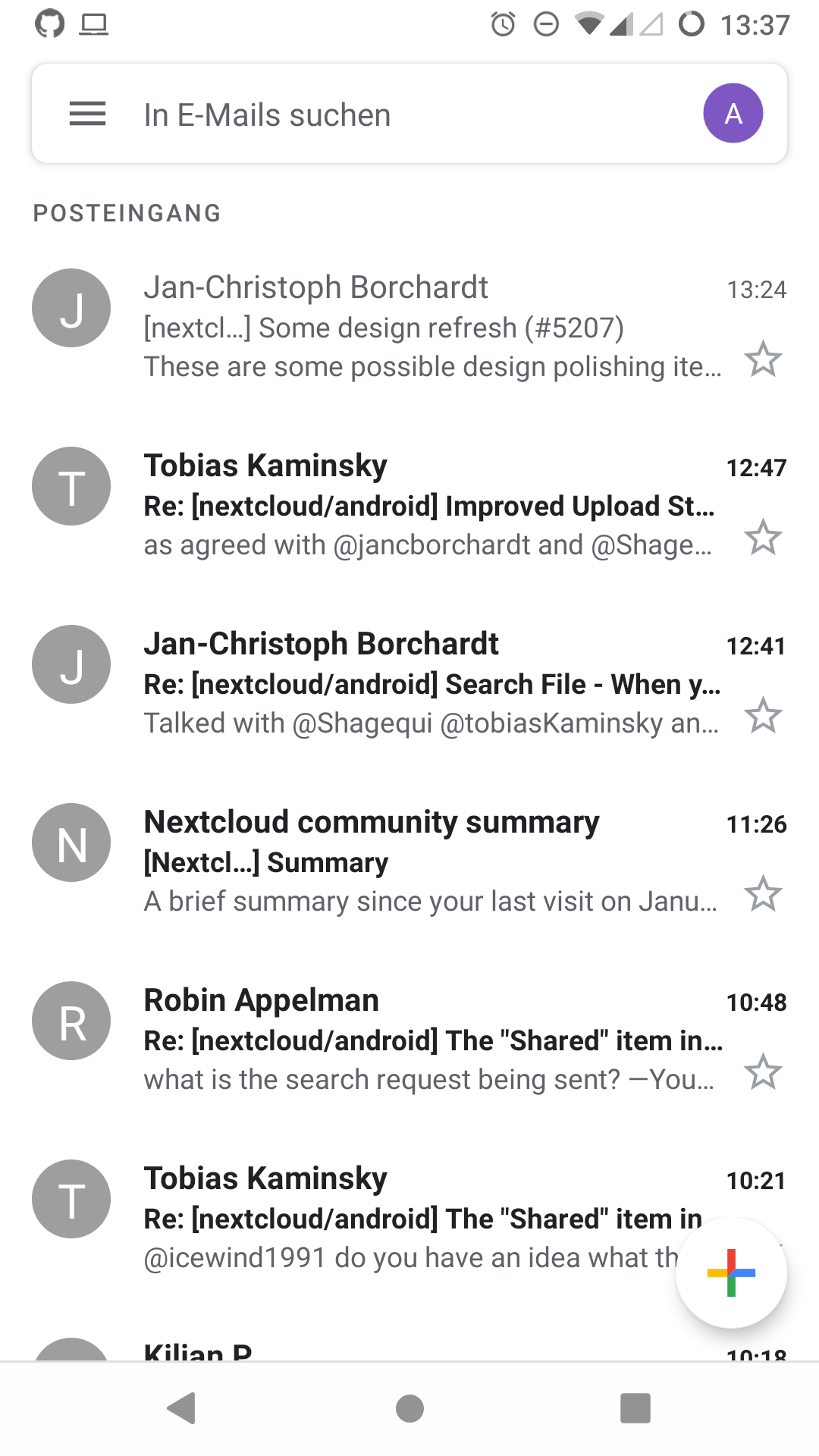
Transparent bottom bar: The Home/Back/Switcher bar on the bottom currently has a black background. If we make it transparent like in Gmail, it will look much lighter and like "more space for your own stuff"
the bottom bar is actually white in GMail, not transparent.
 AndyScherzinger
on 15 Jan 2020
AndyScherzinger
on 15 Jan 2020
@AndyScherzinger where do you see it's white? Looks at best like it's white with translucency set on pre-Android 10. On Android 10 it looks transparent with some automatic adaptation.
 mario
on 15 Jan 2020
mario
on 15 Jan 2020
On OP3T, Lineage 16. / Android 9:
AndyScherzinger
on 15 Jan 2020
Fun stuff.
mario
on 15 Jan 2020
Semi-transparentcy is fine with me (the Google News app has that for the bottom bar). So I am fine with the statement/decision, just wanted to clearify that it might not look as described got GMail on all devices.
AndyScherzinger
on 15 Jan 2020
Hmm, guess it’s device- or version-dependent then. :) The point is: Let’s make the bottom bar semi-transparent. :crystal_ball:
jancborchardt
on 16 Jan 2020
Yes let's do it, btw, the bar is semi transparent now in Gmail (so a bug within their app...)
AndyScherzinger
on 16 Jan 2020
I would suggest : Add an unique "in-notification" file transfer status with action buttons, like mentionned in : https://github.com/nextcloud/android/issues/1532
 Shagequi
on 20 Jan 2020
Shagequi
on 20 Jan 2020
Hello,
After discussion with @tobiasKaminsky and @jancborchardt, here are our mokups to refresh the current design.
The iOS and Android apps will be aligned designwise.
https://infomaniak.invisionapp.com/share/3VWA11OK9E8#/410365622_App_Nextcloud_-_Drive_2
In the first step, we will not implement the bottom bar.
In the new design only the header bar is going away, the rest should still be themed.
 JorisBodin
on 17 Apr 2020
JorisBodin
on 17 Apr 2020
@JorisBodin Mockup looks great, beware that @tobiasKaminsky started working on this (a while ago), see #5290 so best would be to collaborate on that branch and looping in @tobiasKaminsky ❤️
AndyScherzinger
on 17 Apr 2020
Hi, here is a new todo list for this implementation
According to the mockups here : https://infomaniak.invisionapp.com/share/3VWA11OK9E8#/410365622_App_Nextcloud_-_Drive_2
GLOBAL CHANGES
- [x] Set the status and appbar color to « white » (adapted to the app theme/style) @JorisBodin https://github.com/nextcloud/android/pull/5933
- [x] For each picture thumbnail, first show a « grey » square @Sirambd https://github.com/nextcloud/android/pull/5991
- [x] Check and change icons and set real Material ones @Shagequi https://github.com/nextcloud/android/pull/5966
- [x] Check and change fonts, colors and font-styles (bold/etc.) @Shagequi https://github.com/nextcloud/android/pull/5938
- [x] White Navigation bar in light mode @JorisBodin https://github.com/nextcloud/android/pull/6087
- [x] In gridmode don't show share button @Sirambd https://github.com/nextcloud/android/pull/6145
- [X] Fix toolbar upload file in light mode @JorisBodin https://github.com/nextcloud/android/pull/6165
APPBAR CHANGES
- [x] Integrate the account to the right of the appbar @JorisBodin https://github.com/nextcloud/android/pull/6067
- [x] Dialog select account @Shagequi https://github.com/nextcloud/android/pull/6116
- [x] Change appbar design (based on mockups) @JorisBodin https://github.com/nextcloud/android/pull/6067
- [x] Display filter and display mode icons (grid/list) in appbar directly @JorisBodin https://github.com/nextcloud/android/pull/5992
- [x] Change Manage Accounts Activity based on mockups @Shagequi https://github.com/nextcloud/android/pull/6022
FILES LIST CHANGES
- [x] Add « round » effect on thumbnails @sirambd https://github.com/nextcloud/android/pull/6044
- [x] Add more spacing/margin between cases in grid display mode and 3 columns @sirambd https://github.com/nextcloud/android/pull/6044
- [x] Change the size of the folders thumbnails @Shagequi https://github.com/nextcloud/android/pull/6029
- [x] Change the location of the « Favorite » star on thumbnails @Shagequi https://github.com/nextcloud/android/pull/6042
- [x] Set « points » separator instead of commas « , » in file sub-data @Shagequi https://github.com/nextcloud/android/pull/5938
- [x] Remove MenuItem: filter, grid/list mode @Shagequi https://github.com/nextcloud/android/pull/6173
DRAWER CHANGES
- [X] Create the new dialog for accounts choose/management @Shagequi https://github.com/nextcloud/android/pull/6146
- [X] Replace the account header in drawer by Nextcloud logo (only once all the above tasks done) @Shagequi https://github.com/nextcloud/android/pull/6156
PICTURES/MEDIAS CHANGES
- [x] remove shared symbol in pictures tab @sirambd https://github.com/nextcloud/android/pull/6145
- [x] More spacing, favorite star location, etc.
ADD FILE MENU/DIALOG CHANGES
- [x] Edit design based on mockups (applied progressively in many PRs)
ACCOUNTS MANAGEMENT CHANGES
- [x] Re-create the "View profile" Activity : Invision mockup https://github.com/nextcloud/android/pull/6105
Some points could be missing, don't hesitate to edit the checklist to adjust.
Obviously, all the points must be in agreement with the mockups, and it is necessary to follow the points in order (at least up to the Drawer) to allow an efficient and conflict-free modification.
We're going to start working on that right now :)
Shagequi
on 21 Apr 2020
Hi,
I really like the new design but I would argue that the following proposal is a better arrangement of the bottom buttons, because especially the most important files button is now by far better reachable for right-handed people (apparently I have switched the order from "left to right" to "from right to left"):
My Proposal:

Current Prototype:
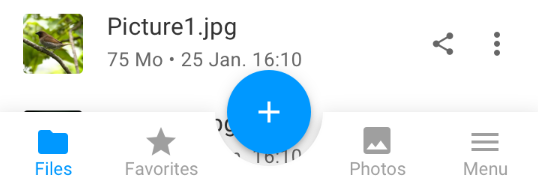
BTW: Concerning the sliding in animation from the right side: is this an animation bug or is it meant to be this way? I would argue, that the side menu should still come from the left side, so that you are still able to open the menu with a gesture from the left side.
 szaimen
on 1 May 2020
szaimen
on 1 May 2020
@szaimen it is a default that the main entry is always on the left. If we go with a bottom bar, then the order as in the mockup is fine (possibly having "Notifications" instead of "Photos" though).
jancborchardt
on 2 May 2020
@jancborchardt I am all in for defaults that follow the function but that is clearly a standard that doesn't make sense for 90% of the people who want to use the app on a daily basis.
But +1 for this idea:
If we go with a bottom bar, then (possibly having "Notifications" instead of "Photos" though).
szaimen
on 2 May 2020
a standard that doesn't make sense for 90% of the people
Basically all apps using this means doing it any different would _not_ make sense for 90% of the people.
Let’s not discuss this to death, we are first going without a bottom bar for Android anyway.
jancborchardt
on 3 May 2020
@szaimen @jancborchardt Of course, we can look with the person who designed the mock-ups and integrate it into a debate in another (new) issue ^_^
Shagequi
on 4 May 2020
Comment from @jancborchardt here about mockups : https://github.com/nextcloud/android/pull/6029#issuecomment-626173398
sorry for the miscommunication. The folder icon size is great in the grid view as in the mockup – but for the list view, the current folder icon size is better, so we should keep that.
I checked the current mockup again to make sure there’s no inconsistencies, and 3 more things came up (which I gave as feedback before as well):
The search requires 2 characters minimum – that is unnecessarily restrictive, instead the current view should be filtered first for quick results.
The "Menu" navigation sliding in from the right but then sticking to the left is strange. Would look nicer if it is a full view list.
The text in the app header is not left-aligned with the file names down below. (Compared to how it is in the current app.)
The mockup also doesn’t have other details like left/right animation for going into folders, so I didn’t assume it was so set in stone but a basis for what we’ll work on. Sorry if that was the wrong assumption, and hope the comment clears it up? :)
Shagequi
on 9 May 2020
Hello @jancborchardt
The "Menu" navigation, doesn't change, until we have the bottom navigation bar. And it's fullscreen view. It's a mock-up problem.
The text in the app header is not left-aligned with the file names down below. (Compared to how it is in the current app.)
This is the native android display. We can hack it if you want.
JorisBodin
on 11 May 2020
The "Menu" navigation, doesn't change, until we have the bottom navigation bar. And it's fullscreen view. It's a mock-up problem.
Cool, no worries from my side. Just wanted to make sure as the mockup is sometimes cited as the gold standard, which it often can not be for these reasons, and others such as some parts not being covered by it. (Which again, is fine by me.)
The text in the app header is not left-aligned with the file names down below. (Compared to how it is in the current app.)
This is the native android display. We can hack it if you want.
Not very important, but it’s a nice detail. Some apps seem to align it, and it does look better.
jancborchardt
on 11 May 2020
Not very important, but it’s a nice detail. Some apps seem to align it, and it does look better.
Maybe it's the content is align at the bar and not the opposite?
JorisBodin
on 12 May 2020
Not very important, but it’s a nice detail. Some apps seem to align it, and it does look better.
Maybe it's the content is align at the bar and not the opposite?
Not sure, but if we ignore the content we can also say that the search text should be aligned with the header text. That means either moving the search text to the left (which would look nice) or moving the header text further to the right (which takes away more space for letters and looks off).
jancborchardt
on 12 May 2020
@Shagequi what about the bottom appbar which is visible in the mockups? I haven't seen that on the list https://github.com/nextcloud/android/issues/5207#issuecomment-617270183
szaimen
on 28 May 2020
@szaimen It'll be implemented later, if I remember @jancborchardt wanted to do this redesign in two phases :
1- Consists to apply all the above check list
2- Consists to implement the bottom app-bar
@JorisBodin may confirm this.
Shagequi
on 28 May 2020
Yep, as we are not sure about the bottom app-bar yet, we wanted to first start out with all the other great improvements to not have that one thing block the rest. :)
jancborchardt
on 28 May 2020
As the first major round of updates is done (awesome work @Infomaniak), I will go now through the app and collect missing todos and add them in first post.
 tobiasKaminsky
on 5 Jun 2020
tobiasKaminsky
on 5 Jun 2020
Feel free to add something if you find it.
After this "second" round, we then should close this issue and create individual issues, if something is still "wrong".
tobiasKaminsky
on 5 Jun 2020
As nothing more popped up so far, I will transfer the remaning ones as new issues and close this one.
Please open any issues, related to new design, as "bug" so that we make sure to fix them for next stable.
tobiasKaminsky
on 8 Jun 2020
Really great work everyone! :)
jancborchardt
on 8 Jun 2020
Related issues
Shagequi
·
3Comments
 JSoko
·
3Comments
tobiasKaminsky
·
3Comments
JSoko
·
3Comments
tobiasKaminsky
·
3Comments
 rainer042
·
3Comments
rainer042
·
3Comments
 ezaquarii
·
3Comments
ezaquarii
·
3Comments
Most helpful comment
Hello,
After discussion with @tobiasKaminsky and @jancborchardt, here are our mokups to refresh the current design.
The iOS and Android apps will be aligned designwise.
https://infomaniak.invisionapp.com/share/3VWA11OK9E8#/410365622_App_Nextcloud_-_Drive_2
In the first step, we will not implement the bottom bar.
In the new design only the header bar is going away, the rest should still be themed.
iOS: https://github.com/nextcloud/ios/issues/1218