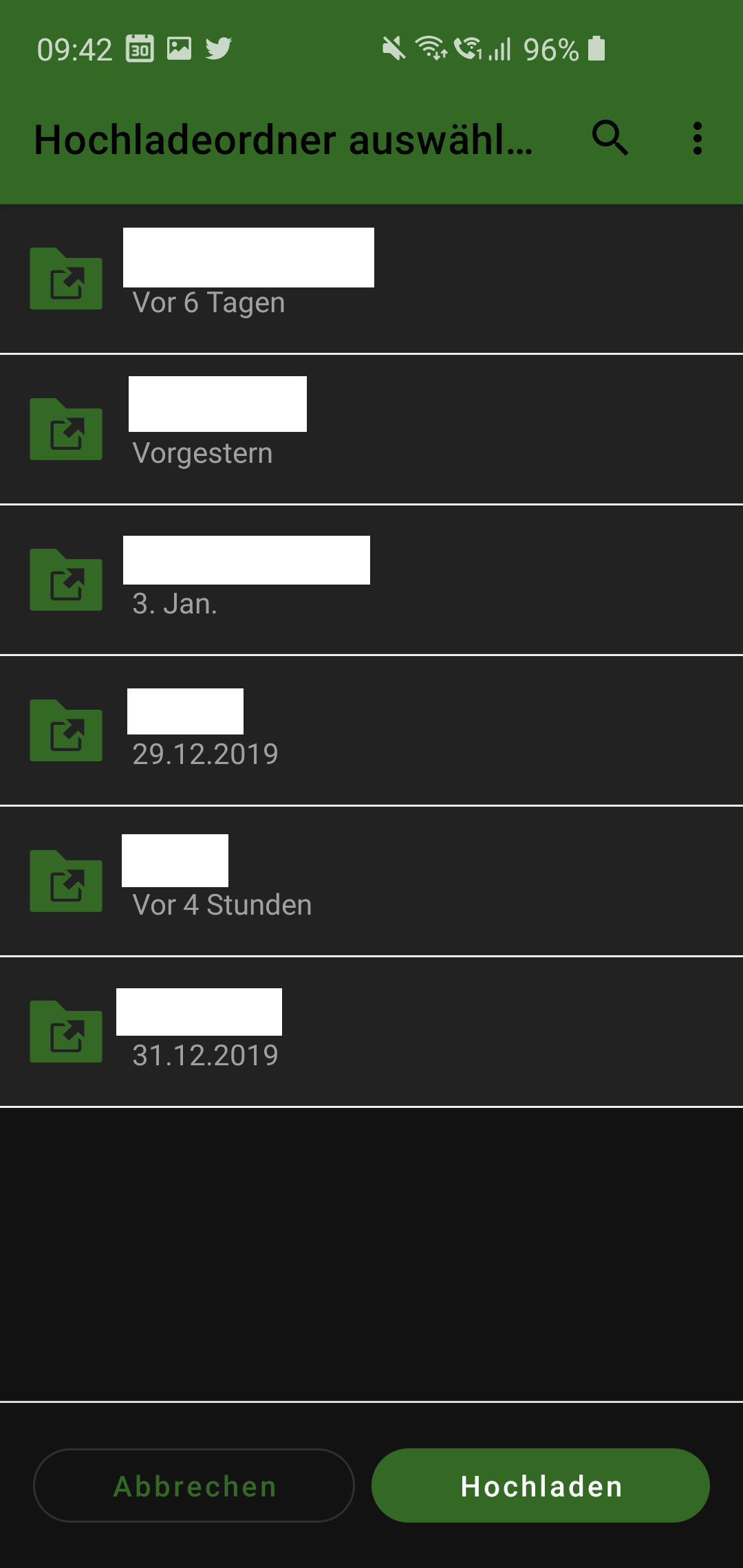
Android: [3.10 RC2] Dark Mode upload picker doesn't look right
Steps to reproduce
- enable dark mode on 3.10 RC2
- share a file from another app to nextcloud
- see the upload picker
Expected behaviour
there shouldn't be white dividing lines:
Actual behaviour
there are white dividing lines.
Environment data
Android version:
Android 10
Device model:
SGS10e
Stock or customized system:
Stock
Nextcloud app version:
3.10 RC2
Nextcloud server version:
17.0.2
Look at this screenshot
 szaimen
All 5 comments
Actually, I cannot upload files here, but the UI doesn't show that! (only the "Hochladen" Button doesn't work then)
kind of comparable to: https://github.com/nextcloud/android/issues/5124
szaimen
on 14 Jan 2020
Nice catch, the divider is actually light gray and also present in the light theme, so the divider needs to be removed in general.
 AndyScherzinger
on 14 Jan 2020
AndyScherzinger
on 14 Jan 2020
@AndyScherzinger have you seen my comment below?
https://github.com/nextcloud/android/issues/5188#issuecomment-574133506
I could open a new issue for that...
szaimen
on 14 Jan 2020
I could open a new issue for that...
Yes please, since it is a different part of the app/implementation than #5124 - Thanks for your reports 🙏
AndyScherzinger
on 14 Jan 2020
I could open a new issue for that...
Yes please, since it is a different part of the app/implementation than #5124 - Thanks for your reports 🙏
I opened https://github.com/nextcloud/android/issues/5190 for that 👍
szaimen
on 14 Jan 2020
Related issues
 Tie-fighter
·
3Comments
Tie-fighter
·
3Comments
 JSoko
·
3Comments
JSoko
·
3Comments
 tobiasKaminsky
·
3Comments
tobiasKaminsky
·
3Comments
AndyScherzinger
·
3Comments
tobiasKaminsky
·
3Comments
tobiasKaminsky
·
3Comments
AndyScherzinger
·
3Comments
Most helpful comment
I opened https://github.com/nextcloud/android/issues/5190 for that 👍