Android: Drawer is swipeable from the left on image/picture preview
Hi,
The Drawer is swipeable from the left when we consult a picture. Given the full screen mode, the Drawer is cropped and not really useful.
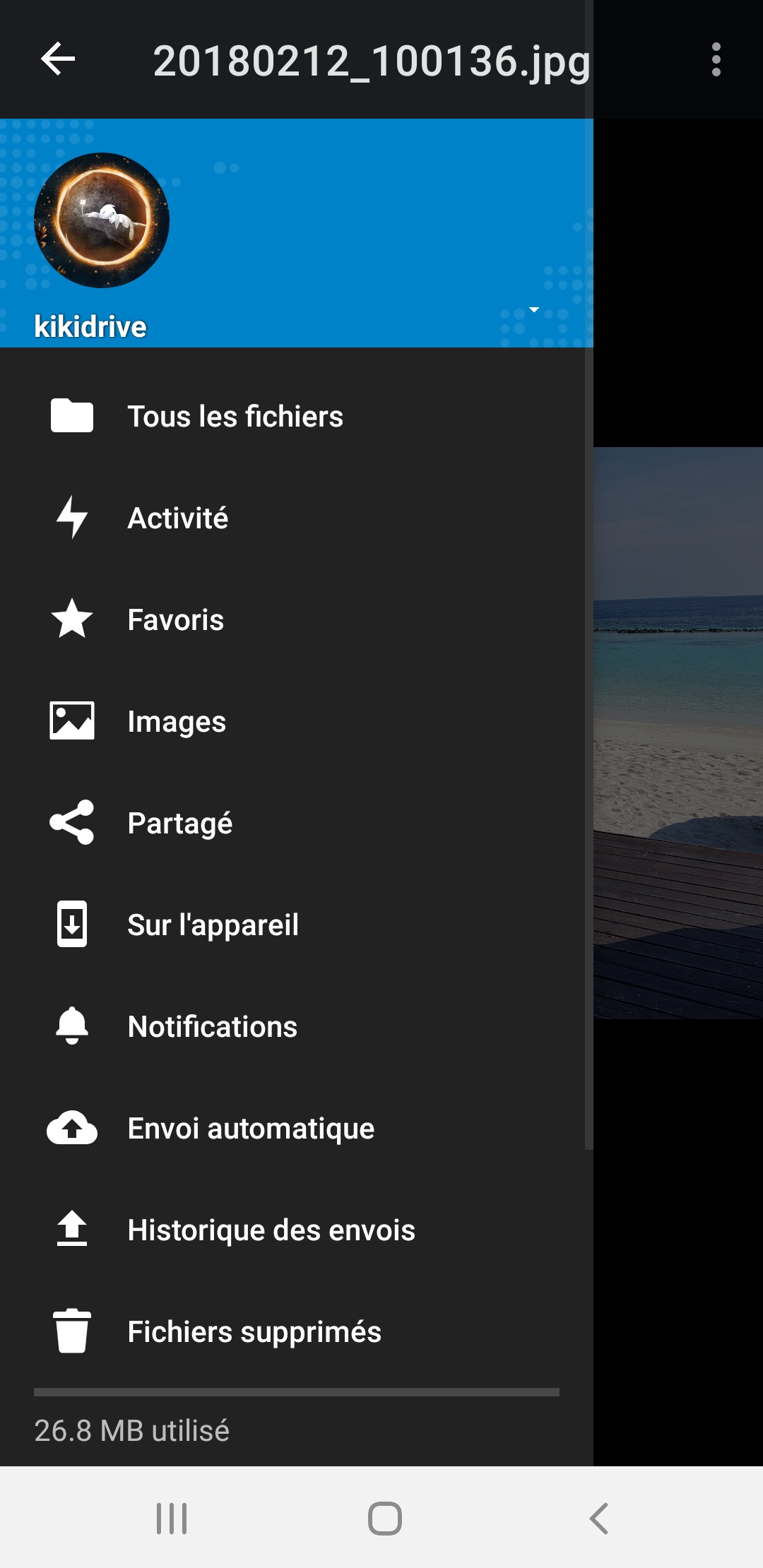
Is it needed ?
App version : 3.9.0
 Shagequi
All 12 comments
Nope, not needed. The issue here (just a guess, haven't looked at the code) is that the activity inherits the DrawerActivity which might well be because of the Tablet behavior (where this would just be on the left (file list, etc.) Not sure though.
cc @tobiasKaminsky
 AndyScherzinger
on 20 Nov 2019
AndyScherzinger
on 20 Nov 2019
Normally, this block :
        mFullScreenAnchorView.setOnSystemUiVisibilityChangeListener
                (flags -> {
                    boolean visible = (flags & View.SYSTEM_UI_FLAG_HIDE_NAVIGATION) == 0;
                    if (visible) {
                        actionBar.show();
                        setDrawerLockMode(DrawerLayout.LOCK_MODE_UNLOCKED);
                    } else {
                        actionBar.hide();
                        setDrawerLockMode(DrawerLayout.LOCK_MODE_LOCKED_CLOSED);
                    }
                });
com/owncloud/android/ui/preview/PreviewImageActivity.java:121
shouldn't allow the Drawer in "visible mode". So we may remove this block and replace by only setDrawerLockMode(DrawerLayout.LOCK_MODE_LOCKED_CLOSED); to disallow Drawer swiping.
Shagequi
on 20 Nov 2019
Worth a try I guess 👍
AndyScherzinger
on 20 Nov 2019
Hi @AndyScherzinger :)
My fix works for pictures, but videos are concerned too (the Drawer is swipeable).
Do I need to fix for just pictures or videos too ?
Shagequi
on 21 Nov 2019
Video is in PreviewVideoActivity.
 tobiasKaminsky
on 21 Nov 2019
tobiasKaminsky
on 21 Nov 2019
plus there is also the text preview activity
AndyScherzinger
on 21 Nov 2019
This request did not receive an update in the last 4 weeks. Please take a look again and update the issue with new details, otherwise the issue will be automatically closed in 2 weeks. Thank you!
![stale[bot] picture](https://avatars3.githubusercontent.com/in/1724?v=4&s=40) stale[bot]
on 19 Dec 2019
stale[bot]
on 19 Dec 2019
up
Shagequi
on 16 Jan 2020
Can't understand why... the videos preview activity can't lock the Drawer.
Shagequi
on 16 Jan 2020
@Shagequi are you sure you are actually loading the Videos Preview activity? I really don't think that's used anymore, what you see when you click on a video is PreviewMediaFragment. See line 2343 in FileDisplayActivity in your branch. :) So you might want to handle the drawer locking/unlocking in the fragment lifecycle methods.
 mario
on 17 Jan 2020
mario
on 17 Jan 2020
I'll work today on a fix for video preview activity/fragment (in order to hide the Drawer) @AndyScherzinger
Shagequi
on 20 Jan 2020
Issue created
Shagequi
on 20 Jan 2020
Related issues
Shagequi
·
3Comments
 rainer042
·
3Comments
rainer042
·
3Comments
 JSoko
·
3Comments
AndyScherzinger
·
3Comments
JSoko
·
3Comments
JSoko
·
3Comments
AndyScherzinger
·
3Comments
JSoko
·
3Comments