Android: Autoupload - option: Original file... delete/keep
Actual behaviour
install nextcloud
set battery optimization off
log in
set autoupload (pictures)
try to set "original file... delete".
cant change/choose.
Expected behaviour
install nextcloud
set battery optimization off
log in
set autoupload (pictures)
try to set "original file... delete".
change/choose "Original file... delete"
Steps to reproduce
- install nextcloud
- set battery optimization off
- log in
- set autoupload
- choose remot folder
- try to choose "Original file...
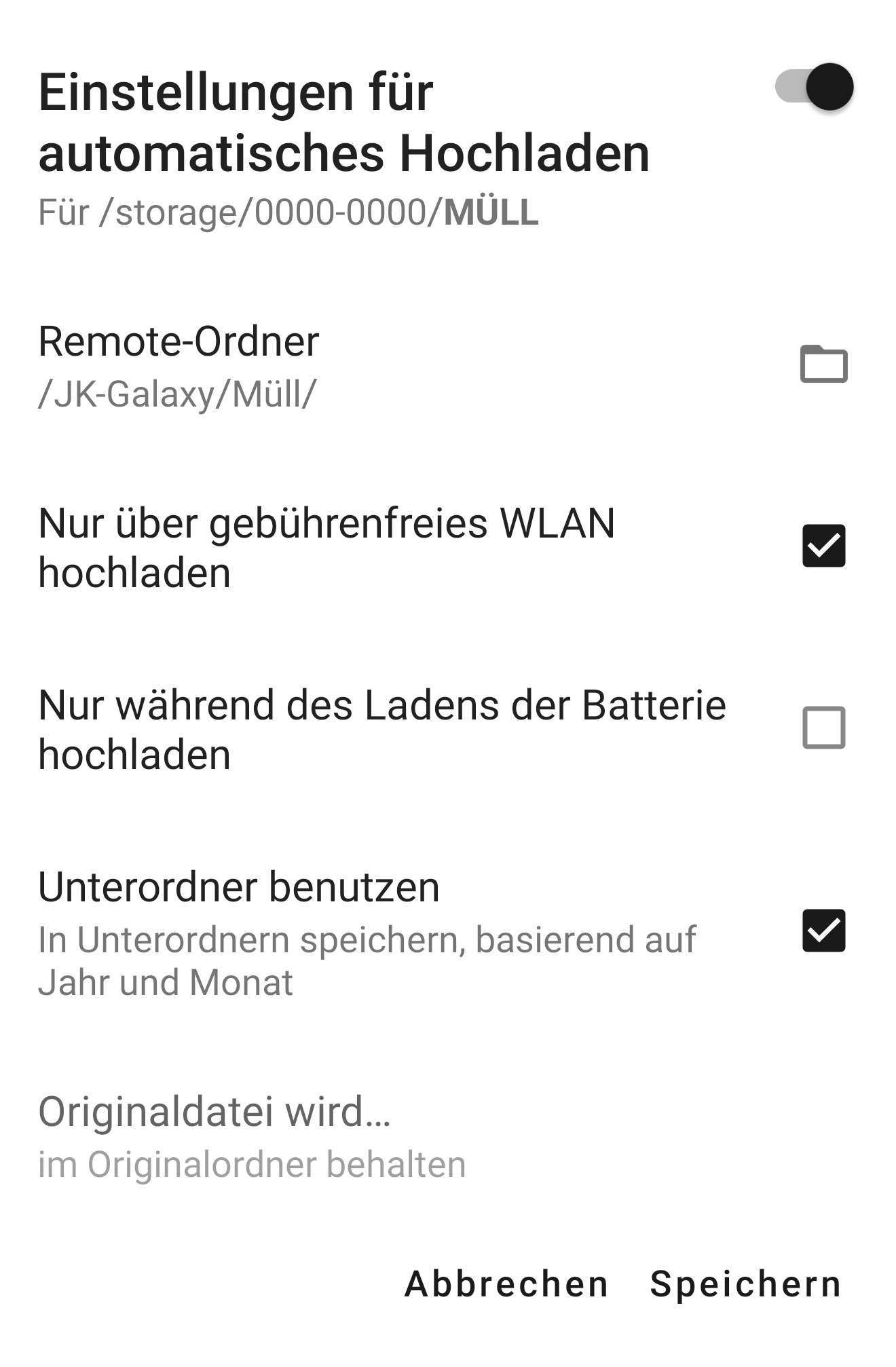
"
Environment data
Android version: 9.0
Device model: SM-N950F
Stock or customized system: Stock
Nextcloud app version: 3.5.0 / 3.6.0 / 3.6.2 / 3.7.1
Nextcloud dev app version: 20190815
Nextcloud server version: 15.0.5 / 16.0.0 / 16.0.1 / 16.0.3
Interesting
with latest iOS on iPhone 5S works
Changelog
- Added Nextcloud dev app version
~ Updated App/Server Version
~ Updated App/Server Version
 Excel1
All 10 comments
This request did not receive an update in the last 4 weeks. Please take a look again and update the issue with new details, otherwise the issue will be automatically closed in 2 weeks. Thank you!
![stale[bot] picture](https://avatars3.githubusercontent.com/in/1724?v=4&s=40) stale[bot]
on 9 May 2019
stale[bot]
on 9 May 2019
This request did not receive an update in the last 4 weeks. Please take a look again and update the issue with new details, otherwise the issue will be automatically closed in 2 weeks. Thank you!
stale[bot]
on 10 Jun 2019
This request did not receive an update in the last 4 weeks. Please take a look again and update the issue with new details, otherwise the issue will be automatically closed in 2 weeks. Thank you!
stale[bot]
on 17 Jul 2019
@tobiasKaminsky could this be due to failing permission checks? (in case we can't change this setting due to the checks done, we should probably hide it then?)
 AndyScherzinger
on 17 Jul 2019
AndyScherzinger
on 17 Jul 2019
This request did not receive an update in the last 4 weeks. Please take a look again and update the issue with new details, otherwise the issue will be automatically closed in 2 weeks. Thank you!
stale[bot]
on 15 Aug 2019
Ah, indeed this seems to be a custom folder and this might lack write/delete permission.
To avoid confusion, I would not hide this, but show an explaining message, like on move/copy: source folder is read-only; files will only be uploaded.
 tobiasKaminsky
on 15 Aug 2019
tobiasKaminsky
on 15 Aug 2019
@tobiasKaminsky
Yes. I proved it. The option is greyed for pictures in self created folders ( or folders created by galery) on SD Card by automatic upload. (even though the writing permissions are given).
The option is not greyed for pictures in folders on internal storage.
Excel1
on 15 Aug 2019
I had the same issue, moved everything back to the internal storage of my phone and voila it works again as expected.
Perhaps we could handle the SD Card so the option can also be used with SD card as the NC storage, there are phones out there with quite small internal storage.
 feutl
on 10 Dec 2019
feutl
on 10 Dec 2019
I've the same issue on Lineage OS 14.1 / Android 7.1.2 / Samsung Galaxy S7 / Nextcloud Android App 3.8.1 / Nextcloud Server 16.0.4

 M4xTheMan
on 2 Feb 2020
M4xTheMan
on 2 Feb 2020
This issue over a year old. Any thoughts as to when it will be fixed? We need the app to request write/delete permission for the SD Card.
 DesktopMasters
on 30 Apr 2020
DesktopMasters
on 30 Apr 2020
Related issues
 ikke-t
·
3Comments
ikke-t
·
3Comments
 eppfel
·
3Comments
eppfel
·
3Comments
 Tie-fighter
·
3Comments
tobiasKaminsky
·
3Comments
Tie-fighter
·
3Comments
tobiasKaminsky
·
3Comments
 Shagequi
·
3Comments
Shagequi
·
3Comments
Most helpful comment
This issue over a year old. Any thoughts as to when it will be fixed? We need the app to request write/delete permission for the SD Card.