Android: Upload of updated files in instant upload does not work
Hi,
updated files won't overwrite existing files at instant upload.
A message around a problem will be shown and user have to fix it manually.
User had to delete the related file in nc.
 Siggi0904
All 19 comments
GitMate.io thinks possibly related issues are https://github.com/nextcloud/android/pull/3509 (3.5.0 RC1), https://github.com/nextcloud/android/issues/2027 (3.0.0-RC1 auto-upload not working), https://github.com/nextcloud/android/issues/3539 ([3.5.0 RC1] Not loading after upgrade), https://github.com/nextcloud/android/issues/3531 ([3.5.0 RC1] No app available for sending email), and https://github.com/nextcloud/android/issues/3530 ([3.5.0 RC1] Loading of activities fails and an "Unexpected exception" is displayed).
 nextcloud-android-bot
on 31 Jan 2019
nextcloud-android-bot
on 31 Jan 2019
Thanks for your report, but this is unrelated to 3.5.0 RC1 as we did not touched the auto upload part, but we will have a look.
You expect that the changed file will be uploaded again, but overwrite the server file:
- create an image
- image gets uploaded
- change image locally
- image should get uploaded and overwrite server version
 tobiasKaminsky
on 1 Feb 2019
tobiasKaminsky
on 1 Feb 2019
Hi Tobias,
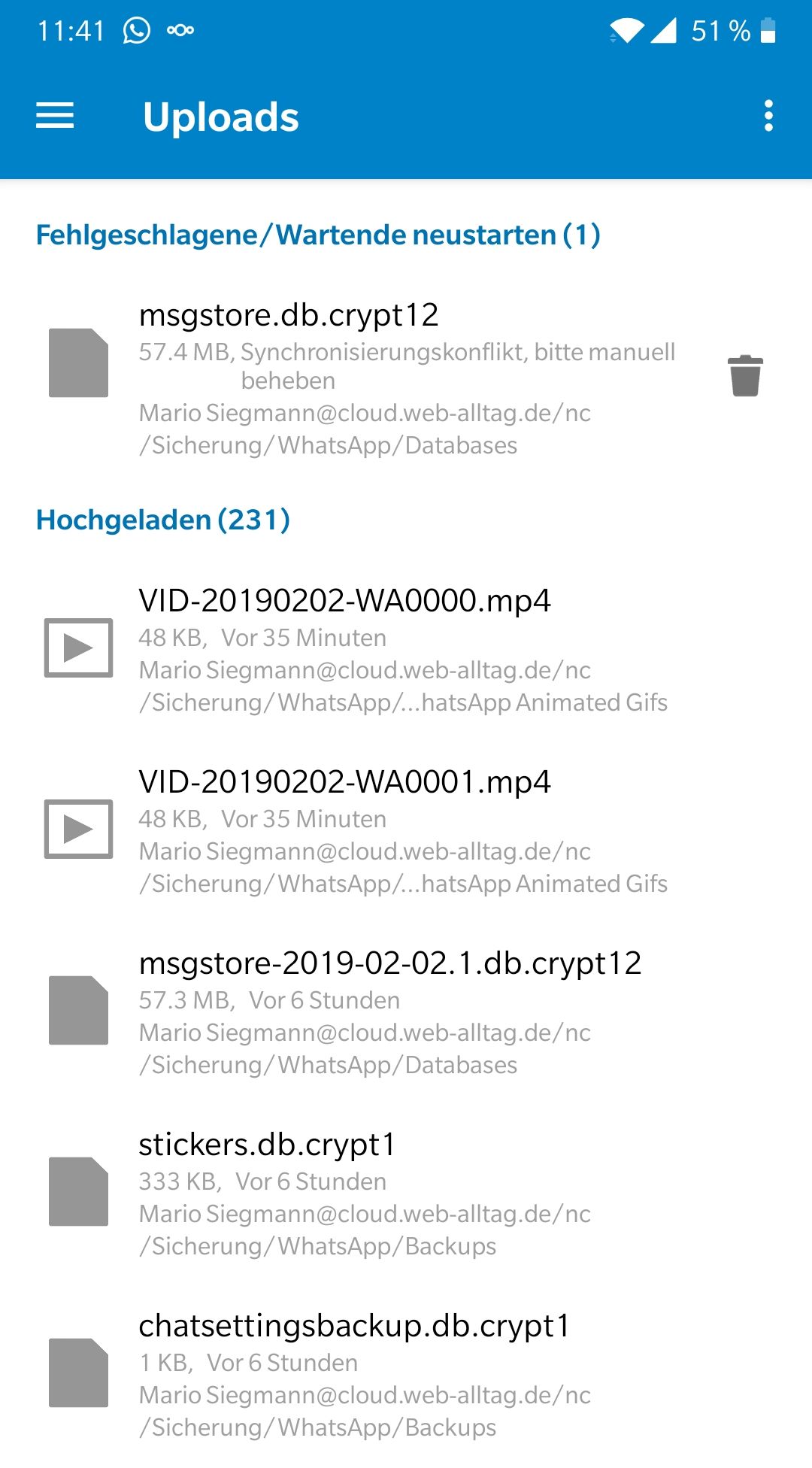
yes, in my case its the database file from WhatsApp. I backup the whole whatsapp folder with instant upload. To fix the problem I have to delete the file from NC and search for new files in instant upload.
Here a picture with these error I mean:
Siggi0904
on 2 Feb 2019
Hm. Is this something we want to have @AndyScherzinger?
This is AutoUpload, not 2way sync…
tobiasKaminsky
on 6 Feb 2019
Hmmm,
@Siggi0904 are you using "custom folders" for that? I guess so since else Auto Upload wouldn't even detect the changes (only done for custom folders). Then it would also override.
_If_ the server file changed _and_ the client file changed than you are having a conflict, unresolvable by the client and there isn't anythign we can do about that. We only offer to remove this upload (trash bin) or restart it, so all other steps have to be done by the user, manually.
Not sure if this could even be resolved by the client and even with 2-way sync you would have a conflict and would have to manually resolve it.
 AndyScherzinger
on 6 Feb 2019
AndyScherzinger
on 6 Feb 2019
@AndyScherzinger yes it's "custom folder" in german called "erstellen Sie einen eigenen Ordner". And there is no two way sync. Only android app with instant upload will upload newly and changes files to NC.
This setting for whole whatsapp folder was done long time before in older versions and works great last time. The changes/newly files will be detect fine and upload works for new files.
Only what I saw is, that after deleting this existing file in NC and rescan for failled uploads/newly files in the Android app the file is shown directly without uploading procedure. Means file is upload but not updated correctly on NC, I think.
Today I did some tests and switched back to the older version 3.4.2 and all works fine.
That means this is 3.5.0 RCx related.
Siggi0904
on 6 Feb 2019
Hm. We did not changed andything from 3.4->3.5 in regard of auto upload, or? @AndyScherzinger
tobiasKaminsky
on 8 Feb 2019
Not that I am aware of, no.
AndyScherzinger
on 8 Feb 2019
Hm, could be a server side problem? Is it 15.x related?
Siggi0904
on 10 Feb 2019
Don't think it is related to the server version. Especially since you wrote that it is working with 3.4.x
AndyScherzinger
on 10 Feb 2019
Ok, switched to final 3.5.0, latest version.
No solution of with this version actually.
Siggi0904
on 14 Feb 2019
Here you see, I'm not alone in the dark. :-)
Siggi0904
on 16 Feb 2019
@Siggi0904 is it possible to downgrade to previous version? Can I find somewhere the apk of previous version?
@Nextcloud team
For me this issue is critical and to be honest I would rate it as blocking for next release. It must be fixed really soon as it seriously affects application's functionality.
 PTamis
on 17 Feb 2019
PTamis
on 17 Feb 2019
@PTamis yes you cn downgrade and the files are right here. :-)
Look at code/releases: https://github.com/nextcloud/android/releases
There you find all releases.
Siggi0904
on 17 Feb 2019
Just download it. Thanks a lot @Siggi0904
Same issue has been reported also with #3641
So I guess a solution would be available soon since this starts to affect a lot of people.
PTamis
on 17 Feb 2019
Seeing the same problem with auto-upload of WhatsApp database (msgstore.db.crypt12). Tried removing and renaming the server version. After that upload works once, but the next upload after a change leads again to errors about a conflict. This used to work for a long time.
 tribut
on 26 Feb 2019
tribut
on 26 Feb 2019
Is there any solution for this problem?
Siggi0904
on 9 Mar 2019
Maybe you should request new feature to do what you think it's supposed to do?
:wink:
 developerfromjokela
on 10 Apr 2019
developerfromjokela
on 10 Apr 2019
fixed with 3.6.0
Siggi0904
on 12 Apr 2019
Related issues
 JSoko
·
3Comments
tobiasKaminsky
·
3Comments
JSoko
·
3Comments
tobiasKaminsky
·
3Comments
 daywalk3r666
·
3Comments
daywalk3r666
·
3Comments
 eppfel
·
3Comments
eppfel
·
3Comments
 rainer042
·
3Comments
rainer042
·
3Comments