Android: Portrait mode saves each photo in a new directory
Is your feature request related to a problem? Please describe.
Google Camera on Pixel 2/3 in Portrait mode saves each photo in a new folder.
See:
- https://forum.xda-developers.com/pixel-2-xl/help/portrait-mode-creates-folder-t3709779
- https://productforums.google.com/forum/#!category-topic/phone-by-google/qScg2CMrzGA
- https://productforums.google.com/forum/#!topic/phone-by-google/LyB4OLy528o
- https://www.reddit.com/r/GooglePixel/comments/7qx6hm/pixel_2s_portrait_mode_makes_folders_for_each/
- https://androidcommunity.com/gcam-tool-fixes-the-way-modded-google-camera-apps-save-portrait-mode-images-20180220/
This makes camera photo backups impossible because you'd need to add a new folder to backup.
Describe the solution you'd like
It would be awesome if Nextcloud app could recognize DCIM/IMG_* folders and back their content into Camera upload location together with all other photos.
Describe alternatives you've considered
I can manually move each portrait to the Camera directory, but that sucks.
 zbraniecki
All 21 comments
GitMate.io thinks possibly related issues are https://github.com/nextcloud/android/issues/1245 (only new made photos synced with server), https://github.com/nextcloud/android/issues/630 (New autoupload not respecting custom directories & errors), https://github.com/nextcloud/android/issues/1901 (Photo view: load new images when reaching bottom), https://github.com/nextcloud/android/issues/1890 (Photos not loading), and https://github.com/nextcloud/android/issues/567 (Photo view).
 nextcloud-android-bot
on 16 Nov 2018
nextcloud-android-bot
on 16 Nov 2018
r2evans thinks that nextcloud-android-bot and gitmate.io are missing the point. This issue is completely unrelated to all of those suggestions. (Not bad for a bot, though.)
The problem is that the nextcloud-android app only looks for specific files within each camera directory. The camera app (at least on my pixel 3) creates a few types of images:
IMG_yyyymmdd__HHMMSS.jpgfor standard one-frame imagesMVIMG_yyyymmdd__HHMMSS.jpgfor "motion" jpegs, similar to apple's "live photo" capturing a few secondsPANO_yyyymmdd__HHMMSS.jpgfor panorama shots, still just a single-frame single-file jpegIMG_yyyymmdd__HHMMSSdirectory for portrait-mode pictures, where one image is the original and one image has the background blurred. (I am reverse-engineering the directory ... I only see two images in all of mine, though I admit it's possible there can be more to this.)
The last one is a relatively recent introduction to the android scene (as far as I'm aware), so it's not surprising that it is not immediately recognized. The previous assumption that all images to sync would be on the top level has been safe up until now. I suggest that specifically looking for directory names that follow this convention will not work with all phone manufacturers, so perhaps the solution could be:
- Add an option for a camera location to allow recursion, one of:
a. Unlimited dirs/subdirs;
b. User-defined depth (default to 1); or
c. Only one level deep.
If the default is "false" (no subdirs), then the original behavior remains unchanged.
 r2evans
on 27 Nov 2018
r2evans
on 27 Nov 2018
- Add an option for a camera location to allow recursion, one of:
a. Unlimited dirs/subdirs;
b. User-defined depth (default to 1); or
c. Only one level deep.
For a/b:
if you have /camera specified and /camera/burstX/img_1-10.jpg are created, what shall happen:
- all files are uploaded into same /remote/camera folder -> could give you file conflicts
- all files are uploaded into /remote/camera/burstX
 tobiasKaminsky
on 18 Jan 2019
tobiasKaminsky
on 18 Jan 2019
Is there a reason to deviate from the naming structure that android is already using to deconflict file-naming? (That is, sync the dirs as-is, no renaming.) You don't have to do any translation, and the android naming convention already mitigates name conflicts.
r2evans
on 19 Jan 2019
I think this would be solved by #285 increment 5: real one way sync.
In the meantime with the current logic it might be feasible to just scan for every */.jpg and upload it as if they were in the parent directory? There could be a setting to enable/disable this, but I think that's it.
If there is a naming conflict said file could be ignored for now (or saved with a suffix), but I don't think there should be any, at least not with the photo app/DCIM folder. So one could restrict this feature for the DCIM folder to be sure for now.
I think syncing camera photos is really important, maybe so important that such quick fix is worth it.
 doits
on 14 Jun 2019
doits
on 14 Jun 2019
I came here because I saw all those IMG_* folders in the nexcloud auto upload view and was thinking that they aren't backed up.
But doing some spot checking on my nexcloud server, it looks like they are actually there.
$ find Pixel2XL/ -name "00100dPORTRAIT_00100_BURST20180815175619889_COVER.jpg" -exec sha256sum {} \;
bb2749ebe9afe959041f7bf4a29b54c88883da87297fbb9f2be0514d0d327fbc  Pixel2XL/2018/08/00100dPORTRAIT_00100_BURST20180815175619889_COVER.jpg
bb2749ebe9afe959041f7bf4a29b54c88883da87297fbb9f2be0514d0d327fbc  Pixel2XL/00100dPORTRAIT_00100_BURST20180815175619889_COVER.jpg
$ find Pixel2XL/ -name "00000PORTRAIT_00000_BURST20180815175619889.jpg" -exec sha256sum {} \;
5826105a938bc01519e45aefbc5a5e41886d1951d2f0b3b251b1f3f85f6ff882  Pixel2XL/00000PORTRAIT_00000_BURST20180815175619889.jpg
5826105a938bc01519e45aefbc5a5e41886d1951d2f0b3b251b1f3f85f6ff882  Pixel2XL/2018/08/00000PORTRAIT_00000_BURST20180815175619889.jpg
The two files in the top level Pixel2XL/ folder I have manually uploaded by selecting them from within the corresponding IMG_ folder and then uploading them.
The ones in the Year/Month/ folder have been automatically uploaded, but they seem to be the exact same file.
I also searched for those files on my phone and the only place I found them was within the Camera/IMG_* folder.
This makes me wonder if there already _is_ something in place that is uploading the Portrait pictures from the IMG_ sub folders .
To double check I just took a Portrait picture now and instantly saw the upload notification.
Checking the server, the two files are there
$ find Pixel2XL/ -name "*201909182216*"
Pixel2XL/2019/09/00100sPORTRAIT_00100_BURST20190918221608450_COVER.jpg
Pixel2XL/2019/09/00000PORTRAIT_00000_BURST20190918221608450.jpg
and on the phone they only exist within the IMG_ folder.
 jakommo
on 18 Sep 2019
jakommo
on 18 Sep 2019
https://github.com/nextcloud/android/pull/4425
This should solve it, can you give it a try?
There is an APK file in this PR, which you can install in parallel to your existing Nextcloud app.
tobiasKaminsky
on 19 Sep 2019
I also have the problem on my Pixel 4 XL: a new subfolder is created with each photo in Portrait mode.
I tested the latest version of the application Nextcloud on the Play Store and the APK of #4425. It doesn't change anything unfortunately...
The result with the app on the Play Store:
IMG_20191102_233616/
IMG_20191102_233616/00000PORTRAIT_00000_BURST20191102233616470.jpg
IMG_20191102_233616/00100trPORTRAIT_00100_BURST20191102233616470_COVER.jpg
The result with the APK of #4425:
IMG_20191103_003206/
IMG_20191103_003206/IMG_20191103_003206/
IMG_20191103_003206/IMG_20191103_003206/00000PORTRAIT_00000_BURST20191103003206222.jpg
IMG_20191103_003206/IMG_20191103_003206/00100trPORTRAIT_00100_BURST20191103003206222_COVER.jpg
Thanks...
 nephthys
on 3 Nov 2019
nephthys
on 3 Nov 2019
@tobiasKaminsky I also can still see the issue with portrait photos with the latest playstore release as described by @nephthys
The photos get uploaded just fine, the issue is that there is still a new media folder detected for each portrait photo.
 juliushaertl
on 19 Apr 2020
juliushaertl
on 19 Apr 2020
Tobias I'm having this issue in a Pixel 3a. Will try the APK o your PR.
What's the release plan if that's successfully merged?
 maddes
on 2 Jul 2020
maddes
on 2 Jul 2020
This seems a veery old bug, which I thought is already fixed.
@juliushaertl can yo confirm that it still a problem for you?
tobiasKaminsky
on 3 Jul 2020
So I clarified this.
This is something we cannot /want to fix, as messing/changing around hierarchy while uploading just asks for problems.
So if Pixel is creating new subdirectories, then it is their "fault" and honestly I do not get why they are doing it.
tobiasKaminsky
on 3 Jul 2020
Yes, this is still an issue with 3.12.1 RC1
Isn't there a way to somehow ignore directories from showing them in the autoupload if they are a child of another folder that is offered to autoupload?

As an alternative, how about just showing auto upload folders that are enabled by default and just show the full list after pressing a plus button to setup new auto uploads? That would already help a lot to get a cleaner UI for such cases?
juliushaertl
on 8 Jul 2020
Isn't there a way to somehow ignore directories from showing them in the autoupload if they are a child of another folder that is offered to autoupload?
yes that would be possible but isn't implemented atm
As an alternative, how about just showing auto upload folders that are enabled by default and just show the full list after pressing a plus button to setup new auto uploads? That would already help a lot to get a cleaner UI for such cases?
the simpler solution is probably rather the initial idea of hidding such folders at all times (since they don't make any sense for auto upload)
A question (since i don't have such a device/behavior): Are these images uploaded or ignored at the moment when the parent folder has been activated?
 AndyScherzinger
on 8 Jul 2020
AndyScherzinger
on 8 Jul 2020
A question (since i don't have such a device/behavior): Are these images uploaded or ignored at the moment when the parent folder has been activated?
They are uploaded just fine with the existing auto upload of the parent folder and the subdirectory is also properly kept:
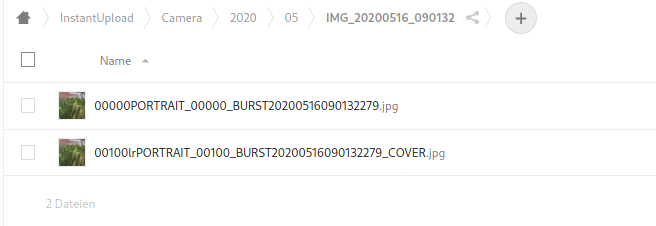
juliushaertl
on 8 Jul 2020
Yes, they are uploaded just fine, the only problems I see with it are:
- A small annoyance of all those folders showing up on the auto-upload list of possible folders to auto-upload.
- A bigger annoyance: it seems to create broken images on the Google Photos gallery. Looks like the app creates/saves some thumbnails that Photos can't read? Basically since I enabled the auto-upload I see a bunch of broken (gray) images on the Google Photos library after every sync.

maddes
on 8 Jul 2020
One more snap showing the details of one of those:
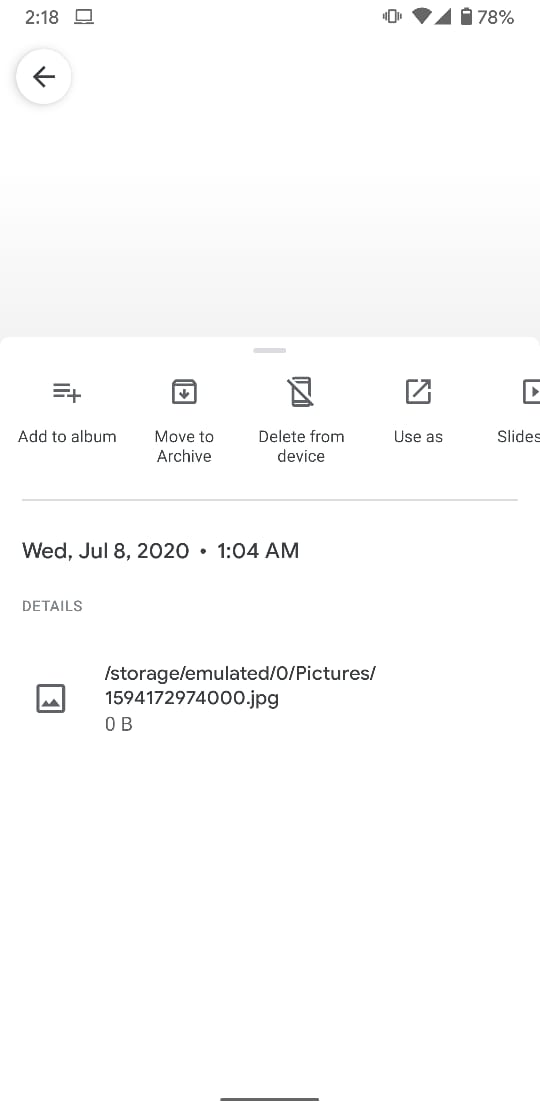
maddes
on 8 Jul 2020
I also get a lot of "New photo media folder detected" and "File upload conflict" with the Pixel 3a. It has a negative effect on the WAF (Wife Acceptance Factor) in this house and my general mood.
 erikkroes
on 1 Aug 2020
erikkroes
on 1 Aug 2020
I want to chime in and add another request for hiding subfolders of folders which are already selected for auto upload.
One particular annoyance we've had with the 'New photo media folder detected' notifications is that there isn't a wya to hide them without hiding all NextCloud notifications. Since my wife alternates between taking pictures and videos of our kids often, lots of her videos get vibrations recorded because the previously taken pictures trigger the notifications.
Ultimately, since the pictures are already being uploaded (because the parent folder is uploading them), the notifications feel pretty unnecessary and redundant. And unfortunately NextCloud doesn't seem to have granular control over which notifications to show either.
 tygill
on 24 Aug 2020
tygill
on 24 Aug 2020
@tygill See #4738 for hiding the new folder notification - it is possible to do it without hiding all notifcations! You should be able to expand the notification and do it there.
doits
on 24 Aug 2020
Interesting - it looks like #4738 does allow this notification to be hidden, which is exactly what I wanted. That's excellent to know. Thanks for pointing it out!
tygill
on 24 Aug 2020
Related issues
 daywalk3r666
·
3Comments
daywalk3r666
·
3Comments
 Bugsbane
·
3Comments
Bugsbane
·
3Comments
 JSoko
·
3Comments
JSoko
·
3Comments
 eppfel
·
3Comments
AndyScherzinger
·
3Comments
eppfel
·
3Comments
AndyScherzinger
·
3Comments
Most helpful comment
r2evans thinks that nextcloud-android-bot and gitmate.io are missing the point. This issue is completely unrelated to all of those suggestions. (Not bad for a bot, though.)
The problem is that the nextcloud-android app only looks for specific files within each camera directory. The camera app (at least on my pixel 3) creates a few types of images:
IMG_yyyymmdd__HHMMSS.jpgfor standard one-frame imagesMVIMG_yyyymmdd__HHMMSS.jpgfor "motion" jpegs, similar to apple's "live photo" capturing a few secondsPANO_yyyymmdd__HHMMSS.jpgfor panorama shots, still just a single-frame single-file jpegIMG_yyyymmdd__HHMMSSdirectory for portrait-mode pictures, where one image is the original and one image has the background blurred. (I am reverse-engineering the directory ... I only see two images in all of mine, though I admit it's possible there can be more to this.)The last one is a relatively recent introduction to the android scene (as far as I'm aware), so it's not surprising that it is not immediately recognized. The previous assumption that all images to sync would be on the top level has been safe up until now. I suggest that specifically looking for directory names that follow this convention will not work with all phone manufacturers, so perhaps the solution could be:
a. Unlimited dirs/subdirs;
b. User-defined depth (default to 1); or
c. Only one level deep.
If the default is "false" (no subdirs), then the original behavior remains unchanged.