Actual behaviour
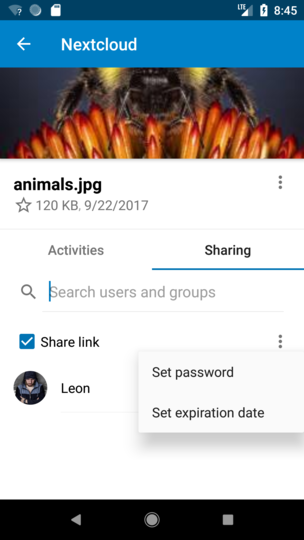
- The new files details / sharing screen looks great but i can´t find a way to copy the link. Am i doing sth. wrong?
Expected behaviour
- The context menu should show sth. like "copy link"
Steps to reproduce
- Share a file from the web browser via link
- Try to share the url from within the Nc App
Screenshots
From the Nc Blog post:
 splitt3r
All 15 comments
@splitt3r you can click on "Share link" ;)
@jancborchardt @nextcloud/designers how should we improve this one? Add a menu item like suggested or add a "copy icon" next to "Share link" as a hint?
 AndyScherzinger
on 13 Jun 2018
AndyScherzinger
on 13 Jun 2018
"copy icon" :+1:, similar to web ui would be:

or android way would be:

or in overflow menu: copy and share as two options
--> I am totally uncertain ;-)
 tobiasKaminsky
on 14 Jun 2018
tobiasKaminsky
on 14 Jun 2018
Well, the Android copy icon (which should be used instead of the Nc copy icon) would be:
https://materialdesignicons.com/icon/content-copy
which would just copy it to your clipboard.
The share icon would make sense if we want to share the link (directly), like we do wenn clicking on the action.
Since the share actions also always contain a "copy to clipboard" entry in the available options I'd say it is enough if we add the share icon right next to the text to suggest that there is a click action available.
AndyScherzinger
on 14 Jun 2018
Yes, there should be the content-copy icon to the left next to the 3-dot icon. :)
And as confirmation, both when you check the »Share link« checkbox and also when you click that content-copy icon, there should be a toast saying "Link copied to clipboard".
 jancborchardt
on 14 Jun 2018
jancborchardt
on 14 Jun 2018
@jancborchardt wouldn't it be better to launch the _Andoird_ share actions like we do now (when you click on the text next to the check box) since that is way more comfortable than the clipboard in my opinion.
Android share would basically present you this:

So I'd argue that "copy to clipboard (see item in the list) is rather a desktop-ish action because being a mobile user you want to use this link in another application (usually) so why not just launch it right away?
AndyScherzinger
on 14 Jun 2018
Problem with the share icon I forgot to mention is that this is already in use in the list view to define sharing with Nc/federated/mail users, so that might be an issue.
Nevertheless I think we shouldn't drop the screen I showed above because that is already in our app, built in since forever and in my opinion for a good reason.
AndyScherzinger
on 14 Jun 2018
What about splitting it up?
Have a real "copy to clipboard" and the share dialog to send the link to another app.
tobiasKaminsky
on 15 Jun 2018
What about splitting it up?
Have a real "copy to clipboard" and the share dialog to send the link to another app.
Then let's put the copy icon next to the 3-dot and the "send" to be in the overflow menu :) + the Snackbar message for "copied to clipboard"
AndyScherzinger
on 19 Jun 2018
@jancborchardt I put the screenshots and the explanation for the design decisions into the PR #2730
AndyScherzinger
on 19 Jun 2018
Right – so there's 2 slightly different things which should both happen:
- Directly when you check the "Share link" box, it should open that dialog for sharing/copying link.
- There should be a copy/share icon next to the 3-dot-icon for subsequent copies, because clicking the "Share link" text is not really discoverable for that. (In most cases, clicking text next to a checkbox _unchecks_ that box.)
jancborchardt
on 20 Jun 2018
Directly when you check the "Share link" box, it should open that dialog for sharing/copying link.
That's how it is working at the moment
There should be a copy/share icon next to the 3-dot-icon for subsequent copies, because clicking the "Share link" text is not really discoverable for that.
The copy icon has been added via #2730 but next to the checkbox label due to the layout of the elements for shared folders.
(In most cases, clicking text next to a checkbox unchecks that box.)
This isn't the case at the moment but we could easily change it to this behavior (which makes sense since we now have a copy/send action directly available to the user. (I can just do this if you decide to go that way)
AndyScherzinger
on 20 Jun 2018
@AndyScherzinger cool – it's ok like this. The issue if tapping on the text would unshare is of course that it might not be wanted. So let's keep the "Share link" text tap to open the dialog as you did. :)
jancborchardt
on 20 Jun 2018
@AndyScherzinger cool – it's ok like this. The issue if tapping on the text would unshare is of course that it might not be wanted. So let's keep the "Share link" text tap to open the dialog as you did. :)
IO unfortunately changed that acording to your comment right after your comment... So should we roll back that change or keep it that way?
AndyScherzinger
on 20 Jun 2018
@AndyScherzinger now with the more padding on the copy icon I think it’s fine. But if we notice issues ourselves we can always change it. :)
jancborchardt
on 20 Jun 2018
Sweet, then let's wait and see 👍
AndyScherzinger
on 20 Jun 2018
Related issues
 eppfel
·
3Comments
tobiasKaminsky
·
3Comments
eppfel
·
3Comments
tobiasKaminsky
·
3Comments
 JSoko
·
3Comments
JSoko
·
3Comments
 toobie83
·
3Comments
toobie83
·
3Comments
 ezaquarii
·
3Comments
ezaquarii
·
3Comments
Most helpful comment
@AndyScherzinger now with the more padding on the copy icon I think it’s fine. But if we notice issues ourselves we can always change it. :)