Android: Improper text wrapping in the grid view of All files activity
Actual behaviour
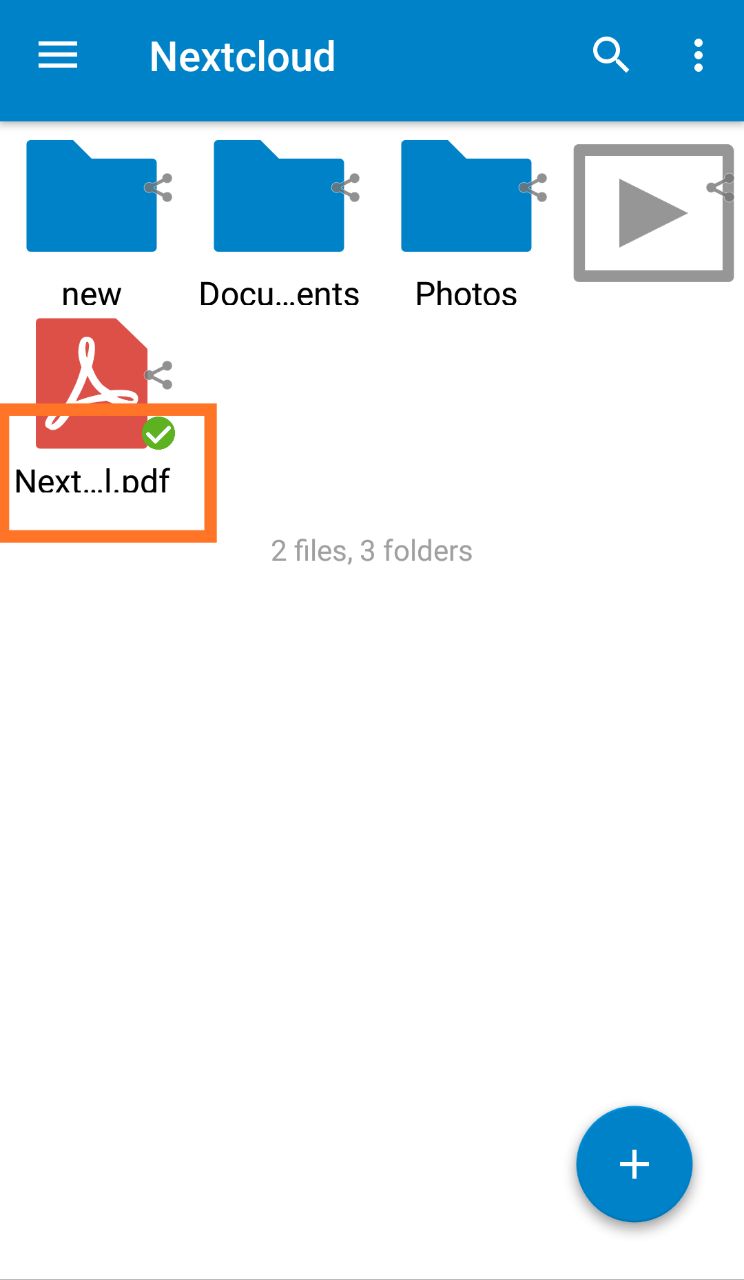
Currently, the height of the text contents in the text view is greater than the height of the view itself. Due to this a fraction of the height of the text strings becomes invisible.
Expected behaviour
The text needs to be wrapped properly within the text view.
Steps to reproduce
- Open the app and log into your account.
- Open the All files activity
- Choose Grid view from the Options menu in the Action Bar
- You'll see the following, as in the attached screenshot.
Environment data
Android version: 7.0
Device model: Xiaomi Redmi Note 4
Screenshot
 arundhatigupta
All 7 comments
@mario @AndyScherzinger @tobiasKaminsky @nextcloud/designers Would you please have a look at this? :) I think this is not a big issue, but still this should be fixed. :)
arundhatigupta
on 9 Mar 2018
@arundhati24 It is the same or associated with #2305 ?
 xXSTrikeXx
on 9 Mar 2018
xXSTrikeXx
on 9 Mar 2018
Yeah, good point.
The filetype icons could be a bit smaller here, they are very big. (Image previews should retain size thought.) Then the text has more space and can move up a bit.
 jancborchardt
on 9 Mar 2018
jancborchardt
on 9 Mar 2018
I agree with Jan and no, has nothing to do with #2305 imho
 AndyScherzinger
on 9 Mar 2018
AndyScherzinger
on 9 Mar 2018
@xXSTrikeXx As @AndyScherzinger mentioned, it is not the same as #2305 :)
arundhatigupta
on 10 Mar 2018
@jancborchardt Do we need more suggestions, or may I proceed to work on this? :)
arundhatigupta
on 10 Mar 2018
@arundhati24 since Jan from designers and me from dev perspective are fine with the issue and Jan proposed a way to do it I think it is good to go 👍
AndyScherzinger
on 11 Mar 2018
Related issues
 ikke-t
·
3Comments
ikke-t
·
3Comments
 JSoko
·
3Comments
AndyScherzinger
·
3Comments
JSoko
·
3Comments
AndyScherzinger
·
3Comments
 ezaquarii
·
3Comments
ezaquarii
·
3Comments
 tobiasKaminsky
·
3Comments
tobiasKaminsky
·
3Comments