Android: Check for unsupported server & warn
On login / first start after an upgrade the app should warn the user if an unsupported server is detected and recommend to upgrade to latest stable version.
Login: for every new account
first start after upgrade: this way we can notify existing users about EOL servers.
@jospoortvliet, @MorrisJobke, @rullzer
 tobiasKaminsky
All 13 comments
Login: for every new account
:+1: This is fine for every user on the system - something like: "Please be aware that you run this against an ownCloud server which doesn't support all of the features that this app provides - for a better experience ask you admin to migrate to Nextcloud"
first start after upgrade: this way we can notify existing users about EOL servers.
I would say, that this should only shown to admin users, because normal users can't do much here. It would be annoying for them to always see a "Please upgrade the server software, because it is end of life" but they can't do anything, because they are no admins.
 MorrisJobke
on 27 Feb 2018
MorrisJobke
on 27 Feb 2018
"always": exactly one time after an upgrade of the app ;-)
While I understand that users cannot do anything directly, they still can contact the admin and maybe they should also be warned that an EOL server may have security risks...
tobiasKaminsky
on 27 Feb 2018
I think this is a great idea. Even worded correctly. Users that might not be able to fix it directly could contact their admin.
 rullzer
on 27 Feb 2018
rullzer
on 27 Feb 2018
Maybe it helps with this: those are the released versions of OC: https://github.com/nextcloud/server/blob/stable12/version.php#L40-L48
So if the product name does not match, then you could use one of them to determine it.
MorrisJobke
on 15 Jun 2018
A copy of my comment from #2178:
It should just give the possibility to detect why it breaks without digging into logs and debugging things. Basically like something we do with the setup checks on the server. Giving some indicators, that something could break and why it does so. Otherwise people are frustrated that it just doesn't work and this should give an easy way, what are potential reasons for a non-optimal experience.
MorrisJobke
on 15 Jun 2018
I will start with this on Monday.
As described in first post, I want to check on accessing to a new server and for existing apps on update.
tobiasKaminsky
on 15 Jun 2018
On new account / new installation:
legacy login:
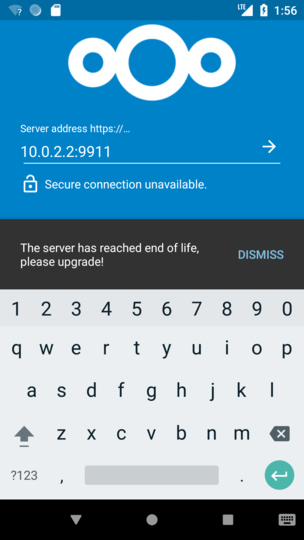
weblogin:
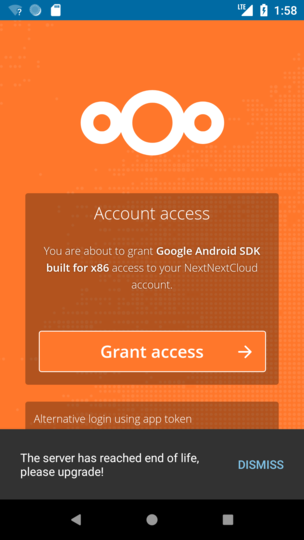
More to come ;-)
tobiasKaminsky
on 19 Jun 2018
This is on app upgrade:
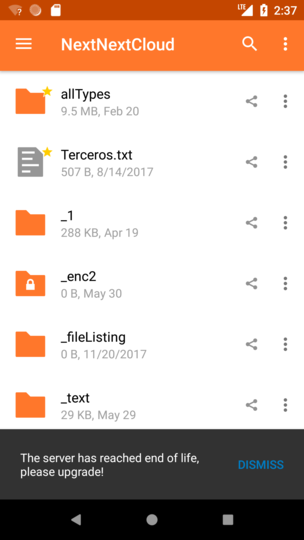
It is shown/checked once for each account.
tobiasKaminsky
on 19 Jun 2018
This is currently hardcoded, e.g. checked if version is older than NC13 (which includes all dot releases).
I think this is good enough as we do not need to have an "instant" EOL message.
Currently this app is updated every ~2 months, so this should be good enough, or?
tobiasKaminsky
on 19 Jun 2018
@tobiasKaminsky nice and simple and having it hard coded is good enough for now I'd say.
rullzer
on 19 Jun 2018
:+1: I also think that is just fine :)
 AndyScherzinger
on 19 Jun 2018
AndyScherzinger
on 19 Jun 2018
It is shown/checked once for each account.
Is that enough? Maybe once a week or something? When DOES it check, when started? Only once ever?
 jospoortvliet
on 10 Aug 2018
jospoortvliet
on 10 Aug 2018
Once the account is added.
The idea is that a regular user cannot do anything against it, despite bugging his admin. So it should not be that intrusive.
Let us see how it is working / accepted by users. We can then iterate and be more forceful in upcoming versions.
tobiasKaminsky
on 15 Aug 2018
Related issues
 JSoko
·
3Comments
JSoko
·
3Comments
 daywalk3r666
·
3Comments
daywalk3r666
·
3Comments
 rainer042
·
3Comments
rainer042
·
3Comments
 Shagequi
·
3Comments
Shagequi
·
3Comments
 eppfel
·
3Comments
eppfel
·
3Comments
Most helpful comment
This is on app upgrade:
It is shown/checked once for each account.