Android: Missing Avatar fetch after update.
Hey,
after updating to v3.0.0 my profile avatar isnt fetching from the server. I think its only after upgrading to the new version and not for new app registrations. Im using Huawei Y6 2017.
 xXSTrikeXx
All 29 comments
Which server version do you use?
Do I understand you correctly that with an upgraded app (2.x -> 3.0) it is working, whereas a freshly installed app does not get the avatar?
 tobiasKaminsky
on 19 Feb 2018
tobiasKaminsky
on 19 Feb 2018
No. Exatcly inversely. I updated from v2.X android to 3.0.X and server to v13. And after that my profile account hasnt got any image. On friends mobile phone (Android 4, Galaxy S3 Neo) it is working, but he DOESN´T use an own avatar. There is only the standard avaratar with the first letter of his name. I tested new accounts adding to the app and it is working on my device.
xXSTrikeXx
on 19 Feb 2018
@xXSTrikeXx on the drawer, what is the name before the "@"?
Does this match the username in user list when logged in as admin?
tobiasKaminsky
on 20 Feb 2018
The name before "@" is the same as the login name. It´s my name "Timo".
If I understand your 2nd question correctly its the same name as the name when editing users in the web ;)
Edit to complete last observation:
https://github.com/nextcloud/android/issues/2203#issuecomment-367093880
After back adding the test account none avatar is showing up.
@tobiasKaminsky Question: Could be the Cache on the Server responsible for this behavior? Because I turned it yesterday off to test other stuff :D
xXSTrikeXx
on 20 Feb 2018
Strange...
The default avatar (Letter with color) can also be generated on device as a fallback, so this does not mean anything.
Can you create us a test account, test if the problem occurs also there and if so send the credentials to android at nextcloud dot com with a reference to this issue?
tobiasKaminsky
on 21 Feb 2018
Done. 👍
xXSTrikeXx
on 22 Feb 2018
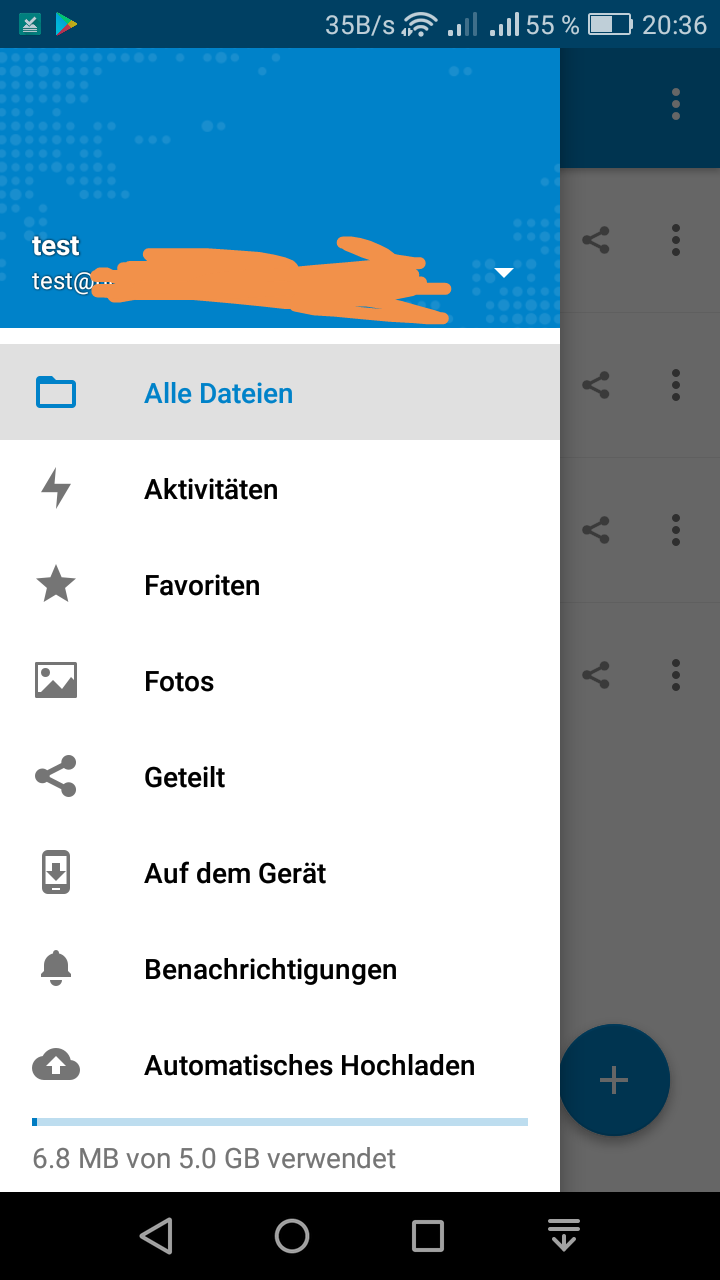
Updating Libraries (3.0.2) don't resolve the problem. I'm the only one who have this behavior? When this is the case I will reinstall the app and close the issue ;)
xXSTrikeXx
on 27 Feb 2018
Never had the issue strangely you don't see any avatar,not even a fallback. That is extremely strange...
 AndyScherzinger
on 27 Feb 2018
AndyScherzinger
on 27 Feb 2018
@xXSTrikeXx thanks for your email with test credentials.
For me it worked without a problem:
- first letter T on green background
- changing avatar on web ui
- waiting a bit
- new avatar on drawer
As you said in your email, I'll provide you some test credentials on my server.
tobiasKaminsky
on 28 Feb 2018
@tobiasKaminsky I deinstalled the app and reinstalled. Do I have to delete all old files before reinstalling it? Because I become the same behavior after a while after reinstalling the app.
xXSTrikeXx
on 4 Mar 2018
I can confirm that an upgraded app does not load any custom avatar. Neither in the head of the sidebar nor in the account settings of the app. Clearing the app cache does not solve the issue.
 ghost
on 5 Mar 2018
ghost
on 5 Mar 2018
@xraMsamohT Thanks for confirming this bug. I already reinstalled without clearing the cache.
Which device do you use?
FYI on Talk the Avatar is displayed correct!
xXSTrikeXx
on 5 Mar 2018
@xXSTrikeXx Galaxy Note 4 with stock Android 6.0.1.
Nextcloud 12.0.5
Android app 2.x -> 3.0.0 ... 3.0.3
ghost
on 5 Mar 2018
It seeems, that it is an Android 6.x error. Any ideas?
@tobiasKaminsky @AndyScherzinger @mario :)
xXSTrikeXx
on 5 Mar 2018
I reanimated my old Nexus S with CyanogenMod 11 (Android 4.4.4). No problems with the avatars. 😉
ghost
on 6 Mar 2018
@xraMsamohT year, I don't have any problems on new/other devices. AVD shows me and all works fine. It has to do with the updates ;)
xXSTrikeXx
on 6 Mar 2018
@xXSTrikeXx can you try the failing app with a new account?
I am unsure if we talked about this, but I can create you a test account on a different server.
Can you provide us additional infos via logcat? https://github.com/nextcloud/android/blob/master/README.md#getting-debug-info-via-logcat
tobiasKaminsky
on 8 Mar 2018
@tobiasKaminsky As you can see in my last screenshot I´ve already added a new account to my failing app.
And yes we´ve already talked about this, and you have already send me account credentials to your E2E server 😉 . I think I´ve answered directly to your email 😃 .
Search for:
03-08 15:15:46.522 20042 20503 D OwnCloudClient #9: Creating OwnCloudClient
There i Readded my test account ;)
Please have a look on line 19283:
03-08 15:16:50.541 20898 20927 D Avatar : URI: https://....
I added the test account I´ve created for you and created a new logcat. 2nd link ;) I sent it on IRC in pm to you ;)
EDIT:
On the 2nd file I added your test account of my instance. The problem is, that when I added your account, no avatar was displayed. Now after stopping the logcat the avatar is there after while. I can explain it to myself, that there is something corrupt on the 2 accounts I added before. Now your account - I haven´t added before - the avatar is working. Is there a quick solution or sth. else what I can do for you? I think it´s related to your explanation at:
https://github.com/nextcloud/android/issues/2032#issuecomment-371503315
Update: After a while now the new avatar from your test account (the account from me for you) is gone. Now there is no avatar displayed. Not on my personal, not on my test account and not on the test2 account I gave it to you. Thats very wired and strange.
@tobiasKaminsky
xXSTrikeXx
on 8 Mar 2018
Latest update rc1 doesn't solve it
xXSTrikeXx
on 25 Mar 2018
Even 3.1 let me stay on this old problem. Any solution? Maybe a complete reinstall? How can I purge the database? Because I think this is the reason.
xXSTrikeXx
on 12 Apr 2018
Same here. A reinstall with a sync of dozens of gigabytes is not a solution for me. ;-)
ghost
on 12 Apr 2018
A reinstall is only for android needed, because Tobias already tested it with his phone on my server. So I think it´s mobile side after updating. So it´s not dozens of gigabyte ;) Just a few, depends on your phone :)
xXSTrikeXx
on 12 Apr 2018
Reinstall (uninstall and install) removes all synced files on the smartphone, imho. That's dozens of gigabytes. Reloading all files after upgrade to v3.0 was a pain.
ghost
on 12 Apr 2018
Re-installing the app would lead to remove of all downloaded files.
If you really want, you can move the downloaded folder, then re-install the app and move it back in again.
I am unfortunately a bit out of clue, what the problem could be. Therefore I also cannot try to debug it with you, as I would at least need one single clue...
tobiasKaminsky
on 19 Apr 2018
If you really want, you can move the downloaded folder, then re-install the app and move it back in again.
That hasn't work when upgrading to v3.0. That's why I do not want to repeat that for testing.
ghost
on 19 Apr 2018
V.3.2 RC2 seems to fix this, can others approve, that the bug is fixed in this version?
xXSTrikeXx
on 3 Jun 2018
Well, I get the same behavior/issue again with 3.3.0 RCs :/, see #3015
AndyScherzinger
on 11 Sep 2018
Is this still the case? I recall that we fixed this.
It was due to a changed response on eTag usage?
tobiasKaminsky
on 12 Oct 2018
Sorry, I hadn´t an eye on Github or the development of nextcloud over one month now. I started a new job and I didn´t found much time to investigate time for testing new nextcloud stuff. But I take time to answer you this question. I think the Bug is solved since 3.3.0 or 3.2.0.
I have not seen the bug for a long time.
Well done 👍 😁
xXSTrikeXx
on 12 Oct 2018
Related issues
 JSoko
·
3Comments
JSoko
·
3Comments
 ikke-t
·
3Comments
tobiasKaminsky
·
3Comments
ikke-t
·
3Comments
tobiasKaminsky
·
3Comments
 ThaDaVos
·
3Comments
ThaDaVos
·
3Comments
 toobie83
·
3Comments
toobie83
·
3Comments