Android: Image & Preview not loading correctly
Hello,
i installed right now the new app. If i click on a picture and swipe through, sunddenly the preview and image are not loading anymore.
A video from the issue: https://vimeo.com/254868826
Best regards,
HANNES
Android version: 7.0
Device model: Huawei Mate 10 Lite
Nextcloud app version: 3.0.0.
 Django3
All 22 comments
Instead of downloading the whole file, a screen adapted image is shown. This is computed by the server.
Are the preview/thumbnails on web ui are working for this specific files?
 tobiasKaminsky
on 9 Feb 2018
tobiasKaminsky
on 9 Feb 2018
Yes, in the web ui is everything fine.
So if i open a folder in the app, i can see per example 20 thumbnails were loading in the first few seconds and then click immediately on a picture. Everything is fine, i can swipe until i reach the photos without thumbnails.
Then not the screen adapted image is shown/loading first - i recognized it is immediately loading the full size picture and is showing the black placeholder. What in my opinion is the wrong way, cause the thumbnail/screen adapted image should bridge the time of loading the full file or allow to swipe through.
Django3
on 9 Feb 2018
I have the same problem. At folders with many files, no thumbnails were loading and if i click on a photo, i only can see the placeholder even if i wait a while.
 Christian-U
on 10 Feb 2018
Christian-U
on 10 Feb 2018
Same here. Android 7.1, Nextcloud App: 3.0.0, Nextcloud Server 13.0.
 hoellen
on 12 Feb 2018
hoellen
on 12 Feb 2018
@tobiasKaminsky : any steps we can test for you to find the issue?
Most times, neither the preview nor the full picture itself will be loading. So it is only showing the placeholder.
Django3
on 14 Feb 2018
Logcat would be nice to see why the preview generation is not working.
ttps://github.com/nextcloud/android/blob/master/README.md#getting-debug-info-via-logcat
tobiasKaminsky
on 14 Feb 2018
@tobiasKaminsky - here is my logcat in the attachment.
... i used nextcloud from 9:50 about 1 minute.
Django3
on 15 Feb 2018
Hmm, I tried this:
- enter e folder with ~1k images
- fast swipe to a point where no thumbnails are available
- click on this image -> placeholder -> wait a moment -> resized image
- continue to browse through other images, all behave the same
I am using https://apps.nextcloud.com/apps/previewgenerator to have previews nearly instantly.
Otherwise you would have to wait until the server processes the resized image with the right dimensions.
All in all, I do not see a reason why the thumbnails/resized images are not shown. Yes, it could take a while, but if you do not browse the folder, the thumbnails must appear...
Or is there something special with the folder? Shared? Read-only?
Can you create us a test account, test if the problem occurs also there and if so send the credentials to android at nextcloud dot com with a reference to this issue?
tobiasKaminsky
on 15 Feb 2018
I just wanted to create the log file today, but I tried it 4 times times and the thumbnails works every time when I tried. I can't reproduce it anymore...
Perhaps this is due to the phone restart I did yesterday?
I use also the previewgenerator. And it works fine (and fast) on the web-ui.
If i get again into this problem I will provide a log file with (hopefully) more information.
hoellen
on 15 Feb 2018
OK, i will make a few other tests and can create a test account tomorrow.
I recognized, it seems to skip the resized image in my case.
I tried the same:
- enter a folder with ~162 images
- fast swipe to a point where no thumbnails are available
- click on this image -> placeholder -> wait a long moment -> image (no resized image).
or
- enter a folder with ~162 images
- swipe to a point where thumbnails are available
- click on this image -> resized image -> wait a moment -> image
So only if i click on a image with loaded thumbnail, everything is fine.
Django3
on 17 Feb 2018
click on this image -> placeholder -> wait a long moment -> image (no resized image).
Do I understand correctly that in your first case the whole image is downloaded?
tobiasKaminsky
on 19 Feb 2018
Yes correct! I hope i will find today some time to make a few tests.
Django3
on 19 Feb 2018
Strange, the complete image should never be downloaded automatically.
tobiasKaminsky
on 20 Feb 2018
Hmm ... @tobiasKaminsky , i think we misunderstand each other. ;) Maybe i used a wrong word for something or misunderstand something.
- enter a folder with ~162 images
- fast swipe to a point where no thumbnails are available
- click on this image -> placeholder (low-res image skipped) -> wait a long moment -> image
In this case, user with a not so fast connection see the placeholder for a long time cause the low-res image skipped. Maybe you are using the thumbnail for it? If yes, the thumbnail should load immediately if you click on a image without one to allow fast swiping through images/files ... maybe also pre-fetching +2 and -2 thumbnails.
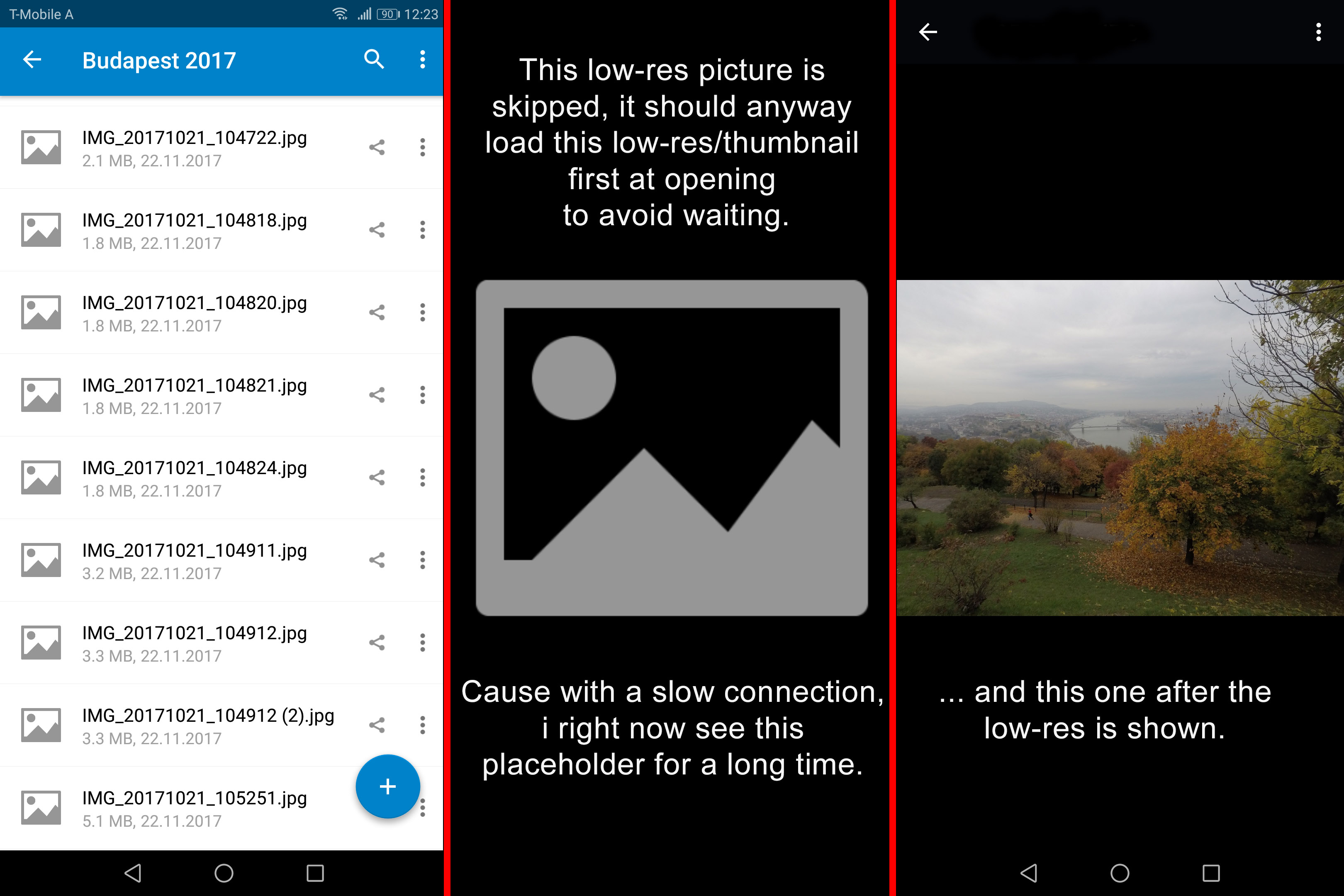
- enter a folder with ~162 images
- swipe to a point where thumbnails are available
- click on this image -> low-res image -> wait a moment -> image
Everything is fine ...
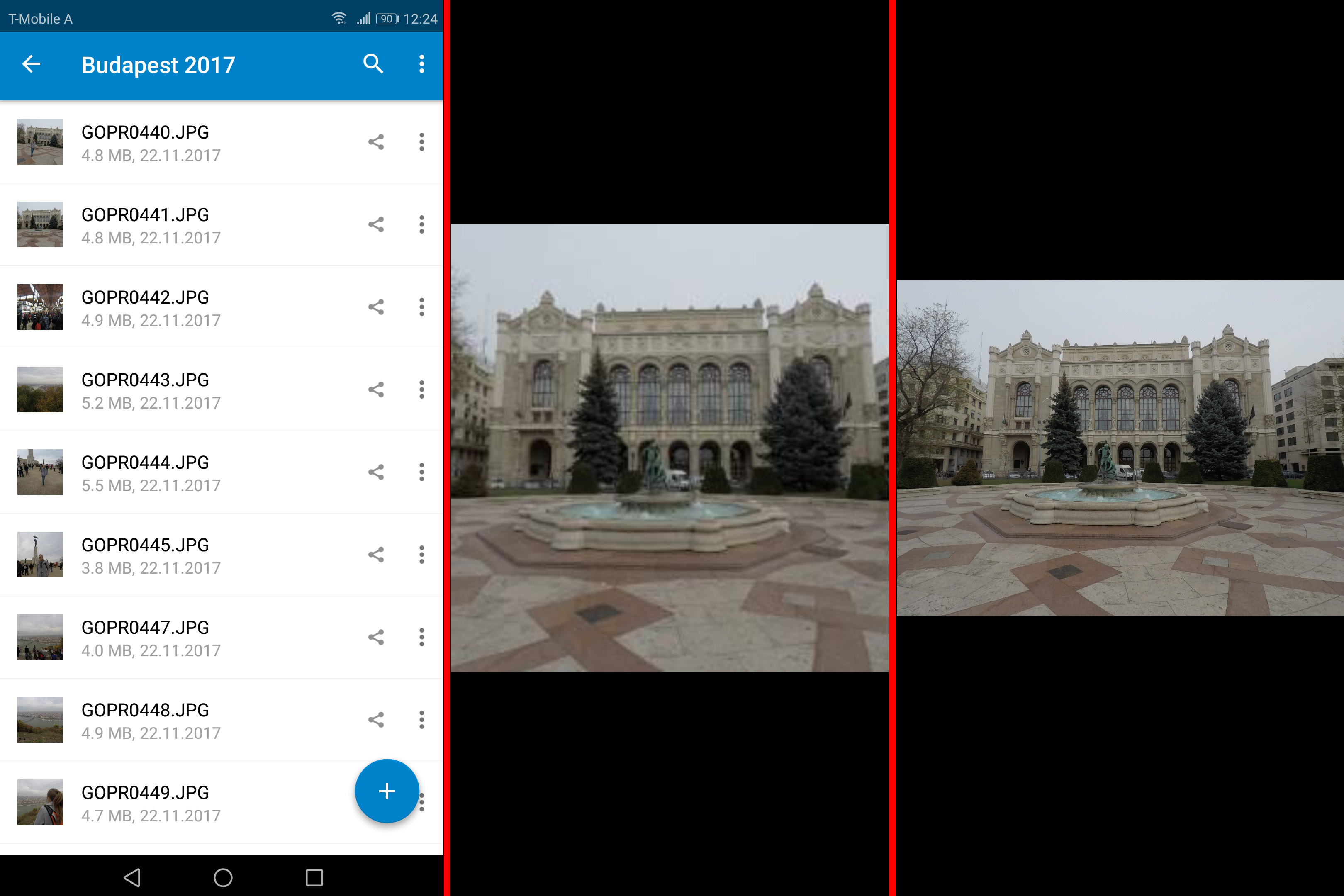
I'm sorry if i confused you with a wrong phrase. :(
Django3
on 20 Feb 2018
To clarify first the wording:
left: file list with placeholder (dummy image icon) as thumbnails (little square images)
middle: shows thumbnail as long as it takes to load the resized/screen adapted image. As you show on your second case, you see a real square image (thumbnail) if it is already downloaded.
right: show resized/screen adapted image (~50-100kb) instead of the downloaded image (5-10Mb), which is shown via a green download arrow.
So the problem is that if you click on an image which has no thumbnail and no resized image, the app tries to fetch directly the resized images as otherwise you would have to wait a bit for thumbnail fetching and then get the resized image afterwards.
This is done to preserve time and data.
Right now I do not have a better idea. I had once the idea to download all recent thumbnails when on wifi to have those immediately, but this will also not really work due to limited cache...
tobiasKaminsky
on 20 Feb 2018
Ok, thanks a lot for this explanation.
Then i have a other problem if the resized image is really only about 100kb. Cause it takes in my case about 5 seconds (best rarer case) to 40 seconds to load the resized image. The average time is about 25 seconds ... also with a 56k modem 100kb that should be downloading faster. ;)
This is the reason why i thought, it is downloading the full (5-10MB) image ...
Django3
on 23 Feb 2018
@Django3 the resized image first must be created by the server and this depends on the image size and how fast your computer is.
You can use preview generator, but this will consume a large amount of space, in trade of faster previews.
tobiasKaminsky
on 23 Feb 2018
@tobiasKaminsky I think I've got the same issue. I had already opened a issue about that :
https://github.com/nextcloud/android/issues/1281
but in my app, no thumbnail is load.
I've previewGenerator too but when I search in log, I can find this :
ThumbnailsCacheManager: generate thumbnail: 1167814_10151851143253706_248510567_n.jpg URI: https://<url>/256/256/<endOfUrl>, it doesn't use the existing previewGenerator thumbnail ?!
 loic12305
on 12 Apr 2018
loic12305
on 12 Apr 2018
Using v3.5.1 with a nextcloupi server appears that image previews take a very long time to load. Does the android app not use the same previews generated by the default configuration for nextcloupi @tobiasKaminsky @rullzer?
 nero120
on 26 Apr 2019
nero120
on 26 Apr 2019
This request did not receive an update in the last 4 weeks. Please take a look again and update the issue with new details, otherwise the issue will be automatically closed in 2 weeks. Thank you!
![stale[bot] picture](https://avatars3.githubusercontent.com/in/1724?v=4&s=40) stale[bot]
on 24 May 2019
stale[bot]
on 24 May 2019
Any updates guys?
nero120
on 24 May 2019
This request did not receive an update in the last 4 weeks. Please take a look again and update the issue with new details, otherwise the issue will be automatically closed in 2 weeks. Thank you!
stale[bot]
on 21 Jun 2019
Related issues
 ezaquarii
·
3Comments
ezaquarii
·
3Comments
 daywalk3r666
·
3Comments
daywalk3r666
·
3Comments
 ikke-t
·
3Comments
ikke-t
·
3Comments
 Shagequi
·
3Comments
tobiasKaminsky
·
3Comments
Shagequi
·
3Comments
tobiasKaminsky
·
3Comments