Actual behaviour
I start the app, put in my own server address, "testing connection" appears for half a second, then a NC Screen is shown with a button "Grant Access". I click the button, put in username and password, click login. Then appears "recirecting" and "trying to login". But then the app closes, not completely but Iam back on Home Screen again. When I open the app, there is again the screen to put in the server address.
Password is correct, if I put a wrong password it says to me, that its not correct.
Expected behaviour
I should be logged in and the app should work :)
Environment data
Android version: Lineage OS 14.1, Android 7
Device model: Samsung S4
Nextcloud app version: 2.0.1
Nextcloud server version: 12.04
Logs
There is nothing logged on the webserver corrsponding to this problem, just about the wrong password attempt I tried.
Once before, the app was working perfectly. But then I had to reinstall Lineage after I encrypted the phone and had a boot loop. I don't know if that can be connected somehow to the problem.
 hajika
All 54 comments
I can see via NetMonitor, that the app is still connecting to my server from the background, even when it asks me for my server address when I open it.
Logging in with "nextcloud dev" works by the way..
hajika
on 24 Jan 2018
I am having the same issue.
Stock Galaxy S6.
New (different) login screen that asks me if I want to "Grant my phone Access" to the server.
Inputting user/password just loops and returns to this screen again.
There is also an "Alternative login using app token" option but unsure what that is.
If I let it sit for a minute, it presents a "revert to old login method" option and when pressed it does present the old login screen. Entering user/password does accept input and appears to login but it just loops you back to the beginning.
Nothing in the logs at all.
 pfloor
on 24 Jan 2018
pfloor
on 24 Jan 2018
I managed to stop the loop. There were many Device entries for the same device so I turned the phone off, revoked them all and then restarted the phone (not sure turning the phone off was necessary but I did it anyway). Now I am able to log in...

pfloor
on 25 Jan 2018
that unfortunately didn't work for me. I also had a lot of Samsung devices there and deleted them, but still had the same problem. And also, after I did the first "fresh" login attempt, I got two new Samsung devices there.
hajika
on 25 Jan 2018
FYI: I too have 2 devices that were created at first for my phone. Although only one of them is currently active, the other seems to not have had any activity after it was initially created...

pfloor
on 25 Jan 2018
my nextcloud app version is 2.0.1 by the way, do you have the same?
hajika
on 25 Jan 2018
No, I am on 3.0.0 RC2. This is a testing version that is available.
pfloor
on 25 Jan 2018
Where did you get this version? But I guess its similar to the "dev" version that is available on F-Droid (Version 2018-01-21) and also works for me. But its being said, that you should not use this version in production..
hajika
on 26 Jan 2018
The two new devices was a bug in the server. This is fixed in NC13.
 rullzer
on 26 Jan 2018
rullzer
on 26 Jan 2018
hajika,
From what I understand, there are 3 versions.
1) Production that is on Google Play.
2) Beta (also on Google Play but you must sign up for it) This is the one replaces the production version and provides auto updates. This is the one I use, it is fairly stable...
https://play.google.com/apps/testing/com.nextcloud.client
3) Dev that is available on F-Droid. This one has daily snapshots. You can run it along side the production version but updates are manual. This one may contain lots of bugs, I have never tried it.
pfloor
on 26 Jan 2018
@pfloor exactly while to extend your answer the Production version is also available on F-Droid, same goes for the Beta which is offered by F-Droid while F-Droid doesn't actively propagate pre-stable releases. (the dev build is another app where all builds are labelled as "production".)
 AndyScherzinger
on 26 Jan 2018
AndyScherzinger
on 26 Jan 2018
same goes for the Beta which is offered by F-Droid
that is "nextcloud dev" on F-Droid?
hajika
on 26 Jan 2018
exactly the same issue on my android m8 lineageOS 14.1 Nextcloud 2.0.1
logcat:
W AccountManagerService: insertAccountIntoDatabase: Account {name=user@host/owncloud, type=nextcloud}, skipping since the account already exists
But i can't find a Nextcloud account?!
Nextcloud dev Version 20180131 has not this issue. After logon i find a "Nextcloud dev" account.
 lars-vom-mars-x
on 3 Feb 2018
lars-vom-mars-x
on 3 Feb 2018
Hello
i had the same problem after i updated my nextcloud to 13. but @pfloor posted a link to the beta app. i tried the beta and every thing worked and no loop any more.
So i will suggest that everyone that has problems with the app, download the beta app as that work for now.
beta link from @pfloor posted: https://play.google.com/apps/testing/com.nextcloud.client
 Unknowlars
on 11 Feb 2018
Unknowlars
on 11 Feb 2018
Yes we already pointed out, that the Beta is working here.
But first one shouldn't use beta in production, and second we should figure out what the problem is here. Because I think there are more people having this issues who don't report here but just don't use the app and maybe even not NC because of this problem.
I would like to here from the developers how we can figure out what the problem is? How to access more loggings (foremost in the app) etc.?
hajika
on 11 Feb 2018
Now, after Reboot of mobile, is the same issue with "Nextcloud dev Version 20180131". :-)
I think, that is the same issue like #1814.
lars-vom-mars-x
on 11 Feb 2018
Not only do I believe they are not the same issue, I am not sure they are even related. I use a Galaxy S6 and there is no provision for an SD card so I cannot use an SD card for storage. Also, my device list has cleaned itself up, there is now only one phone listed in the device list and I have no login issues after reboot.
1814 seems to be an Android issue dealing with SD cards and security and this issue appears to be a NC issue. I'm sure they are not the same issue and I don't think they are related at all.
pfloor
on 11 Feb 2018
I have the same issue, I see this with logcat.
02-23 23:45:57.831  6852  6852 E ActivityThread: Activity com.owncloud.android.authentication.AuthenticatorActivity has leaked ServiceConnection com.owncloud.android.authentication.AuthenticatorActivity$OperationsServiceConnection@e064e9b that was originally bound here
02-23 23:45:57.831  6852  6852 E ActivityThread: android.app.ServiceConnectionLeaked: Activity com.owncloud.android.authentication.AuthenticatorActivity has leaked ServiceConnection com.owncloud.android.authentication.AuthenticatorActivity$OperationsServiceConnection@e064e9b that was originally bound here
02-23 23:45:57.831  6852  6852 E ActivityThread:        at android.app.LoadedApk$ServiceDispatcher.<init>(LoadedApk.java:1336)
02-23 23:45:57.831  6852  6852 E ActivityThread:        at android.app.LoadedApk.getServiceDispatcher(LoadedApk.java:1231)
02-23 23:45:57.831  6852  6852 E ActivityThread:        at android.app.ContextImpl.bindServiceCommon(ContextImpl.java:1450)
02-23 23:45:57.831  6852  6852 E ActivityThread:        at android.app.ContextImpl.bindService(ContextImpl.java:1422)
02-23 23:45:57.831  6852  6852 E ActivityThread:        at android.content.ContextWrapper.bindService(ContextWrapper.java:636)
02-23 23:45:57.831  6852  6852 E ActivityThread:        at com.owncloud.android.authentication.AuthenticatorActivity.onResume(AuthenticatorActivity.java:978)
02-23 23:45:57.831  6852  6852 E ActivityThread:        at android.app.Instrumentation.callActivityOnResume(Instrumentation.java:1270)
02-23 23:45:57.831  6852  6852 E ActivityThread:        at android.app.Activity.performResume(Activity.java:6788)
02-23 23:45:57.831  6852  6852 E ActivityThread:        at android.app.ActivityThread.performResumeActivity(ActivityThread.java:3431)
02-23 23:45:57.831  6852  6852 E ActivityThread:        at android.app.ActivityThread.handleResumeActivity(ActivityThread.java:3494)
02-23 23:45:57.831  6852  6852 E ActivityThread:        at android.app.ActivityThread$H.handleMessage(ActivityThread.java:1546)
02-23 23:45:57.831  6852  6852 E ActivityThread:        at android.os.Handler.dispatchMessage(Handler.java:102)
02-23 23:45:57.831  6852  6852 E ActivityThread:        at android.os.Looper.loop(Looper.java:154)
02-23 23:45:57.831  6852  6852 E ActivityThread:        at android.app.ActivityThread.main(ActivityThread.java:6186)
02-23 23:45:57.831  6852  6852 E ActivityThread:        at java.lang.reflect.Method.invoke(Native Method)
02-23 23:45:57.831  6852  6852 E ActivityThread:        at com.android.internal.os.ZygoteInit$MethodAndArgsCaller.run(ZygoteInit.java:889)
02-23 23:45:57.831  6852  6852 E ActivityThread:        at com.android.internal.os.ZygoteInit.main(ZygoteInit.java:779)
02-23 23:45:57.832  2101  2120 W ActivityManager: Unbind failed: could not find connection for android.os.BinderProxy@73b9c1d
02-23 23:45:57.834  6852  6852 E ActivityThread: Activity com.owncloud.android.authentication.AuthenticatorActivity has leaked ServiceConnection com.owncloud.android.authentication.AuthenticatorActivity$OperationsServiceConnection@e48d8ec that was originally bound here
02-23 23:45:57.834  6852  6852 E ActivityThread: android.app.ServiceConnectionLeaked: Activity com.owncloud.android.authentication.AuthenticatorActivity has leaked ServiceConnection com.owncloud.android.authentication.AuthenticatorActivity$OperationsServiceConnection@e48d8ec that was originally bound here
02-23 23:45:57.834  6852  6852 E ActivityThread:        at android.app.LoadedApk$ServiceDispatcher.<init>(LoadedApk.java:1336)
02-23 23:45:57.834  6852  6852 E ActivityThread:        at android.app.LoadedApk.getServiceDispatcher(LoadedApk.java:1231)
02-23 23:45:57.834  6852  6852 E ActivityThread:        at android.app.ContextImpl.bindServiceCommon(ContextImpl.java:1450)
02-23 23:45:57.834  6852  6852 E ActivityThread:        at android.app.ContextImpl.bindService(ContextImpl.java:1422)
02-23 23:45:57.834  6852  6852 E ActivityThread:        at android.content.ContextWrapper.bindService(ContextWrapper.java:636)
02-23 23:45:57.834  6852  6852 E ActivityThread:        at com.owncloud.android.authentication.AuthenticatorActivity.onResume(AuthenticatorActivity.java:978)
02-23 23:45:57.834  6852  6852 E ActivityThread:        at android.app.Instrumentation.callActivityOnResume(Instrumentation.java:1270)
02-23 23:45:57.834  6852  6852 E ActivityThread:        at android.app.Activity.performResume(Activity.java:6788)
02-23 23:45:57.834  6852  6852 E ActivityThread:        at android.app.ActivityThread.performResumeActivity(ActivityThread.java:3431)
02-23 23:45:57.834  6852  6852 E ActivityThread:        at android.app.ActivityThread.handleResumeActivity(ActivityThread.java:3494)
02-23 23:45:57.834  6852  6852 E ActivityThread:        at android.app.ActivityThread.handleLaunchActivity(ActivityThread.java:2757)
02-23 23:45:57.834  6852  6852 E ActivityThread:        at android.app.ActivityThread.-wrap12(ActivityThread.java)
02-23 23:45:57.834  6852  6852 E ActivityThread:        at android.app.ActivityThread$H.handleMessage(ActivityThread.java:1496)
02-23 23:45:57.834  6852  6852 E ActivityThread:        at android.os.Handler.dispatchMessage(Handler.java:102)
02-23 23:45:57.834  6852  6852 E ActivityThread:        at android.os.Looper.loop(Looper.java:154)
02-23 23:45:57.834  6852  6852 E ActivityThread:        at android.app.ActivityThread.main(ActivityThread.java:6186)
02-23 23:45:57.834  6852  6852 E ActivityThread:        at java.lang.reflect.Method.invoke(Native Method)
02-23 23:45:57.834  6852  6852 E ActivityThread:        at com.android.internal.os.ZygoteInit$MethodAndArgsCaller.run(ZygoteInit.java:889)
02-23 23:45:57.834  6852  6852 E ActivityThread:        at com.android.internal.os.ZygoteInit.main(ZygoteInit.java:779)
02-23 23:45:57.834  2101  3111 W ActivityManager: Unbind failed: could not find connection for android.os.BinderProxy@25b29db
 benpro
on 23 Feb 2018
benpro
on 23 Feb 2018
Same issue! Beta is the same.
Account not provisioned.
Your account is not provisioned, access to this service is not possible
But I could do the user/pass login in beta at least...
 lupetalo
on 27 Feb 2018
lupetalo
on 27 Feb 2018
This seems to be the same as #1531
To fix, the following steps need to be taken as outlined by @notmyrealhandle :
- Move the nextcloud app from external storage to internal storage.
- Put the device into recovery mode
- Use adb to extract /data/system_ce/0/accounts_ce.db:
adb pull /data/system_ce/0/accounts_ce.db - Edit the sqlite database you just extracted deleting the entries referring to the nextcloud accounts in the "accounts" and "extras" table:
sqlite3 accounts_ce.db
select * from accounts
delete from accounts where _id = <ID of relevant field>
select * from extras
delete from extras where accounts_id = <ID of relevant field>
.exit - Put the modified accounts_ce.db file back onto the phone:
adb push accounts_ce.db /data/system_ce/0/ - Restart the phone
- Add your nextcloud account again into the nextcloud app
- Enjoy!
 amas01
on 6 Mar 2018
amas01
on 6 Mar 2018
I don't want to do that. I want the app to work.
lupetalo
on 6 Mar 2018
After completing this the app should work. The error seems to be because it is stored on external storage. Until I carried out the outlined steps, I could not get the app working again. But after doing this, I have not experienced this issue again.
amas01
on 6 Mar 2018
You are missing the point. Nobody should need to do what you proposed.
lupetalo
on 6 Mar 2018
No, I completely understand that you should not 'need' to do this, however, after this bug takes effect there does not seem to be a way out other than completing the above.
amas01
on 6 Mar 2018
what about fixing the code? I don't want to address you, because I guess you are not responsible, but I would like to have a word from a maintainer what is going on here and why its not working and what is the problem why it can't be fixed.
I bet, there are a other people out there having this problem and do not jump in here.
hajika
on 6 Mar 2018
I agree with @hajika completely. And I will add that if dev team needs data or testing, that I am avealable...
lupetalo
on 6 Mar 2018
@hajika @lupetalo
I think amas01 just wanted to debug this behavior and wanted to give a quick workaround about this issue to solve it finally.
Feel free to contribute to solve the issue ;)
 xXSTrikeXx
on 6 Mar 2018
xXSTrikeXx
on 6 Mar 2018
Somehow the app can be moved from internal storage to external storage.
There is a specific setting for this is AndroidManifest: https://developer.android.com/guide/topics/data/install-location.html
If you do not declare this attribute, your application will be installed on the internal storage only and it cannot be moved to the external storage.
We never had this set. Starting from 2.2.18 we set this explicitly to "internalOnly", as it was pointed out that this is needed on specific devices.
There are known problems if an app is moved to external storage.
On some devices there is the possibility to format the sdcard as "internal storage".
When migrating apps from device to "internal storage [sdcard]), the user gets this warning, saying "Some apps won't work correctly":
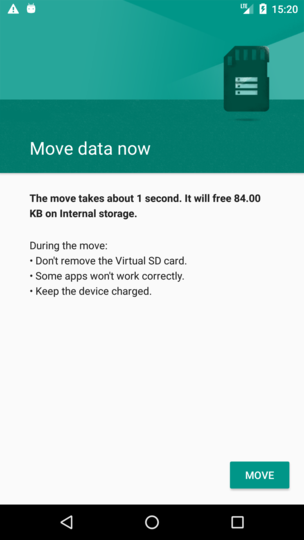
This is my current explanation, which is hopefully correct. I could reproduce this on one device (formatting sdcard as internal storage and app was moved to it (without me doing anything)).
I hopefully could pointed out to you that this is not a fault of us developing the app, but rather a problem which only occurs on very specific circumstances.
One solution is pointed out by @amas01 at https://github.com/nextcloud/android/issues/2032#issuecomment-370811027.
Another solution is to use a different server address if possible. As the account includes the server address, a new account will be setup.
For example you maybe have https://nextcloud.server.com, but it is also accessible via https://www.server.com/nextcloud
Unfortunately there is nothing we can do in regard of this corrupt account.
 tobiasKaminsky
on 8 Mar 2018
tobiasKaminsky
on 8 Mar 2018
I am having this issue. How can I fix it without doing advanced stuff?
 petoknm
on 28 Mar 2018
petoknm
on 28 Mar 2018
Unfortunately there is nothing we can do from developer side, as explained in above post. :-(
tobiasKaminsky
on 29 Mar 2018
All I needed to do to end up in this situation is removing the login from the app. When logging back in I doesn't work and when trying the old login (in the app instead of the web view thingy) it says wrong username/password... (I use a password manager so I really don't think the password changes in the two seconds between copying and pasting)... Assuming 90% of users are screwed what can the 10% of technically skilled people do without requiring a rooted phone? I tried putting my device (OnePlus 3) into recovery mode and pulling the specified file (as per @amas01's comment) and all I got is
$ adb devices -l
List of devices attached
xxxxxxxx               sideload usb:1-5.1.4 transport_id:3
$ adb pull /data/system_ce/0/accounts_ce.db
adb: error: connect failed: closed
And since the app is the only subject that can access this information (apart from adb and similar) wouldn't it be possible to make some sort of button that resets all of the app's info and hide it somewhere in the settings? I don't want to blame anyone, but I think this still needs to addressed in a user accessible manner.
petoknm
on 29 Mar 2018
@petoknm
How can I fix it without doing advanced stuff?
- install or move the app to your "internal storage". see https://github.com/nextcloud/android/issues/2032#issuecomment-371503315
Attention: On some devices there is the possibility to format the sdcard as "internal storage". In this case the app will be installed in the "external storage".
That's stupid with the sdcard as "internal storage". At this point all apps will be installed on sdcard, without warnings.
.. be carfully: check you app preferences: only "internal storage" works.- Use a different server address: new server address forces new account setup
It works on my device with linageOS ...
lars-vom-mars-x
on 30 Mar 2018
I don't seem to have an option to move the app to internal storage. I assume it is there since I don't have an SD card in the phone.
And the different server address worked. Fortunately it doesn't strip ending slashes so I just added a slash to the end and it worked. Still sounds like a not satisfactory fix. What if it happens again? Do I need to change the servers address for real? Do I need to setup a proxy that redirects to the actual server address? And all of that just because of one phone's corrupt account?
petoknm
on 30 Mar 2018
I wanted to second petoknm's fix above for anyone else having issues. Remove the account and either add or remove a slash ( / ) to the end of your address to have it reauthorize when adding the "new" account. Nothing gets broken or changed or altered. Thank you @petoknm for offering such a simple solution to a problem that so many are having even though this issue is "... a problem which only occurs on very specific circumstances."
 capnhayhurst
on 5 Apr 2018
capnhayhurst
on 5 Apr 2018
It seems that every time I update my lineage-OS the issue pops up again and I have to remove the account data in the "accounts_ce.db" Then everything works again. Maybe I shouldn't install every update...
 AZtech
on 10 Apr 2018
AZtech
on 10 Apr 2018
@AZtech , have you moved the app from external to internal storage. After making this move, you should not get this error again even after an update.
amas01
on 11 Apr 2018
You guys are missing the point. This SHOULD NOT HAPPEN at all, we should not need any tutorials and fixes...
lupetalo
on 11 Apr 2018
@amas01 , you're right. As they say "he who can read and follow instructions, has certain advantages in life". I missed step # 1! Looks ok now! Thanks!
AZtech
on 11 Apr 2018
I created a test version, which can be installed as an upgrade to the existing app.
Can someone with at least Android 5.1 (Lollipop) can test it?
Please do this steps:
- verify that with current 3.1 version the problem still occurs
- install test version
- try it again
Link to download test version: https://cloud.nextcloud.com/s/fazWbsg8LoAKCtE
(it is signed by us and will replace 3.1 version with 3.1.1, so it will not interfere with upcoming 3.2. You have to enable "allow installation from unknown sources").
tobiasKaminsky
on 25 May 2018
Hi, I tried this build (v3.1.1 Alpha2) after confirming the issue on my phone (Lineage 14.1, Android 7.1.2) with version 3.1.0 (from Google Play). It did not solve the issue.
I did not follow the instructions provided here to edit the accounts_ce.db database. I'll try this later.
 pbuyle
on 29 May 2018
pbuyle
on 29 May 2018
After wiping the accounts using adb (as suggested by @amas01), and ensuring the application is installed in the internal memory (and without a SD card configured as internal memory) I was able to log into my instance.
However, when re-formating the SD card as internal memory, re-installing the app (using v3.1.1 Alpha2 provided by @tobiasKaminsky), confirming the app were indeed installed on the SD card and rebooting the phone, the issue reapparead.
pbuyle
on 6 Jun 2018
Thank you for testing @pbuyle.
Unfortunately this is a problem, that we as app developer cannot address.
We already have android:installLocation="internalOnly" in our AndroidManifest.xml, which should not be needed as this is the default, but some vendors are doing what they want, if this option is not set.
And for you it seems that "sd-card mounted as internal storage" also causes the trouble.
@pbuyle which device do you have?
tobiasKaminsky
on 7 Jun 2018
This is on a Samsung Galaxy S5 (SM-G900W8, ktle) running Android 7.1.2/Lineage 14.1-20180601-NIGHTLY-ktle.
The Seafile Android application behave the same under the same conditions (redirecting back to an empty account screen after addition of the account, see https://forum.seafile.com/t/solved-android-app-account-disappears/4947). So this is definitively an OS bug, or at least a bad behavior whose workaround isn't obvious/well known.
pbuyle
on 7 Jun 2018
Now that I have an affected device, I spent several hours in debugging and trying to understand the problem.
As always there are so many different combinations, that there may be several causes, but one of it is a bug that does not entirely remove a custom account when uninstalling the app.
Also the move from internal to external storage (and vice vera) can cause this.
This also affects other apps, e.g. Dropbox.
Some technical background:
Androids own account manager has a stale account in its database. When querying if a given account exists, our app gets none back, assuming that we have to add it.
This then will fail as the account manager cannot add an account twice with the same name.
Also programatically removing the old account will not work.
But the stored account name is case sensitive and this is our chance.
The internal account's name is built from the username and server address, e.g "tobias" and "cloud.server.com" --> [email protected].
The username is the name that the admin gave the user when creating the account.
The login flow returns always the username, e.g. if you enter your email address as login, we will internally build the account with the returned username.
However it seems that the login flow is returning the username exactly as entered.
So if you have an account [email protected] and this is causing the login loop, you can try to login with "TOBI" or "TOBI " or "ToBi" and all should allow you to login.
Please note that due to androids bug all older account names are burnt and will not work, so if you have done this multiple times, it may be that no suitable combination is left.
TL;DR: It is a bug in Androids Account Manager system, which we cannot solve, but only try to circumvent: login with uppercase username or append a whitespace.
tobiasKaminsky
on 13 Jun 2018
@tobiasKaminsky, Why doesn't removing the old account work?
I can confirm that's the case: I did attempt to manually remove the account, and I still got the same behavior, even though the Google Account Manager didn't have a nextcloud account listed anymore. I'm just confused as to why that doesn't work, unless the account existence isn't the problem... or maybe Google is keeping our accounts after we delete them (a big BIG NO-NO!).
When attempting to login to the Android Nextcloud app, I get this loop. Seeing as the android machine had it's nextcloud account removed during one of the troubleshooting steps, attempting to login afterwards, it is not the existence of the (now non-existent) account that is causing the problem.
I should note that I have gotten this issue due to android upgrades before (as others have noted). For whatever reason, continually attempting to login over, and over again, while reverting to the previous login method (option appears on app, during loop) and then back again got it to work again, a several times... It's possible that I changed case at least once, but given the countless times I've done this, there has to be something else to it. (I typically upgrade weekly)
I just reproduced the above fix and it logged in... but added 2 accounts in the Account Manager, one without a name, and one with the username in all caps (I did not add the all caps)... this definitely seems like a bug! Perhaps, when I did this before, the caps changed automatically too?!?! I'm lost on why this would happen.
Given that inconsistent behavior, and the fact that other apps that use accounts don't exhibit this behavior (Amazon Prime Video is a big one that comes to mind), I'm not fully sold that this is _solely_ an Android bug. I don't use dropbox, but I believe you that the issue exists there too. It just seems to me that it's a combination of things.
I should note that I did nothing to my android device to get this issue, this time, and I never put things on an SD card. The key in my case is most likely the password reset that I was forced to do. (In case it matters, I moved the nextcloud docker image to another host. Nextcloud needed to be re-installed even though all data (mysql) and config was cloned as well. When re-installing all the existing users and data remained, but I had to reset passwords.)
I'm still able to login using the Web UI, with the reset pass.
 king-dopey
on 3 Sep 2018
king-dopey
on 3 Sep 2018
I had the Nextcloud App failing to log in on a Motorola Moto E (2nd Gen., XT1524) with Lineage OS 14.1 installed, right after I configured the SD card as internal memory.
I tried amas01's procedure (deleting entries from Androids accounts and extras table) from his comment on Mar 6 and it worked for me. I perfectly agree that this is too much for a normal user, but I also think that anyone who manages to install LineageOS via a custom recovery and fastboot+adb can do this.
@amas01: Thank you for this solution.
Some of my experiences with amas01's procedure:
My Nextcloud-entries in the "extras" table disappeared automatically right after deleting the specific entries in the "accounts" table. It seems to me that those tables have joint indices. In fact I just deleted entries in the "accounts" table. So you might want to do "select * from accounts" and select * from extras" right in the beginning just to get an overview what is in there.
I had to watch out to not delete DAVdroid entries that point to my Nextcloud server since I synchronize my calendars and contacts via Nextcloud too. If you don't have DAVdroid (or other Apps that synchronize with your Nextcloud server), then identifying the entries you have to delete should be no problem at all.
 fluppe2
on 21 Oct 2018
fluppe2
on 21 Oct 2018
I can confirm this is still occurring. I'm using an older android, Motorola XT1080 Droid Maxx, with the NextCloud app. After reading through the comments I was able to synthesize a remedy although it doesn't fix the app unfortunately.
There were two suggestions that I followed:
1) As @tobiasKaminsky recommended login with uppercase username or append a whitespace. I created a new user account with the beginning letter as upper case.
2) As @amas01 recommended to edit the SQL database. Rather than edit I just removed the app from my phone and re-installed.
After these two steps I was able to log on with the NextCloud app.
 Colbix
on 6 Dec 2018
Colbix
on 6 Dec 2018
Further clarification, I only encountered this problem after I went through the process of making NextCloud available through the internet. I didn't encounter this issue when I was hosting this only for LAN access.
Colbix
on 6 Dec 2018
With the latest Lineage OS release (I'm testing on Nexus 6), I was able to delete the account from Account Manager, in Android Settings, and all applicable entries were removed from accounts_ce.db. I was also able to log back in afterwards.
This should be verified by others, however. This could also be because I gave up on using Nextcloud on my Android for a long time, due to this extremely annoying issue.
king-dopey
on 11 Dec 2018
@king-dopey Sadly this is indeed a problem of Android, but I am glad that it is working now for you.
tobiasKaminsky
on 11 Dec 2018
It worked once for me, that isn't a pattern, yet. I'll be installing
updates over the next couple days to verify, but I'm also hoping others can
do the same.
It could be that the latest update (or one of the recent ones) fixed this
issue. Or, it could be that the stale account that was on my device for a
couple months had different casing, allowing it to work.
The only thing that I was able to confirm, for sure, is that the entries
did exist in accounts_ce.db and they were removed when I removed the
account in the standard way.
On Tue, Dec 11, 2018, 12:53 AM Tobias Kaminsky <[email protected]
wrote:
@king-dopey https://github.com/king-dopey Sadly this is indeed a
problem of Android, but I am glad that it is working now for you.—
You are receiving this because you were mentioned.
Reply to this email directly, view it on GitHub
https://github.com/nextcloud/android/issues/2032#issuecomment-446121396,
or mute the thread
https://github.com/notifications/unsubscribe-auth/AH4Uytzu5-KcQ1BdSPJPI1fdXL65fdOGks5u33KVgaJpZM4Rp36u
.
king-dopey
on 11 Dec 2018
I'm no longer able to reproduce this issue, with the Nextcloud app, when updating Lineage OS. No changes to the accounts were necessary. With this bug no longer happening, it's hard to pinpoint the root cause...
However, the Nextcloud Talk app still isn't able to login, even after removing the accounts last time. It just gets stuck at redirecting, just as the Nextcloud app was... and Nextcloud Talk does not have any accounts in accounts_ce.db (nor were there any when the standard Nextcloud account was removed). This is alluding to a bug somewhere in the Nextcloud architecture. I think there is something else happening, which we are missing.
king-dopey
on 13 Dec 2018
An update came over F-Droid and now the Nextcloud Talk app works. Whatever that issue was, it was a bug in the Nextcloud Talk app.
At any rate, if Lineage OS users update to the latest release and update their Android apps to the latest, everything should work again. You may have to remove the Nextcloud Account, in the standard way, within Android settings, if you're coming from an older Lineage OS version.
I cannot confirm, however, if the Lineage OS update actually did anything. It very will could have been the updated Nextcloud apps (Nextcould app was also updated in-between the test where it didn't work and it did). As such, I also cannot confirm if the alleged fix is related only to Shamu Lineage OS, Lineage OS as a whole, ASOP, or a google apps update.
king-dopey
on 15 Dec 2018
This request did not receive an update in the last 4 weeks. Please take a look again and update the issue with new details, otherwise the issue will be automatically closed in 2 weeks. Thank you!
![stale[bot] picture](https://avatars3.githubusercontent.com/in/1724?v=4&s=40) stale[bot]
on 9 May 2019
stale[bot]
on 9 May 2019
Related issues
AndyScherzinger
·
3Comments
 Tie-fighter
·
3Comments
Tie-fighter
·
3Comments
 toobie83
·
3Comments
tobiasKaminsky
·
3Comments
toobie83
·
3Comments
tobiasKaminsky
·
3Comments
 ezaquarii
·
3Comments
ezaquarii
·
3Comments
Most helpful comment
I don't want to do that. I want the app to work.