Currently user/account info is read only.
As discussed https://github.com/nextcloud/android/pull/1919#issuecomment-355293107 this should be editable.
@rullzer do we have an endpoint for this?
 tobiasKaminsky
All 25 comments
The provisioning API can be used to edit users.
 rullzer
on 5 Jan 2018
rullzer
on 5 Jan 2018
I had a look on provisioning API now available. And there are some clarification needed:
- Provisioning API seems to be able to update only single field at a time, IMO we should be able to update fields in a bundle
- Is there a way to get fields which are in permittedFields in advance, so we know which edit form elements can be displayed?
- If decided to go with the current API, should there be a rollback mechanism if any fields fails to update
 przybylski
on 13 Jan 2018
przybylski
on 13 Jan 2018
Provisioning API seems to be able to update only single field at a time, IMO we should be able to update fields in a bundle
Why can't you update once the user is done editing a field? I really don't want to add another API that does the same thing.
Is there a way to get fields which are in permittedFields in advance, so we know which edit form elements can be displayed?
I don't think so but for this we could extend the API. That would make sense IMO.
If decided to go with the current API, should there be a rollback mechanism if any fields fails to update
Just update them one by one ;)
rullzer
on 13 Jan 2018
Why can't you update once the user is done editing a field? I really don't want to add another API that does the same thing.
To reduce network usage.
przybylski
on 13 Jan 2018
@przybylski really? I mean do those few extra bytes really matter? It is not as if you are sending over gigabytes of data.
rullzer
on 13 Jan 2018
Its not only few extra bytes. But the way network operations are now implemented AFAIK is that they are opening new connection on each request, which means it will start several connections, which means additional reasons which can fail. For people that have high speed connection is not a problem, but for slower connections it might be a problem.
przybylski
on 13 Jan 2018
But on the other hand it wouldn't make too much sense since we also need to support old implementation. Maintaining two implementation is a bad thing.
przybylski
on 14 Jan 2018
@nextcloud/designers
simple design, first iteration of edit screen:
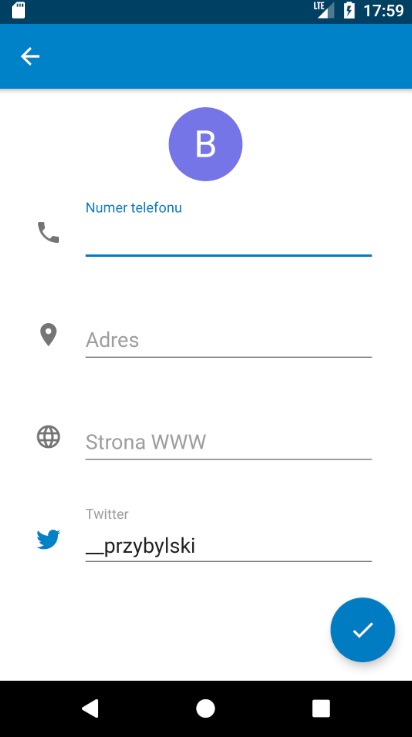
saving (note progressbar around the FAB):
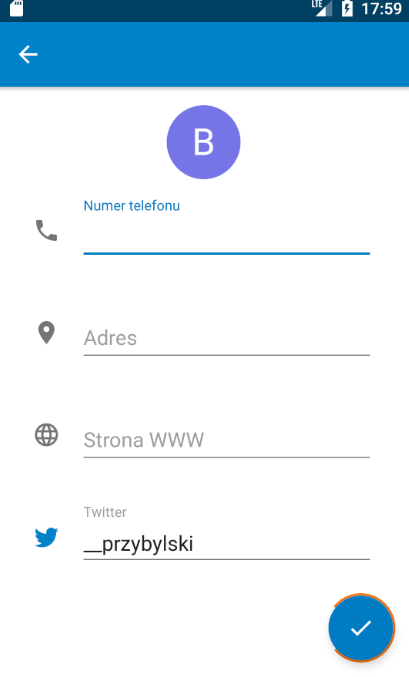
Obviously it is missing "Edit" or something in the title
przybylski
on 18 Jan 2018
@przybylski can't we have in-line editing, instead of a separate screen?
 mario
on 18 Jan 2018
mario
on 18 Jan 2018
@mario not impossible, but i think it doesn't fit into android patterns
Also wouldn't inline editing would "force" a empty placeholders for non filled fields?
przybylski
on 18 Jan 2018
Agree with @mario, the editing should be inline.
 jancborchardt
on 19 Jan 2018
jancborchardt
on 19 Jan 2018
I agree with @przybylski following the argument that it doesn't fit into android patterns
cc @tobiasKaminsky for feedback
 AndyScherzinger
on 19 Jan 2018
AndyScherzinger
on 19 Jan 2018
Editing inline is something that is done on web, but not on android (at least to my experience).
This is what official contacts app by android is doing:
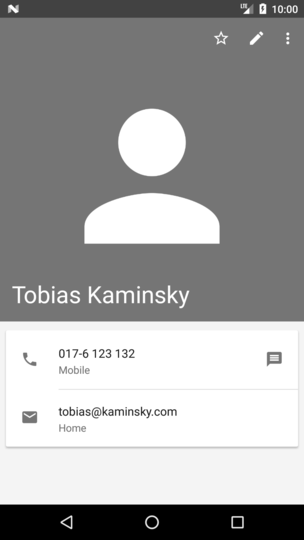
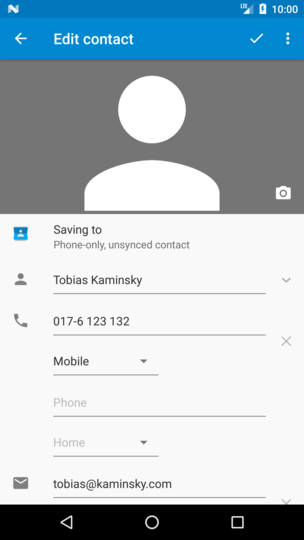
So we can argue that NC users are known to the "edit inline" way due to web ui OR that users are known to the android way because of android.
At some other points we already followed the android way instead of NC/web way, so I tend to go with the android way.
Also wouldn't inline editing would "force" a empty placeholders for non filled fields?
This is indeed true, and it will clutter up the UI if you only have one filled field.
tobiasKaminsky
on 22 Jan 2018
I'll make sure you have your API to know what fields are available in https://github.com/nextcloud/server/issues/7983
rullzer
on 22 Jan 2018
Ok, while inline editing is usually nicer, I don't have super strong feelings here. Importanr is that of course the structure and order is the same in both display and editing.
jancborchardt
on 22 Jan 2018
So basically right now it would be 3-to-2 for separate editing like started by @przybylski
As for the design I'd also say let's adapt the style of the standard Android contacts app, like posted by Tobias. Which is actually what I used as an inspiration for the display (non-editing part) of the user info UI already :)
Would that work for you @przybylski ?
AndyScherzinger
on 22 Jan 2018
@rullzer sure, but still legacy implementation must be supported.
As a compromise I propose to use set of standard fields: website, twitter, address, phone.
With the new API other fields will be shown as well.
@AndyScherzinger works for me
Progress:
small API issues I am trying to track them down why I always get unauthorized response from server.
przybylski
on 22 Jan 2018
@przybylski possible cause cookies (or lack of)?
mario
on 22 Jan 2018
@mario weird because I am using Oparations mechanism from Nextcloud-Library I honestly thought that it is handling setting sessions etc
przybylski
on 22 Jan 2018
@przybylski well we can't offer editing before Nextcloud 14. As there is no guarantee you can update anything. Which will result in weird error messages.
for example: website, twitter, address, phone: Those are only available if you have the lookup server connector enabled
rullzer
on 23 Jan 2018
@rullzer ok, makes sense, I am testing that against 12 so that might be a reason for the odd behaviour. I'll adjust my implementation and change test version
przybylski
on 23 Jan 2018
I sat down to this again and found what went wrong upon updating.
Does anyone knows why OCS requests require password confirmation when editing account details.
IMO access key should be enough.
This is why I am getting from the server:
<ocs>
    <meta>
        <status>failure</status>
        <statuscode>997</statuscode>
        <message>Password confirmation is required</message>
        <totalitems></totalitems>
        <itemsperpage></itemsperpage>
    </meta>
    <data/>
</ocs>
@przybylski mmm yeah that is one of the security measures in the server. Let me open a server ticket if we should disable that.
rullzer
on 30 Jan 2018
I can understand the security reasons, the need to reenter the password is just a bit counter intuitive when it comes to REST APIs.
przybylski
on 31 Jan 2018
Yes, we always authenticate when using the rest api, so there should be no additional password check.
tobiasKaminsky
on 31 Jan 2018
Related issues
 ikke-t
·
3Comments
ikke-t
·
3Comments
 ezaquarii
·
3Comments
AndyScherzinger
·
3Comments
ezaquarii
·
3Comments
AndyScherzinger
·
3Comments
 Shagequi
·
3Comments
Shagequi
·
3Comments
 Bugsbane
·
3Comments
Bugsbane
·
3Comments
Most helpful comment
@przybylski can't we have in-line editing, instead of a separate screen?