Android: Screenshots forbidden if app protection (fingerprint / pin) is enabled
Steps to reproduce:
- enable fingerprint or pin protection in app
- try to make a screenshot
This is not an intended limitation I guess, please correct the app's manifest:

I experience this behaviour with DEV-version 20171230 on OP3T running Oreo.
 nursoda
All 18 comments
This seems the way to prevent screenshots: https://developer.android.com/reference/android/view/WindowManager.LayoutParams.html#FLAG_SECURE
However we only use this in PassCodeManager, e.g. when inserting pin code.
Where do you see this info?
 tobiasKaminsky
on 5 Jan 2018
tobiasKaminsky
on 5 Jan 2018
I get it on every screen, like in a folder view, in settings, etc. Independent of whether I enable PIN or Fingerprint in settings or not. Installed via F-Droid, no device settings tweaked that I know of.
nursoda
on 5 Jan 2018
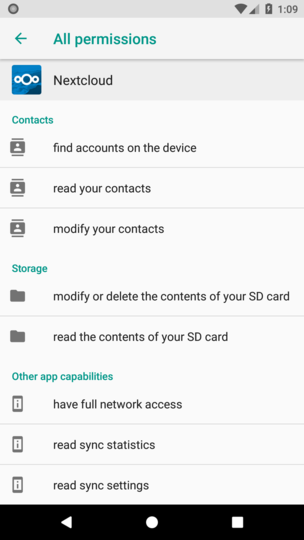
How did you get the screenshot, you posted on the starting issue?
I can find a similar one, but there is nothing with "screenshot".
tobiasKaminsky
on 5 Jan 2018
Actually I was too quick: It DOES matter whether I enable fingerprint or not, but to see the effect, I have to switch, then kill the app, then restart it, then try to screenshot. So, here are the permissions as shown on my device. They are identical whether I switch fingerprint on or not:
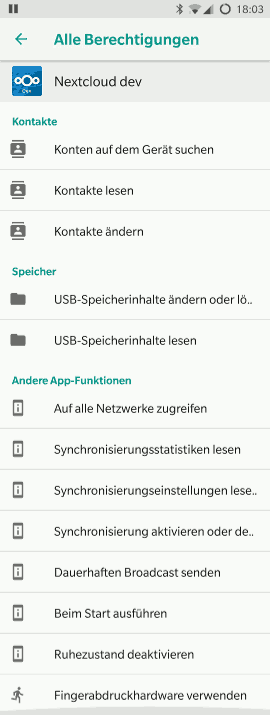
When I start the app with fingerprint off, switch it on and then do a screenshot, I get this:
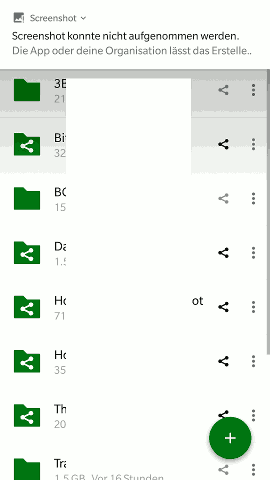
Leaving either Fingerprint or PIN on, killing and restarting it, I can no longer take screenshots.
nursoda
on 5 Jan 2018
https://github.com/nextcloud/android/pull/1657 enhances the way we protect the app.
We will have to make sure that this is working there.
tobiasKaminsky
on 8 Jan 2018
Note, that it's not FPR only, but activating PIN does the same.
nursoda
on 8 Jan 2018
So while finishing #1657, I came across this.
During enabling passcode, indepent of pin/fingerprint, it is also assumed that the content of the app should never be leaked.
Therefore the FLAG_SECURE is set. This prevents android from showing the content in "recent apps":
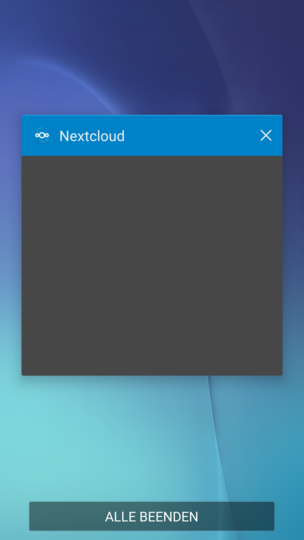
FLAG_SECURE: treat the content of the window as secure, preventing it from appearing in screenshots or from being viewed on non-secure displays.
I would likte to keep it this way, as when user add another layer of security, it should be as secure as possible...
tobiasKaminsky
on 20 Mar 2018
I would likte to keep it this way, as when user add another layer of security, it should be as secure as possible...
I agree with this opinion and also think if passcode or device credentials have been activated to protect the app's content then screenshots are blocked too
 AndyScherzinger
on 20 Mar 2018
AndyScherzinger
on 20 Mar 2018
OK
nursoda
on 21 Mar 2018
:+1: Then we can close this.
tobiasKaminsky
on 21 Mar 2018
I beg to differ.
I use scrcpy to control my phone from a computer, and the FLAG_SECURE prevents the screen from being displayed. Please consider adding an option to disable the flag, be it enabled by default. Signal provides it.
 ykzk
on 24 Aug 2018
ykzk
on 24 Aug 2018
Would you be willing to reconsider adding an option to disable the protection, like Signal does for instance?
ykzk
on 5 Dec 2018
@jancborchardt @AndyScherzinger what do you think?
Adding another option to our settings menu is nothing I like.
And for security having FLAG_SECURE, so no screen capture and no details in "recent apps" is needed, I think.
tobiasKaminsky
on 6 Dec 2018
Adding another option to our settings menu is nothing I like.
@tobiasKaminsky I fully agree with your assessment. While technically it would be an option to create a sub-page for such "expert"-settings I fear that we then simply opened the gates for any kind of additional setting for what I consider edge cases and end-up with a larger number of settings we need to maintain and possible eeven create conflicting settings. So I'd also still vote against such settings even though this will block certain usage scenarios.
AndyScherzinger
on 6 Dec 2018
Sorry if I'm being pushy, but I fail to see your point here.
The menu barely has any settings, and on the contrary is cluttered - in my opinion - with barely useful entries like the license, a link to source code, etc (a lot of things for which a lot of people don't use the app but rather a real browser, I think). To be honest, I'm very surprised of your fear of a Pandora box of "expert settings" when you have an "expert mode" switch in this very same menu :-|
Security-wise, Signal did not have any issue adding such a setting and boy do they have security in mind.
I don't consider an application which offers a nice set of settings to be bloated. On the contrary, I often find myself cursing at apps that pretend to be simple and unbloated where it actually just lacks functionality.
I believe you can have both functionality and good user experience. I hope I'm not the only one.
ykzk
on 6 Dec 2018
To be honest, I'm very surprised of your fear of a Pandora box of "expert settings" when you have an "expert mode" switch in this very same menu :-|
@ykzk I recommend reading Choosing our preferences for background on the several issues associated with adding settings.
@AndyScherzinger @tobiasKaminsky as this only seems to happen with "Passcode", maybe we could add a short explanatory sentence to the "Enter your passcode" step, also saying something like "The app will be secured against screenshots and not show contents in the app switcher."
 jancborchardt
on 21 Dec 2018
jancborchardt
on 21 Dec 2018
maybe we could add a short explanatory sentence to the "Enter your passcode" step, also saying something like "The app will be secured against screenshots and not show contents in the app switcher."
should be possible I think
AndyScherzinger
on 21 Dec 2018
explanatory sentence to the "Enter your passcode" step
As we can also lock with "device credentials" and thus there is no "enter your passcode", this info must be directly next to choosing lock mechanism in settings…
tobiasKaminsky
on 29 Jan 2019
Related issues
 ikke-t
·
3Comments
ikke-t
·
3Comments
 Bugsbane
·
3Comments
Bugsbane
·
3Comments
 daywalk3r666
·
3Comments
daywalk3r666
·
3Comments
 JSoko
·
3Comments
JSoko
·
3Comments
 rainer042
·
3Comments
rainer042
·
3Comments
Most helpful comment
Sorry if I'm being pushy, but I fail to see your point here.
The menu barely has any settings, and on the contrary is cluttered - in my opinion - with barely useful entries like the license, a link to source code, etc (a lot of things for which a lot of people don't use the app but rather a real browser, I think). To be honest, I'm very surprised of your fear of a Pandora box of "expert settings" when you have an "expert mode" switch in this very same menu :-|
Security-wise, Signal did not have any issue adding such a setting and boy do they have security in mind.
I don't consider an application which offers a nice set of settings to be bloated. On the contrary, I often find myself cursing at apps that pretend to be simple and unbloated where it actually just lacks functionality.
I believe you can have both functionality and good user experience. I hope I'm not the only one.