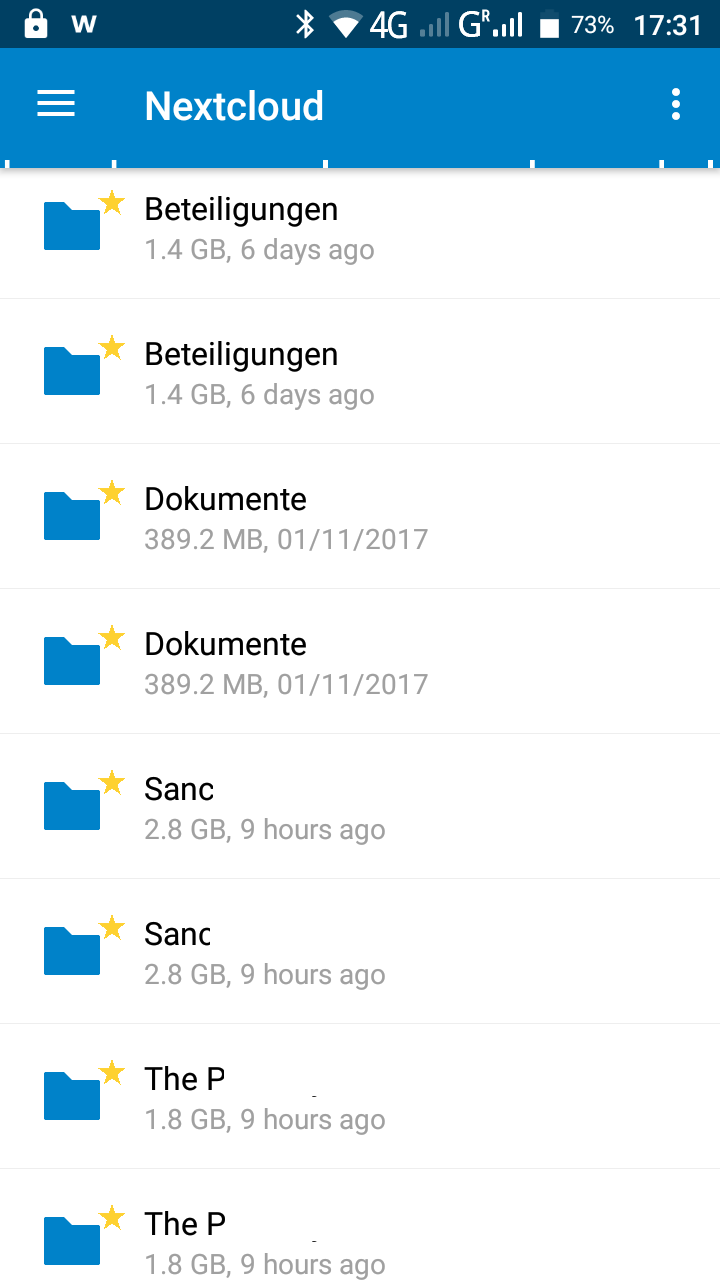
Android: Android Favorites are shown twice
Steps to reproduce
- Open Favorites in Android
2.
3.
Expected behaviour
Show each item only once
Actual behaviour
Each item is shown twice
the web client shows each item only once
Server configuration detail
Operating system: Linux 4.9.0-4-amd64 #1 SMP Debian 4.9.65-3 (2017-12-03) x86_64
Webserver: Apache/2.4.25 (Debian) (apache2handler)
Database: mysql 10.1.26
PHP version: 7.0.19-1
Modules loaded: Core, date, libxml, openssl, pcre, zlib, filter, hash, Reflection, SPL, session, standard, apache2handler, apcu, mysqlnd, PDO, xml, apc, bz2, calendar, ctype, curl, dom, mbstring, fileinfo, ftp, gd, gettext, iconv, igbinary, imap, intl, json, exif, mcrypt, mysqli, pdo_mysql, pdo_sqlite, Phar, posix, readline, redis, shmop, SimpleXML, sockets, sqlite3, sysvmsg, sysvsem, sysvshm, tokenizer, wddx, xmlreader, xmlwriter, xsl, zip, Zend OPcache
Nextcloud version: 12.0.4 - 12.0.4.3
Updated from an older Nextcloud/ownCloud or fresh install:
Where did you install Nextcloud from: unknown
Signing status
Array
List of activated apps
Enabled:
 - activity: 2.5.2
 - admin_audit: 1.2.0
 - admin_notifications: 1.0.1
 - announcementcenter: 3.1.1
 - bruteforcesettings: 1.0.3
 - calendar: 1.5.7
 - comments: 1.2.0
 - contacts: 2.0.1
 - dav: 1.3.0
 - deck: 0.2.8
 - external: 2.0.3
 - federatedfilesharing: 1.2.0
 - federation: 1.2.0
 - files: 1.7.2
 - files_external: 1.3.0
 - files_pdfviewer: 1.1.1
 - files_sharing: 1.4.0
 - files_texteditor: 2.4.1
 - files_trashbin: 1.2.0
 - files_versions: 1.5.0
 - files_videoplayer: 1.1.0
 - firstrunwizard: 2.1
 - gallery: 17.0.0
 - issuetemplate: 0.3.0
 - logreader: 2.0.0
 - lookup_server_connector: 1.0.0
 - mail: 0.7.6
 - nextcloud_announcements: 1.1
 - notes: 2.3.2
 - notifications: 2.0.0
 - oauth2: 1.0.5
 - passman: 2.1.4
 - password_policy: 1.2.2
 - provisioning_api: 1.2.0
 - serverinfo: 1.2.0
 - sharebymail: 1.2.0
 - spreed: 2.0.2
 - spreedme: 0.3.11
 - survey_client: 1.0.0
 - systemtags: 1.2.0
 - tasks: 0.9.5
 - theming: 1.3.0
 - twofactor_backupcodes: 1.1.1
 - updatenotification: 1.2.0
 - workflowengine: 1.2.0
Disabled:
 - bookmarks
 - encryption
 - nextant
 - ocr
 - ojsxc
 - registration
 - user_external
 - user_ldap
Configuration (config/config.php)
{
    "instanceid": "ocde8d3204fb",
    "passwordsalt": "***REMOVED SENSITIVE VALUE***",
    "datadirectory": "\/var\/www\/owncloud_data",
    "dbtype": "mysql",
    "version": "12.0.4.3",
    "dbname": "owncloud",
    "dbhost": "localhost",
    "dbtableprefix": "oc_",
    "dbuser": "***REMOVED SENSITIVE VALUE***",
    "dbpassword": "***REMOVED SENSITIVE VALUE***",
    "installed": true,
    "enable_previews": true,
    "forcessl": true,
    "theme": "",
    "maintenance": false,
    "mail_smtpmode": "smtp",
    "mail_smtphost": "smtp.world4you.com",
    "mail_smtpport": "587",
    "mail_smtptimeout": 10,
    "loglevel": 3,
    "share_folder": "\/Shared",
    "trusted_domains": [
        "service.chricar.at"
    ],
    "mail_from_address": "xenon",
    "mail_domain": "strakosch.at",
    "secret": "***REMOVED SENSITIVE VALUE***",
    "singleuser": false,
    "forceSSLforSubdomains": true,
    "trashbin_retention_obligation": "auto",
    "filelocking.enabled": "false",
    "filesystem_check_changes": 1,
    "mail_smtpauthtype": "PLAIN",
    "mail_smtpsecure": "tls",
    "mail_smtpauth": 1,
    "mail_smtpname": "***REMOVED SENSITIVE VALUE***",
    "mail_smtppassword": "***REMOVED SENSITIVE VALUE***",
    "auth.bruteforce.protection.enabled": true,
    "overwrite.cli.url": "\/owncloud",
    "updater.release.channel": "stable",
    "memcache.local": "\\OC\\Memcache\\APCu"
}
Are you using external storage, if yes which one: local/smb/sftp/...
Are you using encryption: no
Are you using an external user-backend, if yes which one: LDAP/ActiveDirectory/Webdav/...
LDAP configuration (delete this part if not used)
With access to your command line run e.g.:
sudo -u www-data php occ ldap:show-config
from within your Nextcloud installation folder

Without access to your command line download the data/owncloud.db to your local
computer or access your SQL server remotely and run the select query:
SELECT * FROM `oc_appconfig` WHERE `appid` = 'user_ldap';


Eventually replace sensitive data as the name/IP-address of your LDAP server or groups.
Client configuration
Android version:
6
Device model:
uleFone
Stock or customized system::
stock
Nextcloud app version::
2.0.0
Nextcloud server version::
12.0.4
Logs
Browser log
Insert your webserver log here
Nextcloud log
Insert your Nextcloud log here
Browser log
Insert your browser log here, this could for example include:
a) The javascript console log
b) The network log
c) ...
 ferdiga
All 10 comments
ferdiga
on 2 Jan 2018
Related to #1732 and #1704 and #1698
 tobiasKaminsky
on 3 Jan 2018
tobiasKaminsky
on 3 Jan 2018
After refreshing the list (pulling down the list) it should be displayed only once...anyway still a problem ;)
 ChrisDeath
on 8 Apr 2018
ChrisDeath
on 8 Apr 2018
I noticed same thing like ChrisDeath above.
To me it's not only favourites. It's also photos where I get double files.
Maybe there should be refresh command while choosing favourites or photos...
 MeiRos
on 13 Apr 2018
MeiRos
on 13 Apr 2018
@ChrisDeath @MeiRos We found the cause for that, see https://github.com/nextcloud/android/pull/1704#issuecomment-380098314 - while we now "just need to come up with the right fix" :wink:
 AndyScherzinger
on 13 Apr 2018
AndyScherzinger
on 13 Apr 2018
Nice! Looking forward for your decission. :)
ChrisDeath
on 13 Apr 2018
PR is #2490
AndyScherzinger
on 12 May 2018
fix will ship with the next dev build and with stable release 3.2.0 folks :)
AndyScherzinger
on 23 May 2018
Will test it as soon as it is on F-Droid.
Thanks alot already now :)
ChrisDeath
on 23 May 2018
You are very welcome @ChrisDeath, it should be in today's dev build while we can't say for sure when f-droid will be publishing it. Hang in there mate :)
AndyScherzinger
on 23 May 2018
Related issues
 eppfel
·
3Comments
eppfel
·
3Comments
 JSoko
·
3Comments
JSoko
·
3Comments
JSoko
·
3Comments
JSoko
·
3Comments
 Tie-fighter
·
3Comments
Tie-fighter
·
3Comments
 daywalk3r666
·
3Comments
daywalk3r666
·
3Comments
Most helpful comment
@ChrisDeath @MeiRos We found the cause for that, see https://github.com/nextcloud/android/pull/1704#issuecomment-380098314 - while we now "just need to come up with the right fix" :wink: