Android: Full Next Search: UI displaying search results
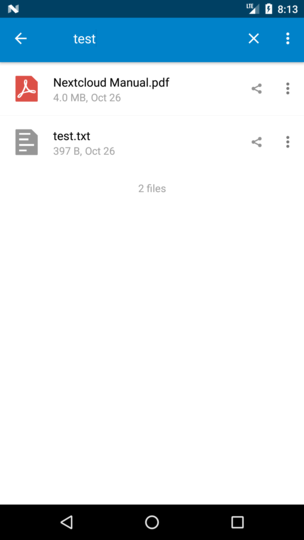
If full next search is enabled, we can use this to search within files.
The result is then the file with one (or more) search exerpts, e.g:
Nextcloud Manual.pdf with search "test":
"\/
\/nextcloud\ndavfs user,rw,auto 0 0\n\n8. Then test that it mounts and authenticates",
" to Internet Options, Content Tab, Clear SSL State.\n\n17. Close browser, then re-open and test.\n\nProblem",
", as this scenario illustrates:\n\n1. User1 shares a folder “test” with User2 and User3\n\n2. User2",
" (the recipient) deletes a file\/folder “sub” inside of “test”\n\n3. The folder “sub” will be moved"
This is the current search result:
@jancborchardt
 tobiasKaminsky
All 19 comments
I'd say
- add the excerpts to the list items
- have some white space between them (8dp or 16dp)
- make the search term/hits bold
- use grey for the font color (like the size, timestamp).
what do you think @jancborchardt ? To me the found file is the most important information thus still black while the excerpts just give you an idea "what" has been found and you likely have to open the file anyways, so grey sounds good to me. Looking at search engine results it is also like that meaning the excerpt have less contrast/focus.
 AndyScherzinger
on 7 Nov 2017
AndyScherzinger
on 7 Nov 2017
Your ideas sound great!
If @jancborchardt is fine with this, do you have time ant want to help me with the UI thing? 👍
tobiasKaminsky
on 8 Nov 2017
Sure thing! If there is a branch that already has the UI definitions as far as being able to display anything, then I can pimp it 😁
AndyScherzinger
on 8 Nov 2017
Sounds good! :) I would actually say to add it in the style of the second row where size and date is shown. As that info is not important in the search results we can cut it, and rather put several lines of that in there, each line a result inside the file, which on tap could open the file and scroll-navigate to the position of the result and highlight it. (Or am I asking for too much here?)
 jancborchardt
on 10 Nov 2017
jancborchardt
on 10 Nov 2017
@jancborchardt yes, that is what I had in mind, minus the scroll to the position part since I am not sure if that can be implemented that easily while it should be possible technically but probably needs more effort and might have to be postponed.
AndyScherzinger
on 13 Nov 2017
Regarding the scroll part: this might work with txt files as we display them inline, but imagine a word document or a pdf file. As we show both types of files only with external apps we cannot scroll to anything ;-)
tobiasKaminsky
on 13 Nov 2017
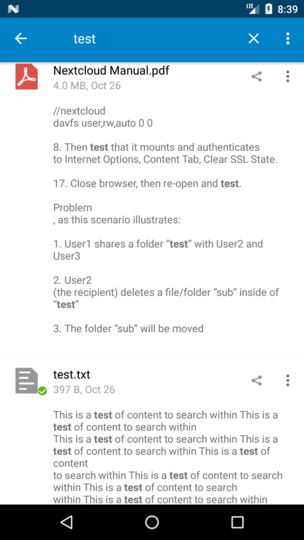
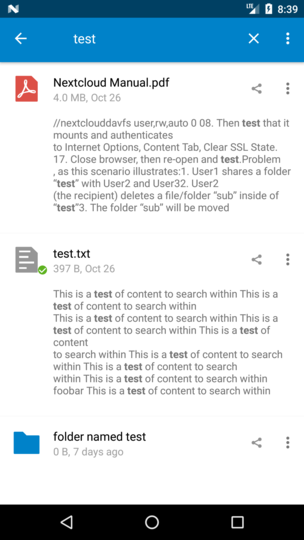
Do we want to have line breaks in search results?
- pro: it is exactly what the real text looks like
- con: it blows up the view
With linebreaks:
Without linebreaks:
searching for "nextcloud" gives also results/highlight for "Nextcloud", neat :-)
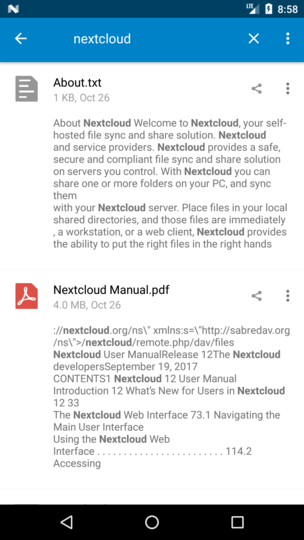
Many thanks to @AndyScherzinger who did the layout 🎉
tobiasKaminsky
on 14 Nov 2017
Ideally it should be one row per result in the file, with somewhitespace between the rows.
Every hit should for context have some text before (max until a line break) and some behind it (also max until a line break).
(If needed I can mock it up later, but am mobile atm at dentist. ;)
jancborchardt
on 14 Nov 2017
How about only the lines that have any content? So the whole text, rendered as is, sans empty lines.
Or the whole sentence the word was in, possibly the prior and following one too.
Possibly with some indication of where the occurrence is.
Bonus, clickable link for copying where the occurrence is. In either a link or plaintext.
 comradekingu
on 14 Nov 2017
comradekingu
on 14 Nov 2017
Ideally it should be one row per result in the file, with somewhitespace between the rows.
That is still the idea, yes. Haven't had the time to check for a possible implementation (technical pov) but still plan to do :)
AndyScherzinger
on 14 Nov 2017
Nice work !
What about displaying no excepts, or just a first line, and show more on long tap on the result
 daita
on 14 Nov 2017
daita
on 14 Nov 2017
@tobiasKaminsky some changes in the JSON of the result:
this is the _old_ format:
  "more": {
    "webdav": "00006918ocrdh3dnsj8m",
    "path": "/folder _ test . das/local2g test.txt",
    "timestamp": 1526033859,
    "mimetype": "text/plain",
    "modified_timestamp": 1526033859,
    "etag": "da93277a52668ccecc7e2c037b3f9810",
    "permissions": 27,
    "size": 15,
    "favorite": false
  },
This is the NEW format:
 "info": {
    "type": "file",
    "file": "phrase.txt",
    "path": "\\/tet",
    "mime": "text\\/plain",
    "size": 55,
    "mtime": 1528377613,
    "etag": "d0dd964176fcef46a2dad3205d74ae7f",
    "permissions": 27,
    "webdav": "00007078ocrdh3dnsj8m",
    "favorite": false
  },
This modification is only about the meta data
daita
on 8 Jun 2018
@daita was the change in format exposed in any way by say capabilities or something?
 mario
on 8 Jun 2018
mario
on 8 Jun 2018
no, the format change only apply to result sent on search request.
daita
on 10 Jun 2018
@daita Sure, but that's a breaking change xD Anyway, nothing some checks can't solve, but an elegant way would be to expose it in an API version or in our case capabilities or something else.
mario
on 10 Jun 2018
it's not a breaking change if the feature is not available yet. Or am I missing something ?
Is the fulltextsearch already available into the Android Client ?
daita
on 11 Jun 2018
Is the fulltextsearch already available into the Android Client ?
Nope, it is a pending work in progress #1928
AndyScherzinger
on 11 Jun 2018
@AndyScherzinger Any news regarding Full Text Search in Android Client? It would be really helpful to have the same search as we have online...
 dd-fxaver
on 13 Apr 2019
dd-fxaver
on 13 Apr 2019
No news yet unfortunately. The work has been started a while ago but not been picked up again. Everybody is welcome to pick up the open PR and we are all happy to assist of course.
AndyScherzinger
on 14 Apr 2019
Related issues
 JSoko
·
3Comments
AndyScherzinger
·
3Comments
JSoko
·
3Comments
AndyScherzinger
·
3Comments
 markbryanduncan
·
3Comments
markbryanduncan
·
3Comments
 ThaDaVos
·
3Comments
ThaDaVos
·
3Comments
 ikke-t
·
3Comments
ikke-t
·
3Comments
Most helpful comment
No news yet unfortunately. The work has been started a while ago but not been picked up again. Everybody is welcome to pick up the open PR and we are all happy to assist of course.