Android: UX: Enhance sharing when resharing is forbidden
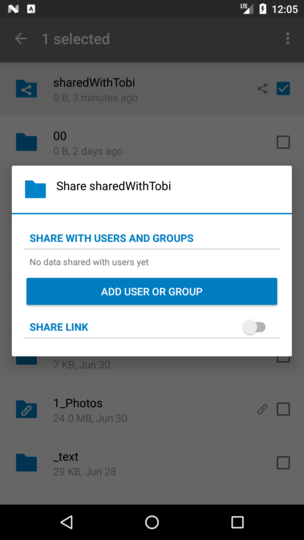
Actual behaviour
- error after sharing
Expected behaviour
- show a text "not allowed to reshare files/folders" instead of whole stuff beneath the horizontal border
Steps to reproduce
- disable "allow resharing" in server setting
- try to share a shared file
PR: #1792
 tobiasKaminsky
All 24 comments
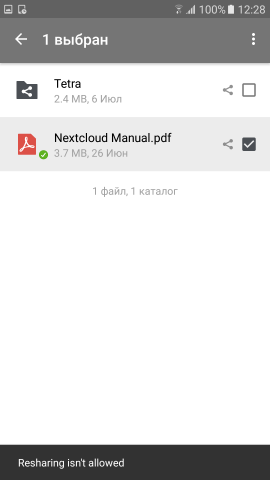
@tobiasKaminsky What kind of notification that the resharing is forbidden you see here?
I've been thinking about Snackbar or a Dialog but personally I think that Snackbar is better choice since it should be just a notification without any additional actions required.
It would look like on the screenshot below.
 ]
]
 vnidens
on 28 Jul 2017
vnidens
on 28 Jul 2017
@tobiasKaminsky @vnidens Snackbar sounds good to me, also looking at the fact that #1198 whenever merged to master will also move many Toasts to Snackbars :)
 AndyScherzinger
on 28 Jul 2017
AndyScherzinger
on 28 Jul 2017
@AndyScherzinger Great! In this case I continue to work on this issue and #1177
vnidens
on 28 Jul 2017
@vnidens awesome! So you mean code wise or mockup wise? (would love code wise 😀)
@mario @tobiasKaminsky FYI @vnidens works on this, so I hope you are fine with the chosen/discussed solution.
AndyScherzinger
on 28 Jul 2017
@AndyScherzinger Code wise for sure :)
Can you tell me how I should manage the new string resource (the Resharing is not allowed message) in terms of localization? Should I add translations or I can only add it into the main strings.xml file and then it would be handled by Transifex?
vnidens
on 28 Jul 2017
@vnidens nice! As for the translations, you only need to commit the main strings.xml and everything else will be handled automatically via our bot+transifex as soon as the PR has been merged to master.
AndyScherzinger
on 28 Jul 2017
:+1: looking forward to your contribution.
Happy to have you on board :-)
tobiasKaminsky
on 31 Jul 2017
@AndyScherzinger @tobiasKaminsky While working on this issue I've noticed that the resharing is also possible from several file previews fragments (not only from the files list case you've mentioned).
I think it would be better to hide the "Share" menu completely in these fragments if the resharing isn't enabled. From my point of view it's much better to not have the menu than have one which can do nothing but show you the message "you can't do that" :)
vnidens
on 31 Jul 2017
My idea was to explain it to the user as it can happen that another account (on a different server) is allowed to share the file/folder and thus confuse the user.
But let us ask @nextcloud/designers how to proceed
(I am also fine with removing the share entry if resharing is disabled)
tobiasKaminsky
on 31 Jul 2017
I'd also say remove it if resharing is forbidden but let hear what the designers say :)
AndyScherzinger
on 1 Aug 2017
I'd also say remove it if resharing is forbidden but let hear what the designers say :)
Yep - I would just not show it.
 MorrisJobke
on 1 Aug 2017
MorrisJobke
on 1 Aug 2017
Even better (if possible) might be to show it greyed out and change the text from »Share« to »Not allowed to share«? Or just have it greyed out and show a snackbar with further info on click.
Just not showing it is missing feedback, and will also be confusing since people don’t know why.
 jancborchardt
on 8 Aug 2017
jancborchardt
on 8 Aug 2017
Just not showing it is missing feedback, and will also be confusing since people don’t know why.
This was exactly what I said in https://github.com/nextcloud/android/issues/1176#issuecomment-319009614, but @AndyScherzinger and @MorrisJobke voted for not showing.
tobiasKaminsky
on 9 Aug 2017
Well, I am also fine with showing the info that it can't be shared (for the bugfix release after the next stable) while I don't know if (being a user) I would want to click share just to realize that I can't / am not allowed to.
AndyScherzinger
on 9 Aug 2017
@tobiasKaminsky yes, with the important distinction that the »Share« text needs to be greyed out, otherwise it seems active/clickable.
@AndyScherzinger Yep – the greying out is an indicator that it’s not really available / clickable. If it’s clicked anyway, you get feedback why. :)
jancborchardt
on 13 Aug 2017
Where should be the greyed out shared text?
In the overflow menu when selecting a file/folder?
In the "share" popup?
tobiasKaminsky
on 14 Aug 2017
In the overflow menu.
The share menu should not show, cause you can't use it, right? (Or can you share the link?) cc @schiessle
Instead of the sharing dialog, tapping the greyed out "Share" text should show a toast/snackbar saying smth like "You don't have permissions to share this file".
jancborchardt
on 14 Aug 2017
I see everyone agreed to still keep the menu but grey it out and show a message that the action isn't allowed.
I would update the behavior in the near future.
vnidens
on 15 Aug 2017
@vnidens yes, that contribution would be very welcome! :)
jancborchardt
on 16 Aug 2017
@vnidens that would be really great 🚀
AndyScherzinger
on 16 Aug 2017
@jancborchardt @AndyScherzinger @tobiasKaminsky After some digging it seems that it's impossible to change view/background of an individual ActionBar/Toolbar menu - you can only apply theme to all menu items at once.
So the final solution would look like an ordinary "Share" menu item which shows Snackbar with warning.
PS. If you do know the way to update the view of the individual menu item just give me a tip
vnidens
on 23 Aug 2017
@AndyScherzinger can you help here as you are our ui master? ;-)
tobiasKaminsky
on 30 Oct 2017
So the final solution would look like an ordinary "Share" menu item which shows Snackbar with warning.
@jancborchardt are you fine with this?
tobiasKaminsky
on 30 Oct 2017
Sounds ok, yes.
jancborchardt
on 30 Oct 2017
Related issues
 JSoko
·
3Comments
JSoko
·
3Comments
 markbryanduncan
·
3Comments
markbryanduncan
·
3Comments
 ThaDaVos
·
3Comments
AndyScherzinger
·
3Comments
tobiasKaminsky
·
3Comments
ThaDaVos
·
3Comments
AndyScherzinger
·
3Comments
tobiasKaminsky
·
3Comments
Most helpful comment
I see everyone agreed to still keep the menu but grey it out and show a message that the action isn't allowed.
I would update the behavior in the near future.