Android: 1.4.2 file system polling battery drain
Actual behaviour
updating to 1.4.2 (rc4 or release) creates battery drain when photo upload is selected and watching an sd card. the processes com.nextcloud.client, sdcard and mount.exfat eat up cpu resources
Expected behaviour
no significant resource usage as in previous versions
Steps to reproduce
- install 1.4.2
- enable picture upload, wifi only, loads of pictures on sd card
- use a process monitoring tool like better battery stats to loom at the processes
Environment data
Android version: 6.0.1
Device model: hlte
Stock or customized system: resurrection remix
Nextcloud app version: 1.4.2
Nextcloud server version:latest
Logs
Web server error log
n. a.
Nextcloud log (data/nextcloud.log)
would have to recreate

 maltklaus
All 35 comments
cc @mario as he rewrote the auto upload part
 tobiasKaminsky
on 4 Apr 2017
tobiasKaminsky
on 4 Apr 2017
Seems to be a particular issue with SD cards on certain phones, yes. Dunno how to debug, but will try.
 mario
on 4 Apr 2017
mario
on 4 Apr 2017
Same issue for me, battery drain caused by high CPU usage while the client is configured to auto upload. If I disable the auto upload, Nextcloud process stops draining battery and high CPU usage stops.
No matter if I enable uploads only while charging, Nextcloud would still show High CPU usage and battery drain.
Can provide screenshots or other info if needed.
Environment data
Android version: 7.1.2
Device model: Nexus 6P
Stock or customized system: Fully stock, no root, locked bootloader
Nextcloud app version: 1.4.2
Nextcloud server version:latest
 returntrip
on 30 Apr 2017
returntrip
on 30 Apr 2017
This will be fixed in 1.5 I hope :)
We will pool every half an hour or so.
On Sun, 30 Apr 2017 at 11:01, Stefano notifications@github.com wrote:
Same issue for me, battery drain caused by high CPU usage while the client
is configured to auto upload. If I disable the auto upload, Nextcloud
process stops draining batter and high CPU usage stops.No matter if I enable uploads only while charging, Nextcloud would still
show High CPU usage and battery drain.Can provide screenshots or other info if needed.
Environment data
Android version: 7.1.2
Device model: Nexus 6P
Stock or customized system: Fully stock, no root, locked bootloader
Nextcloud app version: 1.4.2
Nextcloud server version:latest
—
You are receiving this because you were mentioned.Reply to this email directly, view it on GitHub
https://github.com/nextcloud/android/issues/746#issuecomment-298220432,
or mute the thread
https://github.com/notifications/unsubscribe-auth/AAAWst28Vol8xndbUvTGcf37FXLChqvoks5r1E3rgaJpZM4Mdygr
.
mario
on 30 Apr 2017
@mario thanks for the quick reply. Should I try the RC? Perhaps it is fixed there? Can the auto upload feature stop polling all together when the phone is not charging?
returntrip
on 30 Apr 2017
It is not yet :) I have to rewrite auto upload once again :)
On Sun, 30 Apr 2017 at 11:08, Stefano notifications@github.com wrote:
@mario https://github.com/mario thanks for the quick reply. Should I
try the RC? Perhaps it is fixed there?—
You are receiving this because you were mentioned.Reply to this email directly, view it on GitHub
https://github.com/nextcloud/android/issues/746#issuecomment-298220670,
or mute the thread
https://github.com/notifications/unsubscribe-auth/AAAWsj1YL-tUCzum-tBTNvns7aZ8Bh1hks5r1E9dgaJpZM4Mdygr
.
mario
on 30 Apr 2017
@ OK! Would be great if you could disable checking for files to upload when the phone is disconnected from the charger and the "upload only while charging" function is ticked (instead of checking every 30 minutes). Let us know when you wish to test :).
returntrip
on 30 Apr 2017
This may be a naive question, but why poll at all? Can't it just react to new photos and videos using the NEW_IMAGE and NEW_VIDEO intent receivers?
 lexelby
on 30 Apr 2017
lexelby
on 30 Apr 2017
Unfortunately no. It never worked on all phones, and starting Android 7 it
doesnt work anywhere.
On Sun, 30 Apr 2017 at 14:07, Lex Neva notifications@github.com wrote:
This may be a naive question, but why poll at all? Can't it just react to
new photos and videos using the NEW_IMAGE and NEW_VIDEO intent receivers?—
You are receiving this because you were mentioned.Reply to this email directly, view it on GitHub
https://github.com/nextcloud/android/issues/746#issuecomment-298228482,
or mute the thread
https://github.com/notifications/unsubscribe-auth/AAAWsnn3VOsEskDgrAYD162mcsnDb3F9ks5r1HmKgaJpZM4Mdygr
.
mario
on 30 Apr 2017
Ugh, how annoying! I wonder why they would get rid of such a useful feature.
The problem is, I (like other folks here?) have like 5000 photos on my sd card. Polling would take a lot of processing power and i/o, I would expect.
lexelby
on 30 Apr 2017
https://developer.android.com/about/versions/nougat/android-7.0-changes.html#bg-opt mentions this change, for those curious.
lexelby
on 30 Apr 2017
@lexelby will be better when we start doing it every 30 minutes instead of every second :)
mario
on 30 Apr 2017
Can confirm this issue. On may Galaxy S7 Edge with Android 7.0 the system is always warning about one app draining the battery and ask if I want to put it in "sleep mode". The app: Nextcloud 1.4.2.
On a related note. If autoupload is turned on, it misses many files so the autoupload is unfortunately not reliable and useful today: https://github.com/nextcloud/android/issues/804
 snicke
on 14 May 2017
snicke
on 14 May 2017
Confirmed this issue occurs on OnePlus One internal storage (virtual SD card). App's CPU usage is a constant 4-8%.
Suggest to watch for filesystem changes using an event-based mechanism, then scan/poll every 1 hour to catch any missing files. (All event based systems occasionally miss files)
 GitHubGeek
on 25 May 2017
GitHubGeek
on 25 May 2017
Can confirm on OnePlus One running LineageOS based on Android 7.1.2 and app version 1.4.3.
Had the phone on standby for most of the day and about 55% battery left in the evening. Nextcloud used 14% battery over that day compared to only 12% for the display and minor percentages for the other apps.
 sebastianklein96
on 20 Jun 2017
sebastianklein96
on 20 Jun 2017
Dear users,
thank you for your patience. After lots of work, we’re super excited to be able to give you a test version with new auto upload implementation. Keep in mind we will only accept bugs related to Auto Upload in this APK, as other things might be broken.
https://cloud.nextcloud.com/s/ftZraTruRQjTe0R
This is a dev APK so it will not overwrite your existing play store/f-droid APK unless you’re already running dev version. Also, you might need to remove your existing dev version before installing this one.
Explanation of the current functionality:
- added support for custom folders
- separated image and video folders
- checks for new files happens every 15-20 minutes
- automatic retry every 15-20 minutes or when you force close/open the app
- automatic pause once network is changed (untested!)
- significantly less battery usage
All and any testing is more than appreciated, especially with large and ever-going files like Videos. (like, try to record a 30 min video).
Let me know if you’ve got any questions.
Cheers,
Mario
mario
on 26 Jul 2017
Thanks a lot for the test version and all the work, Mario!
I've got a question and a problem to report with it!
Question: I'm missing the option to upload videos and photos separately - is that coming back?
Problem: The app can't upload anything from my external SD card, where my pictures reside, uploads from the internal SD card work. I am able to navigate to the external SD card and select the files I want to upload, but the app only gives me a "file not found" error when it actually wants to upload the files.
This applies to both pictures being uploaded manually as well as the auto-upload function
Here's an extract from the log file:
`2017/07/26 12:58:26
UploadFileOperation : Checking name collision in server2017/07/26 12:58:26
OwnCloudClient #3 : REQUEST HEAD /owncloud/remote.php/webdav/SofortUpload/2017/07/IMG_20170718_073627.jpg2017/07/26 12:58:27
GetRemoteSharesForFileOperation : Got 1 shares2017/07/26 12:58:27
FileDataStorageManager : Sending 51 operations to FileContentProvider2017/07/26 12:58:27
FileContentProvider : applying batch in provider com.owncloud.android.providers.FileContentProvider@8ef2b88 (temporary: false)2017/07/26 12:58:27
ExistenceCheckRemoteOperation : Existence check for https://redacted/owncloud/remote.php/webdav/SofortUpload/2017/07/IMG_20170718_073627.jpg targeting for existence finished with HTTP status 404(FAIL)2017/07/26 12:58:27
FileContentProvider : applied batch in provider com.owncloud.android.providers.FileContentProvider@8ef2b882017/07/26 12:58:27
RefreshFolderOperation : Send broadcast com.owncloud.android.operations.RefreshFolderOperation.EVENT_SINGLE_FOLDER_SHARES_SYNCED2017/07/26 12:58:27
UploadsStorageManager : Updating /storage/3434-3134/DCIM/Camera/IMG_20170718_073627.jpg with status:UPLOAD_IN_PROGRESS and result:UNKNOWN (old:/storage/3434-3134/DCIM/Camera/IMG_20170718_073627.jpg status:UPLOAD_IN_PROGRESS result:-1)2017/07/26 12:58:27
UploadsStorageManager : Updating /storage/3434-3134/DCIM/Camera/IMG_20170718_073627.jpg with status=UPLOAD_IN_PROGRESS2017/07/26 12:58:27
UploadsStorageManager : updateUpload returns with: 1 for file: /storage/3434-3134/DCIM/Camera/IMG_20170718_073627.jpg2017/07/26 12:58:27
UploadsStorageManager : notifyObserversNow2017/07/26 12:58:27
ExpandableUploadListAdapter : refreshView2017/07/26 12:58:27
ExpandableUploadListAdapter : loadUploadItemsFromDb2017/07/26 12:58:27
UploadFileOperation : /storage/3434-3134/DCIM/Camera/IMG_20170718_073627.jpg not exists anymore2017/07/26 12:58:27
UploadFileOperation : Upload of /storage/3434-3134/DCIM/Camera/IMG_20170718_073627.jpg to /SofortUpload/2017/07/IMG_20170718_073627.jpg: Operation finished with HTTP status code -1 (fail)2017/07/26 12:58:27
UploadsStorageManager : updateDataseUploadResult uploadResult: com.owncloud.android.lib.common.operations.RemoteOperationResult@7480830 upload: com.owncloud.android.operations.UploadFileOperation@14a4ca92017/07/26 12:58:27
UploadsStorageManager : Updating /storage/3434-3134/DCIM/Camera/IMG_20170718_073627.jpg with status:UPLOAD_FAILED and result:FILE_NOT_FOUND (old:/storage/3434-3134/DCIM/Camera/IMG_20170718_073627.jpg status:UPLOAD_IN_PROGRESS result:-1)2017/07/26 12:58:27
UploadsStorageManager : Updating /storage/3434-3134/DCIM/Camera/IMG_20170718_073627.jpg with status=UPLOAD_FAILED2017/07/26 12:58:27
UploadsStorageManager : updateUpload returns with: 1 for file: /storage/3434-3134/DCIM/Camera/IMG_20170718_073627.jpg2017/07/26 12:58:27
cache_test_DISK_ : image read from disk -2181101802017/07/26 12:58:27
UploadsStorageManager : notifyObserversNow2017/07/26 12:58:27
FileUploader : NotifyUploadResult with resultCode: LOCAL_FILE_NOT_FOUND2017/07/26 12:58:27
cache_test_DISK_ : image read from disk -1061965905`
maltklaus
on 26 Jul 2017
The answer to your question: if you go to auto uploads you can configure video and image folders separately, sure.
The answer to your problem: Please delete what you installed, download the new APK from the same URL and your issue should be resolved. Please let me know if that is indeed the case.
mario
on 26 Jul 2017
Installed the new version - upload and auto-upload are now working and I can start testing, thanks!
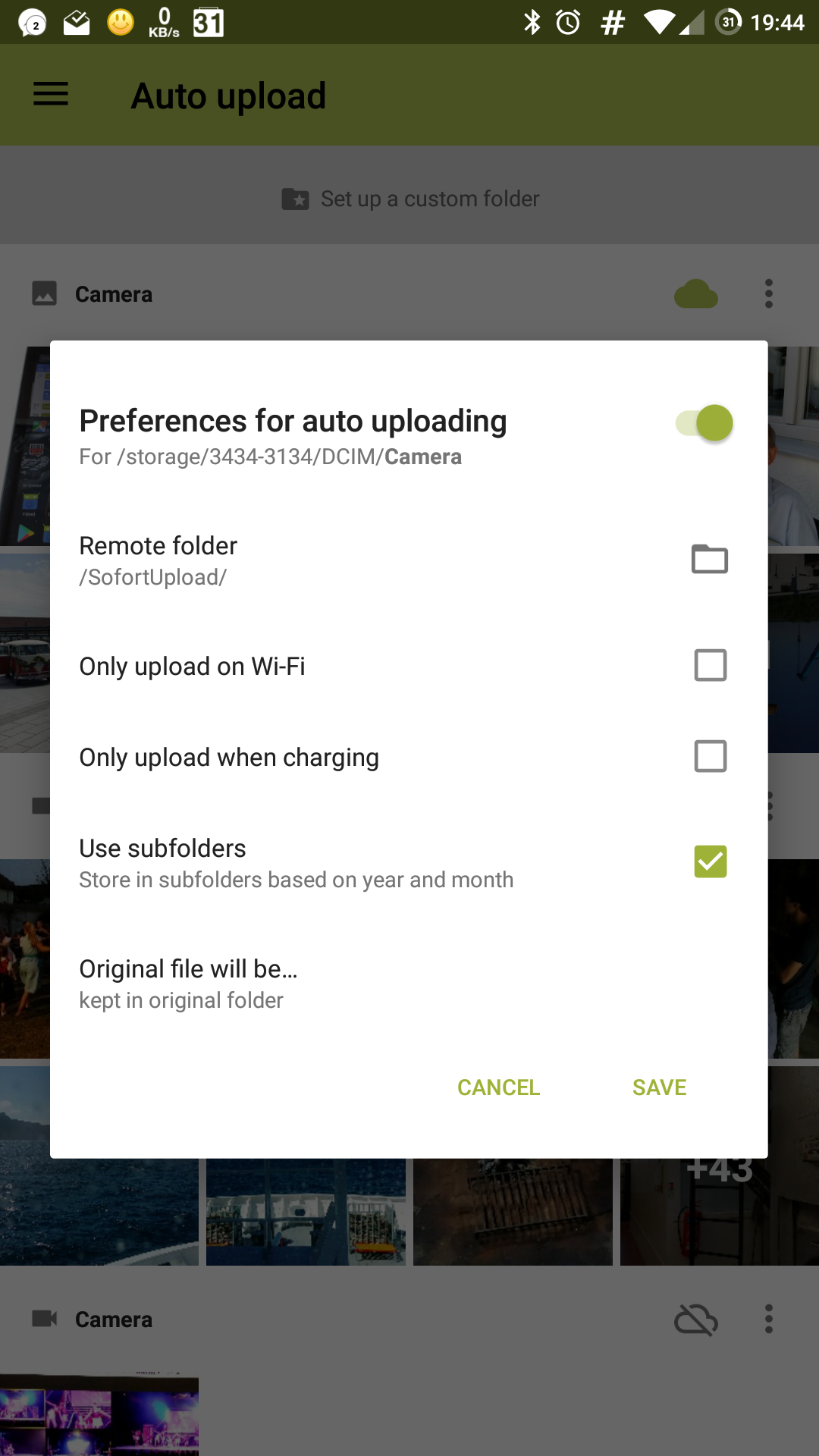
Regarding auto upload, I'm attaching a screenshot of the options I'm getting, no separation between images and video:
maltklaus
on 26 Jul 2017
Oh, only just now noticed the auto-upload now differentiates between video and images - I was used to the "old" menu with per-folder settings for video and images in one single menu. Sorted now!
maltklaus
on 26 Jul 2017
:)
mario
on 26 Jul 2017
Right, I've been running the dev version for a while and feedback has been delayed due to me moving Nextcloud servers and everything.
Uploading, polling and everything works, but I have noticed the Nextcloud process using quite a lot of CPU time on my system. Whether this is due to me having thousands of pictures on my external SD card or not, I can't say. I just rebooted my phone. 1h12 minutes in, GSam reports 7,5 minutes of CPU usage for Nextcloud, with just over a minute of keep awake time, having woken up the phone 12 times, putting the app on top of the battery list with the phone idling the whole time. I will leave it running for a few days and report back in more detail, but from initial experiments it seems like not a whole lot has changed for me.
The "old" way, back when it listened for the "new picture taken" system hook (I think that's how it worked), was the most energy efficient for me.
maltklaus
on 20 Aug 2017
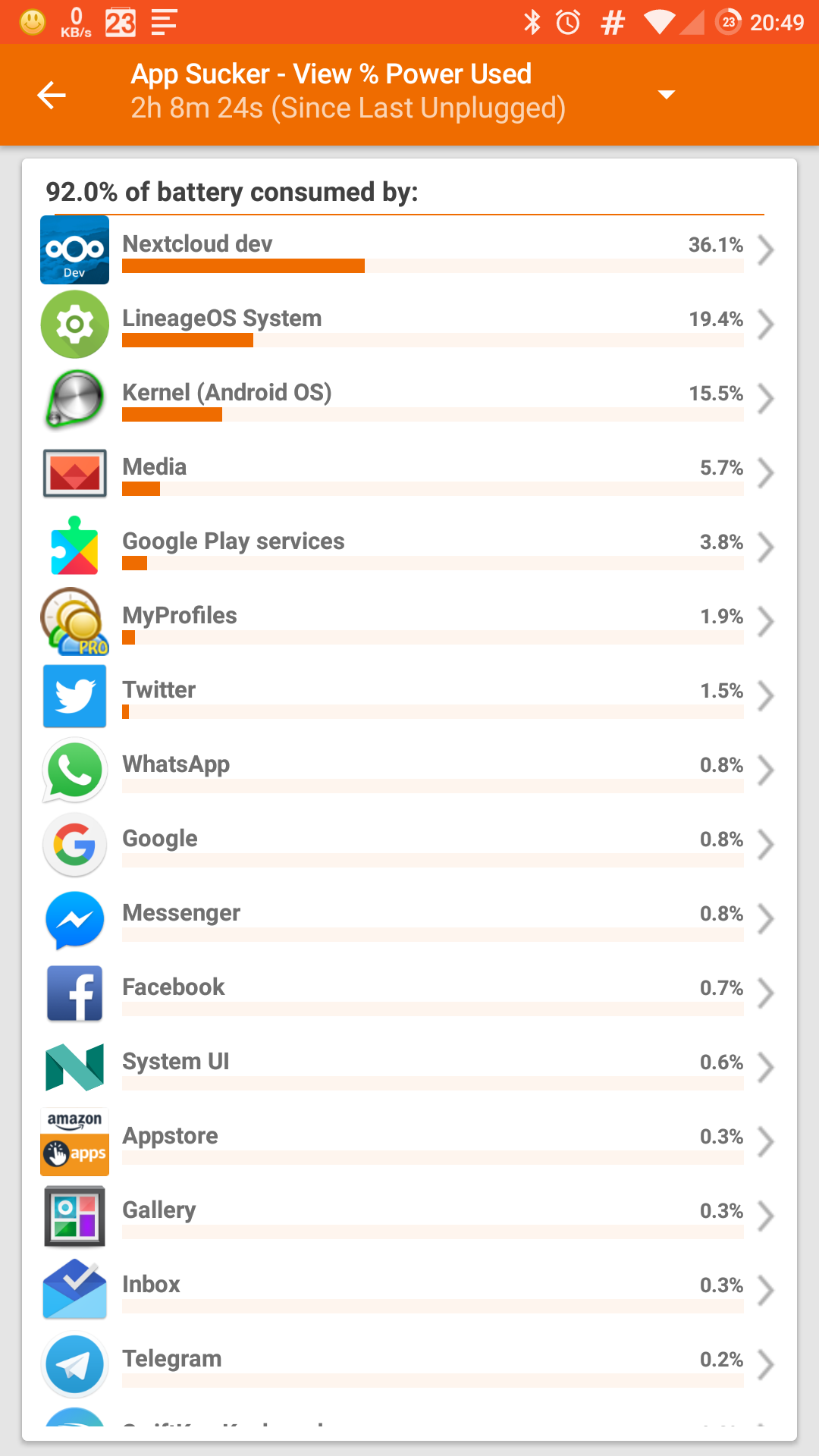
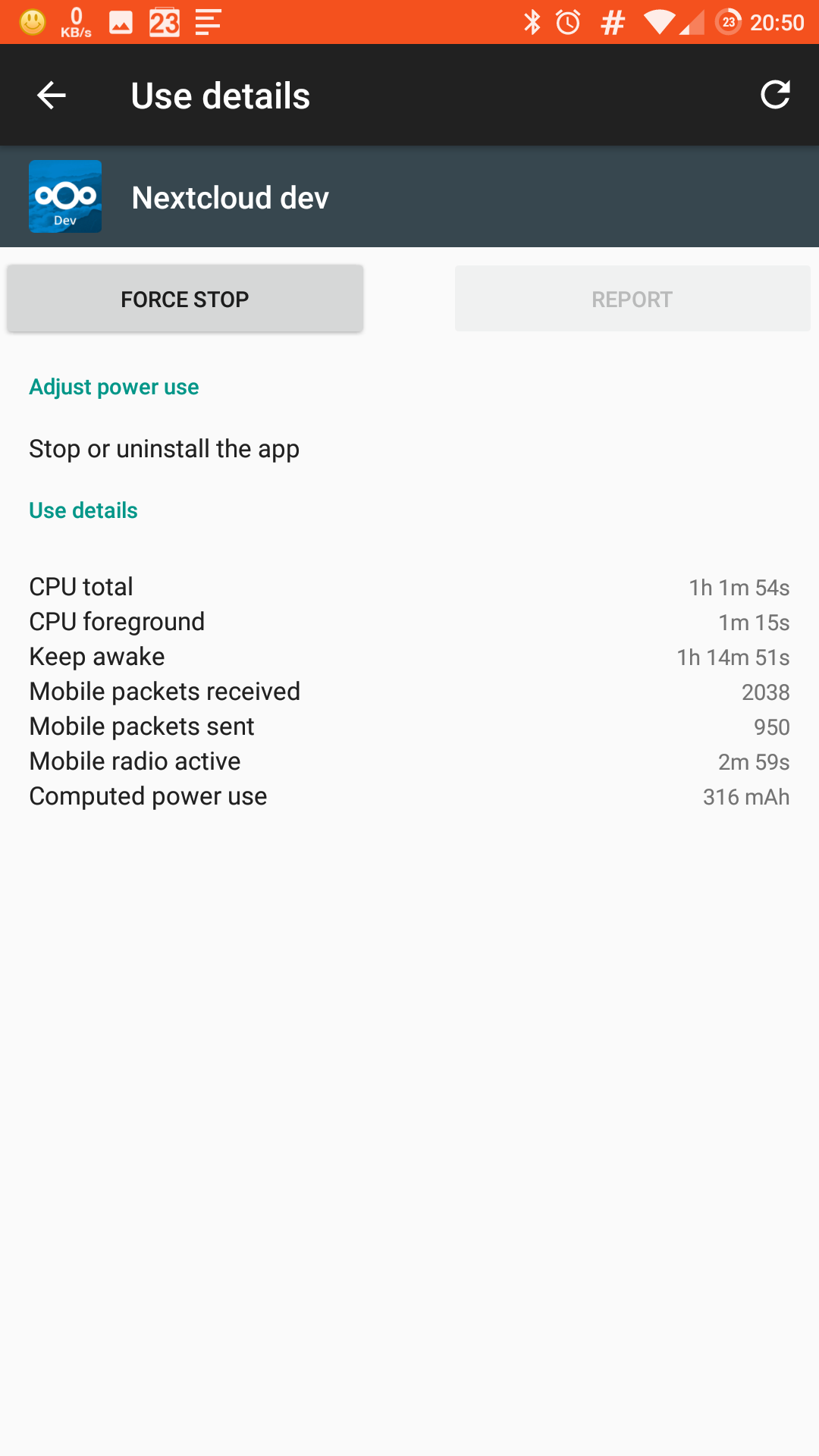
As suspected and feared from initial quick trials, these are the battery/process stats for the Nextcloud-dev app with auto-upload enabled (on a folder with 5500 files)
One screenshot shows the battery stats on a 2-hour, 8-minute portion right after a fresh boot after a hard power down, the second one shows the CPU usage and the time it held the device awake on a 14-hour cycle.
maltklaus
on 21 Aug 2017
Custom folder or photo/video folder? Also, are enabled folders on SD card and how many new files were uploaded in that time?
mario
on 21 Aug 2017
"Standard" photo/video folder on the external SD card. There was no activity triggered, I deliberately didn't take any pictures or video today.
On a side note: I didn't test the auto upload with bigger video files, but I have used this version to upload them manually and it worked without problems.
maltklaus
on 21 Aug 2017
The real catch is that we don't poll the filesystem anymore unless you use custom folders, so I don't know where this all comes from :-/
mario
on 21 Aug 2017
I just wanted to take a look at the logs, but the last entry was in July, I purged the logs and will try to see whether they populate again.
media folder is at /sd-card-name/DCIM/Camera
I'll try something else. I'll set an auto upload watchdog on a folder with very few pictures, say, the Whatsapp picture folder, just to compare behaviour.
maltklaus
on 21 Aug 2017
Thanks!
mario
on 21 Aug 2017
Interesting. I have enabled auto-upload for the internal sd-card's camera folder, which is being used by twitter to store the originals (about 50 files in there), and cpu usage by nextcloud is measurable, but negligible (4 minutes of CPU time in over 2 hours).
maltklaus
on 21 Aug 2017
Further test results: Given the low battery impact the 2-hour test yesterday evening had, I tried something else today: Moved all my pictures sitting in the camera folder on my external SD card to an archive folder and instructed Nextcloud to watch and auto-upload the now empty camera folder on the external SD card. Had it on that setting the entire day - no (read: negligible) battery impact, as expected.
My theory: Somehow Nextcloud uses the polling mechanism on the camera folder on my external SD card, and since this was filled with 5500+ files, that had an impact on the phone's battery life.
maltklaus
on 22 Aug 2017
Right, further observations:
I was out hiking today, testing the auto-upload via mobile connection under rough conditions (changing network signal, everything from no signal over edge to LTE).
What I found was, auto-upload only works on a stable signal. if signal changes, it often leaves the upload just sitting there, neither continuing nor aborting. One occasion it tried for over 50 minutes to upload a photo, with the progress bar sitting at 9%. Every time that happened I had to manually force close the app.
When I got home, I tried to sync a 7xx MB video file via wi-fi. First attempt failed (might have been due to an IP reset by my provider), same thing, the upload just sat there at 29%, neither continuing nor aborting. Killing the app and retrying allowed me to transfer the file in the end.
Sorry, I would provide logs if the app had recorded all of these actions in the log file...
maltklaus
on 27 Aug 2017
Is this still the case on 2.0?
tobiasKaminsky
on 30 Oct 2017
Since this thread died down I recently upgraded from the dev version to 2.0
Uploads are instant and I don't notice any battery drain - but it could very well still be an issue if you have a folder with a couple thousand of pictures...
maltklaus
on 30 Oct 2017
I also have no battery drain on 2.0. Unfortunately I am using the Autoupload function only for custom folders. Not using Nextcloud for the Camera folder (cause it was killing my battery pre 2.0), I am using Plex instead.
returntrip
on 31 Oct 2017
Thank you for your reply.
So I am closing it for now, but please feel free to reopen if it occurs again.
tobiasKaminsky
on 2 Nov 2017
Related issues
 rainer042
·
3Comments
rainer042
·
3Comments
 JSoko
·
3Comments
JSoko
·
3Comments
 ezaquarii
·
3Comments
ezaquarii
·
3Comments
 Tie-fighter
·
3Comments
Tie-fighter
·
3Comments
 toobie83
·
3Comments
toobie83
·
3Comments
Most helpful comment
It is not yet :) I have to rewrite auto upload once again :)
On Sun, 30 Apr 2017 at 11:08, Stefano notifications@github.com wrote: