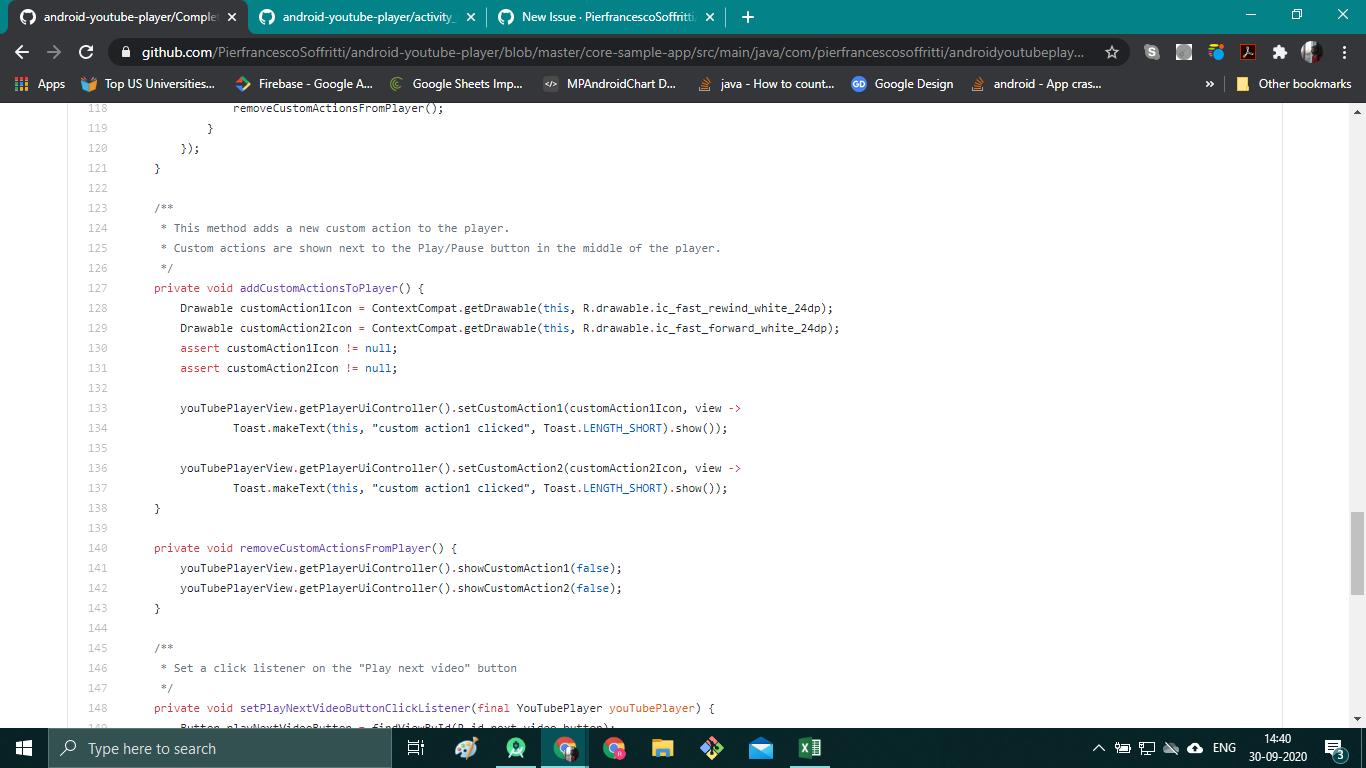
Android-youtube-player: How to implement 'skip 10 seconds' in complete example? Right now it displays a toast message
 raghavagg01
All 16 comments
Well, your question is quite extensive without any code we could just work on. If I had some time I could program you a full solution with a youtube like effect with double taps and so on. But instead, let me provide you some hints how you can approach your problem yourself:
- You are right with your custom actions, this is required if you want to provide a "skip 10 seconds" button on the panel. If you cannot trigger a button click event with your provided code just let me know
- Next you have to get the current time, if you like the duration of your video too (for handling the end of video when skipped event) whenever the user clicks on "skip 10secs". This can be achieved with the
YouTubePlayerListener. For how you can integrate such a listener see my comment in #619. - Use the
YouTubePlayer.seekTo(seconds)method to move your video to the calculated seconds (justcurrentSeconds + 10). Notice: theseekTo()method works only for already playing videos (might be a bug).
Let us know if that was helpful.
 malliaridis
on 30 Sep 2020
malliaridis
on 30 Sep 2020
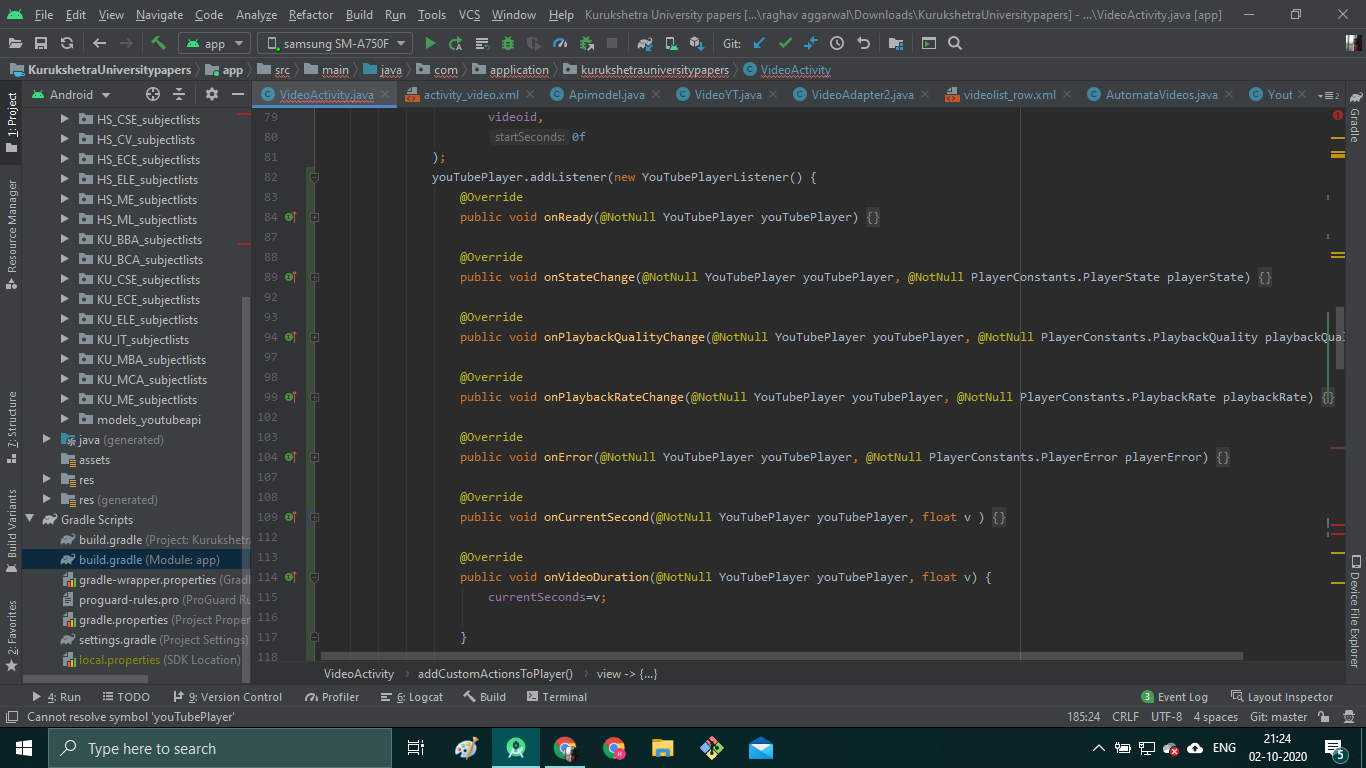
I have added the Listener but i just couldn't understand how to implement it. This is my file where i have written the code VideoActivity.java
raghavagg01
on 1 Oct 2020
Well, the listener has a couple of functions you have to override and can use to get the duration. Just add on line 81 the listener you added to the youTubePlayer starting at line 131 . In the function on line 163 called onVideoDuration() you get the video duration in seconds as a parameter. There you can just set your variable for example that holds the video duration.
malliaridis
on 2 Oct 2020
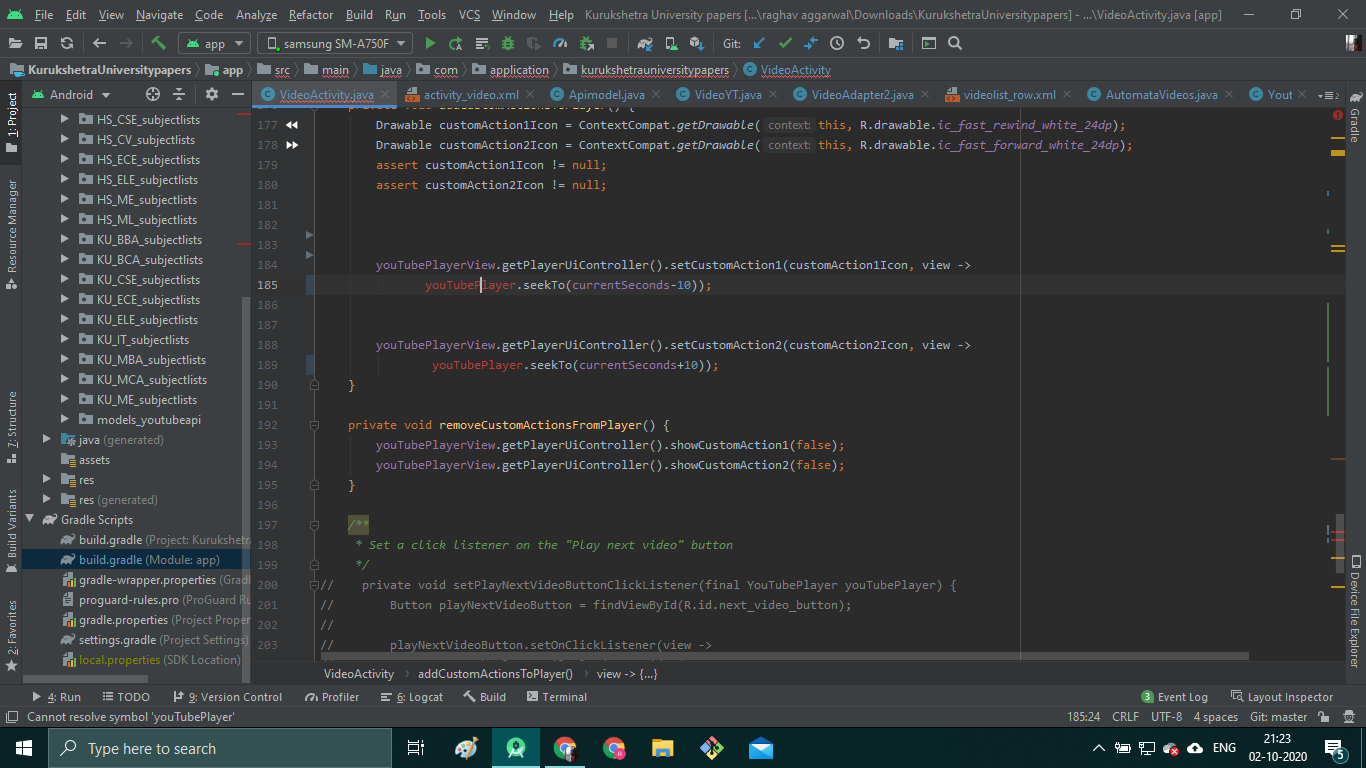
Thanks for the response, I have followed the steps but turns out i don't know how to initialize Youtube player object as i can't understand the difference between YoutubePlayerView and YoutubePlayer. Kindly refer to the file i mentioned in my previous comment u will see that i haven't initialized it.
raghavagg01
on 2 Oct 2020
I have created a local variable but it needs to be initialized

raghavagg01
on 2 Oct 2020
YouTubePlayerView is just the View object, this that gets inflated with a layout inflater from the layout. It is same as a Button, a TextView and so on. So you initialize it indirectly by using setContentView() and fetching an instance with findViewById().
You can assume that the YouTubePlayer is just your data model (not very sure about that, therefore just assume). This holds some information like duration and current seconds and provides actions like play, pause and mute. This object gets usually indirectly initialized together with your YouTubePlayerView when you provide in your XML-file a video URL.
When the YouTubePlayerView and YouTubePlayer are completely initialized, you can get an instance of the YouTubePlayer from the YouTubePlayerView with a listener called YouTubePlayerListener, which declares a onReady method which you have to implement (to say what to do when ready / completely initialized). An example implementation could look like this:
public class SimpleExampleActivity extends AppCompatActivity {

    @Override
    protected void onCreate(Bundle savedInstanceState) {
        super.onCreate(savedInstanceState);
        setContentView(R.layout.activity_simple_example);

        YouTubePlayerView youTubePlayerView = findViewById(R.id.youtube_player_view);
        youTubePlayerView.addYouTubePlayerListener(new YouTubePlayerListener() {
            @Override
            public void onReady(YouTubePlayer youTubePlayer) {
                // TODO Do something with the YoutubePlayer instance passed as parameter
            }

            @Override
            public void onStateChange(YouTubePlayer youTubePlayer, PlayerConstants.PlayerState state) {
                // TODO Do something when the state of the youtube player changes, like paused or played
            }

            @Override
            public void onPlaybackQualityChange(YouTubePlayer youTubePlayer, PlayerConstants.PlaybackQuality playbackQuality) {
                // TODO Do something when the playback quality changes
            }

            @Override
            public void onPlaybackRateChange(YouTubePlayer youTubePlayer, PlayerConstants.PlaybackRate playbackRate) {
                // TODO and so on
            }

            @Override
            public void onError(YouTubePlayer youTubePlayer, PlayerConstants.PlayerError error) {
                // TODO and so on
            }

            @Override
            public void onCurrentSecond(YouTubePlayer youTubePlayer, float second) {
                // TODO and so on
            }

            @Override
            public void onVideoDuration(YouTubePlayer youTubePlayer, float duration) {
                // TODO Use the duration parameter that holds the actual duration of the video
            }

            @Override
            public void onVideoLoadedFraction(YouTubePlayer youTubePlayer, float loadedFraction) {
                // TODO and so on
            }

            @Override
            public void onVideoId(YouTubePlayer youTubePlayer, String videoId) {
                // TODO and so on
            }

            @Override
            public void onApiChange(YouTubePlayer youTubePlayer) {
                // TODO and so on
            }
        });
        getLifecycle().addObserver(youTubePlayerView);
    }
}
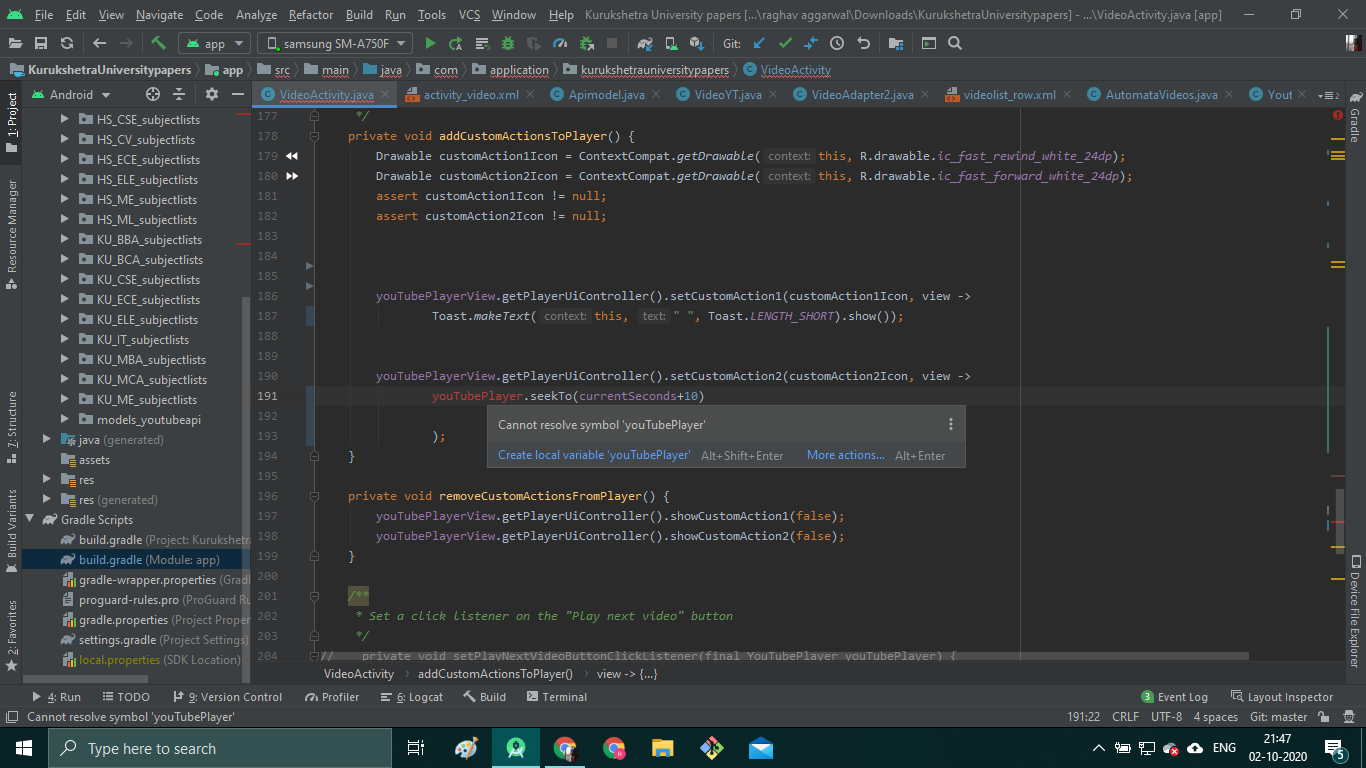
I am getting this message. This is my updated file VideoActivity.java
raghavagg01
on 2 Oct 2020
Yeah, that's because you have no variable declared in the class level. Are you new in java development?
malliaridis
on 2 Oct 2020
Here is a way you could initialize / declare the variables based on your activity.
public class VideoActivity extends AppCompatActivity {
    private YouTubePlayerView youTubePlayerView;
    private FullScreenHelper fullScreenHelper = new FullScreenHelper(this);
    private float currentSeconds;
    private float duration;
    private YouTubePlayer youTubePlayer;
    String videoid;

    @Override
    protected void onCreate(Bundle savedInstanceState) {

        super.onCreate(savedInstanceState);
        setContentView(R.layout.activity_video);
        Intent intent1 = getIntent();
        videoid = intent1.getStringExtra("videoId");
        youTubePlayerView = findViewById(R.id.youtube_player_view);

        initYouTubePlayerView();
    }

    @Override
    public void onConfigurationChanged(Configuration newConfiguration) {
        super.onConfigurationChanged(newConfiguration);
        youTubePlayerView.getPlayerUiController().getMenu().dismiss();
    }

    @Override
    public void onBackPressed() {
        if (youTubePlayerView.isFullScreen())
            youTubePlayerView.exitFullScreen();
        else
            super.onBackPressed();
    }

    private void initYouTubePlayerView() {
        getLifecycle().addObserver(youTubePlayerView);

        youTubePlayerView.addYouTubePlayerListener(new YouTubePlayerListener() {

            @Override
            public void onReady(@NonNull YouTubePlayer player) {
                youTubePlayer = player;

                addFullScreenListenerToPlayer();
            }

            @Override
            public void onApiChange(YouTubePlayer youTubePlayer) {

            }

            @Override
            public void onVideoId(YouTubePlayer youTubePlayer, String videoId) {

            }

            @Override
            public void onVideoLoadedFraction(YouTubePlayer youTubePlayer, float loadedFraction) {

            }

            @Override
            public void onVideoDuration(YouTubePlayer youTubePlayer, float d) {
                duration = d;
            }

            @Override
            public void onCurrentSecond(YouTubePlayer youTubePlayer, float second) {
                currentSeconds = second;
            }

            @Override
            public void onError(YouTubePlayer youTubePlayer, PlayerConstants.PlayerError error) {

            }

            @Override
            public void onPlaybackRateChange(YouTubePlayer youTubePlayer, PlayerConstants.PlaybackRate playbackRate) {

            }

            @Override
            public void onPlaybackQualityChange(YouTubePlayer youTubePlayer, PlayerConstants.PlaybackQuality playbackQuality) {

            }

            @Override
            public void onStateChange(YouTubePlayer youTubePlayer, PlayerConstants.PlayerState state) {

            }
        });
    }

    private void addFullScreenListenerToPlayer() {
        youTubePlayerView.addFullScreenListener(new YouTubePlayerFullScreenListener() {
            @Override
            public void onYouTubePlayerEnterFullScreen() {
                setRequestedOrientation(ActivityInfo.SCREEN_ORIENTATION_LANDSCAPE);
                fullScreenHelper.enterFullScreen();

                addCustomActionsToPlayer();
            }

            @Override
            public void onYouTubePlayerExitFullScreen() {
                setRequestedOrientation(ActivityInfo.SCREEN_ORIENTATION_PORTRAIT);
                fullScreenHelper.exitFullScreen();

                removeCustomActionsFromPlayer();
            }
        });
    }

    private void addCustomActionsToPlayer() {
        Drawable customAction1Icon = ContextCompat.getDrawable(this, R.drawable.ic_fast_rewind_white_24dp);
        Drawable customAction2Icon = ContextCompat.getDrawable(this, R.drawable.ic_fast_forward_white_24dp);
        assert customAction1Icon != null;
        assert customAction2Icon != null;

        youTubePlayerView.getPlayerUiController().setCustomAction1(customAction1Icon, view ->
                Toast.makeText(this, " ", Toast.LENGTH_SHORT).show());


        youTubePlayerView.getPlayerUiController().setCustomAction2(customAction2Icon, view ->
                youTubePlayer.seekTo(currentSeconds + 10)

        );
    }

    private void removeCustomActionsFromPlayer() {
        youTubePlayerView.getPlayerUiController().showCustomAction1(false);
        youTubePlayerView.getPlayerUiController().showCustomAction2(false);
    }
}
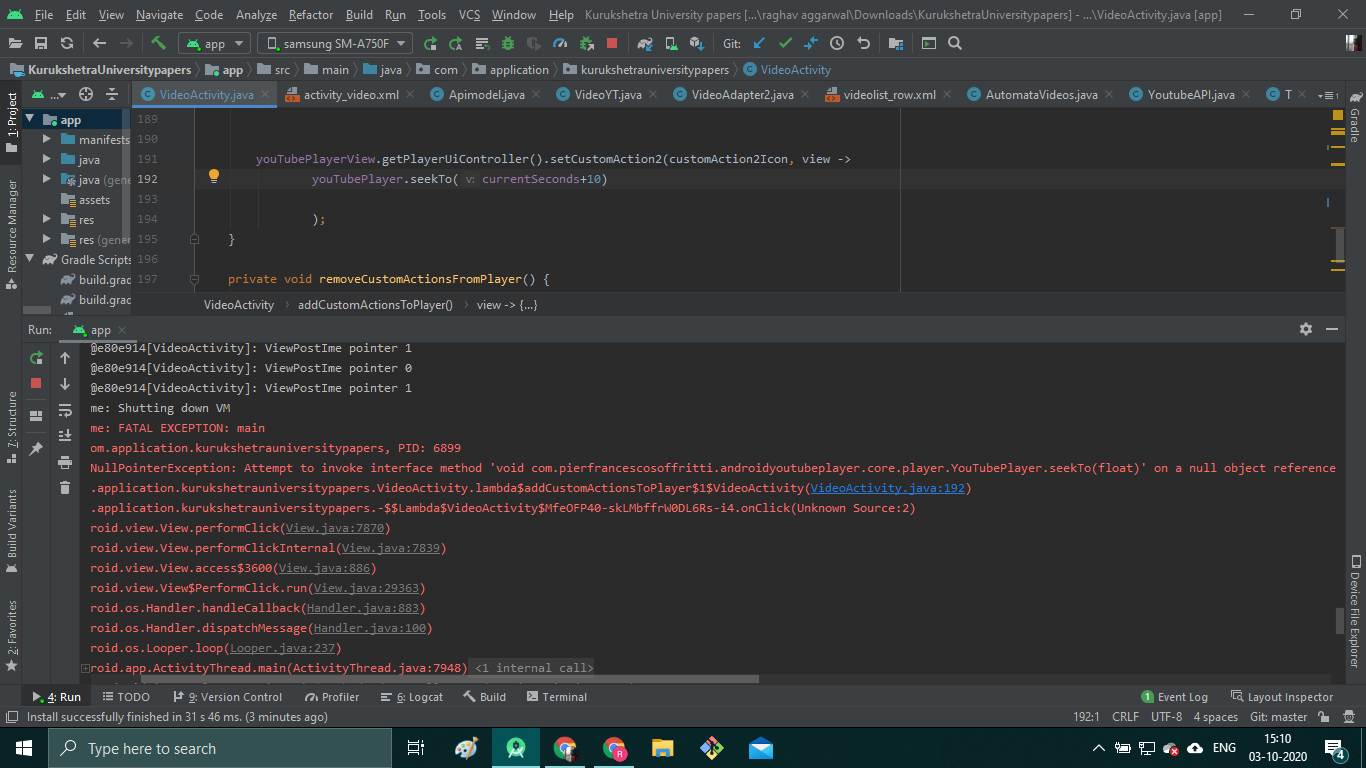
I initialized the YoutubePlayer variable earlier as u said but i was getting this error while i clicked on the custom action button. That's why i removed the declaration at class level
raghavagg01
on 3 Oct 2020
@malliaridis answered the question in great details, I am going to close this issue. Feel free to continue the discussion if you want.
 PierfrancescoSoffritti
on 3 Oct 2020
PierfrancescoSoffritti
on 3 Oct 2020
I really appreciate the effort, probably the answer to my last comment will solve my issue. Regards
raghavagg01
on 3 Oct 2020
@raghavagg01 it seems like you haven't completely / correctly initialized your video at this moment. Your action is only executable if your object is not null, and that is only the case if you provided a video id and cued / loaded the video (this can happen directly or indirectly).
Since I haven't a whole / detailed overview of your project, if you like, you can give me access to a project with that problem and when I find some time I can make a commit where I fix this minor issue. But the solution is for sure not far away. :)
malliaridis
on 3 Oct 2020
Turns out i got the mistake, it's working properly now. Thanks a lot @malliaridis for answers and @PierfrancescoSoffritti for such an amazing Github library :)
raghavagg01
on 3 Oct 2020
Ah ok. I was ready to commit a fix but had to fork the project first. Happy to hear that it's working now. :)
EDIT: If you still interested in the solution, check the changes I've made.
malliaridis
on 3 Oct 2020
Code looks more readable now, if u can create a pull request i will merge it :)
raghavagg01
on 3 Oct 2020
Related issues
 hetsgandhi
·
3Comments
hetsgandhi
·
3Comments
 cnbcyln
·
8Comments
cnbcyln
·
8Comments
 DorenBoust
·
6Comments
DorenBoust
·
6Comments
 heeyounglee
·
3Comments
heeyounglee
·
3Comments
 rajeefmk
·
5Comments
rajeefmk
·
5Comments
Most helpful comment
Well, your question is quite extensive without any code we could just work on. If I had some time I could program you a full solution with a youtube like effect with double taps and so on. But instead, let me provide you some hints how you can approach your problem yourself:
YouTubePlayerListener. For how you can integrate such a listener see my comment in #619.YouTubePlayer.seekTo(seconds)method to move your video to the calculated seconds (justcurrentSeconds + 10). Notice: theseekTo()method works only for already playing videos (might be a bug).Let us know if that was helpful.