Android-youtube-player: Video shows blank screen while audio and controls work
Hello, I promise I've read all the threads on issues related to this and I've tried all the suggested remedies but still experiencing the following issues.
This is the screen that I see, the video view is basically a blank screen but the audio and controls work.

Here is my resource file, copied straight from the sample app:
`
android:orientation="vertical"
xmlns:app="http://schemas.android.com/apk/res-auto"
xmlns:android="http://schemas.android.com/apk/res/android">
    <com.pierfrancescosoffritti.androidyoutubeplayer.core.player.views.YouTubePlayerView
        android:id="@+id/youtube_player_view"
        android:layout_width="match_parent"
        android:layout_height="wrap_content"
        app:autoPlay="true"
        app:videoId="YE7VzlLtp-4"
        app:showYouTubeButton="false"
        app:showSeekBar="false" />
`
Here is my Activity code:
override fun onCreate(state: Bundle?) {
        super.onCreate(state)
        setContentView(R.layout.activity_ads_video_detail)
        playerView = findViewById(R.id.youtube_player_view)
        lifecycle.addObserver(playerView)
}
The environment I'm testing on:
- Lib version: 10.0.5
- Kotlin
- Pixel 2 Emulator, API 23, x86_64
- Also reproduced on real Pixel 3 Device running API 28
- Also tried setting hardwareAccelerated=true in the manifest
I don't think it's a code related issue, but I'm running out of ideas on what to try next... please help! Thank you!
 jerbotron
All 11 comments
It is expected not to work on emulators, should work fine on pixel 3 though.
 PierfrancescoSoffritti
on 11 Nov 2019
PierfrancescoSoffritti
on 11 Nov 2019
But the sample app works on the same emulator?
It is expected not to work on emulators, should work fine on pixel 3 though.
jerbotron
on 12 Nov 2019
Repros also on a real device (OnePlus)
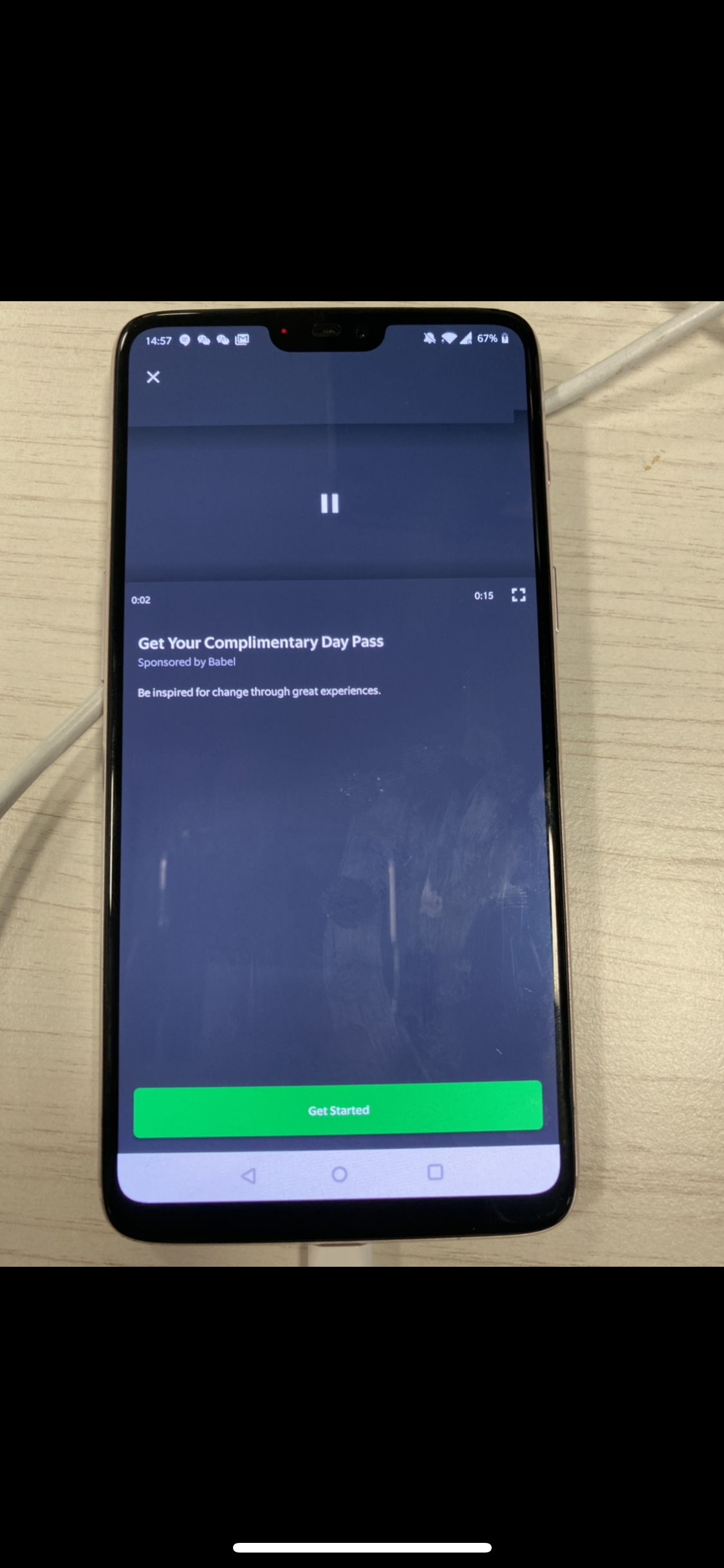
jerbotron
on 13 Nov 2019
Do you have the same problem with the sample app? if not there must be something wrong with the way you're using the library.
PierfrancescoSoffritti
on 13 Nov 2019
Hello, I'm having this same issue did you managed to solve it?
 CandinhoX
on 24 Feb 2020
CandinhoX
on 24 Feb 2020
I'm also stuck with this problem, tried everything but still no luck.
 brookmg
on 28 Mar 2020
brookmg
on 28 Mar 2020
@AbelTesfaye found the solution for this. Turns out I didn't enable hardware acceleration in the manifest. Thanks
in the AndroidManifest.xml
<application
        ...
        android:hardwareAccelerated="true">
        ...
</application>
@AbelTesfaye found the solution for this. Turns out I didn't enable hardware acceleration in the manifest. Thanks
in the
AndroidManifest.xml<application ... android:hardwareAccelerated="true"> ... </application>
Its working awesome...Like a magic...
Thanks a lot...
 vikasjplutus
on 14 May 2020
vikasjplutus
on 14 May 2020
@AbelTesfaye found the solution for this. Turns out I didn't enable hardware acceleration in the manifest. Thanks
in the
AndroidManifest.xml<application ... android:hardwareAccelerated="true"> ... </application>
thank you too!! (thanks to the owner too @PierfrancescoSoffritti )
that solution works
 kinsog
on 10 Jun 2020
kinsog
on 10 Jun 2020
@AbelTesfaye found the solution for this. Turns out I didn't enable hardware acceleration in the manifest. Thanks
in the
AndroidManifest.xml<application ... android:hardwareAccelerated="true"> ... </application>
Was the solution for me as well. @PierfrancescoSoffritti Can you please mark this as the solution as I have seen this in closed tickets as well as a lot of comments regarding this issue.
 StefanVanStaden
on 21 Jun 2020
StefanVanStaden
on 21 Jun 2020
It's already in the doc.
PierfrancescoSoffritti
on 25 Jun 2020
Related issues
 MatanKoby
·
4Comments
MatanKoby
·
4Comments
 zeropol2
·
3Comments
zeropol2
·
3Comments
 StevenNick88
·
6Comments
StevenNick88
·
6Comments
 kenmobi
·
7Comments
kenmobi
·
7Comments
 cnbcyln
·
8Comments
cnbcyln
·
8Comments
Most helpful comment
@AbelTesfaye found the solution for this. Turns out I didn't enable hardware acceleration in the manifest. Thanks
in the
AndroidManifest.xml