Android-youtube-player: Memory not being released on destroying activity
I have observed that when activity is destroyed then all the instances of the library code are not finished and thus the memory taken by library code isn't released.
Could you please look into it.
 divyas93
All 7 comments
Hey, how do you know this is happening?
Feel free to send a pull request.
 PierfrancescoSoffritti
on 23 Oct 2019
PierfrancescoSoffritti
on 23 Oct 2019
I use your library as an item in my RecyclerView in an Activity. Maybe you need to check the internal webview.
Below is my LeakCanary info:
ApplicationLeak(className=com.abc.ArticleDetailActivity, leakTrace=
┬
├─ org.chromium.device.power_save_blocker.PowerSaveBlocker
│ Leaking: NO (a class is never leaking)
│ GC Root: Global variable in native code
│ ↓ static PowerSaveBlocker.b
│ ~
├─ java.util.HashMap
│ Leaking: UNKNOWN
│ ↓ HashMap.table
│ ~
├─ java.util.HashMap$Node[]
│ Leaking: UNKNOWN
│ ↓ array HashMap$Node[].[0]
│ ~
├─ java.util.HashMap$Node
│ Leaking: UNKNOWN
│ ↓ HashMap$Node.key
│ ~
├─ com.pierfrancescosoffritti.androidyoutubeplayer.core.player.views.WebViewYouTubePlayer
│ Leaking: YES (View.mContext references a destroyed activity)
│ mContext instance of com.abc.ArticleDetailActivity with mDestroyed = true
│ View#mParent is null
│ View#mAttachInfo is null (view detached)
│ View.mWindowAttachCount = 2
│ ↓ WebViewYouTubePlayer.mContext
╰→ com.abc.ArticleDetailActivity
Leaking: YES (WebViewYouTubePlayer↑ is leaking and Activity#mDestroyed is true and ObjectWatcher was watching this)
key = 4ee2961d-1584-4a7a-8eab-d2c91687a56a
watchDurationMillis = 6575
retainedDurationMillis = 1567
, retainedHeapByteSize=295071)
 acvt007
on 25 Oct 2019
acvt007
on 25 Oct 2019
Hello,
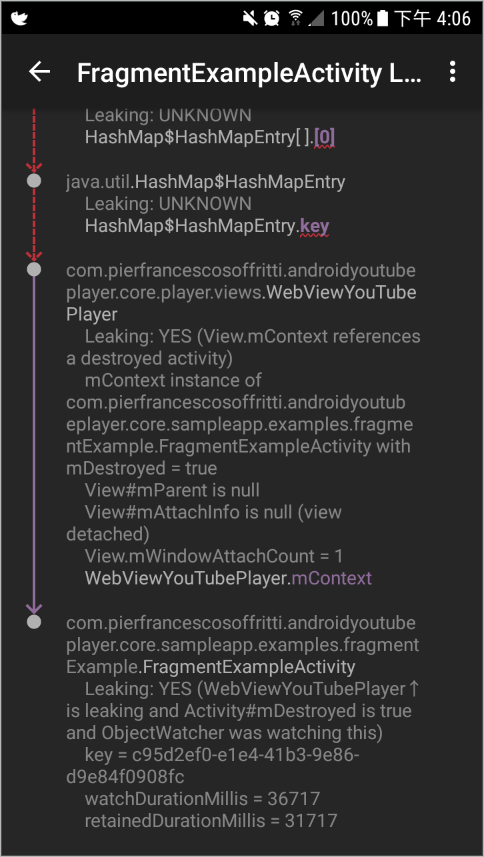
This problem can be reproduced in Sample App.
After adding debugImplementation 'com.squareup.leakcanary:leakcanary-android:2.0-beta-3' into build.gradle of core-sample-app, launch "ayp API" and click "Fragment Example". Then press back key to go back to main page. You will see leakcanary reports the leak(refer to the attachment).
 IvanLu101
on 6 Nov 2019
IvanLu101
on 6 Nov 2019
Thanks for the info. These days I don't have much time to work on the library, pull requests are welcome!
PierfrancescoSoffritti
on 7 Nov 2019
I use your library as an item in my RecyclerView in an Activity. Maybe you need to check the internal webview.
Below is my LeakCanary info:
ApplicationLeak(className=com.abc.ArticleDetailActivity, leakTrace=
┬
├─ org.chromium.device.power_save_blocker.PowerSaveBlocker
│ Leaking: NO (a class is never leaking)
│ GC Root: Global variable in native code
│ ↓ static PowerSaveBlocker.b
│ ~
├─ java.util.HashMap
│ Leaking: UNKNOWN
│ ↓ HashMap.table
│~
├─ java.util.HashMap$Node[]
│ Leaking: UNKNOWN
│ ↓ array HashMap$Node[].[0]
│~
├─ java.util.HashMap$Node
│ Leaking: UNKNOWN
│ ↓ HashMap$Node.key
│ ~
├─ com.pierfrancescosoffritti.androidyoutubeplayer.core.player.views.WebViewYouTubePlayer
│ Leaking: YES (View.mContext references a destroyed activity)
│ mContext instance of com.abc.ArticleDetailActivity with mDestroyed = true
│ View#mParent is null
│ View#mAttachInfo is null (view detached)
│ View.mWindowAttachCount = 2
│ ↓ WebViewYouTubePlayer.mContext
╰→ com.abc.ArticleDetailActivity
Leaking: YES (WebViewYouTubePlayer↑ is leaking and Activity#mDestroyed is true and ObjectWatcher was watching this)
key = 4ee2961d-1584-4a7a-8eab-d2c91687a56a
watchDurationMillis = 6575
retainedDurationMillis = 1567
, retainedHeapByteSize=295071)
same problem with me
 samankit
on 24 Mar 2020
samankit
on 24 Mar 2020
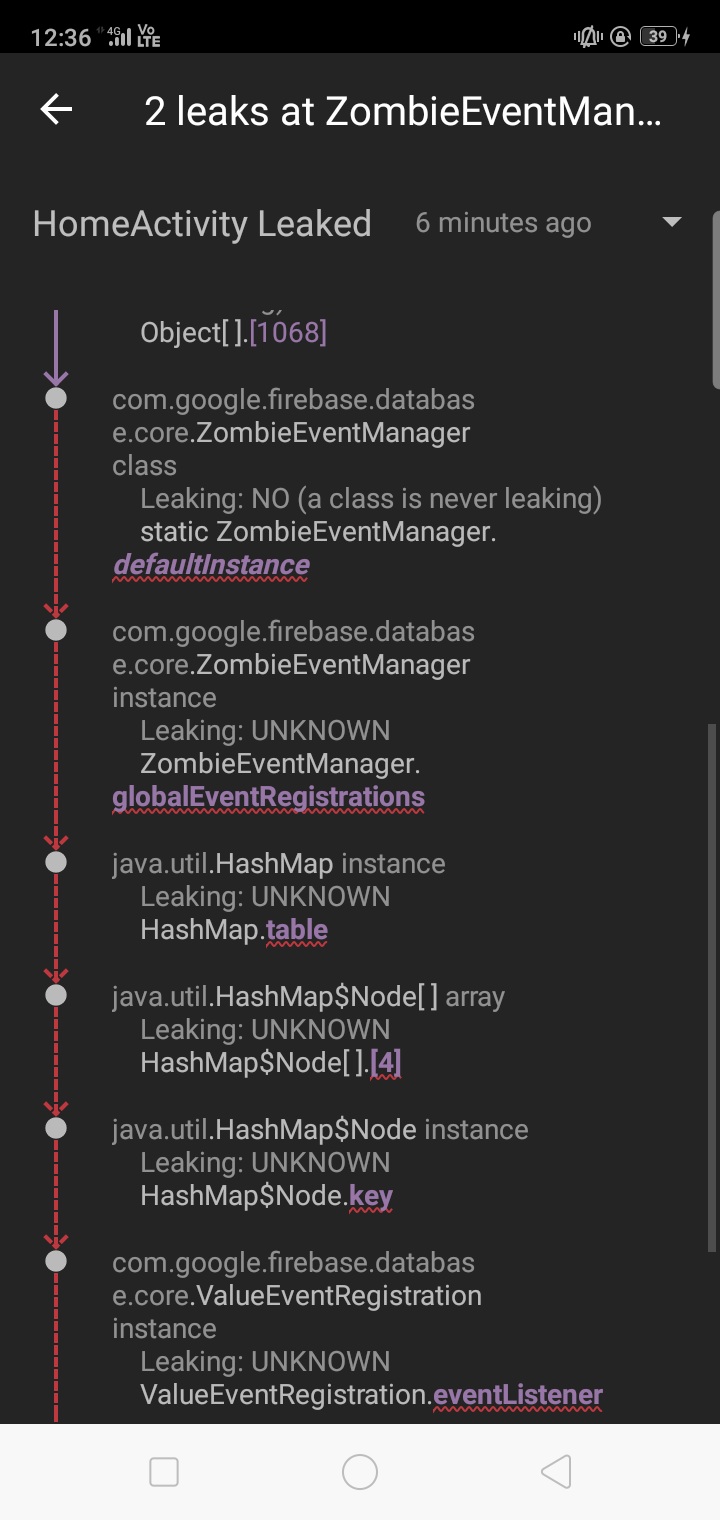
how to resolve it?
samankit
on 24 Mar 2020
I'm also seeing the same issue reported by Logcat on Android Studio. A workaround that seems to work is to override onStop in my fragment as follows
override fun onStop() {
        super.onStop()
        youtubePlayerView.release()
    }
I understand this is not the best option as I'm doing more than needed but at least it unregisters the networkListener
Proposed fix is to simply call context.unregisterReceiver(networkListener) in the onStop method of LegacyYoutubePlayerView ...
@PierfrancescoSoffritti I have created a PR for a proposed fix... this is my 1st PR ever to an open-source project so I hope I'm doing things right.
Regards,
Adam
 aalloul
on 18 May 2020
aalloul
on 18 May 2020
Related issues
 theforec
·
8Comments
theforec
·
8Comments
 cnbcyln
·
8Comments
cnbcyln
·
8Comments
 mankidal19
·
8Comments
mankidal19
·
8Comments
 uzaysan
·
7Comments
uzaysan
·
7Comments
 raghavagg01
·
5Comments
raghavagg01
·
5Comments
Most helpful comment
I'm also seeing the same issue reported by Logcat on Android Studio. A workaround that seems to work is to override onStop in my fragment as follows
I understand this is not the best option as I'm doing more than needed but at least it unregisters the
networkListenerProposed fix is to simply call
context.unregisterReceiver(networkListener)in theonStopmethod ofLegacyYoutubePlayerView...@PierfrancescoSoffritti I have created a PR for a proposed fix... this is my 1st PR ever to an open-source project so I hope I'm doing things right.
Regards,
Adam