Android-runtime: Console.log broken in Chrome DevTools
This is a:
- [x] Bug report
- [ ] Feature request
Is this a real problem/a really cool feature?
- [x] I checked and verified that the Feature/Issue is not already logged on SO
- [x] I checked and verified that the Feature/Issue is not already logged on Github issues
Context:
The content of the first console.log ever to execute, after the Chrome DevTools are connected, will replace all other console logs displayed in the Console Panel in Chrome DevTools. The bug appears in Chrome 62 and up.
Note: The problem does not seem present inside VSCode, likely because the VSCode console prints out the CLI output, as opposed to the Inspector Console.
Your environment (if applicable):
- CLI: 3.3.0
- Runtime version: 3.3.1 (irrelevant)
- Cross-platform modules: 3.3.0
- Plugin(s): irrelevant
- OS: irrelevant
- Node and npm: irrelevant
- Device/Emulator: Android SDK Emulator API 26
- Android API Level: 26
Type of error (if applicable):
- [ ] Build-time
- [x] Run-time
Possible solution/implementation:
Implement the Log domain of Chrome DevTools and send messages through its proper https://chromedevtools.github.io/devtools-protocol/tot/Log/#event-entryAdded event.
Reproduction steps/repo (if applicable):
- Open a debug session in Chrome DevTools using
tns debug androidand following the on-screen instructions. console.log("1");console.log("2");- Console logging anything after the "1" string will not display the true text, but instead show
"1"
 petekanev
All 5 comments
The good new is that every console.log has its own value.
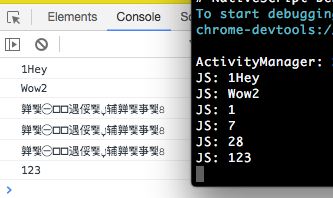
However, with the current next version of android-runtime (3.4.1-2018-02-06-02) it looks like if you console.log some number that has 1 or 2 digits (it works for 3 digits number and letter and number) Chrome DevTools' console prints strange value. Values are correct in terminal.
Chrome version 64.0.3282.167
 Natalia-Hristova
on 16 Feb 2018
Natalia-Hristova
on 16 Feb 2018
@Natalia-Hristova I'll check that out, thanks for reporting the problem!
petekanev
on 16 Feb 2018
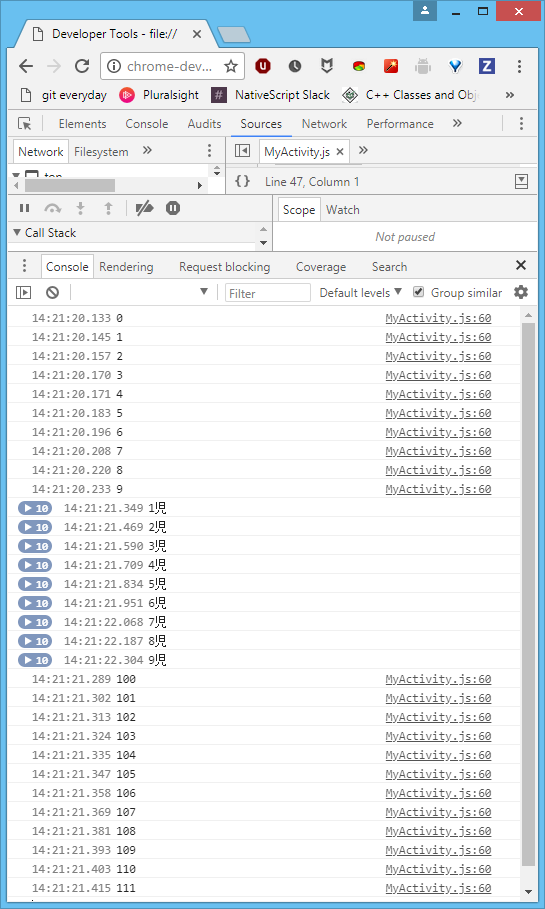
@Natalia-Hristova I looped 1 through 112, it would appear that all 2-digit numbers display similar behavior. I am almost sure it's something to do with the encoding that the strings are sent with. I'll let you know when it's been addressed.
petekanev
on 21 Feb 2018
I'll also note that characters different from those supported by the utf-8 encoding may appear as gibberish. I have yet to figure out how to take the console.log arguments and pass them on as utf-16-encoded strings.
I'll likely open a new issue after the new console implementation is released.
petekanev
on 21 Feb 2018
The issue is fixed and will be available in the next official version of android-runtime .
Natalia-Hristova
on 22 Feb 2018
Related issues
 romulowspp
·
4Comments
romulowspp
·
4Comments
 EddyVerbruggen
·
5Comments
EddyVerbruggen
·
5Comments
 zahid-dapperapps
·
3Comments
zahid-dapperapps
·
3Comments
 theharshalpatil
·
4Comments
petekanev
·
4Comments
theharshalpatil
·
4Comments
petekanev
·
4Comments