Android-runtime: Issue while calling activity
_From @patelhr on September 30, 2017 3:34_
I have crated method to call activity methods.but my existing application activity methods contain context and calling some other java virtual methods.So is there any solution for this problem?
I am calling method using this
var test = new com.tns.TestObject();
console.log(test.doSomething());
It will call java method but it don't have activity context and calling failed to virtual method.
So is there any way in native script to call activity method with context?
_Copied from original issue: NativeScript/nativescript-angular#1016_
 NickIliev
All 7 comments
@patelhr
You can access the Android application context with
import { android } from "tns-core-modules/application";
var context = android.context;
However, can you please provide additional information on what is the goal you are trying to achieve?
A sample project with the code involved would be of great help as well.
NickIliev
on 2 Oct 2017
I have integrated nativescript with my existing android application.
Here I want to call existing android app activity from my ts file of nativescript
Here my ts file code for calling activity
----->app.component.ts
ngOnInit() {
console.log("forground"+application.android.foregroundActivity)
let intent: android.content.Intent = new android.content.Intent(
application.android.foregroundActivity,
com.cameracountmodule.activity.CameraActivity.class
);
application.android.foregroundActivity.startActivityForResult(intent);
}
Here my activity code of existing app----->
package com.cameracountmodule.activity;
public class CameraActivity extends AppCompatActivity {
//some code
}
When I am run this code it throw me error--->
"TypeError: Cannot read property 'activity' of undefined in nativescript"
java.lang.RuntimeException: Unable to resume activity {com.visualogyx.app.dev/com.visualogyx.app.activity.CorpacNativeScriptActivity}: java.lang.NullPointerException: Attempt to invoke virtual method 'android.os.Handler android.support.v4.app.FragmentHostCallback.getHandler()' on a null object reference
 patelhr
on 2 Oct 2017
patelhr
on 2 Oct 2017
Hey @patelhr please provide a sample project in a github repo.
It is not clear how you've done the integration, but it sounds like you cannot use com.cameracountmodule.activity.CameraActivity in JavaScript because there is no metadata generated for your existing android application's classes.
If that is indeed your case, you can workaround by using reflection. It should look something like this:
let cameraActivityClass = java.lang.Class.forName("com.cameracountmodule.activity.CameraActivity");

ngOnInit() {
 console.log("forground"+application.android.foregroundActivity)
 let intent: android.content.Intent = new android.content.Intent(
 application.android.foregroundActivity,
 cameraActivityClass);

 application.android.foregroundActivity.startActivityForResult(intent);
}
 petekanev
on 2 Oct 2017
petekanev
on 2 Oct 2017
@Pip3r4o Thanks for answer
Here is sample of my application flow
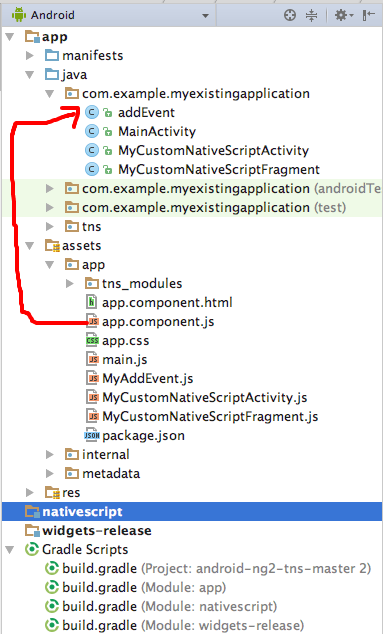
1.So is there possible to call this activity?How?
2.If yes then can we access that activity public method?
patelhr
on 2 Oct 2017
@patelhr As I mentioned in my previous comment - yes, you can call that activity, I've also left a code sample how that can be achieved.
2) The activity public methods (addEvent) will need to be called from JS using Java reflection, since no metadata is generated for your classes in the original Android Studio project.
petekanev
on 2 Oct 2017
@Pip3r4o Again thank you for your quick reply.
Can you tell how to call method of activity using reflection in nativescript.
TS file -->>
ngOnInit() {
const cameraActivityClass = java.lang.Class.forName('com.visualogyx.app.activity.Hello');
console.log(cameraActivityClass.boring());
}
JAVA file -->
package com.visualogyx.app.activity;
import android.util.Log;
public class Hello extends android.app.Activity {
public Hello(){
Log.d("Hello","sds");
}
public void onCreate(android.os.Bundle param_0, android.os.PersistableBundle param_1) {
Log.d("Hello","sds");
System.out.println("hello from create");
}
public String boring(){
    return "Hello boring"
}
}
Error ====>
error TS2339: Property 'boring' does not exist on type 'Class'.
patelhr
on 3 Oct 2017
@patelhr any class deriving from android.app.Activity in android is a bit special, and should not be initialized with a constructor, rather leave that to Android's ActivityManager to handle.
Having said that, you need to get a reference to the existing activity if you want to call its member method boring. If you can't however, ensure that the Activity is running, and you have no easy way of retrieving its instance, then the method should be made static. For the purposes of the example I changed boring to be static in Java:
public class Hello extends android.app.Activity
public void onCreate(android.os.Bundle param_0, android.os.PersistableBundle param_1) {
Log.d("Hello","sds");
System.out.println("hello from create");
}

public static String boring(){
    return "Hello boring"
}
}
Now using reflection (if the class is not in our NativeScript project, but instead in the purely Android one) we call boring like so:
let helloClass = java.lang.Class.forName("com.visualogyx.app.activity");
let boringMethod = helloClass.getMethod("boring", [] /* empty array of parameters */);

ngOnInit() {
 console.log("forground"+application.android.foregroundActivity)
 let intent: android.content.Intent = new android.content.Intent(
 application.android.foregroundActivity,
 helloClass );

boringMethod.invoke(null /* no class instance is needed when calling static method */, [] /* no parameters */);

 application.android.foregroundActivity.startActivityForResult(intent);
}
Similarly, if you change the signature of your class or method, you will need to work out the reflection yourself.
Closing this as a workaround for the original issue was provided.
petekanev
on 3 Oct 2017
Related issues
 Natalia-Hristova
·
3Comments
Natalia-Hristova
·
3Comments
 triniwiz
·
4Comments
triniwiz
·
4Comments
 Plamen5kov
·
4Comments
Plamen5kov
·
4Comments
 x4080
·
5Comments
x4080
·
5Comments
 NathanaelA
·
4Comments
NathanaelA
·
4Comments
Most helpful comment
@patelhr
You can access the Android application context with
However, can you please provide additional information on what is the goal you are trying to achieve?
A sample project with the code involved would be of great help as well.