Android-runtime: Gradle daemon setting 'org.gradle.parallel=true' not supported
@KingAndroid commented on Thu Jul 06 2017
I've upgrade ns.
| Component | Current version | Latest version | Information |
| - | - | - | - |
| nativescript | 3.1.1 | 3.1.1 | Up to date |
| tns-core-modules | 3.1.0 | 3.1.0 | Up to date |
| tns-android | 3.1.1 | 3.1.1 | Up to date |
| tns-ios | 3.1.0 | 3.1.0 | Up to date |
Now I can compile ios successfully, but not on android.
While I compile android, it stops on here.
`:asbg:generateBindings
Exception in thread "main" java.lang.NullPointerException
at org.nativescript.staticbindinggenerator.Generator.readDir(Generator.java:289)
at org.nativescript.staticbindinggenerator.Generator.readClasses(Generator.java:244)
at org.nativescript.staticbindinggenerator.Generator.
at org.nativescript.staticbindinggenerator.Generator.
at org.nativescript.staticbindinggenerator.Main.main(Main.java:15)
:asbg:generateBindings FAILED
FAILURE: Build failed with an exception.
Where:
Build file '/Users/admin/Desktop/WORK/barcode/platforms/android/build-tools/android-static-binding-generator/build.
gradle' line: 254What went wrong:
Execution failed for task ':asbg:generateBindings'.`
Could you please let me know resolution and why?
Thank you.
@Pip3r4o commented on Thu Jul 06 2017
Hey @KingAndroid, in order to help you, we need additional information regarding your setup, as well as the plugins used in your project, so ideally sharing your package.json content, and whether you extend a native class would help us.
In addition you could run the build with the --log trace flag like so - tns run android --log trace and share the output, so we get a clue at what might be failing the build.
Please fill out the template accordingly when logging an issue or a feature request in the future.
Thank you!
@KingAndroid commented on Wed Jul 12 2017
Hey @Pip3r4o
I am sorry, I have tried for 5 hrs and I give up.
I have downgrade 3.0.3 and all works well now.
Here are what I can provide for now.
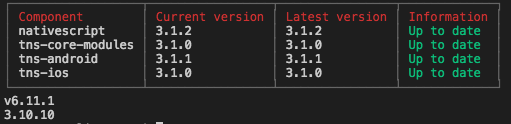
node : 6.11.0
npm : 3.10.0
Package.json
{
  "nativescript": {
    "id": "uk.co.barcodeapp",
    "tns-android": {
      "version": "3.0.1"
    },
    "tns-ios": {
      "version": "3.0.1"
    }
  },
  "dependencies": {
    "moment": "2.18.1",
    "nativescript-geolocation": "^3.0.0",
    "nativescript-ios-uuid": "^1.0.0",
    "nativescript-loading-indicator": "^2.3.2",
    "nativescript-plugin-firebase": "^3.12.0",
    "nativescript-screen-orientation": "^2.0.0",
    "tns-core-modules": "^3.0.1"
  },
  "devDependencies": {
    "babel-traverse": "^6.25.0",
    "babel-types": "^6.25.0",
    "babylon": "^6.17.3",
    "lazy": "^1.0.11"
  }
}
Thank you.
@sveri commented on Sun Jul 09 2017
I have the same problem here, just installed nativescript from scratch, created a new project and ran:
tns rund android

tns --version 3.1.2
npm --version 3.10.9
node --version v6.9.2
@Pip3r4o commented on Sun Jul 09 2017
Hey @sveri unfortunately that information isn't sufficient, as I can't reproduce the problem locally. Please provide the information as requested in my previous comment. Thank you!
@sveri commented on Sun Jul 09 2017
On your demand :-)
@sveri commented on Sun Jul 09 2017
I also have the same problem when using nativescript 3.0.3
@Pip3r4o commented on Thu Jul 13 2017
@sveri thanks for the log! I discovered that the generateBindings is not passed any jars as inputs, thus causing the build error. There wasn't anything else out of the ordinary that I could spot based on the log.
I'd advise you to invalidate the gradle cache located in the user directory/.gradle/cache, re-add the platform and retry a build.
Thanks
@sveri commented on Fri Jul 14 2017
I just tried that and the error is still the same.
I also deleted my nodejs installation and reinstalled everything, my versions are now these:
npm -v && node -v
4.0.0
v6.11.0
@pkoleva commented on Fri Jul 14 2017
Issue moved to NativeScript/NativeScript #4553 via ZenHub
 pkoleva
All 22 comments
@Pip3r4o @KingAndroid This is happens to me too with everything on @latest. Tried delete ~/.gradle/caches/ folder and it had no effect. This is a showstopper.
 ghost
on 17 Jul 2017
ghost
on 17 Jul 2017
@Pip3r4o @kingandroid @vbresults,
The error and lines that fail out are:
https://github.com/NativeScript/android-runtime/blob/master/android-static-binding-generator/project/staticbindinggenerator/src/main/java/org/nativescript/staticbindinggenerator/Generator.java#L288-L289
Based on the Error 288 is returning null. Which causes 289 to fail.
The docs state that listFiles returns:
An array of abstract pathnames denoting the files and directories in the directory denoted by this abstract pathname. The array will be empty if the directory is empty. Returns null if this abstract pathname does not denote a directory, or if an I/O error occurs.
The issue that leads to this failure is this line:
https://github.com/NativeScript/android-runtime/blob/master/android-static-binding-generator/project/staticbindinggenerator/src/main/java/org/nativescript/staticbindinggenerator/Generator.java#L244
It ASSUMES that if it isn't a file; it must be a directory. However, there is at least a couple cases I can think of that isFile will fail.
- the primary one is the permissions. If you did a
tns plugin add xas sudo (or another user) then the permissions of the folder and files will be wrong and so the build will not be able to read the files properly. You might try doingsudo chown -R USERNAME APPwhere USERNAME is your normal username, and APP is your primary app folder. (you can typewhoamito see your username)
- The file is a symlink, device, or socket, or named pipe. All these are not normal files or directories and should be excluded from being processed. If this is the case; you (the user running into this) needs to check the node_modules folder for any non-traditional files and remove them.
 NathanaelA
on 19 Jul 2017
NathanaelA
on 19 Jul 2017
@NathanaelA
So I tried step one and made sure all files are owned by my user. Still the same problem.
For step 2, how would you suggest I find the faulty files?
 sveri
on 19 Jul 2017
sveri
on 19 Jul 2017
Hello @pkoleva
How are you?
Any news to resolve this problem?
I have worry to select which framework for my next project.
I have options with NS, RN and Ionic3.
But I crazily love NS, but I can't go through this issue.
So, could you please let me know any great news?
Thank you
 KingAndroid
on 19 Jul 2017
KingAndroid
on 19 Jul 2017
tns build android
Skipping prepare.Building project...Parallel execution is an incubating feature.
:config phase:  createDefaultIncludeFiles        +found plugins: tns-core-modules-widgets
:config phase:  createPluginsConfigFile
         Creating product flavors include.gradle file in /Users/admin/Desktop/WORK/FeederApp/client/platforms/an
droid/configurations folder...

:config phase:  pluginExtend
        +applying configuration from: /Users/admin/Desktop/WORK/FeederApp/client/platforms/android/configuration
s/include.gradle
        +applying configuration from: /Users/admin/Desktop/WORK/FeederApp/client/platforms/android/configuration
s/tns-core-modules-widgets/include.gradle

:config phase:  addAarDependencies
        +adding dependency: /Users/admin/Desktop/WORK/FeederApp/client/platforms/android/libs/aar/widgets-releas
e.aar
The JavaCompile.setDependencyCacheDir() method has been deprecated and is scheduled to be removed in Gradle 4.0.
The TaskInputs.source(Object) method has been deprecated and is scheduled to be removed in Gradle 4.0. Please use TaskInputs.file(Object).skipWhenEmpty() instead.
Incremental java compilation is an incubating feature.
The Task.leftShift(Closure) method has been deprecated and is scheduled to be removed in Gradle 5.0. Please useTask.doLast(Action) instead.
        at build_1tmn4sbiqv78xvpxhi8g70c1k.run(/Users/admin/Desktop/WORK/FeederApp/client/platforms/android/build-tools/android-static-binding-generator/build.gradle:126)
:preBuild UP-TO-DATE
:preF0DebugBuild UP-TO-DATE
:checkF0DebugManifest
:preF0ReleaseBuild UP-TO-DATE
:prepareComAndroidSupportAnimatedVectorDrawable2531Library UP-TO-DATE
:prepareComAndroidSupportAppcompatV72531Library UP-TO-DATE
:prepareComAndroidSupportDesign2531Library UP-TO-DATE
:prepareComAndroidSupportRecyclerviewV72531Library UP-TO-DATE
:prepareComAndroidSupportSupportCompat2531Library UP-TO-DATE
:prepareComAndroidSupportSupportCoreUi2531Library UP-TO-DATE
:prepareComAndroidSupportSupportCoreUtils2531Library UP-TO-DATE
:prepareComAndroidSupportSupportFragment2531Library UP-TO-DATE
:prepareComAndroidSupportSupportMediaCompat2531Library UP-TO-DATE
:prepareComAndroidSupportSupportV42531Library UP-TO-DATE
:prepareComAndroidSupportSupportVectorDrawable2531Library UP-TO-DATE
:prepareComAndroidSupportTransition2531Library UP-TO-DATE
:prepareFeederAppRuntimeUnspecifiedLibrary
:asbg:generateInterfaceNamesList
:asbg:traverseJsFiles
:prepareFeederAppRuntimeUnspecifiedLibrary UP-TO-DATE
:prepareWidgetsReleaseLibrary UP-TO-DATE
:prepareF0DebugDependencies
:compileF0DebugAidl UP-TO-DATE
:compileF0DebugRenderscript UP-TO-DATE
:generateF0DebugBuildConfig UP-TO-DATE
:cleanLocalAarFiles
:ensureMetadataOutDir
:collectAllJars
:asbg:runAstParser
Running full build
:setProperties
:generateTypescriptDefinitions SKIPPED
:copyTypings SKIPPED
:generateF0DebugResValues UP-TO-DATE
:generateF0DebugResources UP-TO-DATE
:mergeF0DebugResources UP-TO-DATE
:processF0DebugManifest UP-TO-DATE
:processF0DebugResources UP-TO-DATE
:generateF0DebugSources UP-TO-DATE
:incrementalF0DebugJavaCompilationSafeguard UP-TO-DATE
:compileF0DebugNdk UP-TO-DATE
:mergeF0DebugShaders UP-TO-DATE
:compileF0DebugShaders UP-TO-DATE
:generateF0DebugAssets UP-TO-DATE
:mergeF0DebugAssets UP-TO-DATE
:mergeF0DebugJniLibFolders UP-TO-DATE
:transformNative_libsWithMergeJniLibsForF0Debug UP-TO-DATE
:processF0DebugJavaRes UP-TO-DATE
:transformResourcesWithMergeJavaResForF0Debug UP-TO-DATE
:validateSigningF0Debug
finished with reading lines with js files
:asbg:generateBindings
Exception in thread "main" java.lang.NullPointerException
        at org.nativescript.staticbindinggenerator.Generator.readDir(Generator.java:289)
        at org.nativescript.staticbindinggenerator.Generator.readClasses(Generator.java:244)
        at org.nativescript.staticbindinggenerator.Generator.<init>(Generator.java:50)
        at org.nativescript.staticbindinggenerator.Generator.<init>(Generator.java:44)
        at org.nativescript.staticbindinggenerator.Main.main(Main.java:15)
:asbg:generateBindings FAILED

FAILURE: Build failed with an exception.

* Where:
Build file '/Users/admin/Desktop/WORK/FeederApp/client/platforms/android/build-tools/android-static-binding-generator/build.gradle' line: 254

* What went wrong:
Execution failed for task ':asbg:generateBindings'.
> Process 'command '/Library/Java/JavaVirtualMachines/jdk1.8.0_131.jdk/Contents/Home/bin/java'' finished with non-zero exit value 1

* Try:
Run with --stacktrace option to get the stack trace. Run with --info or --debug option to get more log output.

BUILD FAILED

Total time: 8.064 secs
Command ./gradlew failed with exit code 1
# build android

┌─────────┬─────────────────────────────────────────────────────────────────────────────────────────────────┐
│ Usage   │ Synopsis                                                                                        │
│ General │ $ tns build android [--compileSdk <API Level>] [--key-store-path <File Path> --key-store        │
│         │ -password <Password> --key-store-alias <Name> --key-store-alias-password <Password>] [--release │
│         │ ] [--static-bindings] [--copy-to <File Path>]                                                   │
└─────────┴─────────────────────────────────────────────────────────────────────────────────────────────────┘

Builds the project for Android and produces an APK that you can manually deploy on device or in the native emulator.

### Options

    * --compileSdk - Sets the Android SDK that will be used to build the project.
    * --release - If set, produces a release build. Otherwise, produces a debug build. When set, you must also specify the --key-store-* options.
    * --key-store-path - Specifies the file path to the keystore file (P12) which you want to use to code sign your APK. You can use the --key-store-* options along with --release to produce a signed release build. You needto specify all --key-store-* options.
    * --key-store-password - Provides the password for the keystore file specified with --key-store-path. You can use the --key-store-* options along with --release to produce a signed release build. You need to specify all--key-store-* options.
    * --key-store-alias - Provides the alias for the keystore file specified with --key-store-path. You can usethe --key-store-* options along with --release to produce a signed release build. You need to specify all --key-store-* options.
    * --key-store-alias-password - Provides the password for the alias specified with --key-store-alias-password. You can use the --key-store-* options along with --release to produce a signed release build. You need to specify all --key-store-* options.
    * --copy-to - Specifies the file path where the built .apk will be copied. If it points to a non-existent directory, it will be created. If the specified value is directory, the original file name will be used.

### Attributes

<API Level> is a valid Android API level. For example: 22, 23.
KingAndroid
on 19 Jul 2017
Please ref above logs and my dev env.
Also sdks:
- xcode 8.3.3
- Android sdk :
gradlePlugin = 2.3.3
targetSdk = 25
compileSdk = 25
buildToolsVersion = "26.0.0"
supportVersion = "25.3.1"
KingAndroid
on 19 Jul 2017
@NathanaelA All of my permissions are ok, and I have no symlinks in node_modules
ghost
on 19 Jul 2017
Finally, I've fixed!
KingAndroid
on 19 Jul 2017
@KingAndroid And how did you fix it?
sveri
on 19 Jul 2017
task generateBindings() {
def bindingsFile = new File(bindingsFileP);
outputs.dir(absoluteOutDir)
inputs.dir (bindingsFile)

doFirst {
    javaexec {
        main "-jar"

        def str = new LinkedList <String> ();
        str.add("staticbindinggenerator.jar")
        str.add(bindingsFileP)
        str.add(absoluteOutDir)
        str.addAll("interfacenamegenerator.jar")
        args str.toArray()
    }
}
}
KingAndroid
on 19 Jul 2017
Even though I've got build success, but on other hands app does not run successfully.
I can run app on my android :(
KingAndroid
on 19 Jul 2017
@KingAndroid what is the runtime error that you are getting?
Edit: Looking at the modifications you've done to the gradle task I could only say that it would not work that way. You are skipping the essential jars, meaning you would not have any android access through JavaScript.
 petekanev
on 24 Jul 2017
petekanev
on 24 Jul 2017
@NathanaelA @KingAndroid @Pip3r4o @pkoleva It turned out to be org.gradle.parallel=true in ~/gradle.properties causing this. I removed it and the problem is gone!
ghost
on 28 Jul 2017
Also worth mentioning, still doesn't work with the gradle daemon -- if you try to use it, the APK will not install because the manifest is corrupted somehow, using any version, @latest, or @next.
ghost
on 28 Jul 2017
Wah! @vbresults
You are hero! :beers::+1:
You gave solution for finally my head arch!
Many thanks for your great support!
KingAndroid
on 28 Jul 2017
It works on even TNS 3.1.3
KingAndroid
on 28 Jul 2017
@vbresults thanks for finding the culprit, there are some things I am wondering however. Does ~/gradle.properties refer to the user's /.gradle/gradle.properties? How did org.gradle.parallel=true end up in the properties file?
petekanev
on 28 Jul 2017
@Pip3r4o Yes, the user's gradle.properties and I did put it there, as with the line to enable the daemon. My use case requires the fastest build time due to time constraints for each build.
ghost
on 28 Jul 2017
tbh I cannot understand that none of the core developers uses the gradle daemon?
While I could slap myself for not thinking of this, working with gradle, at least the usage of the daemon is recommended since years.
I am not sure about the status of the parallel feature, but that is known to cause problems from time to time.
Edit Also I would suggest to document this somewhere prominently please.
sveri
on 28 Jul 2017
Hi @sveri, currently the Android gradle builds do not work because a strict build order is required to ensure that for example, dynamic metadata generation of Java classes does not happen before Java classes are generated by the static bindings generator.
We are constantly working on improving the build and build times, and will let you know when parallel task execution can be enabled.
petekanev
on 2 Aug 2017
This is enabled by default in gradle 4.x updated in this branch
 Plamen5kov
on 5 Mar 2018
Plamen5kov
on 5 Mar 2018
Related issues
 enchev
·
5Comments
enchev
·
5Comments
 x4080
·
5Comments
x4080
·
5Comments
 m-abs
·
3Comments
Plamen5kov
·
4Comments
m-abs
·
3Comments
Plamen5kov
·
4Comments
 atanasovg
·
3Comments
atanasovg
·
3Comments
Most helpful comment
Also worth mentioning, still doesn't work with the gradle daemon -- if you try to use it, the APK will not install because the manifest is corrupted somehow, using any version, @latest, or @next.