Android-components: Implement new RepostConfirmPrompt
This was needed for knowing to dismiss the pull to refresh throbber if the user triggers pull to refresh but then doesn't proceed with the page reload by cancelling that with the previous ConfirmPrompt. (https://github.com/mozilla-mobile/fenix/issues/9799)
May have other uses also.
GV ticket - https://bugzilla.mozilla.org/show_bug.cgi?id=1659073
 Mugurell
All 9 comments
Previously the prompt would contain a message to display to the user and then for the positive / negative buttons we used generic Strings.
For the new prompt client are expected to always provide their own text.
The previous message was:
To display this page, the application must send information that will repeat any action (such as a search or order confirmation) that was performed earlier.
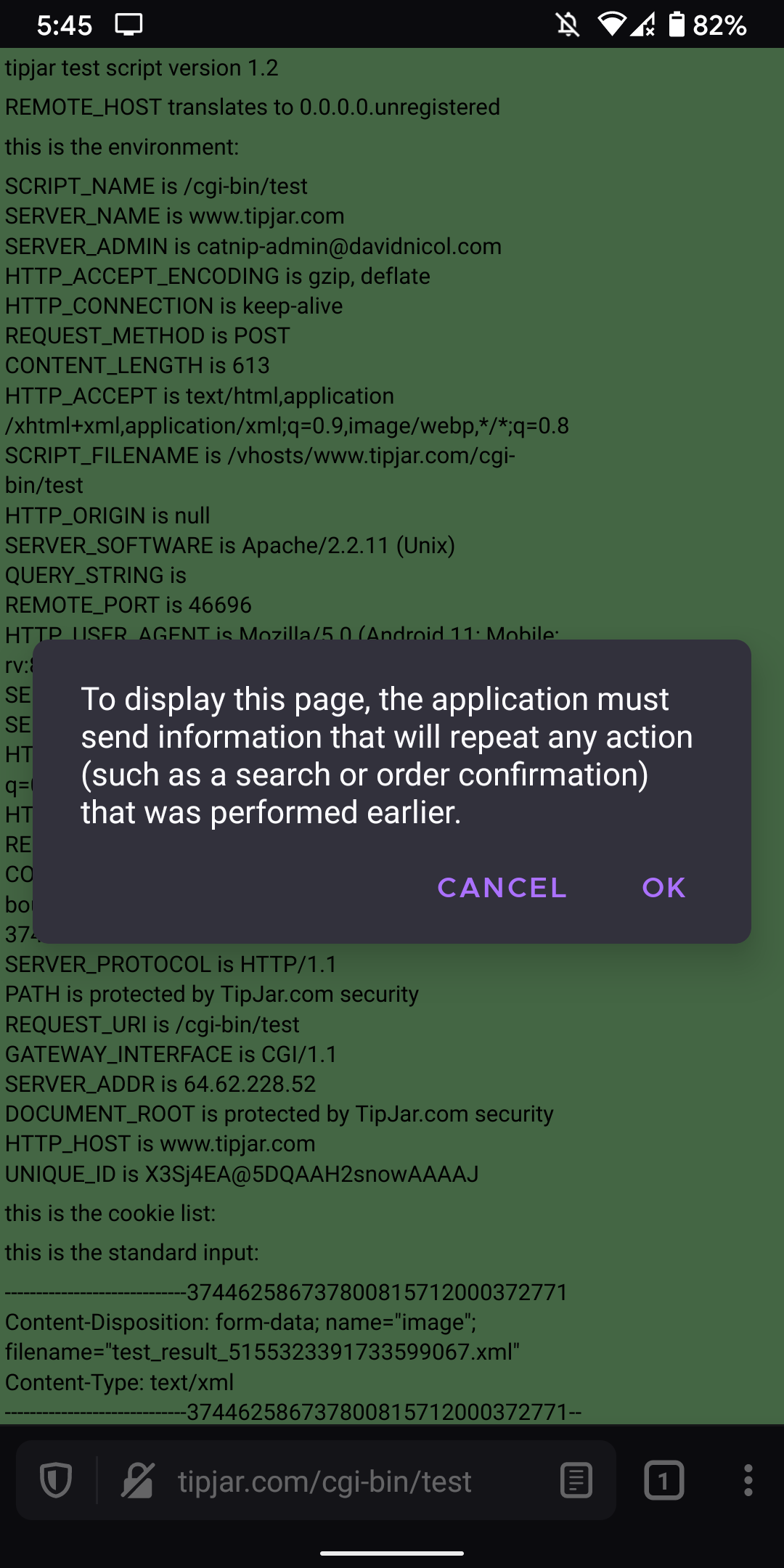
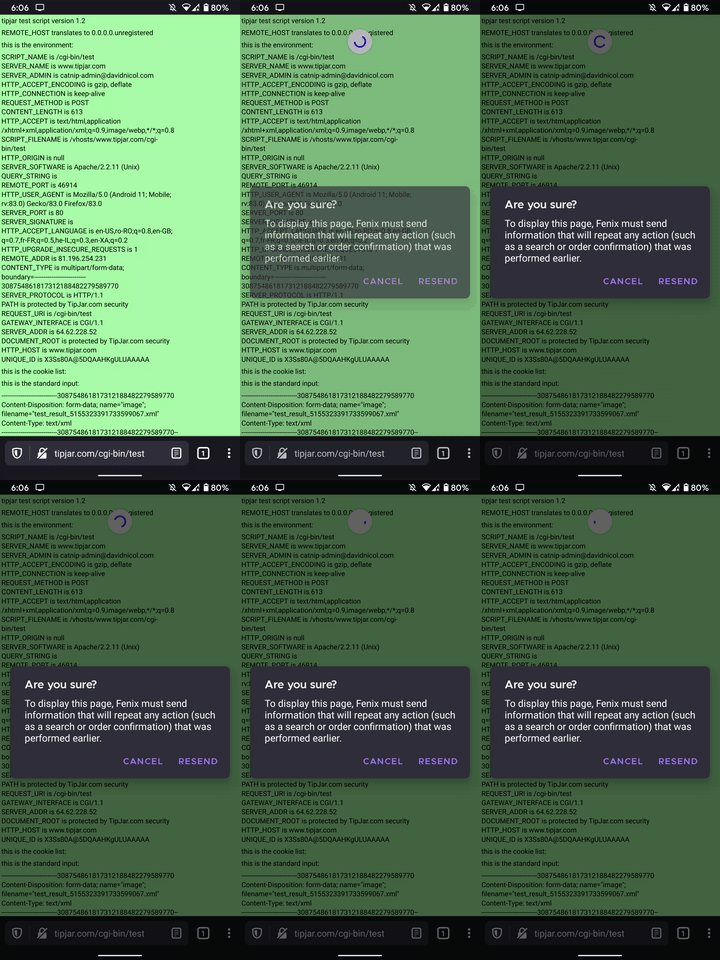
For the new strings Agi used
title: Are you sure?
message: To display this page, %s (application name) must send information that will repeat any action (such as a search or order confirmation) that was performed earlier.
positiveButton: Resend
negativeButton: Cancel
that would give us the following prompt:
@betsymi Does the new strings seem ok with you? Should we use others?
Mugurell
on 30 Sep 2020
Can you better help me understand how one would arrive at this message? What action has the user taken to trigger this, and are the options to cancel the option or try again?
 betsymi
on 2 Oct 2020
betsymi
on 2 Oct 2020
@betsymi This prompt would need to be shown whenever refreshing (with pull to refresh or by pressing the refresh page button) or navigating to a page needs resubmitting data that has been submitted already.
Like on some pages after authenticating with username and password or
like in the above case, I've used https://vijamis.com/filetest to upload a small file and then refreshed the page I've got to after uploading.
After dragging the pull to refresh throbber:
- pressing the positive button of the dialog will actually start the refresh page process and submit again the previous data.
- pressing the negative button on the dialog will just dismiss the dialog, the page will not be refreshed - data will not be resent. (nothing would have happened, we'd just show a dialog and then dismiss it).
Refreshing the page (and resubmitting the initial data) only happens if the user presses the positive button on the dialog.
The dialog should disappear and
Mugurell
on 5 Oct 2020
Thank you! More questions!
- Does this appear every time someone tries to refresh a page, or only in certain instances? Here it looks like it might be because the page didn't load properly.
- What would be the reason someone would want to resend the data? What would be the reason they wouldn't?
betsymi
on 5 Oct 2020
Thank you! More questions!
- Does this appear every time someone tries to refresh a page, or only in certain instances? Here it looks like it might be because the page didn't load properly.
Only on certain instances (I'd say very few cases).
- What would be the reason someone would want to resend the data?
One would get to that specific page (only specific pages would trigger this prompt) only after submitting specific data.
If that data is not resubmitted we wouldn't be able to reload the website, present the same page as currently.
- What would be the reason they wouldn't?
If one is to press the negative button the page won't be refreshed. The dialog would be hidden.
Maybe refreshing the page might make them loose some input data.
Also asking @agi90 to maybe chime in about the exact situation in which a repost prompt would show up and it's importance for the user.
Mugurell
on 5 Oct 2020
Oops sorry I missed this (@agi is best).
This prompt appears when a user tries to refresh a POST request. POST requests are usually meant for page loads that have _side effects_, e.g. submitting a payment, adding a new blog post / comment, etc. You normally wouldn't want to resubmit a POST request because it could cause duplicated effects (double payments, double comments, etc).
Nowadays, web pages largely avoid dropping user in a POST pageload (e.g. they will either have a POST -> GET redirect, or just running the POST in the background) so you don't see this prompt very often anymore. It's common for old web pages that haven't been updated in a while.
I would say in most cases the "right" action for the user is to stop the refresh, there are a few misbehaving websites that use POST requests for things that don't really have side effects (e.g. doing a search), in those cases it's ok to resubmit the request, but that's very rare (and really hard to figure out as a user).
 agi
on 8 Oct 2020
agi
on 8 Oct 2020
Thank you! Here is my proposal for this dialog.
Resend data to this site?
Refreshing this page could duplicate recent actions, such as sending a payment or posting a comment twice.
Left button: Cancel
Right button: Resend data
betsymi
on 8 Oct 2020
@Mugurell Strings for this dialog are now in! I edited my comment from yesterday to make a couple updates. The current placement of the buttons is correct.
betsymi
on 9 Oct 2020
Verified as fixed on Fenix - https://github.com/mozilla-mobile/fenix/issues/9799#issuecomment-711981950, closing this.
Mugurell
on 29 Oct 2020
Related issues
 pocmo
·
3Comments
pocmo
·
6Comments
pocmo
·
3Comments
pocmo
·
3Comments
pocmo
·
6Comments
pocmo
·
3Comments
 codrut-topliceanu
·
3Comments
codrut-topliceanu
·
3Comments
 jonalmeida
·
3Comments
jonalmeida
·
3Comments