Andotp: All tokens are lost after leaving the app
Password-based encryption:
This issue is the result of an upstream bug in certain custom ROMs. Since version 0.4.0 everyone facing this problem can switch the database encryption to the new password-based encryption in the Settings, which SHOULD solve it.
Help wanted:
Could everyone facing this problem please tell me those things:
- Model of your phone
- Which ROM are you using (exact version please)
- Which Gapps are you using (as well with the exact version)
- Which method are you using to lock your phone (PIN, Pattern, Swipe, Facelock, Fingerprint, ...)
You can add those information directly to the wiki or post them here.
Original issue
Since the last update all my tokens are gone if i restart the app (or even if it it just moved to the background).
Steps to reproduce
1.) add new token via QR-Code scan -> token is listed in the app
2.) go to homescreen
3.) switch to app again
Expected Behaviour
added token is still there
Actual Behaviour
no token listed
App Version: 0.2.3 (Play Store)
Android Version: 5.0
Device: BQ Aquaris E4.5
 Marmo
Marmo
All 182 comments
I have same problem, 0.2.2 from F-Droid.
 kosciak9
on 29 Jul 2017
kosciak9
on 29 Jul 2017
I'm gonna check the F-Droid version when I get home tomorrow.
_Sent from my Google Nexus 5X using FastHub_
 flocke
on 29 Jul 2017
flocke
on 29 Jul 2017
Do you guys have a File Manager with root access installed? If yes could you check the folder /data/data/org.shadowice.flocke.andotp/files/? There should be two files otp.key and secrets.dat.
_Sent from my Google Nexus 5X using FastHub_
flocke
on 29 Jul 2017
It's empty for me unfortunately. I have only tried ProtonMail though, and it "got erased" already. I can recreate it, and provide logcat if you want. :)
kosciak9
on 29 Jul 2017
I'm not at home right now, tomorrow I'm gonna try to set up a virtual device with the F-Droid version and test it. But it would be nice if you could upload a logcat.
_Sent from my Google Nexus 5X using FastHub_
flocke
on 29 Jul 2017
And you could try downloading the APKs from Github and test them, maybe it's a problem specifically with the F-Droid version.
_Sent from my Google Nexus 5X using FastHub_
flocke
on 29 Jul 2017
My install is from Play Store
Marmo
on 29 Jul 2017
Which Android version do you guys use?
_Sent from my Google Nexus 5X using FastHub_
flocke
on 29 Jul 2017
Which Android version do you guys use?
I use 5.0
I just installed the apk from github. Everything seems to work fine (sending to background, swiping app away, force closing app), tokens are remembered.
After that I installed the app from the Play Store again, and the problem is gone now o.O
Marmo
on 29 Jul 2017
Android 7.1.2 RessurectionRemix on OnePlus2 without Play Store, F-Droid + microG
kosciak9
on 29 Jul 2017
Did you guys have the original OTP Authenticator app installed when you tried this?
_Sent from my Google Nexus 5X using FastHub_
flocke
on 30 Jul 2017
F-Droid's Google Authenticator (Holo UI). I still have it.
kosciak9
on 30 Jul 2017
No, I'm talking about this app: https://f-droid.org/packages/net.bierbaumer.otp_authenticator/
flocke
on 30 Jul 2017
For anyone who gets this problem: please post a logcat here, I was unable to reproduce this so far and am not able to debug it without logs.
flocke
on 30 Jul 2017
I will try to contribute a logcat later, when I found out how to do that.
I can confirm that entries are lost after leaving the app. I use LineageOS 14.1.2 on Honor 5x (latest nightly).
Interesting sidenote: When I had hit the back-button after the reentry, the entries were visible again. After hitting it a second time they were gone again and never seen again.
 gasso0n
on 19 Aug 2017
gasso0n
on 19 Aug 2017
Additional Info:
I added an entry and made a backup (plain text as well as OpenPGP). After the entry was lost again I restored the backup, which resulted in a blank app.
So the entries are not saved in the backup as well. Hope this helps.
Still no idea how to provide a logcat, sorry.
gasso0n
on 20 Aug 2017
Seems like the database is never written to your devices storage, which is really strange.
There could be multiple points why this is happening, so I can't really do anything without a logcat.
You can check this tutorial on how to get a logcat: https://android.gadgethacks.com/how-to/android-basics-capture-logcat-for-detailed-bug-reports-0167774/
flocke
on 21 Aug 2017
OK, I think I did it:
https://pastebin.com/FpgSWMVm
Is pastebin ok or should I post it here?
gasso0n
on 21 Aug 2017
Pastbin is OK, it quickly gets confusing if you post long logs here.
Seems like some issue with the Android KeyStore beeing unable to load the encryption key.
flocke
on 21 Aug 2017
Could you try this APK: https://www.androidfilehost.com/?fid=961840155545590105
I did some experimenting with the key generation, maybe this already fixes it ...
flocke
on 21 Aug 2017
@gasso0n @kosciak9 @Marmo
Please check the build from my last comment and report back if it works now.
In case it doesn't work please provide a logcat (see 4 posts before this one).
flocke
on 21 Aug 2017
After I updated my andOTP in Fdroid into 0.2.5, I lost all my keys. I can not remember the previous version number.
 ccaapton
on 21 Aug 2017
ccaapton
on 21 Aug 2017
@ccaapton Please post a logcat. And if you are rooted check if any files are in /data/data/org.shadowice.flocke.andotp/files/.
flocke
on 21 Aug 2017
@flocke the new file did not bring a success
https://pastebin.com/6b7bjtWU
But thank you very much for the effort!
gasso0n
on 21 Aug 2017
From what I found this might be a bug in some custom ROMs.
LineageOS seems to be affected: https://jira.lineageos.org/browse/BUGBASH-590
(and maybe all other ROMs that are based on it).
Are you guys all using a custom ROM, if yes, which?
flocke
on 21 Aug 2017
By any chance... could it be insufficient priviligies for the app? I mean does app have access to storage in your app settings?
 SkyWheel
on 2 Sep 2017
SkyWheel
on 2 Sep 2017
To store the tokens internally no permissions are needed. It only needs storage permissions for the backups.
flocke
on 2 Sep 2017
FYI: I too lost my 2FA token using andOTP v0.2.6 (from F-Droid) on an One Plus 2, running LineageOS 7.1.2, Play Store is also installed.
 KopfKrieg
on 2 Sep 2017
KopfKrieg
on 2 Sep 2017
I can't do much since this seems to be a ROM issue (see the LineageOS bug I linked above). We will have to wait for the ROM devs to fix this (or find a fix I can implement myself).
flocke
on 2 Sep 2017
I've also had this problem, however I do have the files in /data/data/org.shadowice.flocke.andotp/files/ ; but tapping on them doesn't add anything in andOTP. Is there something else to do?
 barul42
on 21 Sep 2017
barul42
on 21 Sep 2017
@barul42 Can you get me a logcat?
flocke
on 21 Sep 2017
@flocke
logcat.txt Here it is, hope there's some info in it
barul42
on 21 Sep 2017
@barul42 Which ROM do you use, and did you try clearing the apps data?
flocke
on 21 Sep 2017
Sorry, I only saw after submitting the logcat that it's a know bug w/ LineageOS (which I'm using).
Still did try to clear cache & data after, but no luck.
barul42
on 21 Sep 2017
I have the same issue, I imported my tokens from freeotp but they won't stay as well. I have the lastes lineage as well and deleting the app data won't work as I installed the app freshly.
 devz3r0
on 10 Oct 2017
devz3r0
on 10 Oct 2017
Same here, on LineageOS. Lost 2 newly set up keys.
 rfht
on 13 Oct 2017
rfht
on 13 Oct 2017
Apart from experiencing what others are commenting on lineageOS 14.1 (latest nightly you can get today) I get empty backups (the json is just "[]") even when I can still view the TOPT entry on the screen before losing it.
 rodrigoaguilera
on 13 Oct 2017
rodrigoaguilera
on 13 Oct 2017
Same Problem here.
Motorola Nexus 6 with LineageOS 14.1-20171013-NIGHTLY-shamu
Installed from Google Play
 MartinX3
on 26 Oct 2017
MartinX3
on 26 Oct 2017
I have the same problem on the F-Droid version 0.2.8. I use LineageOS 14.1-20171022-UNOFFICIAL-kminilte. Inside my data/data/org.shadowice.flocke.andotp/files directory files are not present. Importing a plaintext json backup does show Success, but nothing gets shown. Logcat provided at https://pastebin.com/huhGitev
(I'm sorry for the mess but this is the complete logcat I got when opening the app, adding a random key, closing it, opening it again, importing from backup, closing it and opening it again.)
EDIT: After looking at the backup file from the app called otp_accounts.json I found out that nothing is written there except []. However, I made the backup after adding 4 keys.
 ghost
on 21 Nov 2017
ghost
on 21 Nov 2017
@shrzer This can happen if you made the backup right after adding all 4 keys without closing the app in between. The keys get added temporarily but not saved to /data/data/org.shadowice.flocke.andotp/files because of the KeyStore bug in LOS. With that the backup will be empty since it tries to backup the data files.
This is something that should be made clearer to the user, which is why I created #70.
flocke
on 22 Nov 2017
So if I understand correctly to not have the bug we'd have to add the keys, close the app, open the app and then do the backup?
barul42
on 24 Nov 2017
@barul42 No, that won't work. It's just a way to check if you got the bug. If you add keys, close the app and open it again the list should be empty again. There is (currently) no way to get around this bug if you are affected. And since it has something to do with the KeyStore in some custom ROMs I can't do anything to fix it on my part.
flocke
on 24 Nov 2017
Did someone create a bug report in the lineageos jira?
MartinX3
on 24 Nov 2017
@MartinX3 Yeah, bugbash 590 is about keystore (https://jira.lineageos.org/browse/BUGBASH-590?jql=text%20~%20%22keystore%22)
barul42
on 24 Nov 2017
I'm gonna buy a new phone soon as my Nexus 5X is showing first signs of dying (maybe it's the bootloop problem, I will send it to get fixed when I got my new one).
When I get my old one back from repair I will install LineageOS and try to reproduce and debug this myself.
flocke
on 24 Nov 2017
@barul42 Thank you, but that doesn't look like the right bug.
"random freezing and now failure to start for some apps" are not the symptoms.
@flocke
Nice, try a Nexus 6
My one runs with cyanogenmod/lineageos since 2 years very fine.
No failure, no repairing.
MartinX3
on 24 Nov 2017
@MartinX3 How the bug manifests depends strongly on how the different apps use the KeyStore. Fact is that LineageOS has a problem with the KeyStore on some devices. The linked bug matches some of the logcats that people posted here for andOTP. We still have to figure out more about this, which is why I'm gonna try to reproduce it myself.
flocke
on 25 Nov 2017
Good luck!
MartinX3
on 25 Nov 2017
I have updated the app from f-droid now, and after the update all the entries are lost. Then i have tried to restore them and shows restored correctly but it doesn't. I'm on LOS 14.1, and this the logcat that I have been able to save. I don't know if it will work.
 ZJaume
on 29 Nov 2017
ZJaume
on 29 Nov 2017
@ZJaume That logcat seems to be truncated, it is cut of right when things get interesting.
The last error it shows is that an entry has no tags, which is completely fine since before 0.3.0 there were not tags at all. There has to be something else afterwards.
It's strange that it suddenly appeared for you after an update since I didn't touch anything in the storage / KeyStore code for this version.
flocke
on 29 Nov 2017
@flocke I have only delete the logs before the installation, and no more.
Edit: to restore the bakcup after the installation I had to delete app data and then restore the encrypted JSON.
ZJaume
on 29 Nov 2017
@ZJaume Still there seems to be something wrong with the logcat. It ends in the middle of this error
11-28 23:40:23.895 W/System.err(23395): org.json.JSONException: No value for tags
11-28 23:40:23.896 W/System.err(23395):     at org.json.JSONObject.get(JSONObject.java:389)
11-28 23:40:23.896 W/System.err(23395):     at org.json.JSONObject.getJSONArray(JSONObject.java:584)
11-28 23:40:23.896 W/System.err(23395):     at org.shadowice.flocke.andotp.Database.Entry.<init>(Entry.java:159)
11-28 23:40:23.896 W/System.err(23395):     at org.shadowice.flocke.andotp.Utilities.DatabaseHelper.stringToEntries(DatabaseHelper.java:99)
11-28 23:40:23.896 W/System.err(23395):     at org.shadowice.flocke.andotp.Activities.BackupA
which is not even a full stacktrace.
flocke
on 29 Nov 2017
@flocke So strange, I had stopped the logcat a minute before trying to restore backup, it should appear full. The next time I'll try better, sorry.
ZJaume
on 29 Nov 2017
Can confirm this bug with my OnePlus 2 and latest LineageOS
Here my log:
logcat.txt
 beerisgood
on 3 Dec 2017
beerisgood
on 3 Dec 2017
Yeah, my old phone is getting repaired right now. As soon as it is back I will install LineageOS and try to debug this.
flocke
on 3 Dec 2017
NO PROBLEMS on my LineageOS 14.1 10/10/2017. Used just one QRCode for testing. Even restarted phone.
Device: MotoG Play.
 icetbr
on 6 Dec 2017
icetbr
on 6 Dec 2017
Xiaomi Redmi Note 3 (kenzo) LineageOS 14.1 latest nightly build (official) .
Everything works fine.
On December 6, 2017 2:12:37 AM UTC, icetbr notifications@github.com wrote:
NO PROBLEMS on my LineageOS 14.1 10/10/2017. Used just one QRCode for
testing. Even restarted phone.Device: MotoG Play.
--
You are receiving this because you commented.
Reply to this email directly or view it on GitHub:
https://github.com/andOTP/andOTP/issues/16#issuecomment-349507833
SkyWheel
on 6 Dec 2017
@icetbr and @SkyWheel
Try to update your LineageOS and wipe the dalvik & cache after that.
But don't forget to EXPORT a backup of the appdata (not titanium backup!)
MartinX3
on 6 Dec 2017
I'm using lineage 14.1, update when ever a new update is available and wipe my dalvik/cache regularly and haven't seen this issue
 RichyHBM
on 6 Dec 2017
RichyHBM
on 6 Dec 2017
With my new phone I also use a LOS-based ROM (AICP) and have never had this problem.
But still, on some devices LOS has apparently problems with the KeyStore (see https://jira.lineageos.org/browse/BUGBASH-590). The error reported there is the same as most of the logcats here.
I hope I will be able to reproduce this with my old phone when it get's back from repair.
flocke
on 6 Dec 2017
During my (limited) research of the internal functions of the KeyStore I got two ideas what could cause this:
- It might have something to do with the lockscreen / the method used to lock the phone (Swipe, PIN, Pattern, ...)
- It might have something to do with hardware cryptography on specific devices
flocke
on 6 Dec 2017
Help wanted:
Could everyone facing this problem please tell me those things:
- Model of your phone
- Which ROM are you using (exact version please)
- Which Gapps are you using (as well with the exact version)
- Which method are you using to lock your phone (PIN, Pattern, Swipe, Facelock, Fingerprint, ...)
I will compile those information in the wiki and try to find a common factor.
flocke
on 6 Dec 2017
@flocke My dev info:
- Motorola Moto G (XT1032)
- Lineage OS 14.1
- No Gapps, microG Services Core v. 0.2.4-105
- 4x4 Pattern
ZJaume
on 6 Dec 2017
@flocke Here are the infos:
- Samsung Galaxy S5 (klte)
- LineageOS 14.1 (20171130 nightly but happening for as long as I can remember)
- No Gapps or microg
- PIN code
barul42
on 6 Dec 2017
@flocke My device where I have this issue:
- Motorola Moto G (XT1068)
- LineageOS 14.1 (20171202-nightly)
- No Gapps or microG
- PIN
 haeckle
on 6 Dec 2017
haeckle
on 6 Dec 2017
https://github.com/andOTP/andOTP/wiki/Issue-%2316
Feel free to add your information directly instead of posting it here.
flocke
on 6 Dec 2017
@flocke
I added my Nexus 6 to this link
@______________________________all
I recommend only click on the emoticons under your message, after adding your device, instead of posting here.
MartinX3
on 6 Dec 2017
It's still a little early but the one common factor I see is LineageOS 14.1 without Gapps.
So that is what I will try first when I get my phone back.
flocke
on 7 Dec 2017
LineageOS 14.1 without gapps, everything works OK. So, not really common factor.
On December 7, 2017 6:18:07 AM UTC, Jakob Nixdorf notifications@github.com wrote:
It's still a little early but the one common factor I see is LineageOS
14.1 without Gapps.
So that is what I will try first when I get my phone back.--
You are receiving this because you were mentioned.
Reply to this email directly or view it on GitHub:
https://github.com/andOTP/andOTP/issues/16#issuecomment-349874132
SkyWheel
on 7 Dec 2017
Damn it, and here I thought I found a point to start my investigation ...
flocke
on 7 Dec 2017
What if andOTP had a toggle to switch from using the keystore to just using a strong master password?
That way people affected by this could use this instead, (it would also let people use titanium backup)
The down side being that security may not be as good, maybe something for the secret settings?
RichyHBM
on 7 Dec 2017
Yeah, I already got that planed (see https://github.com/andOTP/andOTP/wiki/Encryption-details).
It would take a major rewrite of the whole encryption stuff which is why I put it of until I got some time (maybe over the holidays).
The way I plan to do it is to use the password/PIN used for unlocking the app to generate an encryption key.
flocke
on 7 Dec 2017
But I had the same Problem with nano gapps, too.
Switching to MicroG didn't caused the bug.
It happend regardless of gapps.
Am 7. Dezember 2017 07:18:07 MEZ schrieb Jakob Nixdorf notifications@github.com:
It's still a little early but the one common factor I see is LineageOS
14.1 without Gapps.
So that is what I will try first when I get my phone back.--
You are receiving this because you were mentioned.
Reply to this email directly or view it on GitHub:
https://github.com/andOTP/andOTP/issues/16#issuecomment-349874132
--
Mit freundlichen Grüßen
Martin Dünkelmann
MartinX3
on 7 Dec 2017
Ok, so we are back to LineageOS 14.1 as the only common factor. And it might be device-specific.
flocke
on 7 Dec 2017
I add my OnePlus2 (LOS) with Password+Fingerprint - without any GAPPS
beerisgood
on 7 Dec 2017
Crashing your lineageOS party: I have the same issue, but on a Samsung Galaxy Note 3 with unmodified stock ROM (Build-No LRX21V.N9005XXSGBPL6)
 mawoca
on 9 Dec 2017
mawoca
on 9 Dec 2017
Model of your phone: Asus Zenfone 2 (Z00A)
Which ROM are you using (exact version please): LineageOS 14.1
Which Gapps are you using (as well with the exact version): microG
Which method are you using to lock your phone (PIN, Pattern, Swipe, Facelock, Fingerprint, ...): Pattern
rfht
on 9 Dec 2017
Just a thought but is anyone using any auto unlock features? Location/Bluetooth...
RichyHBM
on 10 Dec 2017
I can confirm the bug :
Honor 5x LineageOs 14.1 (without gapps) stock
Unlock by pattern + fingerprint
I don't use auto unlock
ghost
on 10 Dec 2017
No auto unlock features here.
Also i test all available protections in app but not one save the tokens. Not even without protection
beerisgood
on 10 Dec 2017
In my case, the bug is solved after LineageOS 14.1 nightly update (20171211).
Previous configuration:
- andOTP v0.3.0
- OnePlus One (bacon)
- LineageOS 14.1 (20171204)
- Gapps: None
- Lock: 3x3 Pattern
 j0k2r
on 13 Dec 2017
j0k2r
on 13 Dec 2017
Moto G4 Play (harpia)
Lineage OS 14.1 latest build
No Gapps / no Root
andOTP F-Droid version
Long password unlock method
- /data/ encryption
 o-alquimista
on 15 Dec 2017
o-alquimista
on 15 Dec 2017
EDIT: problem only started today. I recently installed a build update (2-3 days ago)
o-alquimista
on 15 Dec 2017
I updated the wiki, hopefully I got everything posted here.
The most common factor still seems to be LineageOS (even if @mawoca kind of ruins that trend).
My old phone is on it's way back from being repaired, so maybe I will be able to debug this myself soon.
Additional question for everyone: Do you guys have your /data partition encrypted?
@mawoca Could you try and get me a logcat, maybe it is a different bug for you ... (That would at least help me save my LineageOS theory ...)
flocke
on 15 Dec 2017
@flocke Nope, no encrypted partition here.
barul42
on 15 Dec 2017
@flocke I use device encryption
MartinX3
on 15 Dec 2017
@flocke I use device encryption
j0k2r
on 15 Dec 2017
@flocke i use fully device encryption with password at boot
beerisgood
on 15 Dec 2017
@flocke I'm also using device encryption but with a different password then the unlock pin
haeckle
on 15 Dec 2017
@flocke Good news (or bad, depends): ~I had mixed this app up with the original otp-authenticator (where the bug existed if I didn't have a lockscreen set). With andOTP, it works like a charm. Thanks for the great work!~
EDIT: Seems like it stopped working now also with andOTP, very weird. As soon as I started using in-app authentification, the app forgets my tokens. Even when I reset it back to no authentification at all.
Logcat: https://pastebin.com/TE6ws5mS
mawoca
on 16 Dec 2017
Very strange, the in-app authentication is in no way tied to the way the tokens are stored.
flocke
on 16 Dec 2017
@mawoca if you disable in app author, and add new tokens, do they disappear?
RichyHBM
on 16 Dec 2017
I recreated the issue, and turned out it was linked to me clearing the device's credential storage. Once I had done that, andOTP would immediately and from that moment on consistently forget the tokens independently of any lock/auth feature. Before the clearing, the app works flawlessly (with every possible authentication mode). Reinstalling the app seems to reinstall the necessary certificate or something (I can only speculate about how those credentials are linked to andOTP, but I guess you know about that way better) and makes everything work fine again.
mawoca
on 16 Dec 2017
How do you mean clearing the devices credentials?
I'm unable to repro
RichyHBM
on 16 Dec 2017
Might vary from device to device, on mine it is (roughly, System language is not English): System Settings -> General -> Security -> Certificate Storage -> Delete Certificates (Clear all certificates). Alternative ways (in native English) are for example (provided in this stackoverflow answer: https://android.stackexchange.com/a/52139): Settings > Security > Clear credentials, or Settings > Security > Certificate management -> Clear credentials
mawoca
on 16 Dec 2017
I cannot reproduce after latest update from F-Droid. Version 0.3.1
It survived a reboot.
o-alquimista
on 17 Dec 2017
@o-alquimista: So you use LineageOS with encrypted device and lockscreen protection?
beerisgood
on 17 Dec 2017
@beerisgood Yes, LineageOS with encryption and lockscreen protection. However, recently I changed from long password to 4x4 pattern. Could it change anything?
o-alquimista
on 18 Dec 2017
From my reading on the KeyStore this should not matter (unless I set the key so it requires authentication to use, which I did not).
My old phone is back from the shop and I'm gonna try to install LineageOS later today and try a couple of things. Although if this is really device-specific I might not be able to reproduce even with that ...
flocke
on 18 Dec 2017
I just installed LineageOS 14.1 (latest nightly) on my phone and everything is working fine. I even tried clearing the credentials as @mawoca suggested but the app still works as expected.
This seems to be indeed a device-specific bug. I will try some more (other nightlies) later this week.
Another shot in the dark: Could the affected users please also tell me the value of "Storage type" under Settings -> Security.
flocke
on 19 Dec 2017
@flocke
You tried also clearing cache and dalvik from recovery and after that installed a rom from another date?
Nexus 6 > Storage-Type "Hardware" > affected
MartinX3
on 19 Dec 2017
Not yet, but will soon. I'm currently at work.
flocke
on 19 Dec 2017
Hello
I have a faint memory my problems began after i wiped dalvik and cache after upgrading ROM
Took the time to login and mention that because this bug is driving me crazy.
 nomisma-qt
on 19 Dec 2017
nomisma-qt
on 19 Dec 2017
I have the same issue on an One Plus X (onyx) with LineageOS (I added it to the wiki)
The issue appears both on using device pin and andOTP pin.
I tried adding a few codes and tried making an encrypted backup. After I restarted the app the items were gone as usual and when trying to recover the backup it is empty...
 emilhem
on 19 Dec 2017
emilhem
on 19 Dec 2017
@flocke Hardware "protected" with my OnePlus 2
beerisgood
on 19 Dec 2017
My keys are also gone.
I'm using an fairphone2 with lineage build from 12122017.
Im also unable to restore the keys from a backup.
It shows something like "unable to safe data"
My phone is not encrypted, i have not set the in app authentication. My sdcard is normal mounted as external drive. Settings->security->anmeldedatenspeicher->speichertyp=hardware-gestützt
 5t0rmr1d3r
on 19 Dec 2017
5t0rmr1d3r
on 19 Dec 2017
@5t0rmr1d3r Can you try 2 things for me?
- Clear the data for andOTP and try importing the backup again
- Uninstall andOTP and install it again and then try importing the backup again
flocke
on 19 Dec 2017
@flocke deleting the appdata worked, after that i could load my backup.
But i don't know why the data vanished...
5t0rmr1d3r
on 19 Dec 2017
For some reason the app randomly looses access to the encryption key in the KeyStore.
It appears to happen when you clear cache & dalvik in recovery. But only on some devices, I do it every time I flash a ROM update and it never happened to me.
flocke
on 19 Dec 2017
I have over 50 OTP entries. I have tried every OTP app available, andOTP is the best of them all hands down. But i need a OTP app every day from morning to evening.
If i go back to another app, and do the massive work of manually setting up every OTP entry i need, fine. But then i'd have to do it all over again if and when this bug gets fixed. I have done that choir more times i can remember now, i'm so tired of it.
Please please keep up the good work, and find this bug as soon as possible. This is becoming unbearable, All hands on deck
nomisma-qt
on 19 Dec 2017
@flocke I also experience that randomness you describe (using stock Android). After wiping the app data (or reinstalling) everything works for some time until suddenly upon app start there is a blank white screen for some seconds and afterwards the tokens are gone.
Please tell me if I can provide anything that helps hunting down that bug.
Marmo
on 20 Dec 2017
Dont know if it helps: i use the App SealNote from F-Droid and i never got Problems with save Data in this encrypted storage but i think the App use a own encryption way because only a Password can be configured.
beerisgood
on 20 Dec 2017
@beerisgood Yeah, from what I can see SealNote only uses a purely password-based encryption. They don't use the KeyStore at all.
flocke
on 20 Dec 2017
who trusts android keystore anyways? c'mon
do a custom solution, independent of the devil.
nomisma-qt
on 20 Dec 2017
'this man will never be president, c'mon'
Obama '2016
nomisma-qt
on 20 Dec 2017
A custom solution is on the roadmap, but it all takes time
RichyHBM
on 20 Dec 2017
As @RichyHBM said, I have a plan to implement a custom solution without the KeyStore.
But I currently don't have a lot of time to spend programming so it will have to wait.
Maybe between Christmas and New years I will start implementing it as I have some days of work.
flocke
on 20 Dec 2017
Maybe another option for now is to vote the bug in the LineageOS JIRA and wait until solved.
ZJaume
on 20 Dec 2017
Maybe another option for now is to vote the bug in the LineageOS JIRA and wait until solved.
Yes, do that as well. I can try to work around the KeyStore bug by providing a custom encryption solution but in the end it is a bug in the ROM that also affects different apps and should be fixed.
flocke
on 21 Dec 2017
I've made a start at some of the things in the todo from the encryption wiki page, hopefully I may have a first pass done and you can look over it. Take the burden off of you a little :)
RichyHBM
on 21 Dec 2017
@RichyHBM Thank you! There is a lot of work to be done to implement this. We will have to change a lot of stuff from the original OTP Authenticator app that I didn't bother to touch until now.
flocke
on 21 Dec 2017
Had a thought, what if as a first pass we allowed people to use something like openkeychain to provide a pub/private key for encrypting and decrypting?
RichyHBM
on 21 Dec 2017
I think this is way more work. Right now we load the encryption key from the KeyStore (well actually we load the key to decrypt the encryption key from there). I think just dropping in a key generated from the users password/PIN instead of the one loaded from the KeyStore is way easier.
flocke
on 21 Dec 2017
Using the encryption key from openkeychain instead of using the one from the keystore is secure and stable, I think, the amount of people who doesn't own a GPG Key is bigger. :(
MartinX3
on 21 Dec 2017
How do you mean @MartinX3 ?
@flocke I think a first pass doing this should be pretty easy to do, I'll do some investigation, even if its just a short term fix for this bug
One thing I don't get is, if you get k2 and k3 from the user, does that mean you would be asking the users password every time you save the entries?
RichyHBM
on 21 Dec 2017
I mean, that it is a nice idea to encrypt and decrypt the key for the app with the GPG key of the user via openkeychain.
But it is not such a good idea, because not every one has such a key.
MartinX3
on 21 Dec 2017
@RichyHBM The problem is that we would need to send an intent to OpenKeychain every time the database is loaded or saved. I would like to avoid that.
No, I would think we should cache the encryption key as long as the app is running.
I have a general idea in mind on how to implement everything, I just need the time to actually do it.
@MartinX3 Yeah I'm not generally against the idea, I just think it would be even more work to properly implement it. Maybe something for the future.
flocke
on 21 Dec 2017
Anyone can recommend a different app until this get solved and I can switch back to andOTP ?
 varac
on 26 Dec 2017
varac
on 26 Dec 2017
That's quite hard, because every APP I tried used the keystore to encrypt the tokens.
And if you find an APP, it should Export the data in a way, this APP understands it.
Am 26. Dezember 2017 15:30:13 MEZ schrieb varac notifications@github.com:
Anyone can recommend a different app until this get solved and I can
switch back to andOTP ?--
You are receiving this because you were mentioned.
Reply to this email directly or view it on GitHub:
https://github.com/andOTP/andOTP/issues/16#issuecomment-353974638
--
Mit freundlichen Grüßen
Martin Dünkelmann
MartinX3
on 26 Dec 2017
That's quite hard, because every APP I tried used the keystore to encrypt the tokens.
And if you find an APP, it should Export the data in a way, this APP understands it.
Am 26. Dezember 2017 15:30:13 MEZ schrieb varac notifications@github.com:
Anyone can recommend a different app until this get solved and I can
switch back to andOTP ?--
You are receiving this because you were mentioned.
Reply to this email directly or view it on GitHub:
https://github.com/andOTP/andOTP/issues/16#issuecomment-353974638
--
Mit freundlichen Grüßen
Martin Dünkelmann
Mit freundlichen Grüßen
Martin Dünkelmann
MartinX3
on 26 Dec 2017
Yeah, there are a lot of apps but all I know use the KeyStore as well.
There is a fork of the original OTP Authenticator (which was the base for andOTP as well) which uses a password to encrypt the data. It's called Onetimepad (or something like that) but I don't think its on the PlayStore or F-Droid.
flocke
on 26 Dec 2017
Could you use its code?
Am 26. Dezember 2017 17:24:09 MEZ schrieb Jakob Nixdorf notifications@github.com:
Yeah, there are a lot of apps but all I know use the KeyStore as well.
There is a fork of the original OTP Authenticator (which was the base
for andOTP as well) which uses a password to encrypt the data. It's
called Onetimepad (or something like that) but I don't think its on the
PlayStore or F-Droid.--
You are receiving this because you were mentioned.
Reply to this email directly or view it on GitHub:
https://github.com/andOTP/andOTP/issues/16#issuecomment-353985976
--
Mit freundlichen Grüßen
Martin Dünkelmann
MartinX3
on 26 Dec 2017
The main problem is that I want to keep the current encryption as well. To make both work I will have to write the functions myself. But as I said I have the idea how to do it, I just need the time to actually implement it.
flocke
on 26 Dec 2017
flocke, i appreciate your desire for working on your model, but in light of the importance of your app, and the significance of your code in this moment in history, i'd urge you to consider using your skills to help the people trying to negotiate what is now the final hyperinflational stage of western fiat currencies.
The fact is that hundreds of billions of dollars are flowing in panic as the political process known as hyperinflation sets in. Your app is dead in the middle of it all.
Please consider coding a quick temporary fix, while holding off on the clinical solution. I'm sure you understand that it is the future of your generation and your children at stake here.
regards, mike.
nomisma-qt
on 28 Dec 2017
Yes flocke, andOTP is the most important piece of software currently available through f-droid. There is no contest. So it's time to rise to the challenge. The people need a solution in hours, not days.
nomisma-qt
on 28 Dec 2017
flocke, if time is your problem, you could consider setting up a btc, ltc and dgb address for contributions if needed. I can guarantee you would receive millions of dollars worth of money within days.
Then you could quit your day job and concentrate on the important things in life. Your coding skills are worth billions. There is no reason for you to be humble in that sense.
nomisma-qt
on 29 Dec 2017
@nomisma-qt Please stop spamming (basically) the same thing over and over again, it won't make me fix this bug any faster. I won't release a quick-and-dirty fix first as that usually causes a lot of trouble later when you have to fix your "fix" again. I will release a fixed version as soon as it is ready and tested (approximately in the first two weeks of the new year). If you are impatient then please switch to another OTP app in the meantime instead of spamming here, there are a lot of alternatives out there (well maybe not as may on F-Droid but still ...).
And secondly, this will always be a hobby for me, I never wanted to do this full-time. I won't quit or take time of my main job to work on andOTP, even if I got enough donations to do so.
flocke
on 29 Dec 2017
@flocke
That's a bot, not a human, you should report him.
This bot generates text with a few buzzwords and with some words got via the github api, like your name.
MartinX3
on 29 Dec 2017
@MartinX3 That also crossed my mind but his first messages were actually making sense.
Maybe the account got hacked. I'm gonna report him and if he spams again I will block him from the repo.
flocke
on 29 Dec 2017
For everyone that is interested: the implementation of a password-based encryption is coming along nicely in the custom-encryption branch.
flocke
on 29 Dec 2017
Apologies for not pushing my branch up, with Christmas I have been fairly busy myself, glad you managed to get some free time for this!
If you need anyone to test, let the thread know once that branch is functional and I will build/install it.
Also, am I right in saying if you use the custom encryption, titanium backup will work?
RichyHBM
on 29 Dec 2017
Same here, as soon as it needs testing I'll be available. Thanks for the work! :)
barul42
on 29 Dec 2017
@RichyHBM Yes, if it works as I intend then you should be able to use Titanium Backup if you have set the encryption to password-based.
flocke
on 29 Dec 2017
Very very early draft of the password-based encryption: https://cloud.shadowice.org/s/32vZoc5Qojd53OE
You will have to uninstall previous versions from F-Droid or Google Play before installing this one.
In this version you should not change the password once you switched to password-based encryption!
There are potentially a lot of other bugs so please, if you run into one, provide me with a detailed description and a logcat! Please head over to issue #94 to report any bugs in the test version!
flocke
on 29 Dec 2017
I'm not a bot. I think maybe you just don't understand what's going on in the world.. Sry if you feel i'm spamming, i guess i'm not good enough for you ppl. It's OK. Thx for the updates.
nomisma-qt
on 30 Dec 2017
@nomisma-qt
No one wants to attack you, but you also don't need to occur as a teacher to teach us the world.
That's an open source project and not a paid 40h/week job.
So it is also hard to find help. As example I would help as a java enterprise/microservice developer, but also lack in time because of my job and my spare free time to relax.
We welcome any help in the open source area. :)
So, please don't be offended. :)
MartinX3
on 30 Dec 2017
I can only agree with what @MartinX3 said, this was in no way intended as an insult or offending in any way. I do this in my free time (with no intention of making this my full time job) so my time to spend on andOTP is limited. I try to focus a lot of my free time on it but my real job and my family and friends always will come first.
flocke
on 30 Dec 2017
It's ok, i'm not offended. I admit i was just frustrated with everything going on, and ranting in this thread was not the best decision :) Thanks for the efforts, i will try to test for bugs to help solve this issue.
nomisma-qt
on 31 Dec 2017
@nomisma-qt
That's the right mood! :)
Thank you! :D
MartinX3
on 31 Dec 2017
New test version up, check #94.
flocke
on 2 Jan 2018
@devz3r0 How did you export your keys from FreeOTP?
Your comment: "I have the same issue, I imported my tokens from freeotp but they won't stay as well. I have the lastes lineage as well and deleting the app data won't work as I installed the app freshly."
ghost
on 7 Feb 2018
I just updated lineageOS 14.1 and andOTP to the 0.4.0.1
I configured a password and the file storage and the tokens seem to persist even between reboots.
Thank you so much to the developers!
rodrigoaguilera
on 7 Feb 2018
@iknownothingaboutcomputers There is a script to do that. Check the wiki here on Github (its under Migration).
flocke
on 7 Feb 2018
Hi, since I have no backup - is there another way to restore the tokens?
Last thing I did was updating my MotoG2 (Lineage OS 14.1, titan) from Jan 13 2018 version to Feb 24 2018 and since then the tokens are gone.
I have the .../org.shadowice.flocke.andotp/files/ files but they are 256 bytes (otp.key) and 30 bytes (secrets.dat) so it doesn't look as if my 5 or 6 2FA secrets are stored there somewhere.
Today, when I started andOTP, there was some bizarre message about something related to the tokens and after that andOTP didn't start anymore until I did a full reinstall.
 dmichulke
on 28 Feb 2018
dmichulke
on 28 Feb 2018
On a second thought (and I am not an android dev), maybe the files are just the things needed to access the keystore. The names certainly suggest that. In that case, you would have saved the payload in the keystore and there's the problem.
I didn't do a wipe of anything after the OS update, so for some reason andOTP can't access its own keystore data anymore, is that correct?
I also understand there is no workaround, so I could only hope for another LOS update that fixes the issue?! Or maybe risk a downgrade?
dmichulke
on 28 Feb 2018
@dmichulke Sadly, once the KeyStore gets messed up (which is what happened during your Lineage OS update), there is no way of restoring the tokens because the encryption key is lost.
flocke
on 28 Feb 2018
The tokens are not saved inside the KeyStore (it only allows for saving encryption keys), they are saved encrypted inside the secrets.dat file. The key to access that file is saved in otp.key, which in turn is wrapped with a second key stored in the KeyStore (which was the design when I forked this from otp-authenticator and can't be changed anymore at this point).
Another LOS update will not fix the KeyStore, since the keys are already lost. Your only option will be to set everything up again from scratch. I recommend using the password-based encryption (which doesn't rely on the KeyStore) when doing so.
flocke
on 28 Feb 2018
Oh dear, well, I guess that should teach me the lesson of backing up my stuff :-)
Thank you for the quick answer!
dmichulke
on 28 Feb 2018
I've just migrated from FreeOTP on my OnePlus X with LineageOS 14.1.
Should I expect trouble?
 gasinvein
on 10 Sep 2018
gasinvein
on 10 Sep 2018
@gasinvein Yes, I had troubles with LineageOS 14.1 on OnePlus One. A simple workaround is to use PIN protection instead of Android Keystore.
 hmenke
on 10 Sep 2018
hmenke
on 10 Sep 2018
@hmenke How to thigger the bug? Tried wiping dalvik/cache and rebooting, andOTP works as expected.
gasinvein
on 10 Sep 2018
My BQ Aquaris X5 Plus running LOS 14.1 (microG) is also affected – but only if keystore was once selected (after that, issue exists with any combination). Getting out of that: In Settings › Apps › andOTP delete cache and data, then chose PIN/Password right at the start, restore account backup and adjust settings to your liking. As long as keystore wasn't chosen, it seems to work.
 IzzySoft
on 16 Oct 2018
IzzySoft
on 16 Oct 2018
With LineageOS 20190103 update the keystore bug is solved!
Example for OnePlus 2 device: https://review.lineageos.org/c/LineageOS/android_device_oneplus_oneplus2/+/237805
beerisgood
on 3 Jan 2019
That means devices with future builds of LOS 16 (which is what the linked report is for) should no longer be affected. For older versions (LOS 15/14) it would depend on a backport.
IzzySoft
on 3 Jan 2019
That means devices with future builds of LOS 16 (which is what the linked report is for) should no longer be affected. For older versions (LOS 15/14) it would depend on a backport.
Yes. The fix is for 15.1 and for 16+
beerisgood
on 3 Jan 2019
Just for reference, the original issue in LOS 14.1 was fixed back in April 2018:
Fix issue: upgradeKeyBlob call always return PERMISSION_DENIED.
https://review.lineageos.org/c/LineageOS/android_system_security/+/210421
keystore: add upgradeKeyBlob call into keystore exportKey.
https://review.lineageos.org/c/LineageOS/android_system_security/+/210422
Personally, I have not had any issues regarding key store since.
 mrtnmtth
on 3 Jan 2019
mrtnmtth
on 3 Jan 2019
@mrtnmtth that didn't reach my device then: BQ Aquaris X5 Plus (gohan), running official LOS 14.1, and installed a few month after that fix. Still broken here.
IzzySoft
on 3 Jan 2019
@IzzySoft then this seems to be an other device specific issue. You should reach out to the Aquaris-dev team to get it fixed. https://aquaris-dev.org/contribute.html
mrtnmtth
on 3 Jan 2019
@mrtnmtth that could of course be. Well, I've settled with the other storage now. No fingerprint unlock – but meh. 1st-world-problem. Don't need it that often (yet, as unfortunately 2FA/TOTP isn't offered as widespread as I'd wish for). Aquaris is still at 14.1 – so maybe they have it on ther 15.x roadmap. I can wait until then.
IzzySoft
on 3 Jan 2019
@IzzySoft Don't worry, in the rewrite the encryption will be handled differently. The entire database will be encrypted with a key generated from a password or PIN with optional fingerprint unlocking. In that case the key generated from the password will be saved encrypted in the apps storage using the KeyStore (+ Fingerprint). So even in case the KeyStore fails and the fingerprint login doesn't work you will be able to unlock the database with the password.
flocke
on 3 Jan 2019
@flocke that was the other reason I see no urgency. You've already told me about the rewrite – and I vaguely remembered this problem being addressed with it. Thanks again!
IzzySoft
on 3 Jan 2019
Just wanted to report that I'm having the KeyStore error on Android 10 (Oct security patch, no root, bootloader locked) on Pixel 3A. For now I had to switch to a different app (Aegis), but would love to come back once this is solved.
v 0.6.3 from F-Droid
 AABatteries
on 20 Oct 2019
AABatteries
on 20 Oct 2019
@AABatteries The problem went away after clearing data/cache for andOTP and importing the backup again
AABatteries
on 20 Oct 2019
@AABatteries Did this start to happen after the October update of your 3a? Because that update also caused a lot of trouble on my own Pixel 3a.
flocke
on 20 Oct 2019
I can't confirm any problem on my Pixel 3a with October update (GrapheneOS).
andOTP 0.6.3 from F-Droid
beerisgood
on 20 Oct 2019
wtf I added the 2fa key to the app, exited the app, and upon entrance the 2fa was no longer there - thank you very much!!
Xiaomi Mi 9T Pro, password protection
 samsepiol59
on 31 Oct 2019
samsepiol59
on 31 Oct 2019
@samsepiol59 Could you please provide a logcat? Because I never encountered that problem with the password-based encryption before, only with the KeyStore. Your problem seems to be a new one.
flocke
on 31 Oct 2019
Sorry I can't provide log, I already deleted the log (bcs trying to use backup/restore feature to fix this problem but unfortunately doesn't work) and use my recovery code for solving my problem. But in my case (firefox lockwise otp on Xperia X Compact android 8.0 no root), the step to reproduce this problem is:
- Installed andOTP ver 0.7.0-play, using pin authentication for opening andOTP
- Register it to Firefox Lockwise 2FA from other device
- Close andOTP and never use it again for a month
- Install Firefox Browser on my Xperia X Compact
- Do Firefox Account sign in
- Firefox ask for OTP code
- Press home button, open andOTP
- Insert andOTP pin
- Copy Firefox OTP from andOTP
- Press home button, open Firefox, paste OTP
- Error occured (I forgot the error message, but the point of the error told the OTP is invalid)
I also tried to use split screen in step 7 and 10, but the andOTP timeout bar is stopped if you not click/focus on andOTP. However, if you click/focus on andOTP again, the timeout bar is working properly (reduced by time i was focused to other app)
And again, sorry if my explanation looks complicated. I tried to explain as clear as possible 🙏
Hope it helps
Note: andOTP working properly if I do Firefox login from my laptop
 R13TechNewbie
on 23 May 2020
R13TechNewbie
on 23 May 2020
@R13TechNewbie What you are describing is an entirely different issue it seems. This one is for the case that all your tokens are lost when you open the app.
What you are describing sounds like a problem with Firefox itself. Could you check if your phones clock is set to the correct time (that's a common cause for OTP tokens to fail) and if that doesn't help please open a new report so we can keep this one on topic.
flocke
on 23 May 2020
@R13TechNewbie What you are describing is an entirely different issue it seems. This one is for the case that all your tokens are lost when you open the app.
What you are describing sounds like a problem with Firefox itself. Could you check if your phones clock is set to the correct time (that's a common cause for OTP tokens to fail) and if that doesn't help please open a new report so we can keep this one on topic.
Ok, should I remove my comment?
R13TechNewbie
on 23 May 2020
No, you can leave it here as long as the discussion moves to the new issue.
flocke
on 23 May 2020
@R13TechNewbie What you are describing is an entirely different issue it seems. This one is for the case that all your tokens are lost when you open the app.
What you are describing sounds like a problem with Firefox itself. Could you check if your phones clock is set to the correct time (that's a common cause for OTP tokens to fail) and if that doesn't help please open a new report so we can keep this one on topic.
I tried to check my phone time to my timezone, the difference is around 50 second
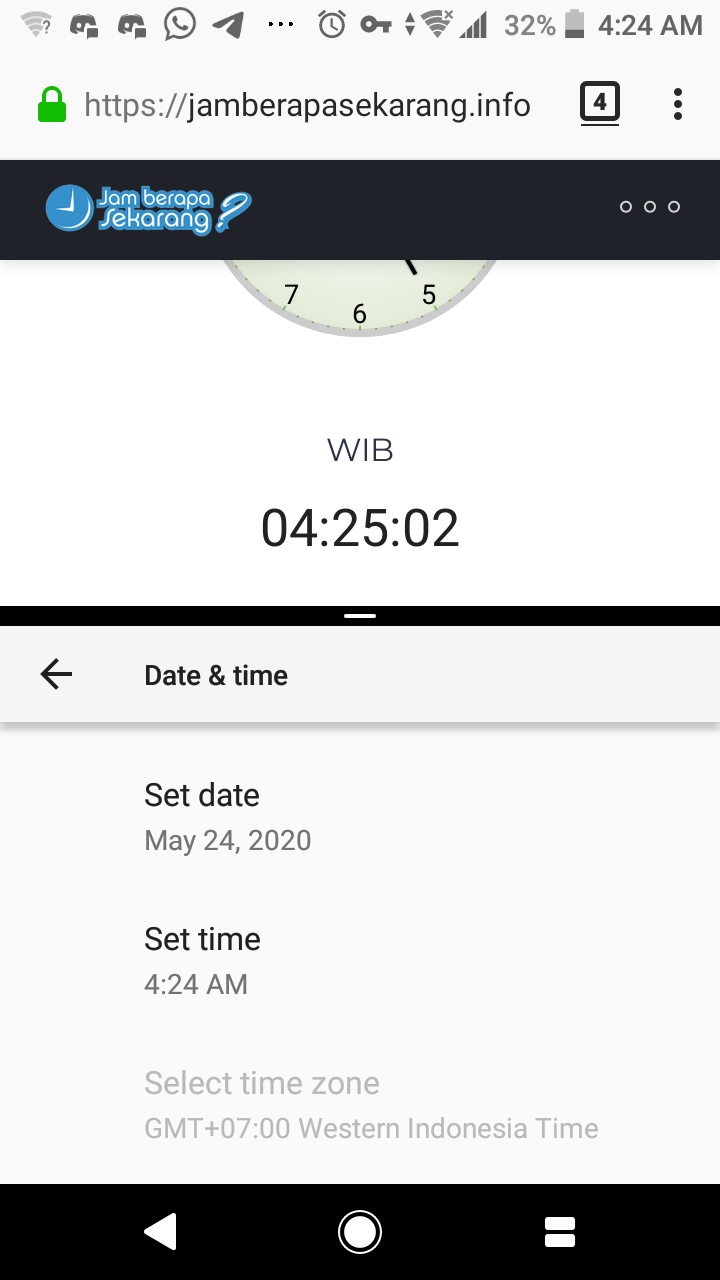
When I use andOTP for login on laptop, I'm not using vpn, and now I am.
Maybe that's the problem. If I have time, I'll try it again without VPN. Thus I think I shouldn't create new issue about this.
Sorry for not reading FAQ first 🙏 I thought this issue is similar to mine.
And thank you for your assistance 👍
R13TechNewbie
on 23 May 2020
Related issues
 BoFFire
·
4Comments
BoFFire
·
4Comments
 SeppPenner
·
3Comments
SkyWheel
·
7Comments
SeppPenner
·
3Comments
SkyWheel
·
7Comments
 D0mm4S
·
4Comments
D0mm4S
·
4Comments
 schoeke
·
5Comments
schoeke
·
5Comments
Most helpful comment
https://github.com/andOTP/andOTP/wiki/Issue-%2316
Feel free to add your information directly instead of posting it here.