Andotp: Have an icon or picture for each entry
In order to quickly select the right entry or simply view the associated OTP in a faster way it would be nice to have a user selectable little icon/picture for each line.
 alphazo
All 28 comments
I like the idea but this will take some time to implement properly, so it's currently very low on my priority list.
_Sent from my Google Nexus 5X using FastHub_
 flocke
on 28 Jul 2017
flocke
on 28 Jul 2017
So, I think this is worth talking about.
I have currently got a very crude setup allowing me to both show an image with the entry and change that image (currently only after creating the entry).
This seems to work well but because I have wanted to store the image in the json, it leaves the json rather bloated (think tens of kilobytes per entry with an image) which isn't ideal.
I have an idea of how to minimize this to only increase that size for each different image (at the moment it would be 10s of KB per entry with an image) but that would need a change of the json format along with a converter from the current json.
A second option is to save the image as a file along with the json file, this would mean a proper backup would require multiple files but would be a nicer approach. Of course there would be a fallback for if the image file wasn't found when restoring.
The final possible solution is to not let the user select a custom image and instead andOTP just ships with a bunch of images you can chose from.
Any thoughts would be much appreciated.
 RichyHBM
on 25 Nov 2017
RichyHBM
on 25 Nov 2017
I like that idea with the pictures!
Why not use as a default/fallback the siteicon?
 5t0rmr1d3r
on 25 Nov 2017
5t0rmr1d3r
on 25 Nov 2017
@RichyHBM Thank you for looking at this now. I had a few ideas on this myself. Currently I am not home but I will write my ideas when I get back (probably on Monday).
The only thing is that I would not want to change the current JSON format if not absolutely necessary.
flocke
on 25 Nov 2017
@flocke I agree also, I'm currently leaning towards having the app supply a pre-selection of images for the user to chose from. But keen to hear your thoughts.
And @5t0rmr1d3r, the reason the site icon as a fallback wouldn't work is because andOTP has no direct way of knowing what site the OTP is for, that would require the user to input the site manually, which is doable but a bit more cumbersome.
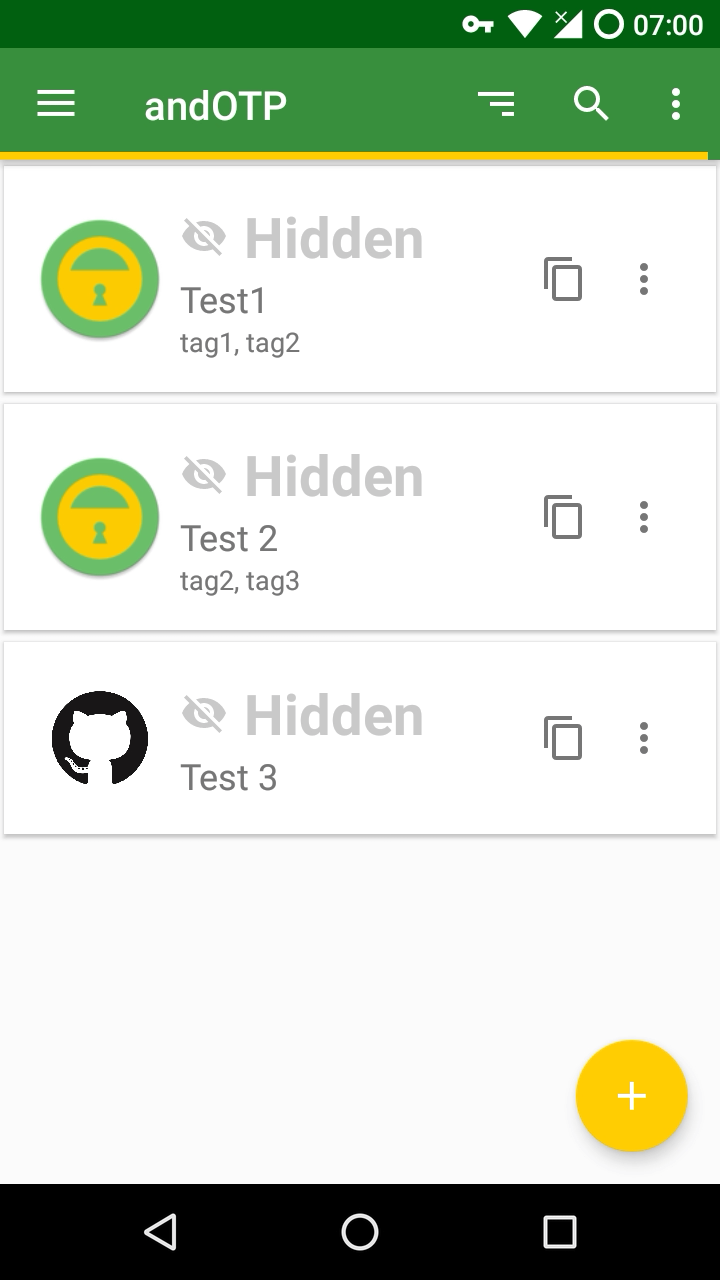
As a teaser, this is how I see it looking:
RichyHBM
on 25 Nov 2017
This project also has a lot of images for 2 factor sites https://github.com/2factorauth/twofactorauth
RichyHBM
on 25 Nov 2017
- I agree that we should (at least in the beginning) only provide predefined images to select from. New ones can be added on request.
- The default should be just an image with the first letter of the label (like the contacts app for example). There are libraries for that.
- Since on small screens the images could take a lot of space users should be able to disable them altogether in the settings.
- And optionally maybe the size of the images should be configurable.
flocke
on 25 Nov 2017
Agree with all points, I will work on a PR based on those points. If you have any recommended libraries that can generate the letter image, that would be great!
As a side note, I will keep my branch for user selected images as it may come useful at some point in the future, I already have thumbnails toggle via settings so you can show/hide them. Also, the reason the size was so big was due to the image used, I changed to a smaller png and it decreased the size dramatically.
Would it be worth setting up a list somewhere of what images to support initially?
RichyHBM
on 25 Nov 2017
I can't remember the specific library, I just remember coming across one at some point. I will have to look again on Monday.
Maybe we should open an issue here and ask the users which icons they would like to see.
It would also be nice to have as much of the images as possible in vector format. This could save us a lot of space.
flocke
on 25 Nov 2017
Makes total sense, there seems to be something in AOSP for generating the graphics in the default android mail app so will see if that can be used.
Feel free to sign this issue to me btw
RichyHBM
on 25 Nov 2017
I can't seem to figure out how to do that with OctoDroid on my phone.
I will assign it to you as soon as I get back home on Monday.
flocke
on 25 Nov 2017
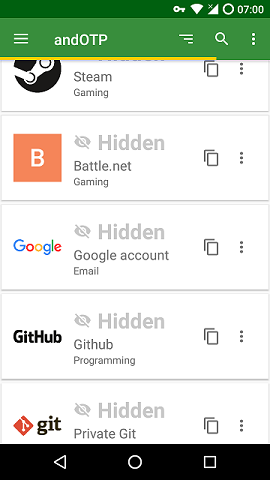
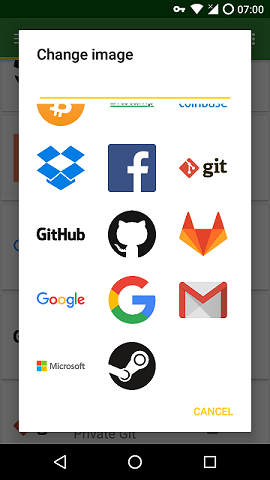
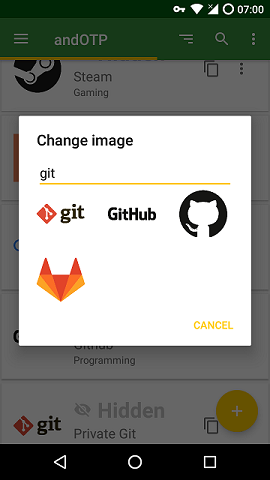
I managed to get it looking like this over the weekend, icons shown are there for placeholder, we still need to decide which icons ship with the app (though these are all vectors and take up less than 1mb in total)
RichyHBM
on 27 Nov 2017
I like it so far, I will review the code when you make a pull request after you think it's ready.
And I'm gonna create an issue later today to poll for the icons we should ship. I also have to look into the copyright implications of shipping all those icons.
flocke
on 27 Nov 2017
Cool, I think it should be ready within the next couple days. Maybe for the PR I could just add category images rather than specific companies, I.e. an image for banking rather than specific bank logos?
RichyHBM
on 27 Nov 2017
PS, In terms of the logos themselves, they come from https://github.com/gilbarbara/logos. Though some may have some odd trademarks or copyrights, but at least there is a repo of images we can take from
RichyHBM
on 27 Nov 2017
Yeah, we should do something generic at first and then add the logos the users need later.
flocke
on 27 Nov 2017
Why not also allow the user to set a custom image?
 ghost
on 30 Nov 2017
ghost
on 30 Nov 2017
Maybe in the future. For now this was easier. Custom images would require a lot of work and make the data store as well as the backup a lot larger and more complicated.
flocke
on 30 Nov 2017
Alright, nice to see some logos at least!
ghost
on 30 Nov 2017
I switched from FreeOTP to andOTP recently and I like it 👍
The only thing I am missing is that you cannot define custom icons. While the predefined icons are a first step, over 50% of my accounts are missing an icon mostly because the service is too small to have a predefined icon added.
I suppose you know that you won't "win" this game by adding more and more predefined icons and the only solution will be to allow custom ones. Are there any new plans to include this feature, noting the last comment was half a year ago?
Personally, I could also live with a solution where backups do not include icons. This functionality could be added later, if needed. Also, larger backups should not be a blocker to implement this feature. You could show a notice to users that backup size will increase when they are about to add a custom icon, although I don't think this is needed.
 diesl
on 13 May 2018
diesl
on 13 May 2018
Yeah, we discussed it a lot already and this is something we definitely would like to add in the future. The thing is that adding custom icons would increase the database size a lot. We need to run some benchmarks to make sure that doesn't negatively impact encryption and decryption speed.
flocke
on 13 May 2018
I can't imagine having a few PNGs stored at some reasonable resolution and quality to be much of a problem. Let's do some calculations.
Most people have hundreds of megabytes if not a few gigabytes of available storage memory on their phones, and likely more on the devices they're backing up to. We wouldn't want a backup file of several gigabytes though. Let's assume we don't want a back up file larger than 10 MB.
You could resize/resample imported icons to some reasonable resolution, e.g. if the icons exceed 256×256, you'd resize the icon to be at most 256×256.
According to this StackOverflow answer, the maximum size of a PNG image is approximately 6 times the number of pixels, in bytes, meaning a 256×256 pixel image would be around 400kB in worst-case PNG compression with 16-bit colors. _Usually though, it's much less as most PNG images are actually compressible and only 8-bit._
We could fit around 25 (256×256 uncompressible, 16-bit custom icons) in our 10MB backup file. I've tested some icons which I would want to use. At 256×256 pixels, they're all less than 100kB each (median < 30kB). Which would allow for hundreds of custom icons in a 10MB backup file. I'd say that would be sufficient.
I can't say much about encryption performance though, but in a background task, it wouldn't hurt too badly if that took a few seconds on slower devices, as long as it's matched with some interface/feedback that lets the user know what is going on.
 JochemKuijpers
on 13 May 2018
JochemKuijpers
on 13 May 2018
I agree, a few MB more shouldn't lead to any noticeable performance decreases (I will run some benchmarks nevertheless).
My original plan was to take the images the user selects, resize them (your 256x256 seems like a reasonable default), compress them as PNG and store them as base32 or base64 string in the database.
flocke
on 13 May 2018
Why does the image have to be stored in the backup though? I see no issue with just having custom icons be lost when backing it up, sure it's not ideal but it's better than not having custom icons at all.
ghost
on 14 May 2018
I would suggest a toggle on the backup activity which decides whether to include the icons in the backup.
But backups aren't the main issue. The main issue is the internal database, which has to be encrypted and saved after each change. So the encryption speed here is really important.
flocke
on 14 May 2018
Great to hear that this feature is still on the todo list.
My original plan was to take the images the user selects, resize them (your 256x256 seems like a reasonable default), compress them as PNG and store them as base32 or base64 string in the database.
You could also think about not storing the icons in the database itself, or about having two parts of the database, where the part with the icons is not going to be encrypted. But of course, these solutions have other disadvantages (privacy, portability, ...)
For the majority of users there will not be any problem though, because they will not have hundreds of icons. Idea: Show a notice that a huge number of custom icons will affect performance, but only after having added maybe 20 icons. 90% of the users will never see the notice ;-)
diesl
on 14 May 2018
I guess the real question is whether or not icons should be encrypted in storage.
In the backup file, sure, because you wouldn't want some external party to inspect the backup and reveal that you're storing a GitHub OTP key in there or something, or change unencrypted icons.
But on the device itself, is it really necessary? Can't we trust the internal file system here for app-private files? Other apps can't touch those icons. We can trust the OS, right?
JochemKuijpers
on 14 May 2018
What about reopening this issue? Or is it better to create a new one?
diesl
on 17 May 2018
Related issues
 xiazeyu
·
3Comments
xiazeyu
·
3Comments
 asmw
·
8Comments
asmw
·
8Comments
 malnvenshorn
·
4Comments
malnvenshorn
·
4Comments
 StoyanDimitrov
·
6Comments
StoyanDimitrov
·
6Comments
 SeppPenner
·
3Comments
SeppPenner
·
3Comments
Most helpful comment
I agree, a few MB more shouldn't lead to any noticeable performance decreases (I will run some benchmarks nevertheless).
My original plan was to take the images the user selects, resize them (your 256x256 seems like a reasonable default), compress them as PNG and store them as base32 or base64 string in the database.