Amplify-js: Can't upload images from my javascript app to Storage setup via the CLI
I've added Storage via the CLI and given permission to Authenticated (read, write, delete) and Guest users (read only) and then pushed.
I've got an app that I have to log into (which is working) and then I've then got a form that tries to upload an image to the storage but its failing with 403 forbidden. I'm not sure where to go from here to get it to authenticate or to try to work out what the issue might be.
Any ideas?
To Reproduce
Steps to reproduce the behavior:
run amplify add Storage or amplify update storage if already added

Then using this little helper:
import { Storage } from "aws-amplify";

export async function s3Upload(sourceFile, targetFilename) {
  const filename = targetFilename ?? `${Date.now()}-${sourceFile.name}`;

  const stored = await Storage.put(filename, sourceFile, {
    contentType: sourceFile.type,
  });

  console.info("S3 Response", stored);

  return stored.key;
}
Used in my onChange handler for my file input:
const handleFileChange = async (event) => {
  console.info("File changed", event.target.files[0]);
  const file = event.target.files[0];
  const attachment = await s3Upload(file);
  console.info("File uploaded to " + attachment );
}
When using the form I get this error in the console:

Expected behavior
Adding Storage and allowing the permissions I have for Authenticated users I would expect that I could push images up once logged in (Authenticated right?).
Desktop (please complete the following information):
- OS: Win 10
- Browser chrome
- Version 87.0.4280.88
Additional context
Not sure if this is related: https://github.com/aws-amplify/amplify-console/issues/1403
This issue was copied from https://github.com/aws-amplify/amplify-console/issues/1427 as I raised it in the wrong repo.
 PeteDuncanson
All 15 comments
Hi @PeteDuncanson did you run amplify push after updating the storage configuration? And are you able to perform other authenticated actions (such as accessing your API) through the JS library?
 edwardfoyle
on 6 Jan 2021
edwardfoyle
on 6 Jan 2021
Hey @edwardfoyle :)
Did I push: Yes
Can I hit the API via my code: Yes
PeteDuncanson
on 8 Jan 2021
Came back to this one today and still getting 403 Forbidden. Any pointers on what I can check or what I might be doing wrong? Feels very much like I'm stuck on this one. I could go poking around manually in the permissions in the console but I don't understand why its not just working out of the box and don't want to use any manual setup steps ("infra as code for the win" right?)
PeteDuncanson
on 8 Jan 2021
Hey @PeteDuncanson I'll try to repro this today. In the meantime, can you open up the 403 response in the network tab of the dev tools in your browser and see if there's any helpful information in the error response?
edwardfoyle
on 8 Jan 2021
@PeteDuncanson so far I haven't been able to repro this. Make sure that the browser session you are testing in has valid credentials (retrieved using Auth.signIn(username, password)). If I logged out, then I got a 403 (as expected).
edwardfoyle
on 8 Jan 2021
It seems like the CLI is provisioning the storage resource correctly so I'm going to transfer this to the JS repo where they can hopefully determine if it's a client-side issue
edwardfoyle
on 8 Jan 2021
Hey @edwardfoyle thanks for looking at this. I'm using Google to login with, the fact I'm seeing my back office makes me think I'm logged in as the API is secured in the same way? Could I be missing something in the wiring up of the login or something?
Checking the request I get this back:
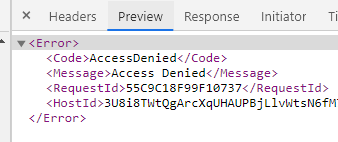
Happy do to a screen share or similar if that would help?
PeteDuncanson
on 8 Jan 2021
@PeteDuncanson if you're able to make other authenticated calls successfully then it seems like you have authenticated properly. Maybe read through the docs here: https://docs.amplify.aws/lib/auth/social/q/platform/js to make sure. Hopefully someone on the JS team can help you debug further
edwardfoyle
on 8 Jan 2021
@PeteDuncanson Could you share your aws-exports.js file (remove sensitive data if needed) and more about how you are authenticating users in the app? Code snippets would be great 👍
 amhinson
on 11 Jan 2021
amhinson
on 11 Jan 2021
Hey @amhinson,
Thanks for getting back. Requested goodies are below :)
aws_exports.js
/* eslint-disable */
// WARNING: DO NOT EDIT. This file is automatically generated by AWS Amplify. It will be overwritten.

const awsmobile = {
    "aws_project_region": "eu-west-1",
    "aws_appsync_graphqlEndpoint": "https://XXXX.appsync-api.eu-west-1.amazonaws.com/graphql",
    "aws_appsync_region": "eu-west-1",
    "aws_appsync_authenticationType": "AMAZON_COGNITO_USER_POOLS",
    "aws_appsync_apiKey": "XXXX",
    "aws_cloud_logic_custom": [
        {
            "name": "webFormHandlerAPi",
            "endpoint": "https://XXXXX.eu-west-1.amazonaws.com/live",
            "region": "eu-west-1"
        },
        {
            "name": "customerCsvExport",
            "endpoint": "https://XXXXX.execute-api.eu-west-1.amazonaws.com/live",
            "region": "eu-west-1"
        }
    ],
    "aws_cognito_identity_pool_id": "eu-west-1:XXXXX",
    "aws_cognito_region": "eu-west-1",
    "aws_user_pools_id": "eu-west-1_XXXX",
    "aws_user_pools_web_client_id": "XXXX",
    "oauth": {
        "domain": "XXXX-live.auth.eu-west-1.amazoncognito.com",
        "scope": [
            "phone",
            "email",
            "openid",
            "profile",
            "aws.cognito.signin.user.admin"
        ],
        "redirectSignIn": "http://localhost:3000/",
        "redirectSignOut": "http://localhost:3000/",
        "responseType": "code"
    },
    "federationTarget": "COGNITO_USER_POOLS",
    "aws_user_files_s3_bucket": "image-store-liveXXXXX-live",
    "aws_user_files_s3_bucket_region": "eu-west-1"
};


export default awsmobile;
Hastily hacked together code snippet, this should be the important bits:
import { s3Upload } from "../utils/S3Tools";

// My callback for the input field
  const handleFileChange = async (event) => {
    // No null check as I was hacking to try to get this working, don't judge ;)
    const file = event.target.files[0];
    console.info("File changed", event.target.files[0]);
    const attachment = file ? await s3Upload(file) : null;
    if (file && file.size > maxUploadFileSize) {
      alert(
        `Please pick a file smaller than ${maxUploadFileSize / 1000000} MB.`
      );
      return;
    }
    try {
      const attachment = file ? await s3Upload(file) : null;    // Fails here with 403 error
      setFieldValue("profilePictureUrl", attachment);
      setFieldTouched("profilePictureUrl", true);
      console.info("File uploaded", attachment);
    } catch (e) {
      console.error("Error uploading image", e);
    }
  };

// Other stuff cut out for ease

//My file upload input, elsewhere in my render method:
   <input
        type="file"
        name="profilePictureFilePicker"
        accept="image/png, image/jpeg"
        onChange={handleFileChange}
      />
Thanks for that info! Could you share more about how you're using Amplify Auth in your app?
amhinson
on 13 Jan 2021
We've got a Auth Provider that we wrap the whole App with:
import { CognitoUser } from "@aws-amplify/auth";
import { CognitoUserSession } from "amazon-cognito-identity-js";
import { CognitoHostedUIIdentityProvider } from "@aws-amplify/auth/lib/types";
import Amplify, { Auth } from "aws-amplify";
import React from "react";

export type UserContextType = {
  user: CognitoUser;
  isLoading: boolean;
  login: Function;
  googleLogin: Function;
  logout: Function;
  isAdmin: Function;
};

// Create a context that will hold the values that we are going to expose to our components.
export const UserContext = React.createContext<UserContextType | null>(null);

// Create a "controller" component that will calculate all the data that we need to give to our components bellow via the `UserContext.Provider` component.
// This is where the Amplify will be mapped to a different interface, the one that we are going to expose to the rest of the app.
export const UserProvider = ({ children }) => {
  const [user, setUser] = React.useState(null) as CognitoUser | any;
  const [
    userSession,
    setUserSession,
  ] = React.useState<CognitoUserSession | null>(null);
  const [isLoading, setIsLoading] = React.useState<boolean>(true);

  React.useEffect(() => {
    // Configure the keys needed for the Auth module
    Auth.configure({});

    // attempt to fetch the info of the user that was already logged in
    Auth.currentAuthenticatedUser()
      .then((user) => {
        setUser(user);
        Auth.currentSession().then((session) => {
          setUserSession(session);
        });
      })
      .catch(() => {
        setUser(null);
      })
      .finally(() => setIsLoading(false));
  }, []);

  // We make sure to handle the user update here, but return the resolve value in order for our components to be  able to chain additional `.then()` logic.
  // Additionally, we `.catch` the error and "enhance it" by providing a message that our React components can use.
  const login = (usernameOrEmail: string, password: string) =>
    Auth.signIn(usernameOrEmail, password)
      .then((cognitoUser) => {
        setUser(cognitoUser);
        Auth.currentSession().then((session) => {
          setUserSession(session);
        });
        return cognitoUser;
      })
      .catch((err) => {
        if (err.code === "UserNotFoundException") {
          err.message = "Invalid username or password";
        }
        throw err;
      })
      .finally(() => setIsLoading(false));

  const googleLogin = () =>
    Auth.federatedSignIn({ provider: CognitoHostedUIIdentityProvider.Google })
      .then((cognitoUser) => {
        setUser(cognitoUser);
        Auth.currentSession().then((session) => {
          setUserSession(session);
        });
        return cognitoUser;
      })
      .catch((err) => {
        if (err.code === "UserNotFoundException") {
          err.message = "Invalid username or password";
        }
        throw err;
      })
      .finally(() => setIsLoading(false));

  const logout = () =>
    Auth.signOut()
      .then((data) => {
        setUser(null);
        setUserSession(null);
        // We should clear out the DataStore incase we have different users using the same machine
        Amplify.DataStore.clear();
        return data;
      })
      .finally(() => setIsLoading(false));

  const isAdmin = () => {
    let isAdmin = false;
    if (userSession) {
      const groups = userSession.getAccessToken().payload["cognito:groups"];
      if (groups.includes("admin")) {
        isAdmin = true;
      }
    }

    console.info("Is Admin? " + isAdmin, userSession);

    return isAdmin;
  };

  // Make sure to not force a re-render on the components that are reading these values, unless the `user` value has changed.
  // This is an optimisation that is mostly needed in cases where the parent of the current component re-renders and thus the current component is forced to re-render as well.
  // If it does, we want to make sure to give the `UserContext.Provider` the same value as long as the user data is the same.
  // If you have multiple other "controller" components or Providers above this component, then this will be a performance booster.
  const values = React.useMemo(
    () =>
      ({
        user,
        isLoading,
        login,
        googleLogin,
        logout,
        isAdmin,
      } as UserContextType),
    [user, isLoading, userSession]
  );

  // Finally, return the interface that we want to expose to our other components
  return <UserContext.Provider value={values}>{children}</UserContext.Provider>;
};

// We also create a simple custom hook to read these values from.
// We want our React components to know as little as possible on how everything is handled
// so we are not only abtracting them from the fact that we are using React's context, but we also skip some imports.
export const useUser = () => {
  const context = React.useContext(UserContext);

  if (context === undefined) {
    throw new Error(
      "`useUser` hook must be used within a `UserProvider` component"
    );
  }
  return context;
};
In your s3Upload function, could you add this to confirm that there is an authenticated user when you are making the call:
const user = await Auth.currentAuthenticatedUser();
console.log(user);

const stored = await Storage.put(filename, sourceFile, {
  contentType: sourceFile.type,
});
@amhinson done 👍
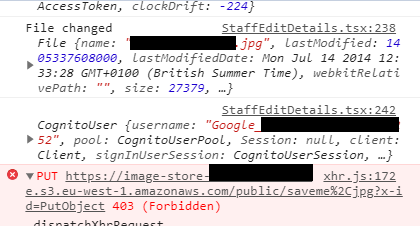
PeteDuncanson
on 13 Jan 2021
Hmm I'm still having no luck reproducing this with a federated Google user uploading a file to S3. This does appear to be similar to other issues such as:
https://github.com/aws-amplify/amplify-cli/issues/4055
https://github.com/aws-amplify/amplify-js/issues/5729
https://github.com/aws-amplify/amplify-js/issues/1094
I know there are a lot of potential solutions presented in those, but have you looked deeper into the roles/policies/groups as suggested in the other issues?
Another suggestion would be to create a sample app from scratch and document every single step to see if you experience the same behavior, since it looks like the original reproduction steps just start with update storage instead of add storage. If the same thing happens, then providing those complete reproduction steps here would be great for us to debug on our side. If you can't reproduce it with the new app, then you can compare what might be different in the policies & S3 bucket.
Let me know what you find! 👍
amhinson
on 13 Jan 2021
Related issues
 callmekatootie
·
3Comments
callmekatootie
·
3Comments
 benevolentprof
·
3Comments
benevolentprof
·
3Comments
 josoroma
·
3Comments
josoroma
·
3Comments
 DougWoodCDS
·
3Comments
DougWoodCDS
·
3Comments
 guanzo
·
3Comments
guanzo
·
3Comments
Most helpful comment
Hmm I'm still having no luck reproducing this with a federated Google user uploading a file to S3. This does appear to be similar to other issues such as:
https://github.com/aws-amplify/amplify-cli/issues/4055
https://github.com/aws-amplify/amplify-js/issues/5729
https://github.com/aws-amplify/amplify-js/issues/1094
I know there are a lot of potential solutions presented in those, but have you looked deeper into the roles/policies/groups as suggested in the other issues?
Another suggestion would be to create a sample app from scratch and document every single step to see if you experience the same behavior, since it looks like the original reproduction steps just start with
update storageinstead ofadd storage. If the same thing happens, then providing those complete reproduction steps here would be great for us to debug on our side. If you can't reproduce it with the new app, then you can compare what might be different in the policies & S3 bucket.Let me know what you find! 👍