Amplify-js: withAuthenticator doesn't accept usernameAttributes or signUpConfig
Describe the bug
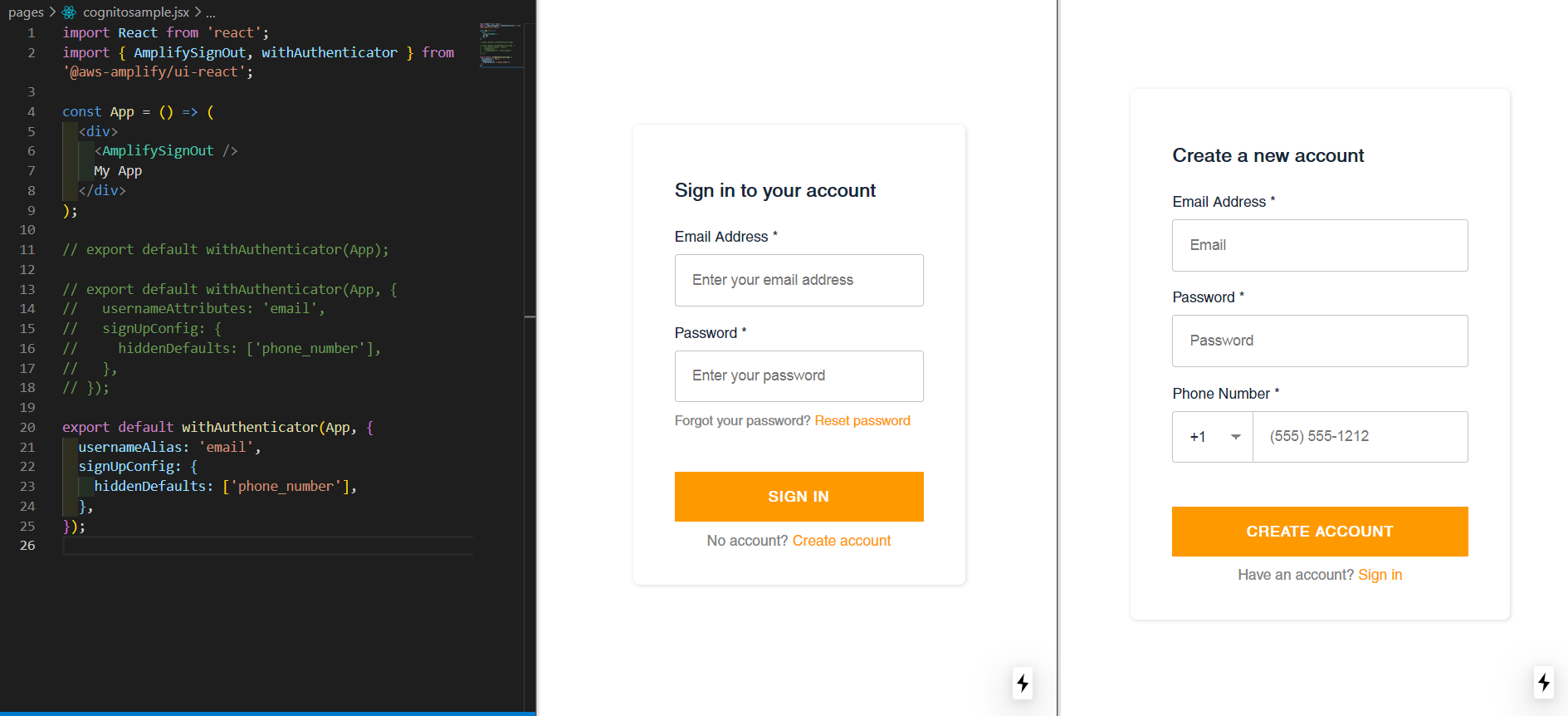
withAuthenticator provides default UI even though usernameAttributes or signUpConfig is set in the second arg.
To Reproduce
- Create a .jsx and fill it with a code snippet below
- Visit the page on a local development server
- Click "Create account" to see the sign-up UI
- Switch three types of
export defaultin the snippet and repeat 2. and 3.
Expected behavior
The sign-in and sign-up UI changes by using usernameAttributes or signUpConfig as described in the documents:
https://docs.amplify.aws/ui/auth/authenticator/q/framework/react-native#signup
https://docs.amplify.aws/ui/auth/authenticator/q/framework/react-native#sign-upin-with-emailphone-number
Code Snippet
```import React from 'react';
import { AmplifySignOut, withAuthenticator } from '@aws-amplify/ui-react';
const App = () => (
My App
);
// default
// export default withAuthenticator(App);
// not working
export default withAuthenticator(App, {
usernameAttributes: 'email',
signUpConfig: {
hiddenDefaults: ['phone_number'],
},
});
// signUpConfig doesn't work
// export default withAuthenticator(App, {
// usernameAlias: 'email',
// signUpConfig: {
// hiddenDefaults: ['phone_number'],
// },
// });
**Screenshots**
default:

not working:

signUpConfig doesn't work :
**Maybe related**
withAuthenticator wraps AmplifyAuthenticator.
(from https://github.com/aws-amplify/amplify-js/blob/main/packages/amplify-ui-react/src/withAuthenticator.tsx)
// ...
export function withAuthenticator(
Component: ComponentType,
authenticatorProps?: ComponentPropsWithRef
) {
const AppWithAuthenticator: FunctionComponent = props => {
// ...
    if (!signedIn) {
        return (
            <AmplifyContainer>
                <AmplifyAuthenticator {...authenticatorProps} {...props} />
            </AmplifyContainer>
        );
    }
    return <Component />;
};

return AppWithAuthenticator;
}
AmplifyAuthenticator accepts four props not including usernameAttributes or signUpConfig but usernameAlias.
(from https://github.com/aws-amplify/amplify-js/blob/06bfecbd32751dee61d5abb6d5be9430ecaeca5a/packages/amplify-ui-components/src/components/amplify-authenticator/amplify-authenticator.tsx)
export class AmplifyAuthenticator {
/* Initial starting state of the Authenticator component. E.g. If signup is passed the default component is set to AmplifySignUp */
@Prop() initialAuthState: AuthState.SignIn | AuthState.SignUp = AuthState.SignIn;
/* Federated credentials & configuration. /
@Prop() federated: FederatedConfig;
/* Username Alias is used to setup authentication with username, email or phone_number /
@Prop() usernameAlias: UsernameAliasStrings;
/* Callback for Authenticator state machine changes */
@Prop() handleAuthStateChange: AuthStateHandler = () => {};
```
What is the simplest workaround for setting up a custom-ui? or, how can we fix it?
 alexspringgit
All 2 comments
Hey @alexspringgit I was able to reproduce the issue and you're right. It seems like when the withAuthenticator library moved packages, it's underlying API was changed as well.
The good news is that you don't have to write your own Auth, or go bare-level with the Auth module.
The AmplifyAuthenticator module allows you to use have flexiblity in what shows up on your page (like having a headder and footer) while also taking advantage of Auth overrides like email signup etc.
I put together a gist showing how this can be done that may suit your needs:
https://gist.github.com/mtliendo/2d09b4b92d129c8b0a9a804cc410ffa5
 mtliendo
on 4 Jan 2021
mtliendo
on 4 Jan 2021
Hi @mtliendo, Thank you for your kind help. Reading your comment, I just now learned that there are two libraies @aws-amplify/ui-react (latest) and aws-amplify-react (legacy). I understood that the code below was for the legacy aws-amplify-react though I was using the latest @aws-amplify/ui-react.
export default withAuthenticator(App, {
  usernameAttributes: 'email',
  signUpConfig: {
    hiddenDefaults: ['phone_number'],
  },
});
Your code worked well even in my evnironment. I really appreciate it. I was able to use email as username in the sign-in UI by <AmplifyAuthenticator usernameAlias="email"> and in the sign-up UI by formFields={[{ type: 'email' }, { type: 'password' }]} in <AmplifySignUp>. Thanks.
https://gist.github.com/alexspringgit/7edbb115d1ca22c860d6440e1caa26e6/revisions

alexspringgit
on 5 Jan 2021
Related issues
 oste
·
3Comments
oste
·
3Comments
 epicfaace
·
3Comments
epicfaace
·
3Comments
 lucasmike
·
3Comments
lucasmike
·
3Comments
 DougWoodCDS
·
3Comments
DougWoodCDS
·
3Comments
 rayhaanq
·
3Comments
rayhaanq
·
3Comments
Most helpful comment
Hey @alexspringgit I was able to reproduce the issue and you're right. It seems like when the
withAuthenticatorlibrary moved packages, it's underlying API was changed as well.The good news is that you don't have to write your own Auth, or go bare-level with the
Authmodule.The
AmplifyAuthenticatormodule allows you to use have flexiblity in what shows up on your page (like having a headder and footer) while also taking advantage of Auth overrides like email signup etc.I put together a gist showing how this can be done that may suit your needs:
https://gist.github.com/mtliendo/2d09b4b92d129c8b0a9a804cc410ffa5