Amplify-js: AmplifyTotpSetup component renders broken image for QR code
Describe the bug
The QR Code image for TOTP Setup fails to render if AmplifyTotpSetup is used in AmplifyAuthenticator
To Reproduce
Steps to reproduce the behavior:
- Create auth flow with
<AmplifyAuthenticator >...</AmplifyAuthenticator> - Add
<AmplifyTotpSetup slot="totp-setup" />child - Register a new user or sign in with one that still needs TOTP Setup
- View broken qr code...
Expected behavior
QR Code renders correctly with no overrides, with issuer override, with header text override, etc
Code Snippet
import React from "react";
import "./App.css";
import Amplify from "aws-amplify";
import {
  AmplifyAuthenticator,
  AmplifySignOut,
  AmplifyTotpSetup,
} from "@aws-amplify/ui-react";
import { AuthState, onAuthUIStateChange } from "@aws-amplify/ui-components";
import awsconfig from "./aws-exports";

Amplify.configure(awsconfig);

const AuthStateApp: React.FunctionComponent = () => {
  const [authState, setAuthState] = React.useState<AuthState>();
  const [user, setUser] = React.useState<object | undefined>();

  React.useEffect(() => {
    return onAuthUIStateChange((nextAuthState, authData) => {
      setAuthState(nextAuthState);
      setUser(authData);
    });
  }, []);

  return authState === AuthState.SignedIn && user ? (
    <div className="App">
      <div>Hello, {(user as any).username}</div>
      <AmplifySignOut />
    </div>
  ) : (
    <AmplifyAuthenticator >
      <AmplifyTotpSetup headerText="My Custom TOTP Setup Text" slot="totp-setup" />
    </AmplifyAuthenticator>
  );
};

export default AuthStateApp;
Screenshots
Working if you don't use the AmplifyTotpSetup component:

Broken with no overrides <AmplifyTotpSetup slot="totp-setup" />

Broken with overrides <AmplifyTotpSetup headerText="My Custom TOTP Setup Text" slot="totp-setup" />

 HarrisonJackson
All 12 comments
Can you please try passing in the current authenticated CognitoUser via the user prop in the AmplifyTotpSetup component? Aka.
Wherever you return the UI:
`diff
return (
<AmplifyAuthenticator >
- <AmplifyTotpSetup headerText="My Custom TOTP Setup Text" slot="totp-setup" />
+ <AmplifyTotpSetup headerText="My Custom TOTP Setup Text" slot="totp-setup" {...{user}} />
</AmplifyAuthenticator>
)
 harrysolovay
on 4 Dec 2020
harrysolovay
on 4 Dec 2020
It still renders a broken image instead of the QR code.
If I remove the <AmplifyTotpSetup ... /> it fast refreshes and the qr code works. I've tried a number of props to try and get the <AmplifyTotpSetup /> slot component to work without luck.
HarrisonJackson
on 10 Dec 2020
I am seeing this same issue using vue.js. I was unable to get it to work with the above recommendation.
 chrispruitt
on 11 Dec 2020
chrispruitt
on 11 Dec 2020
@HarrisonJackson this may be helpful to you. After digging in a bit I found that amplify-js uses stencil.js to compile a single code base to general components that can be used by vue, angular, react. The issue I found was that I was unable to pass in any object (i.e. CognitoUser) to the amplify-totp-setup component as an attribute. If I passed it in as a property it worked!
vue.js offers .prop which will bind as a DOM property instead of an attr. Maybe react is doing the same thing? Found an interesting issue that might be useful for react folks -> https://github.com/facebook/react/issues/7249
This does not work:
<amplify-totp-setup>
    issuer="My Issuer"
    :user="user"
</amplify-totp-setup>
This works:
<amplify-totp-setup>
    issuer="My Issuer"
    :user.prop="user"
</amplify-totp-setup>
In case it is useful to anybody, here is what I did as a temporary workaround for a custom issuer in TOTP setup until #7522 is merged:
const MyAuthenticatorWithCustomTotpIssuer: React.FC = () => {
    <AmplifyAuthenticator>
        <CustomTotpSetup />
    </AmplifyAuthenticator>
}

const CustomTotpSetup: React.FC = () => {
    // This component is a bit of a hack because slots are currently not working properly in the Amplify UI,
    // until this gets merged: https://github.com/aws-amplify/amplify-js/pull/7522
    // Because the TOTP component makes a request to AssociateSoftwareToken on mount, the default component makes
    // this request and is then immediately replaced by this component. This leads to two requests. So we delay this
    // second request by one second so that it doesn't clash with the first one and always happens afterwards, which
    // should lead to the correct QR code being displayed.
    const [user, setUser] = React.useState<CognitoUserInterface | undefined>();
    const [displayComponent, setDisplayComponent] = React.useState<boolean>(false);

    React.useEffect(() => {
        return onAuthUIStateChange((nextAuthState, authData) => {
            if (authData && nextAuthState === AuthState.TOTPSetup) {
                setUser(authData as CognitoUserInterface);
            } else {
                setUser(undefined);
            }
        });
    }, []);

    React.useEffect(() => {
        if (user) {
            const timeout = setTimeout(() => setDisplayComponent(true), 1000);
            return () => clearTimeout(timeout);
        } else {
            setDisplayComponent(false);
        }
    }, [user])

    return (
        <span slot="totp-setup">
            {displayComponent ? (
                <AmplifyTotpSetup issuer={'My Custom Issuer'} user={user} />
            ) : <div>Loading...</div>}
        </span>
    );
}
 bwindsor
on 16 Jan 2021
bwindsor
on 16 Jan 2021
Hi, #7522 should fix this issue. This is now on the unstable npm tag and will be included in the release cycle. Please let us know if this resolves the issue!
 wlee221
on 22 Jan 2021
wlee221
on 22 Jan 2021
I just tested with
    "@aws-amplify/auth": "^3.4.18-unstable.6",
    "@aws-amplify/ui-react": "^0.2.35-unstable.6",
I can confirm that it mostly fixed my issue when customising TOTP setup using AmplifyTotpSetup.
You still need to provide the user prop manually when using a custom TOTP setup component. I am unsure if this is expected behaviour or another issue, as below.
This does not work, and the TOTP setup page does not display a QR code at all. It's because the user prop is not provided to AmplifyTotpSetup.
const MyAuthenticator: React.FC = () => {
    return (
        <AmplifyAuthenticator>
            <AmplifyTotpSetup slot={"totp-setup"} issuer={'My Custom Issuer'} />
        </AmplifyAuthenticator>
    );
}
This does work:
const MyAuthenticator: React.FC = () => {
    const [user, setUser] = React.useState<CognitoUserInterface | undefined>();

    React.useEffect(() => {
        return onAuthUIStateChange((nextAuthState, authData) => {
            setUser(authData as (CognitoUserInterface | undefined));
        });
    }, []);

    return (
        <AmplifyAuthenticator>
            <AmplifyTotpSetup slot={"totp-setup"} issuer={'My Custom Issuer'} user={user}/>
        </AmplifyAuthenticator>
    );
}
Yes, that is the expected behavior -- I should have clarified. You need to pass the user object manually because the custom component is outside amplify-authenticator and hence doesn't have access to user internal to the authenticator. I'll update the docs to clarify this.
wlee221
on 24 Jan 2021
That being said, I see that having to pass user manually is cumbersome. I'll bring this up to the team and discuss if we can reduce this complexity.
wlee221
on 24 Jan 2021
Thanks, with that as expected behaviour then AmplifyTotpSetup is fixed as far as I can tell! It may be good to show how to get the user obejct as an example in the docs.
One option to reduce the complexity for developers would be if amplify just exported something like a useAuthData hook, then it would only be one line for developers to grab the current user object:
export const useAuthData = () => {
    const [authData, setAuthData] = React.useState<CognitoUserInterface | undefined>();

    React.useEffect(() => {
        return onAuthUIStateChange((nextAuthState, data) => {
            setAuthData(data as (CognitoUserInterface | undefined));
        });
    }, []);

    return authData;
}
This actually contains a bug which I've opened a separate issue for #7613, where setAuthData could get called after the component is unmounted. But a workaround would be to use something like this useStateSafe instead of useState.
bwindsor
on 24 Jan 2021
That being said, I see that having to pass
usermanually is cumbersome. I'll bring this up to the team and discuss if we can reduce this complexity.
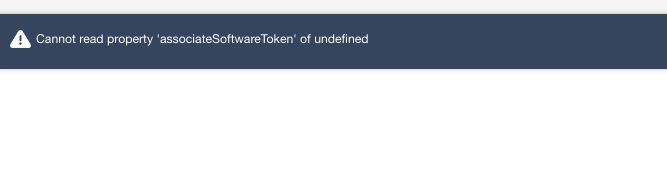
When using Vue and the following format, it attempts to associateSoftwareToken on creation which means that an error toast is displayed as soon as the component is loaded onto the screen. I can manually specify the user, but it's too late because it's already run the setup code without the user.
<amplify-authenticator>
  <amplify-sign-in
    slot="sign-in"
    hide-sign-up
    username-alias="email"
  />
  <amplify-totp-setup
    slot="totp-setup"
    header-text="Setup Multi-Factor Authentication App"
    issuer="AnIssuer"
    :user.prop="user"
  />
</amplify-authenticator>
 jssuttles
on 27 Jan 2021
jssuttles
on 27 Jan 2021
I was having the same issue before #7522 was merged. However there is no stable npm release for it yet. If you're using @aws-amplify/ui-vue version 0.2.33 or below, you will get this associateSoftwareToken error. I believe it should be fixed from 0.2.34-unstable.6 onwards. (release list)
bwindsor
on 27 Jan 2021
Related issues
 epicfaace
·
3Comments
epicfaace
·
3Comments
 shinnapatthesix
·
3Comments
shinnapatthesix
·
3Comments
 leantide
·
3Comments
leantide
·
3Comments
 romainquellec
·
3Comments
romainquellec
·
3Comments
 simon998yang
·
3Comments
simon998yang
·
3Comments
Most helpful comment
That being said, I see that having to pass
usermanually is cumbersome. I'll bring this up to the team and discuss if we can reduce this complexity.