Amplify-js: Swich of language not working for all Auth components
Describe the bug
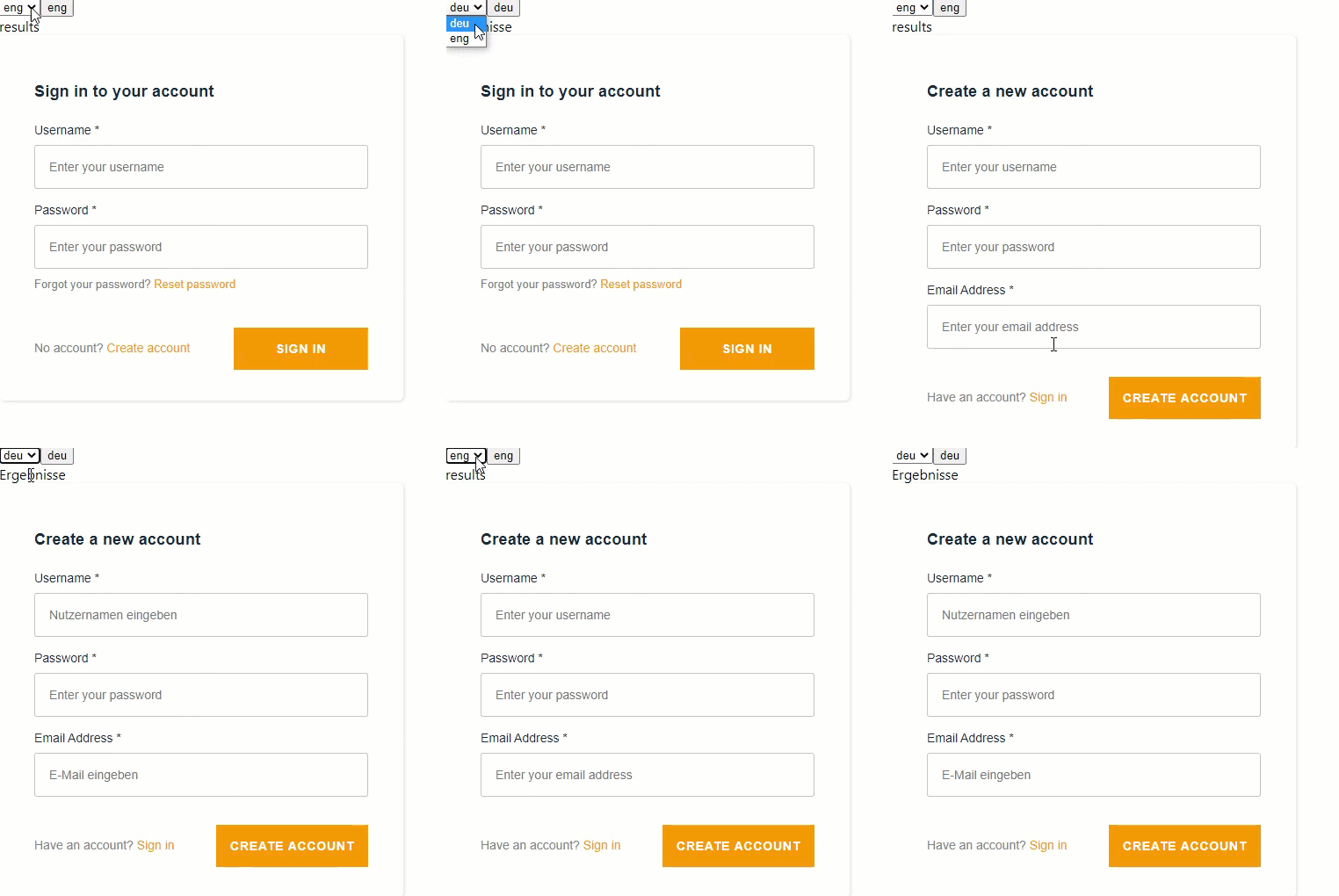
I've created a languge switch, when calling Login Screen it displays the default languge for all labels.
e.g: Sign-In Screen
setting default to en: "Sign in to your account"(english)
setting default to en "Anmeldung"(german)
When changing language in DropDownbox the language of Sign-In will not change. But for the Screen Sign-Up it is working.
Code Snippet
Please provide a code snippet or a link to sample code of the issue you are experiencing to help us reproduce the issue. (Be sure to remove any sensitive data)
Screenshots
Default en:

Default de:
 chkrause
All 3 comments
Hey, @chkrause thanks for opening this issue!
But the code seems to be a bit incomplete, the language JSON files are missing and the even the LanguageSelect component. Additionally, there is also an empty useEffect and the index.js is missing its code.
It would be great if you could provide a minimal reproducible example, a github repo with all your code would be perfect.
Just a tip: github issues support markdown so when embedding code, it would be nicely formatted if you use ``` than just pasting it directly.
Related to https://github.com/aws-amplify/amplify-js/issues/6115 and https://github.com/aws-amplify/amplify-js/pull/6346
 CryogenicPlanet
on 16 Oct 2020
CryogenicPlanet
on 16 Oct 2020
Here you find the Repository for reproducing:
https://github.com/chkrause/LangTest/tree/master/lang
chkrause
on 16 Oct 2020
Hey @chkrause, we have openned a new feature-request to discuss if update i18n language should automatically trigger a re-render #6986.
In the meantime, you could use a work around of manually setting the props in the form fields
javascript
<AmplifySignIn
  headerText={I18n.get(Translations.XXXXX)}
  formFields={[
    {
      type: "email",
      label: I18n.get(Translations.XXXXX),
      placeholder: I18n.get(Translations.USERNAME_PLACEHOLDER),
      required: true,
    },
    {
      type: "password",
      label: I18n.get(Translations.XXXXX),
      placeholder: I18n.get(Translations.PASSWORD_PLACEHOLDER),
      required: true,
    }
  ]}>
</AmplifySignIn>
CryogenicPlanet
on 17 Oct 2020
Related issues
 josoroma
·
3Comments
josoroma
·
3Comments
 cgarvis
·
3Comments
cgarvis
·
3Comments
 rygo6
·
3Comments
rygo6
·
3Comments
 romainquellec
·
3Comments
romainquellec
·
3Comments
 DougWoodCDS
·
3Comments
DougWoodCDS
·
3Comments
Most helpful comment
Here you find the Repository for reproducing:
https://github.com/chkrause/LangTest/tree/master/lang