Amplify-js: AmplifyClass not getting configured on production build
Describe the bug
I'm building an angular app and when I run the production build, amplify modules doesn't work.
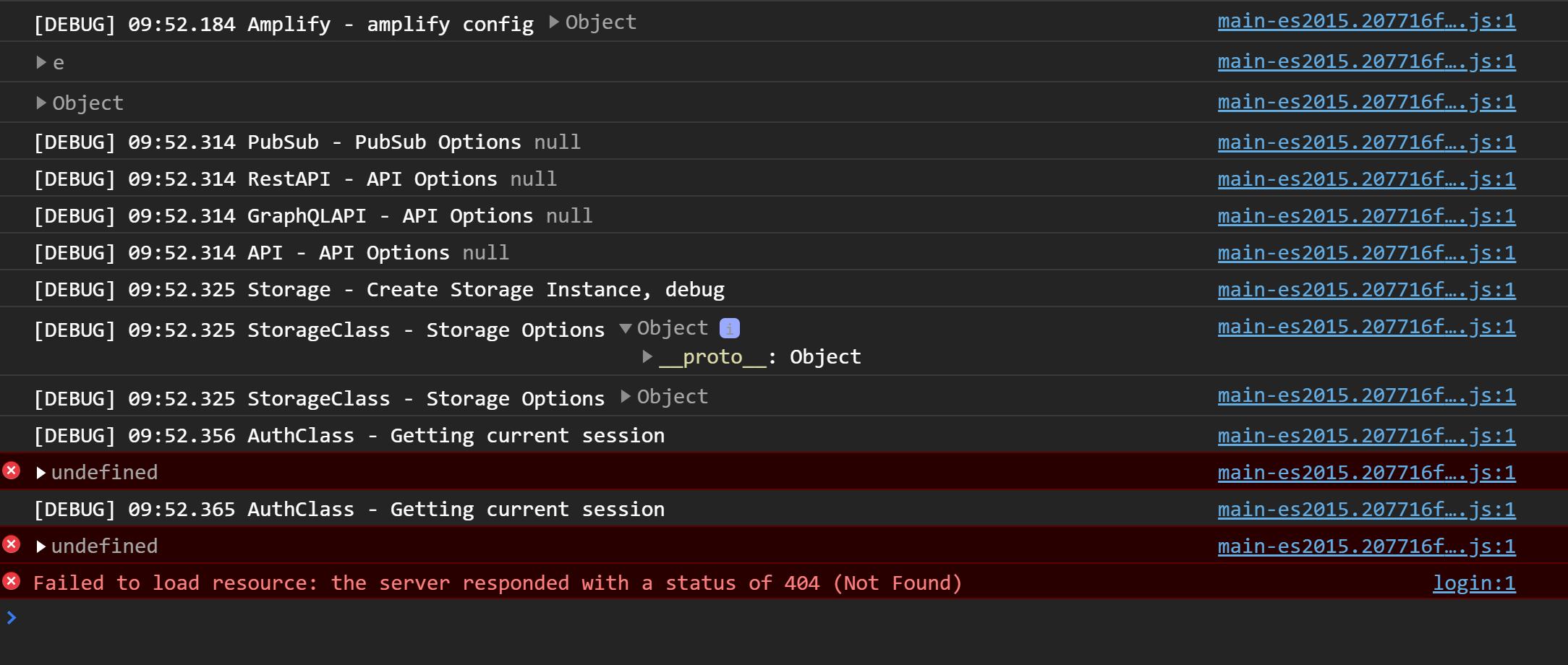
Expected behavior
It's suppose to configure itself and run like it works on "ng serve"
 eifr0980
All 24 comments
Could you provide more information about how you are using Amplify? Also, could you include environment information or version numbers.
 jordanranz
on 9 Sep 2020
jordanranz
on 9 Sep 2020
Could you provide more information about how you are using Amplify? Also, could you include environment information or version numbers.
Latest version of amplify, on windows 10 2004.
When I 'ng serve' everything works fine... Maybe it's something with the build configuration.. but I dont know what may affect it
eifr0980
on 10 Sep 2020
I'm running in the same issue on Ubuntu with Anguar 10.0.5 and 10.1.1.
 WolfWalter
on 14 Sep 2020
WolfWalter
on 14 Sep 2020
In Angular development mode it is working (ng serve). Here is my console log with Amplify debugging on -
import Amplify from 'aws-amplify';
import awsmobile from './aws-exports-ammatech';
Amplify.Logger.LOG_LEVEL = 'DEBUG';
Amplify.configure(awsmobile);
OUTPUT-
[DEBUG] 57:12.800 Amplify - amplify config {aws_project_region: "ap-southeast-2"…}
[DEBUG] 57:12.801 I18n - configure I18n
[DEBUG] 57:12.801 I18n - create I18n instance
[DEBUG] 57:12.801 AuthClass - configure Auth
[DEBUG] 57:12.801 Parser - parse config (3) [{…}, "to amplifyconfig", {…}]
[DEBUG] 57:12.802 Hub - Dispatching to auth with {event: "configured", data: null, message: "The Auth category has been configured successfully"}
[DEBUG] 57:12.803 Hub - Dispatching to auth with {event: "configured", data: null, message: "The Auth category has been configured successfully"}
[DEBUG] 57:12.803 AnalyticsClass - on hub capsule auth {event: "configured", data: null, message: "The Auth category has been configured successfully"}
[DEBUG] 57:12.803 AnalyticsClass - configure Analytics {aws_project_region: "ap-southeast-2"…}
[DEBUG] 57:12.804 Parser - parse config (3) [{…}, "to amplifyconfig", {…}]
[DEBUG] 57:12.804 AWSPinpointProvider - configure Analytics {disabled: undefined, autoSessionRecord: true, aws_project_region: "ap-southeast-2"…}
[DEBUG] 57:12.805 Hub - Dispatching to analytics with {event: "configured", data: null, message: "The Analytics category has been configured successfully"}
[DEBUG] 57:12.805 AnalyticsClass - on hub capsule analytics {event: "configured", data: null, message: "The Analytics category has been configured successfully"}
[DEBUG] 57:12.805 AnalyticsClass - current configuration {autoSessionRecord: true, aws_project_region: "ap-southeast-2"…}
[DEBUG] 57:12.806 Storage - storage configure called
[DEBUG] 57:12.806 StorageClass - configure Storage
[DEBUG] 57:12.806 Parser - parse config (3) [{…}, "to amplifyconfig", {…}]
[DEBUG] 57:12.807 AWSS3Provider - configure Storage undefined
[DEBUG] 57:12.808 Storage - storage vault configure called
[DEBUG] 57:12.808 StorageClass - configure Storage
[DEBUG] 57:12.808 Parser - parse config (3) [{…}, "to amplifyconfig", {…}]
[DEBUG] 57:12.808 AWSS3Provider - configure Storage undefined
[DEBUG] 57:12.809 RestAPI - configure Rest API {opt: {…}}
{DEBUG] 57:12.809 RestAPI - create Rest API instance
[DEBUG] 57:12.809 RestClient - API Options {endpoints: Array(0), aws_project_region: "ap-southeast-2"…}
[DEBUG] 57:12.809 PubSub - configure PubSub {opt: {…}}
[DEBUG] 57:12.810 GraphQLAPI - configure GraphQL API {opt: {…}}
[DEBUG] 57:12.810 GraphQLAPI - create Rest instance
[DEBUG] 57:12.810 RestClient - API Options {aws_project_region: "ap-southeast-2"…}
[DEBUG] 57:12.810 RestAPI - configure Rest API {opt: {…}}
[DEBUG] 57:12.810 RestAPI - create Rest API instance
[DEBUG] 57:12.811 RestClient - API Options {endpoints: Array(0), aws_project_region: "ap-southeast-2"…}
[DEBUG] 57:12.811 GraphQLAPI - configure GraphQL API {opt: {…}}
[DEBUG] 57:12.811 GraphQLAPI - create Rest instance
[DEBUG] 57:12.812 RestClient - API Options {aws_project_region: "ap-southeast-2"…}
[DEBUG] 57:12.812 Interactions - configure Interactions {opt: {…}}
[DEBUG] 57:12.812 XR - configure XR {opt: {…}}
[DEBUG] 57:12.813 AbstractXRProvider - configure SumerianProvider {aws_project_region: "ap-southeast-2" …}
[DEBUG] 57:12.813 Predictions - configure Predictions {aws_project_region: "ap-southeast-2"…}
[DEBUG] 57:12.888 AuthClass - getting current authenticated user
core.js:26827 Angular is running in development mode. Call enableProdMode() to enable production mode.
[DEBUG] 57:12.934 AuthClass - cannot load federated user from auth storage
[DEBUG] 57:12.934 AuthClass - get current authenticated userpool user
[DEBUG] 57:12.962 AuthClass - Failed to get user from user pool
[DEBUG] 57:12.964 AuthClass - The user is not authenticated by the error No current user
[DEBUG] 57:12.966 AuthDecorator - no authenticated user not authenticated
client:52 [WDS] Live Reloading enabled.
But in "production" mode (ng serve --prod) the same code it is not -
[DEBUG] 56:19.233 Amplify - amplify config {aws_project_region: "ap-southeast-2"…}
main.6a3ae9a16f1588763e56.js:1 [DEBUG] 56:19.265 AuthClass - getting current authenticated user
main.6a3ae9a16f1588763e56.js:1 [DEBUG] 56:19.309 AuthClass - cannot load federated user from auth storage
main.6a3ae9a16f1588763e56.js:1 [DEBUG] 56:19.311 AuthClass - get current authenticated userpool user
main.6a3ae9a16f1588763e56.js:1 [ERROR] 56:19.313 AuthError -
Error: Amplify has not been configured correctly.
This error is typically caused by one of the following scenarios:
        1. Make sure you're passing the awsconfig object to Amplify.configure() in your app's entry point
            See https://aws-amplify.github.io/docs/js/authentication#configure-your-app for more information

        2. There might be multiple conflicting versions of aws-amplify or amplify packages in your node_modules.
            Try deleting your node_modules folder and reinstalling the dependencies with `yarn install`
 Ammatech
on 15 Sep 2020
Ammatech
on 15 Sep 2020
I'm having the same issue, works fine when running locally but when running the production build it doesn't seem to configure properly. Only just started happening so might have been introduced in a recent build. My code:
import Amplify, { Auth } from 'aws-amplify';

Amplify.configure(configService.getAuthConfiguration());
Note that the object passed in is same as the documentation e.g. {Auth: { ..., oauth: { ... } }.
I then call:
const config = Auth.configure(null) as any;

    const {
      domain,
      redirectSignIn,
      responseType,
      scope } = config.oauth;
But this causes the error as seen by other people above. The config returned is null.
I've tried debugging into Amplify and the modules are empty, would have thought there should be an 'Auth' reference in there?
Thanks
 ADringer
on 15 Sep 2020
ADringer
on 15 Sep 2020
We are seeing a similar error in optimized builds with Angular 10. In the regular build everything works fine, but with production configuration it fails.
package.json:
...
"aws-amplify": "3.1.1",
...
Additional configuration parameters in angular.json for optimized builds (as used for production):
"optimization": true,
"outputHashing": "all",
"sourceMap": true,
"extractCss": true,
"namedChunks": false,
"aot": true,
"extractLicenses": true,
"vendorChunk": false,
"buildOptimizer": true,
Configuration call
import Amplify from '@aws-amplify/core';

Amplify.configure(aws_config); //our configuration object with pools, region, etc.
While running the code
import Auth from '@aws-amplify/auth';

Auth.currentCredentials();
we receive an error: No Auth module registered in Amplify
There are no dependencies from @aws-amplify listed in the package.json and only singleton resolved dependencies in the package-lock.json. Deleting and reinstalling the node_modules did not help.
 Stephan221713
on 15 Sep 2020
Stephan221713
on 15 Sep 2020
@Stephan221713 Can you using import { Auth } from "aws-amplify" and let me know if that resolves it?
(#6811 may resolve this as well, but want to get you unblocked)
 ericclemmons
on 16 Sep 2020
ericclemmons
on 16 Sep 2020
@ericclemmons Unfortunately, this does not resolve the problem. It is not urgent for us as version 3.0.24 works fine. Do you know which version will have the fix from 6811?
Stephan221713
on 17 Sep 2020
@Stephan221713 #6811 got published yesterday, so updating to @latest will get it for you to try out.
Thanks for clarifying that v3.0.24 works with Angular production builds: that'll help is narrow down the cause!
ericclemmons
on 17 Sep 2020
+1. Also faced this today after upgrade. Now downgrading.
 hisham
on 18 Sep 2020
hisham
on 18 Sep 2020
My earlier post did not make it clear what I thought the problem seems to relate to. Here is my two cents worth (hope it helps and not hinders).
In the file 'packages/core/Ampify.ts' the 'register' method is called by each of the package classes (eg I18n, AuthClass etc) and it populates the _modules object (part of the work from PR 6146). Then when we call Amplify.configure(awsconfig) in our app this method is looping through the _modules object to do the DI and configure the packages.
This works correctly in Angular development mode (ng s) - that is the 'register' method is called and the _modules object is populated BUT in Angular 'production' mode (ng s --prod) 'register' method is NOT called and the _modules object is not populated.
I verified this via console.log hacks in the register and configure methods of the Amplify.ts file and then published a local @aws-amplify/core NPM package via the Contributing guideline in this repo). If of any use I can supply more details ( I am new to publicly reporting problems so not sure on protocols)
Ammatech
on 18 Sep 2020
If it helps btw, downgrading to "@aws-amplify/auth": "3.3.2" was sufficient to resolve this.
And the problem is still there with 3.4.4
hisham
on 18 Sep 2020
I have to say, y'all have done an _excellent_ job of describing & debugging this.
Looks like I have a reproduction here using @unstable (our main branch):
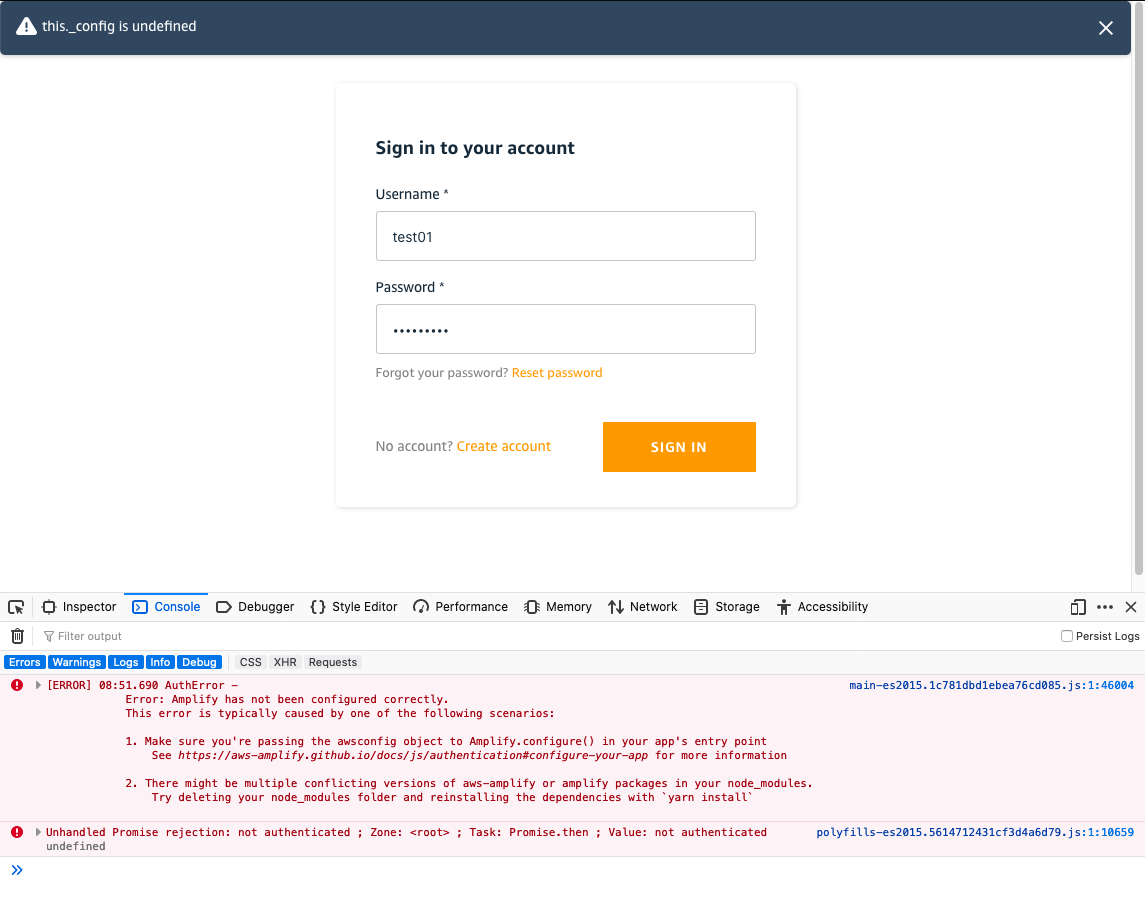
yarn build --prod(which runsng build --prod).--prodis required.npx serve dist/authenticator(my app is calledauthenticator)
What's peculiar is _why is this behavior different in Angular than React/Vue/Next/etc._?
I'm looking into the use of sideEffects: false to see if that's the culprit. Based on what I know, Angular's prod build may be "mark and sweeping" the Amplify.register(Auth) call because this is technically a "side-effect" that happens outside of the export. 🤔
ericclemmons
on 18 Sep 2020
BTW, @Ammatech your research is 💯 :)
ericclemmons
on 18 Sep 2020
@ericclemmons Thanks, glad I could help with the easy part :).
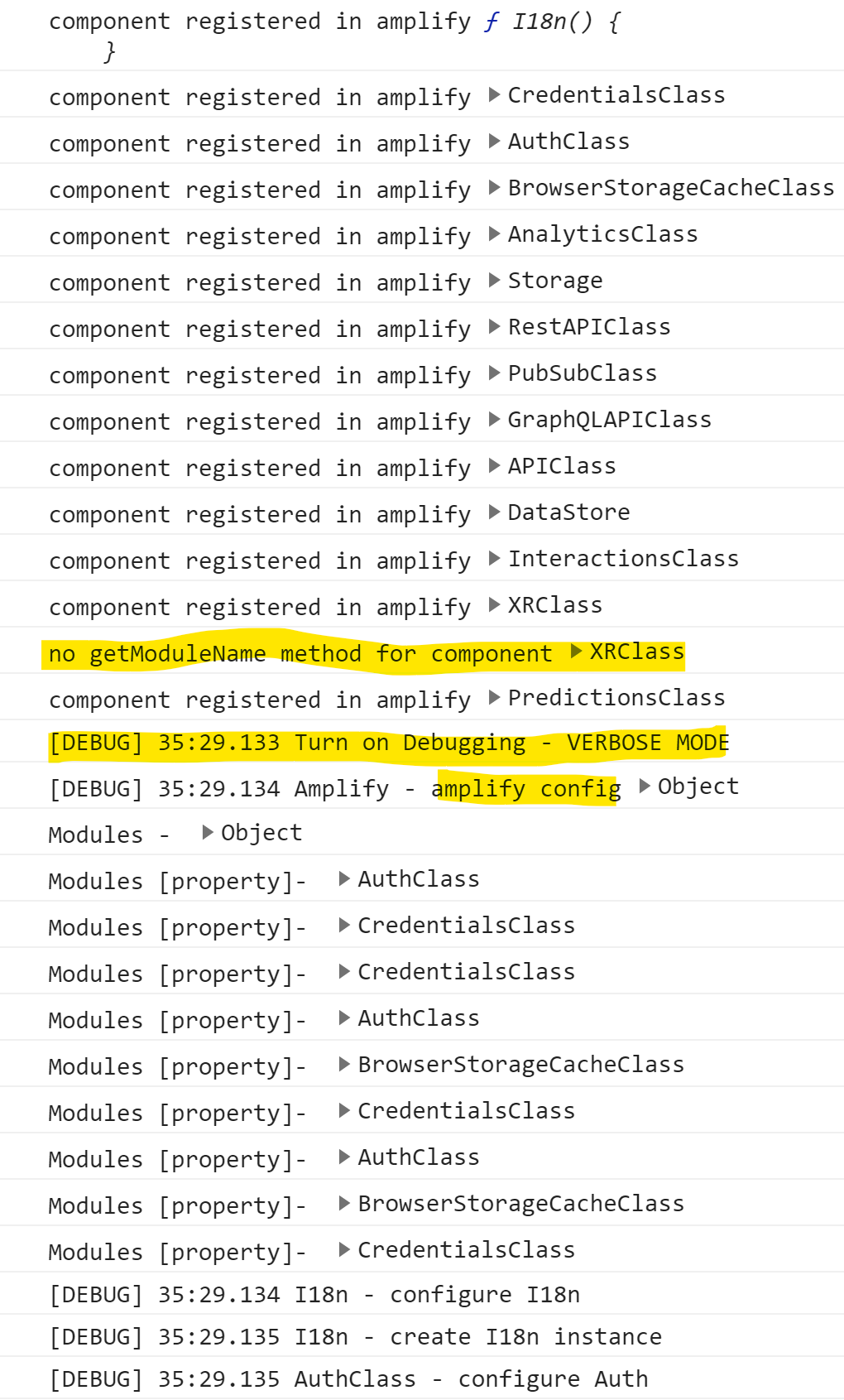
FYI part of the reason I put in console.log hacks and built my own core package was that the Logger debug functionality is not producing output in the 'register' method in the Amplify.ts file even in Angular development mode (see my original post with the DEBUG output). Seems to be chicken and the egg problem as by the time the app code turns on LOG_LEVEL = 'DEBUG' the register methods for each component have already run - I get messages from console.log but not Logger as you see the attached output.
Ammatech
on 21 Sep 2020
I had the same issue for a few weeks, and found a workaround:
in angular.json > projects>architect>build>configurations>production , set buildOptimizer to false
My project is now using the latest angular and the latest amplify libraries.
 gerrytsui
on 22 Sep 2020
gerrytsui
on 22 Sep 2020
@gerrytsui while it's great you found that solution, bundle sizes of angular apps with aws-amplify are big enough as is, so build optimizing is very much needed.
hisham
on 23 Sep 2020
As a workaround I am just calling the register calls for the modules after the configure:
Amplify.configure(awsExports);

Amplify.register(Auth);
Amplify.register(API);
Amplify.register(PubSub);
Amplify.register(Storage);
@gerrytsui while it's great you found that solution, bundle sizes of angular apps with aws-amplify are big enough as is, so build optimizing is very much needed.
agree. But it is an indicator that the problem could be due to optimization, not the amplify library. That is why the code only fails in Angular ? not react and vue.
gerrytsui
on 24 Sep 2020
@gerrytsui yes the issue happens only in prod and not dev builds.
hisham
on 24 Sep 2020
We're working on a fix for this, but there's basically Amplify.register is being treated as a "side-effect" and removed from prod builds, whereas other frameworks' bundlers (Create React App, Next.js, etc.) don't.
We have to provide the right "hints" to make sure Angular keeps it for optimized bundles.
ericclemmons
on 24 Sep 2020
Hi everyone,
We just pushed a fix to latest (https://www.npmjs.com/package/aws-amplify/v/latest via https://github.com/aws-amplify/amplify-js/pull/6867) that addresses Angular's ng build --prod behavior removing Amplify.register.
We validated this fix with Angular 9 & 10 (as well as other frameworks like CRA, Next.js, Vue, & React Native), so please let us know if you still experience issues.
We're sorry for the inconvenience and the workarounds, and are adding production-level integration tests to prevent this from happening again.
Thanks for your help in getting this resolved!
ericclemmons
on 25 Sep 2020
We are facing similar issue with Amplify.configure in the production environment for Reactjs. It works fine in the staging environment, The events are not getting logged for the production environment.
 pmashelkar
on 7 Oct 2020
pmashelkar
on 7 Oct 2020
@pmashelkar Can you open a new issue with more detail around this?
The events are not getting logged for the production environment.
ericclemmons
on 7 Oct 2020
Related issues
 benevolentprof
·
3Comments
benevolentprof
·
3Comments
 ddemoll
·
3Comments
ddemoll
·
3Comments
 ldgarcia
·
3Comments
ldgarcia
·
3Comments
 rygo6
·
3Comments
rygo6
·
3Comments
 DougWoodCDS
·
3Comments
DougWoodCDS
·
3Comments
Most helpful comment
Hi everyone,
We just pushed a fix to
latest(https://www.npmjs.com/package/aws-amplify/v/latest via https://github.com/aws-amplify/amplify-js/pull/6867) that addresses Angular'sng build --prodbehavior removingAmplify.register.We validated this fix with Angular 9 & 10 (as well as other frameworks like CRA, Next.js, Vue, & React Native), so please let us know if you still experience issues.
We're sorry for the inconvenience and the workarounds, and are adding production-level integration tests to prevent this from happening again.
Thanks for your help in getting this resolved!