Amplify-js: Using storage.get with download:true option for a JSON file in React Native seems to cache result
Describe the bug
Using storage.get with download:true option for a JSON file in React Native seems to cache result:
var result = await Storage.get('profile.json', { level: 'private', download: true });
            var user_profile = await new Response(result.Body).json();
"user_profile" variable will contain the JSON stored in the S3. If I update that 'profile.json' with a:
Storage.put('profile.json', JSON.stringify(Userdata), {
                level: 'private',
                contentType: 'application/json'
            })
and in my app I call back the Storage.get on that file, I will get the old content instead of the new saved one. If I open S3 with the AMAZON console and check the json file content, it shows the new content. So each new call to storage.get will return me old content even if content is updated on S3.
To Reproduce
Steps to reproduce the behavior:
- Create a JSON file on S3
- Use the app to fetch the content (storage.get) and verify content
- Use storage.put to update that file content
- Verify new content is present in S3 console
- Use the app to fetch the S3 again (storage.get) and content will show old values instead of new one
Expected behavior
The second storage.get call should return content stored in S3 instead of cached value.
What is Configured?
Using these libs:
"aws-amplify": "^3.0.17",
"aws-amplify-react-native": "^4.2.0",
"aws-sdk": "^2.690.0",
"react-native": "0.61.5",
 pperron
All 8 comments
Hi,
did some more tests and the same code on Android is working fine but on IOS, it seems to result of a cached info. So problem seems to exist on IOS devices. I'm running my tests on an iPhone XR IOS 13.6.1.
pperron
on 26 Aug 2020
I created a simple code to test the problem and running those lines:
const responsePut = await Storage.put('profile.json', JSON.stringify(Userdata), {
                level: 'private',
                contentType: 'application/json'
            })
                .then(result => console.log(result))
                .catch(err => console.log(err));

const result = await Storage.get('profile.json', { level: 'private', download: true });
console.log("Profile JUST after the SAVE...");
const user_profile = await new Response(result.Body).json();
console.log(user_profile);
And on Android, the log from Storage.put and log from the Storage.get are identical and on IOS, they are different, the Storage-get returning me old data instead of new one...
pperron
on 26 Aug 2020
Update: this is also happening with aws-sdk s3. This issue can also occur when using Amplify Storage 'put' and then aws-sdk S3's 'getObject'. However I have a workaround fix to the caching issue by using aws-s3 'getObject' and 'putObject' - so until a fix is made for Amplify, I would suggest just using aws-sdk if possible. There probably is some internal flag not being set with Amplify Storage's "put" method so that on the next "get" it decides to retrieve a cached version.
Posting to say I'm seeing the same with Amplify for Node. In my web app users can edit CSV files on a S3 bucket. After saving the CSV file (Storage 'put') and then re-opening the file (Storage 'get'), an older version of the CSV file is retrieved which I've also suspected is due to caching. Rarely the last-saved file retrieved so the behavior is unpredictable. On the S3 console I can see that the latest updates have been made immediately after the Storage 'put' call.
I have also tried deleting the existing file before saving the new file to S3. Same behavior.
Maybe the devs can implement a "cache: boolean" parameter to turn caching on or off? AFAIK caching isn't talked about in the Amplify documentation either which would help avoid confusion with this issue, unless this isn't intended behavior.
 Jaftem
on 1 Sep 2020
Jaftem
on 1 Sep 2020
I actually discovered cache option mentioned in docs there:
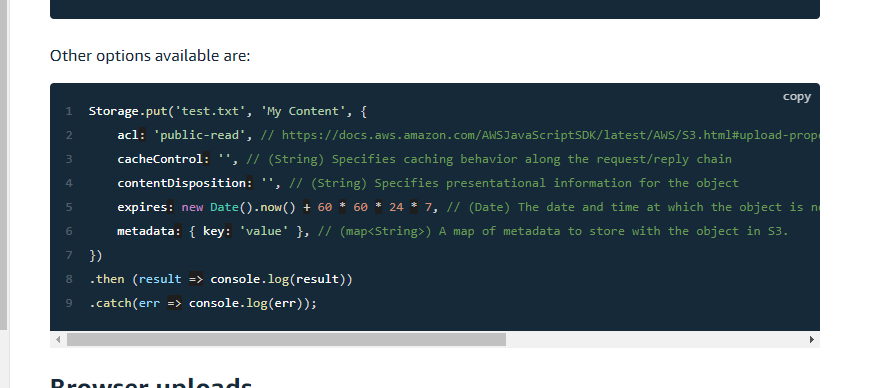
I also found this answer about CacheControl: "no-cache"
https://stackoverflow.com/a/48988988/5943087
So i've tried
await Storage.put((filePath), graphdata, {
contentType: 'application/json',
cacheControl: 'no-cache',
expires: Date.now(), }
But it still doesn't help and files are always cached randomly.
 Zilvinaskli
on 2 Nov 2020
Zilvinaskli
on 2 Nov 2020
Not sure if it might help, but to avoid having to tell users to clear their cache, I used Storage.get without the download = true to get the presigned url, then just used a normal (axios) get on that, and it seems to give the latest version. So perhaps a workaround...
 virtualstyle
on 5 Nov 2020
virtualstyle
on 5 Nov 2020
With @samicey's help I can reproduce this issue.
By default, the HTTP Headers returned by S3 looks something like follows:
HTTP/1.1 200 OK
Content-Type: application/json
Access-Control-Allow-Origin: *
Last-Modified: Wed, 18 Nov 2020 16:53:16 GMT
Access-Control-Allow-Methods: GET, HEAD, PUT, POST, DELETE
Access-Control-Expose-Headers: x-amz-server-side-encryption, x-amz-request-id, x-amz-id-2, ETag
Date: Wed, 18 Nov 2020 17:49:49 GMT
Content-Length: 14
Accept-Ranges: bytes
ETag: "XXXXXXXX"
Vary: Origin, Access-Control-Request-Headers, Access-Control-Request-Method
x-amz-id-2: XXXXXXXXxX
Server: AmazonS3
x-amz-request-id: XXXXXXXXXX
Note there is no Cache-Control or Expires headers. When those headers are missing AND Last-Modified header is present, browsers calculates what's called Heuristic freshness and sets its own ttl in cache. e.g. Firefox docs
This results in subsequent requests getting cached by default as seen:

As Harry mentioned in https://github.com/aws-amplify/amplify-js/issues/7095#issuecomment-728355794 Doing something like
Storage.get(filename, { download: true, cacheControl: 'no-cache' })
will get S3 to return the appropriate Cache-Control headers which eliminates this issue.
Alternatively, as @virtualstyle is doing, signing a presigned url each time will also bypass cache as it requests a new resource url every time.
 wei
on 18 Nov 2020
wei
on 18 Nov 2020
Hi,
tried last night adding the "cacheControl: 'no-cache'" entry to:
Storage.get(filename, { download: true, cacheControl: 'no-cache' })
and worked OK, data doesn't seems to be caches anymore. Thanks @wei for the info :)
That solve my issue !
pperron
on 19 Nov 2020
I also can confirm "cacheControl: 'no-cache'" seems to resolve the issue.
Happy days!
 WillPilgrim
on 16 Jan 2021
WillPilgrim
on 16 Jan 2021
Related issues
 TheRealRed7
·
3Comments
TheRealRed7
·
3Comments
 cgarvis
·
3Comments
cgarvis
·
3Comments
 leantide
·
3Comments
leantide
·
3Comments
 epicfaace
·
3Comments
epicfaace
·
3Comments
 benevolentprof
·
3Comments
benevolentprof
·
3Comments
Most helpful comment
Hi,
tried last night adding the "cacheControl: 'no-cache'" entry to:
Storage.get(filename, { download: true, cacheControl: 'no-cache' })and worked OK, data doesn't seems to be caches anymore. Thanks @wei for the info :)
That solve my issue !