Amplify-js: Vue js - Cannot read property 'configure' of undefined
Describe the bug
I've followed the instructions here:
https://docs.amplify.aws/start/q/integration/vue
My site works great locally with a development build, but as soon as i run a production build i get a blank site with
Cannot read property 'configure' of undefined error in the console
To Reproduce
Steps to reproduce the behavior:
Add amplify to an empty vue js component, with this in main.js:
import Amplify from 'aws-amplify';
import '@aws-amplify/ui-vue';
import aws_exports from './aws-exports';

Amplify.configure(aws_exports);
Run yarn serve - ✅ works as expected
Run yarn build, and run the output with http-server or other - ❌ build succeeds, but site is blank, with this error in the console:
Cannot read property 'configure' of undefined

Expected behavior
The site to render in both development and production builds
 dhoulker
All 16 comments
Webpack 4.44 make this, with 4.43 version will good
 Bipboy
on 27 Jul 2020
Bipboy
on 27 Jul 2020
Thanks @Bipboy !
I had same problem, but I can fix it by changing Webpack 4.44 to Webpack 4.43.
I'd like you to post the relevant URLs.
 mikan3rd
on 27 Jul 2020
mikan3rd
on 27 Jul 2020
Hi All,
i have the same issue. since i use vue-cli generated project i don't know how to change the webpack version.
any idea how to fix this?
 dwips
on 27 Jul 2020
dwips
on 27 Jul 2020
Also if using Amplify hosting, make sure that your webpack version is set in the yarn.lock file not the package-lock.json
 dtruong0
on 28 Jul 2020
dtruong0
on 28 Jul 2020
Adding a note that I ran into this using [email protected] and [email protected] so this isn't exclusive to Vue.
 sawyerh
on 29 Jul 2020
sawyerh
on 29 Jul 2020
Here's a reproduction of this issue, using just aws-amplify: https://github.com/sawyerh/amplify-nextjs-ssr/tree/b5eb93f895e1f7067aeb5e03abff987e0b9357ed
You can reproduce it by running:
$ npm run build
$ npm start
Looks like this may only be an issue when importing the default export:
import Amplify from "aws-amplify"; // 🛑
The issue seems to be resolved if you use the named export instead:
import { Amplify } from "aws-amplify"; // ✅
Thanks @sawyerh ! I can confirm that this is an issue with react native web as well and that using the named export resolves it.
 JesseRWeigel
on 1 Aug 2020
JesseRWeigel
on 1 Aug 2020
I created a small POC with Vue v3 that failed with the above error. In my case, it looks like the errors may be related to the plugin not being updated for Vue 3.
At a top-level glance:
- https://v3.vuejs.org/guide/plugins.html#using-a-plugin
- https://v3.vuejs.org/guide/migration/global-api.html#config-ignoredelements-is-now-config-iscustomelement
After rolling back to Vue v2.6.11 (below), I was able to successfully test locally, and deploy (publish) without the error.
  "@aws-amplify/ui-vue": "^0.2.12",
  "aws-amplify": "^3.0.22",
  "aws-amplify-vue": "^2.1.2",
  "core-js": "^3.6.5",
  "vue": "^2.6.11"
 siegerts
on 5 Aug 2020
siegerts
on 5 Aug 2020
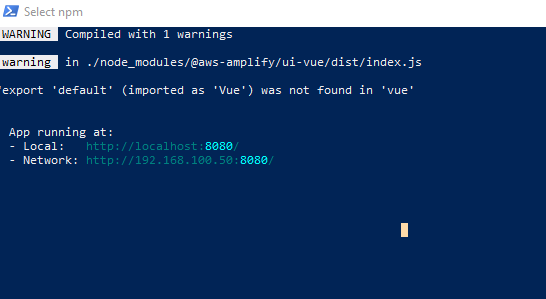
I'm having a similar issue to the OP, but mine's happening on npm run serve. This is also a project run from the tutorial as indicated in the OP. I thought it could be a difference between using Yarn and NPM, but I proved that false by trying both. I'm including code from my main.js and from my package.json as well as the error message. It seems that @aws-amplify/ui-vue is broken. I should say that the project works if I comment out ui-vue or don't use it.
main.js
```import { createApp } from 'vue';
import App from './App.vue';
import { Amplify } from 'aws-amplify';
import '@aws-amplify/ui-vue';
import aws_exports from './aws-exports';
Amplify.configure(aws_exports);
createApp(App).mount('#app');
package.json
"dependencies": {
"@aws-amplify/ui-vue": "^0.2.14",
"aws-amplify": "^3.0.24",
"core-js": "^3.6.5",
"vue": "^3.0.0-0"
},
"devDependencies": {
"@vue/cli-plugin-babel": "~4.5.0",
"@vue/cli-plugin-eslint": "~4.5.0",
"@vue/cli-service": "~4.5.0",
"@vue/compiler-sfc": "^3.0.0-0",
"babel-eslint": "^10.1.0",
"eslint": "^6.7.2",
"eslint-plugin-vue": "^7.0.0-0"
},
```
error:
 inklingsofreality
on 1 Sep 2020
inklingsofreality
on 1 Sep 2020
@inklingsofreality have you tried on a v2.x version of Vue instead of Vue 3? https://github.com/aws-amplify/amplify-js/issues/6411#issuecomment-668915751
siegerts
on 1 Sep 2020
@inklingsofreality have you tried on a v2.x version of Vue instead of Vue 3? #6411 (comment)
I had tried it, but ran into other issues. I'll try again and see if that solves it.
inklingsofreality
on 1 Sep 2020
@inklingsofreality have you tried on a v2.x version of Vue instead of Vue 3? #6411 (comment)
I had tried it, but ran into other issues. I'll try again and see if that solves it.
And more errors, but it could be because my cli-service is 3.0.
cannot find module 'vue-template-compiler/package.json
inklingsofreality
on 1 Sep 2020
After much troubleshooting and refactoring, I finally got it. Apparently, the tutorial is broken. Anyways, here's what my package.json and main.js look like now.
package.json
{
  "name": "manuals",
  "version": "0.1.0",
  "private": true,
  "scripts": {
    "serve": "vue-cli-service serve",
    "build": "vue-cli-service build",
    "lint": "vue-cli-service lint"
  },
  "dependencies": {
    "@aws-amplify/ui-vue": "^0.2.15",
    "aws-amplify": "^3.0.25",
    "core-js": "^3.6.5",
    "vue": "^2.6.12"
  },
  "devDependencies": {
    "@vue/cli-plugin-babel": "~4.5.0",
    "@vue/cli-plugin-eslint": "~4.5.0",
    "@vue/cli-service": "~4.5.0",
    "@vue/compiler-sfc": "^3.0.0-rc.9",
    "babel-eslint": "^10.1.0",
    "eslint": "^7.8.0",
    "eslint-plugin-vue": "^6.2.2",
    "vue-template-compiler": "^2.6.12"
  },
  "eslintConfig": {
    "root": true,
    "env": {
      "node": true
    },
    "extends": [
      "plugin:vue/essential",
      "eslint:recommended"
    ],
    "parserOptions": {
      "parser": "babel-eslint"
    },
    "rules": {}
  },
  "browserslist": [
    "> 1%",
    "last 2 versions",
    "not dead"
  ]
}
main.js
import Vue from 'vue';
import App from './App.vue';
import Amplify from 'aws-amplify';
import '@aws-amplify/ui-vue';
import aws_exports from './aws-exports';

Amplify.configure(aws_exports);

new Vue({
    render: h => h(App),
}).$mount('#app');
I created a small POC with Vue v3 that failed with the above error. In my case, it looks like the errors may be related to the plugin not being updated for Vue 3.
At a top-level glance:
- https://v3.vuejs.org/guide/plugins.html#using-a-plugin
- https://v3.vuejs.org/guide/migration/global-api.html#config-ignoredelements-is-now-config-iscustomelement
After rolling back to Vue v2.6.11 (below), I was able to successfully test locally, and deploy (publish) without the error.
  "@aws-amplify/ui-vue": "^0.2.12",
  "aws-amplify": "^3.0.22",
  "aws-amplify-vue": "^2.1.2",
  "core-js": "^3.6.5",
  "vue": "^2.6.11"
For me, this was the issue. I didn't realize that I was using the Vue 3 Release Candidate/Preview. Commenting out the import allows the app to compile and run, though I'm sure I'll have to use Vue 2.X in the meantime. Or I I'll just use the Auth API manually with my own UI.
Hopefully the plugin can be updated soon.
 chrisleyva
on 3 Sep 2020
chrisleyva
on 3 Sep 2020
I had the same problem, but it doesn't work.
The environment is as follows.
package.json
{
  "name": "amplifyapp",
  "version": "1.0.0",
  "description": "",
  "main": "index.js",
  "scripts": {
    "build": "./node_modules/.bin/webpack",
  },
  "author": "",
  "license": "ISC",
  "devDependencies": {
    "copy-webpack-plugin": "^6.3.2",
    "ts-loader": "^8.0.11",
    "typescript": "^4.1.2",
    "webpack": "^5.10.0",
    "webpack-cli": "^4.2.0"
  },
  "dependencies": {
    "@aws-amplify/api": "^3.2.14",
    "@types/react": "^17.0.0",
    "@types/react-dom": "^17.0.0",
    "aws-amplify": "^3.3.11",
    "react": "^17.0.1",
    "react-dom": "^17.0.1"
  }
}
webpack.config.js
const CopyWebpackPlugin = require('copy-webpack-plugin');

module.exports = {
  mode: 'development',
  target: 'web',
  entry: './src/index.tsx',
  devtool: 'inline-source-map',
  output: {
    path: `${__dirname}/dist`,
    filename: 'bundle.js',
  },
  module: {
    rules: [
      {
        test: /\.(jsx?|mjs|tsx?)$/,
        use: 'ts-loader'
      }
    ]
  },
  resolve: {
    extensions: ['.ts', '.tsx'],
  },
  target: ['web', 'es5'],
  plugins: [
    new CopyWebpackPlugin({
      patterns: ['src/index.html'],
    }),
  ]
}
index.tsx
import React from 'react';
import ReactDOM from 'react-dom';
import { App } from './App';

ReactDOM.render(
  <App />,
  document.getElementById('root'),
);
App.tsx
import React from 'react';
import Amplify from 'aws-amplify';
import awsmobile from './aws-exports';

Amplify.configure(awsmobile);

export class App extends React.Component {
  render() {
    return (
      <>
        <h1>Hello World</h1>
      </>
    );
  }
}
Please treat me well.
 nabezokodaikon
on 7 Dec 2020
nabezokodaikon
on 7 Dec 2020
Related issues
 DougWoodCDS
·
3Comments
DougWoodCDS
·
3Comments
 benevolentprof
·
3Comments
benevolentprof
·
3Comments
 lucasmike
·
3Comments
lucasmike
·
3Comments
 shinnapatthesix
·
3Comments
shinnapatthesix
·
3Comments
 callmekatootie
·
3Comments
callmekatootie
·
3Comments
Most helpful comment
Looks like this may only be an issue when importing the default export:
The issue seems to be resolved if you use the named export instead: