Amplify-js: [Datastore] Improve error handling when data is syncing
Describe the bug
The console does not produce error (actually it does, read along) when one of the AWSDateTime field stored in DynamoDB is not in the correct format. Took us a long time to figure out why our query isn't returning anything.
To Reproduce
- Create schema.graphql:
type Order @model @auth(rules: [{ allow: owner }]) {
  id: ID!
  orderDate: AWSDateTime
  owner: String
}
- Populate the table with orderDate as
2020-05-19T11:5:29.000Z. It's missing a zero before the 5. - Query the Order table.
- Huala, the query doesn't return anything.
- Promptly check the console, no error found.
- But...if you wait long enough, this errors shows up:
Possible Unhandled Promise Rejection (id: 408):
Object {
  "data": Object {
    "syncKDSOrders": Object {
      "items": Array [
        Object {
          "_deleted": null,
          "_lastChangedAt": 1590025175868,
          "_version": 2,
          "cancelBy": null,
          "customerName": "XXXX",
          "customerNumber": "XXXXXXXXXXXXXXX",
          "deliveryAddress": null,
          "deliveryNumber": null,
.
.
.

"errors": Array [
    Object {
      "locations": null,
      "message": "Can't serialize value (/syncOrders/items[32]/orderDate) : Unable to serialize `2020-05-23T06:4:37.000Z` as a valid DateTime Object.",
      "path": Array [
        "syncOrders",
        "items",
        32,
        "orderDate",
      ],
    },
  ],
}
Interesting bits is contained in the error.
Expected behavior
- I tried catching the error in the query and that didn't work.
- I tried catching with
DataStore.configure({
  errorHandler: (error) => {
    console.warn('Unrecoverable error', { error });
  },
});
That didn't work too.
My guess is that it's an error deep inside the source, perhaps somebody can enlighten me.
What is Configured?
yarn list --depth=0 --pattern amplify
yarn list v1.22.4
├─ @aws-amplify/[email protected]
├─ @aws-amplify/[email protected]
├─ @aws-amplify/[email protected]
├─ @aws-amplify/[email protected]
├─ @aws-amplify/[email protected]
├─ @aws-amplify/[email protected]
├─ @aws-amplify/[email protected]
├─ @aws-amplify/[email protected]
├─ @aws-amplify/[email protected]
├─ @aws-amplify/[email protected]
├─ @aws-amplify/[email protected]
├─ @aws-amplify/[email protected]
├─ @aws-amplify/[email protected]
├─ @aws-amplify/[email protected]
├─ [email protected]
└─ [email protected]
Would be great if amplify team members can sort this out with us.
 nubpro
All 9 comments
hi @nubpro - thanks for informing us. We've identified this as a bug and the service should detect this type before syncing. We will work on a fix.
 mauerbac
on 6 Aug 2020
mauerbac
on 6 Aug 2020

Local validations in validateModelFields is not validating AppSync Defined Scalars like AWSDateTime type. The generated typescript type is string for AWSDateTime so typescript can't help either.
One solutions is to validate these AppSync defined scalars in validateModelFields. Is the validation code open source on AppSync's end perhaps we can reuse?
/cc @iartemiev for feedback and next steps.
Repro repo branch 5963.
 wei
on 12 Nov 2020
wei
on 12 Nov 2020
@wei Does your PR surfaces the error to DataStore.errorHandler()?
Otherwise, we will still get Possible Unhandled Promise Rejection error.
nubpro
on 18 Nov 2020
It will throw error on new model initialization as seen:
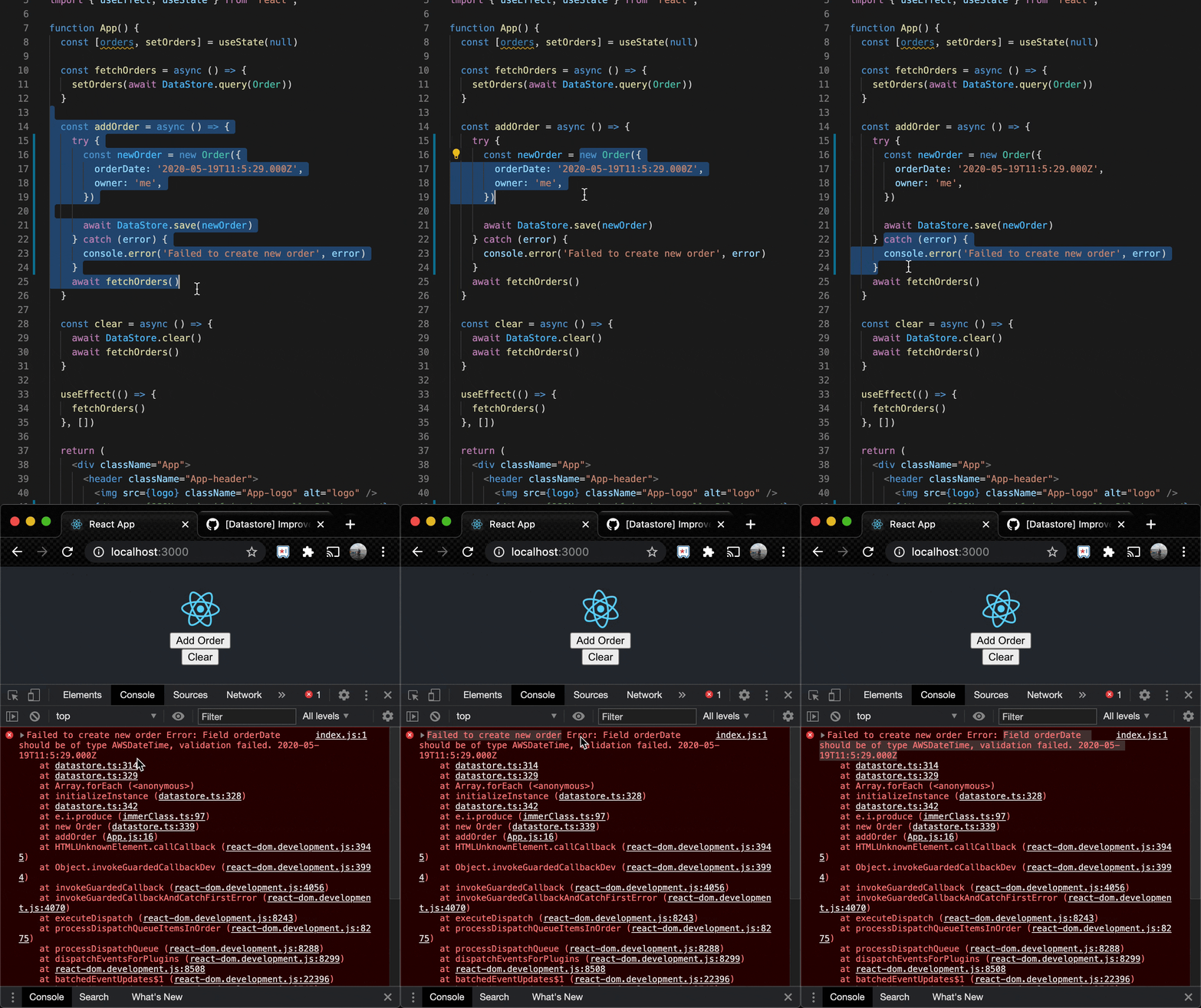
So basically step 2 in your initial comment will fail and throw error. It will throw error directly and immediately (not using DataStore.errorHandler)
wei
on 18 Nov 2020
@wei That is looking good, but my concern is what will happen if DS is syncing corruped data from AppSync? This could happen if someone had accidentally or carelessly incorrectly manipulated the data directly in DDB.
nubpro
on 18 Nov 2020
When you modify say the orderDate to a malformed value in DynamoDB, AppSync sync requests will fail:

which is where your error message is coming from
Can't serialize value (/syncOrders/items[32]/orderDate) : Unable to serialize
2020-05-23T06:4:37.000Zas a valid DateTime Object.
You don't see this error right away because the wrapper function jitteredExponentialRetry is swallowing it and retrying it with exponential backoff.
Exponential backoffs:
It will retry many times and once the next retry delay reaches maxDelay (5min), the error is thrown without any more retries.
You are correct currently that error is not being caught or exposed through DataStore.errorHandler.
jitteredRetry in sync.ts or callers of it need a try catch and expose the error to user.
Potential solution
My proposed commit here catches the error and notifies the observer.error which datastore.ts's start method is already subscribed to:
Exposing it to user
We can do something like assembling a SyncError and call this.errorHandler(...) here. Or perhaps there is a better way to expose this exception to the user?
Supporting scenarios bypassing AppSync and updating DynamoDB directly may be out of the scope of this project/component. Perhaps the easiest way is to not manipulate DynamoDB directly or use extreme caution when updating~
wei
on 18 Nov 2020
@wei Appreciate the thorough breakdown. I learnt a thing or two!
While I agree with the statement that we shouldn't be modifying the data directly, it would be awesome if the client can do something about it. I really dig your solution.
nubpro
on 18 Nov 2020
@nubpro - we merged a PR that adds clientside validation for AppSync scalars (e.g., AWSDateTime, AWSJSON, etc.). It was deployed as part of [email protected].
Regarding surfacing sync errors, we're currently exploring solutions for that. The approach proposed above would cause the sync engine to stop working when a single model encounters an error, which is not the desired behavior. Instead, we're looking into utilizing the Hub for emitting DataStore errors.
Can we close this issue?
 iartemiev
on 24 Nov 2020
iartemiev
on 24 Nov 2020
@nubpro - we merged a PR that adds clientside validation for AppSync scalars (e.g., AWSDateTime, AWSJSON, etc.). It was deployed as part of [email protected].
Regarding surfacing sync errors, we're currently exploring solutions for that. The approach proposed above would cause the sync engine to stop working when a single model encounters an error, which is not the desired behavior. Instead, we're looking into utilizing the Hub for outputting DataStore errors.
Can we close this issue?
Thanks for making the improvement!
Sure lemme close it.
nubpro
on 24 Nov 2020
Related issues
 cgarvis
·
3Comments
cgarvis
·
3Comments
 guanzo
·
3Comments
guanzo
·
3Comments
 ldgarcia
·
3Comments
ldgarcia
·
3Comments
 cosmosof
·
3Comments
cosmosof
·
3Comments
 leantide
·
3Comments
leantide
·
3Comments