Amplify-js: Access to Identity is forbidden. LocalStorage not removing invalid identity from cache
Describe the bug
I have unauth and auth roles in my identity pool. When I am not signed in and try calling auth.currentCredentials() I get this error:
NotAuthorizedException: "Access to Identity 'eu-west-1:c0471e07-9a5e-4c9e-a477-f65641f89e02' is forbidden.
It's using an identity stored in LocalStorage. LocalStorage has this key and value:
Key: CognitoIdentityId-eu-west-1:30da1ce6-4641-4b6f-a756-2ab3b9fc163c
Value: eu-west-1:c0471e07-9a5e-4c9e-a477-f65641f89e02
When I delete this key from LocalStorage, then Amplify correctly creates a new unAuth identity in the Identity pool when I call currentCredentials.
Using the Amplify signOut() method does not remove this key from LocalStorage
To Reproduce
It seems to happen after I make changes to my Identity Pool Roles which I assume is making existing identities invalid. I then signin and out of my web site and this occurs.
Expected behavior
Signout() should remove this cached key OR there should be a means of intercepting this error and clearing this cache item OR... am I missing a crucial config step somewhere??
What is Configured?
If applicable, please provide what is configured for Amplify CLI:
   const awsmobile = {
    'aws_project_region': 'eu-west-1',
    'aws_cognito_region': 'eu-west-1',
    'aws_user_pools_id': 'eu-west-1_gdsa1IJCZ',
    'aws_user_pools_web_client_id': '4trvf9p26r20hjivsspbbjun6o',
    'oauth': {
        'domain': 'designsystem.auth.eu-west-1.amazoncognito.com',
        'scope': [
            'phone',
            'email',
            'openid',
            'profile',
            'aws.cognito.signin.user.admin'
        ],
        'redirectSignIn': 'http://localhost:4200/',
        'redirectSignOut': 'http://localhost:4200/',
        'responseType': 'token'
    },
    'federationTarget': 'COGNITO_USER_POOLS',
    'aws_cognito_identity_pool_id': 'eu-west-1:30da1ce6-4641-4b6f-a756-2ab3b9fc163c',
   };
Environment
 System:
    OS: macOS 10.15.4
    CPU: (12) x64 Intel(R) Core(TM) i7-9750H CPU @ 2.60GHz
    Memory: 55.36 MB / 16.00 GB
    Shell: 5.7.1 - /bin/zsh
  Binaries:
    Node: 14.0.0 - ~/.nvm/versions/node/v14.0.0/bin/node
    npm: 6.14.4 - ~/.nvm/versions/node/v14.0.0/bin/npm
  Browsers:
    Brave Browser: 80.1.4.96
    Chrome: 81.0.4044.129
    Edge: 81.0.416.68
    Firefox: 76.0
    Safari: 13.1
  npmGlobalPackages:
    @angular/cli: 9.1.3
    @aws-amplify/cli: 4.18.1
    @sbg/aws-loginator: 1.0.1
    amplify-cli: 1.0.0
    apollo-codegen: 0.20.2
    apollo: 2.27.3
    aws-azure-login: 2.1.0
    npm: 6.14.4
    typescript: 3.8.3
 dexster
All 12 comments
It seems to happen after I make changes to my Identity Pool Roles
How did you configure your project and how are you making these changes?
I'd like to reproduce your setup with the Amplify CLI (e.g. amplify add auth), but want to ensure my settings match yours.
 ericclemmons
on 11 May 2020
ericclemmons
on 11 May 2020
I was unable to use amplify add auth as my enterprise account has IAM restrictions. I created the Identity pool manually and then manually updated my amplify config.
I have done some more investigation and I can tell you how to recreate it though and why it is happening.
When I navigate to Identity Pool -> Identity Browser and look at the identity that is causing the problem I can see that it has a linked login. So it should not be trying to use this identity for the unauth role. If I replace that id in the LocalStorage property I mentioned above with any other id from the identity browser that does not have a linked login then it works fine. So in this screenshot from my Identity Pool -> Identity Browser the ID without the linked login works fine when I am signed out and try calling currentCredentials(). The linked one does not.

This id causes the error
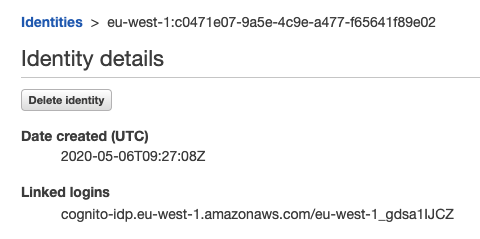
So somehow, possibly during dev and testing of auth. my ID's got themselves mixed up. Now, how do I solve this without manually deleting this LocalStorage property in case it happens again.
dexster
on 11 May 2020
The problem that was occurring was that when doing a federated signin in, it would update the CognitoIdentityId in localstorage with a new identity. This should not happen. If I then signed out I got the issue above.
I noticed I was missing "aws_cognito_identity_pool_id" in the amplify awsconfig. I have added this and it seems to be working now.
dexster
on 21 May 2020
Re-opened. Issue still occurs.
Steps to reproduce as follows:
AWS setup
Create an OpenId provider in a cognito userpool. Custom, not Google or other social.
Create an app client using the implicit flow.
Create an Identity Pool with unauth and auth roles pointing to the userpool and provider created above.
Frontend setup
Default Angular CLI site.
amplify config:
const awsmobile = {
'aws_project_region': 'eu-west-1',
"aws_cognito_identity_pool_id": 'eu-west-1:*********************,
'aws_cognito_region': 'eu-west-1',
'aws_user_pools_id': 'eu-west-1******',
'aws_user_pools_web_client_id': '1qk0vqdg************',
'oauth': {
'domain': 'myhosteduidomain.auth.eu-west-1.amazoncognito.com',
'scope': [
'phone',
'email',
'openid',
'profile',
'aws.cognito.signin.user.admin'
],
'redirectSignIn': 'http://localhost:4200/',
'redirectSignOut': 'http://localhost:4200/',
'responseType': 'token'
},
'federationTarget': 'COGNITO_USER_POOLS',
}
import {Component} from '@angular/core';
import {Amplify} from '@aws-amplify/core';
import Auth from '@aws-amplify/auth';
Amplify.Logger.LOG_LEVEL = 'DEBUG';
@Component({
selector: 'app-root',
templateUrl: './app.component.html',
styleUrls: ['./app.component.scss']
})
export class AppComponent {
constructor() {
//setTimeout(() => {
Auth.currentCredentials();
// ), 5000);
}
signInFederated() {
Auth.federatedSignIn();
}
signOut(): void {
Auth.signOut();
}
getCurrentCreds() {
Auth.currentCredentials().then(result => console.log(result));
}
}
md5-bd5d9a833350648c80c7392e6ab46940
<button (click)="signInFederated()">Federated sign in</button>
<button (click)="signOut()">Sign out</button>
<button (click)="getCurrentCreds()">Get current credentials</button>
Do this
- Serve site. It calls Auth.currentCredentials() on startup. An identity is retrieved/created from the identity pool for Unauth access and stored in LocalStorage.
- Click federated sign in.
- Login using the hosted UI.
- Redirects back to site and calls Auth.currentCredentials() on startup but now gets an Auth identity from the Identity Pool and replaces the Unauth one in LocalStorage
- Call Auth.signOut()
- The page reloads, Auth.currentCredentials runs and does not replace the Auth identity with the Unauth one.
Because I am now signed out and trying to get currentCredentials with the Auth ID I get this error:
{"__type":"NotAuthorizedException","message":"Access to Identity 'eu-west-1:1668f2a9-a6d0-47b2-b734-6baff8711ced' is forbidden."}
If you wait a while before calling Auth.currentCredentials() after signing in then it does not update the unauth Identity in LocalStorage. Uncomment the setTimeout to see this.
dexster
on 23 May 2020
Same issue here using React aws-amplify 3.0.13.
To reproduce the issue:
- Sign in with Google identity provider (Facebook not checked)
- Sign out
- Observe 403 Forbidden responses for our IAM endpoints
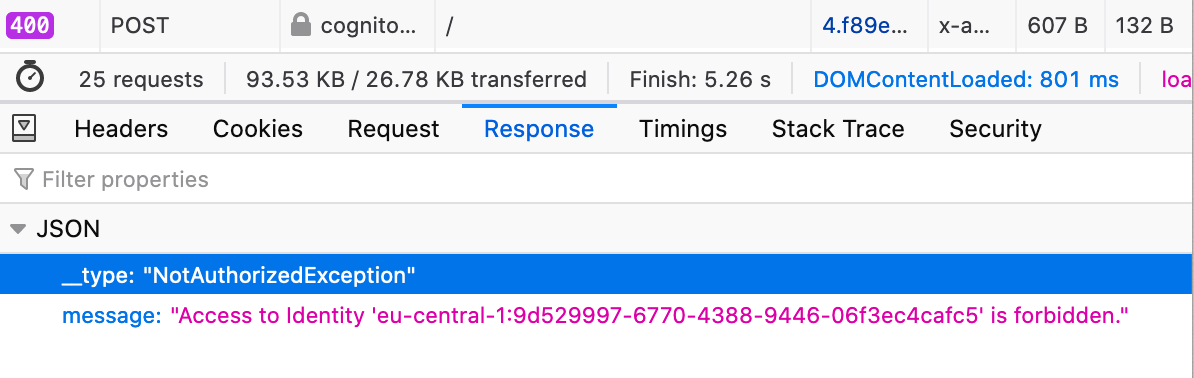
Cognito's internal call returns a 400 Bad Request with response:
{"__type":"NotAuthorizedException","message":"Access to Identity 'eu-central-1:9d529997-6770-4388-9446-06f3ec4cafc5' is forbidden."}
 mannau
on 9 Jun 2020
mannau
on 9 Jun 2020
I've wrapped "Auth.currentCredentials" with my own method which checks for this and clears it
async getCurrentCredentials(): Promise<ICredentials> {
const result = await Auth.currentCredentials();
if (result['message'] && result['message'].toLowerCase().includes('access to identity')) {
this.logger.warn('Credential conflict. Clearing cache');
localStorage.clear();
return Auth.currentCredentials();
else ...
I've now moved from responseType: token to responseType: code. Let's see if that helps. Probably not if it happens with Google which I think uses "code". I did also try Google provider before I posted above but I couldn't recreate it.
dexster
on 9 Jun 2020
Thanks for the heads up @dexster! We now use something similar to your suggestion as a workaround in our React app. The main difference is that we don't clear the whole localStorage, but only the item with the identityId.
So instead of localStorage.clear() we only remove the specific item:
const creds = await Auth.currentCredentials()
if (creds?.message?.includes('Access to Identity') && creds?.message?.includes('is forbidden')) {
  window.localStorage.removeItem(`CognitoIdentityId-${config.cognito.IDENTITY_POOL_ID}`)
  await Auth.currentCredentials()
}
where IDENTITY_POOL_ID is your own Identity Pool ID.
 christiankaindl
on 9 Jun 2020
christiankaindl
on 9 Jun 2020
You've just pointed out a bug in my code. I should also only be clearing that item :)
dexster
on 9 Jun 2020
@dexster Are you still experiencing issues with this? It seems this has been resolved from what you are calling out above. Please let us know.
 sammartinez
on 12 Nov 2020
sammartinez
on 12 Nov 2020
The code above is a workaround and not a resolution. Amplify should cater for this scenario. Anyone else experiencing this issue may spend hours trying to understand why it is happening before adding their own fix.
I have not yet checked if the issue still occurs on the latest amplify version.
dexster
on 12 Nov 2020
This issue has been automatically marked as stale because it has not had recent activity. It will be closed if no further activity occurs. Thank you for your contributions.
![stale[bot] picture](https://avatars.githubusercontent.com/in/1724?v=4&s=40) stale[bot]
on 18 Dec 2020
stale[bot]
on 18 Dec 2020
This issue has been automatically closed because of inactivity. Please open a new issue if are still encountering problems.
stale[bot]
on 25 Dec 2020
Related issues
 cgarvis
·
3Comments
cgarvis
·
3Comments
 karlmosenbacher
·
3Comments
karlmosenbacher
·
3Comments
 DougWoodCDS
·
3Comments
DougWoodCDS
·
3Comments
 simon998yang
·
3Comments
simon998yang
·
3Comments
 oste
·
3Comments
oste
·
3Comments
Most helpful comment
Thanks for the heads up @dexster! We now use something similar to your suggestion as a workaround in our React app. The main difference is that we don't clear the whole localStorage, but only the item with the identityId.
So instead of
localStorage.clear()we only remove the specific item:where
IDENTITY_POOL_IDis your own Identity Pool ID.