Amplify-js: Apple Signing Token is not from a supported provider of this identity pool.
Describe the bug
I can't signing with federated using https://github.com/invertase/react-native-apple-authentication
In the provider I tested with SignInWithApple or appleid.apple.com
Code Snippet
await Auth.federatedSignIn('appleid.apple.com', {token: data.identityToken, expires_at: null})
Screenshots
If applicable, add screenshots to help explain your problem.
What is Configured?
If applicable, please provide what is configured for Amplify CLI:
```
Auth: {
identityPoolId: 'us-east-1:59cf7619-1bf8-4dc0-xxxx-xxx',
region: 'us-east-1',
storage: MemoryStorageNew,
userPoolId: 'us-east-1_xxxx,
userPoolWebClientId: ''
}
```
Smartphone (please complete the following information):
- Device: iPhone11
- OS: 13.4
Additional context
Add any other context about the problem here.
_You can turn on the debug mode to provide more info for us by setting window.LOG_LEVEL = 'DEBUG'; in your app._
 mezalejandro
All 46 comments
Related: https://github.com/aws-amplify/amplify-js/issues/3395
https://github.com/aws-amplify/amplify-js/pull/5402
 amhinson
on 25 Apr 2020
amhinson
on 25 Apr 2020
@mezalejandro Can you provide some more information about how to reproduce the issue?
amhinson
on 25 Apr 2020
Hello @amhinson I followed all the steps https://aws.amazon.com/blogs/security/how-to-set-up-sign-in-with-apple-for-amazon-cognito/
Then using https://github.com/invertase/react-native-apple-authentication
In Auth of was-amplify I see the options:
export declare enum CognitoHostedUIIdentityProvider {
Cognito = "COGNITO",
Google = "Google",
Facebook = "Facebook",
Amazon = "LoginWithAmazon"
}
There is no SignInWithApple option
mezalejandro
on 25 Apr 2020
There is a pull request requesting to add SignInWithApple https://github.com/aws-amplify/amplify-js/pull/5402
mezalejandro
on 25 Apr 2020
Does adding that in fix your issue?
amhinson
on 28 Apr 2020
I think so
mezalejandro
on 28 Apr 2020
is it possible to add that pull request?
mezalejandro
on 4 May 2020
From my testing, this PR doesn't seem to be blocking the use of SignInWithApple as the provider. The PR is just adding it to the enum list of providers, but you can still use that as the provider.
Could you elaborate a bit more on the error/issue you are seeing? There might just be a configuration missing somewhere along the line.
amhinson
on 5 May 2020
@mezalejandro After looking a bit further, there seem to be 2 options for you to integrate "Sign In With Apple" in your app.
The first is using the OAuth Hosted UI, where the user will be taken to a browser to authenticate. In this case, you don't need to use that 3rd party library to get the Apple token, as Cognito will handle that behind the scenes. In this case, you can just use Auth.federatedSignIn({provider: 'SignInWithApple'}).
The other option is using Identity Pool Federation, where you will have to manage all of the tokens via the client & the 3rd party library you're currently using.
There are some intricacies with this approach, however. Here's how I got a working example:
- Add your app bundle id in the "Apple Services ID" field for the Identity Pool:
_Cognito -> Manage Identity Pools -> (select identity pool) -> Edit identity pool -> Authentication Providers -> Apple_
import appleAuth, {
  AppleButton,
  AppleAuthRequestOperation,
  AppleAuthRequestScope,
} from '@invertase/react-native-apple-authentication';

//

async function onAppleButtonPress() {
    const result = await appleAuth.performRequest({
      requestedOperation: AppleAuthRequestOperation.LOGIN,
      requestedScopes: [
        AppleAuthRequestScope.EMAIL,
        AppleAuthRequestScope.FULL_NAME,
      ],
    });
    const decoded = jwt_decode(result.identityToken);

    const credentials = await Auth.federatedSignIn(
      'appleid.apple.com',
      {
        token: result.identityToken,
        expires_at: decoded.exp * 1000 + new Date().getTime(),
      },
      {
        name: `${result.fullName.givenName} ${result.fullName.familyName}`,
        email: decoded.email,
      },
    );

    console.log(credentials);
  }

//

<AppleButton
    buttonStyle={AppleButton.Style.WHITE}
    buttonType={AppleButton.Type.SIGN_IN}
    style={{
        width: 160,
         height: 45,
    }}
    onPress={() => onAppleButtonPress()}
/>
@amhinson I am facing this issue too #5723 .
When I tried 2nd option by adding app bundle id in the "Apple Services ID" field for the Identity Pool, it returned the identity id but no user created in cognito pool.
Is it correct behavior? I want to have user in cognito pool and it should also return identity id.
 TanviVartak
on 11 May 2020
TanviVartak
on 11 May 2020
Hi @TanviVartak in the field Apple Services ID you added the bundle identifier of your app?
mezalejandro
on 11 May 2020
Hi @TanviVartak in the field Apple Services ID you added the bundle identifier of your app?
@mezalejandro Yes
TanviVartak
on 11 May 2020
@amhinson I am facing this issue too #5723 .
When I tried 2nd option by adding app bundle id in the "Apple Services ID" field for the Identity Pool, it returned the identity id but no user created in cognito pool.
Is it correct behavior? I want to have user in cognito pool and it should also return identity id.
That is the expected behavior. Identity Pool Federation is a way to get "AWS credentials directly from Cognito Federated Identities and not use User Pool federation." If you want to use User pools, you can just use the first example I provided with Auth.federatedSignIn({provider: 'SignInWithApple'}).
amhinson
on 11 May 2020
@amhinson I am facing this issue too #5723 .
When I tried 2nd option by adding app bundle id in the "Apple Services ID" field for the Identity Pool, it returned the identity id but no user created in cognito pool.
Is it correct behavior? I want to have user in cognito pool and it should also return identity id.That is the expected behavior. Identity Pool Federation is a way to get "AWS credentials directly from Cognito Federated Identities and not use User Pool federation." If you want to use User pools, you can just use the first example I provided with
Auth.federatedSignIn({provider: 'SignInWithApple'}).
@amhinson Okay, Thanks for the clarification! But as I mentioned in #5723 issue when I use Auth.federatedSignIn({provider: 'SignInWithApple'}) , it just creates a user in cognito user pool but does not return identity id.
Any help would be appreciated.
TanviVartak
on 11 May 2020
@TanviVartak Ah ok! I'll look into it and respond in that other issue, as the original issue here is a slightly different use-case.
amhinson
on 11 May 2020
I am testing like this:
await Auth.federatedSignIn({provider: 'SignInWithApple'})
and I get this message:
TypeError: Cannot read property 'redirectSignIn' of undefined
mezalejandro
on 11 May 2020
I am testing like this:
await Auth.federatedSignIn({provider: 'SignInWithApple'})
and I get this message:
TypeError: Cannot read property 'redirectSignIn' of undefined
@mezalejandro not sure if you have configured oauth as below
Amplify.configure({
Auth: {
mandatorySignIn: true,
region: config.cognito.REGION,
userPoolId: config.cognito.USER_POOL_ID,
identityPoolId: config.cognito.IDENTITY_POOL_ID,
userPoolWebClientId: config.cognito.APP_CLIENT_ID,
oauth : {
domain : 'cognito domain name',
scope : ['phone', 'email', 'profile', 'openid','aws.cognito.signin.user.admin'],
redirectSignIn: 'myapp://oauth/',
redirectSignOut: 'myapp://signout/',
responseType: 'code'
},
}
})
TanviVartak
on 11 May 2020
@TanviVartak thank you very very much! doing federatedSignIn console.log shows me undefined
mezalejandro
on 11 May 2020
@mezalejandro welcome! I didn't get the error but I followed these links to setup
https://docs.aws.amazon.com/cognito/latest/developerguide/cognito-user-pools-social-idp.html
https://dev.to/dabit3/the-complete-react-native-guide-to-user-authentication-with-the-amplify-framework-ib2
TanviVartak
on 12 May 2020
@mezalejandro Does @TanviVartak's comment fix your issue, or are you still having problems?
amhinson
on 12 May 2020
Hi @amhinson now I get undefined when doing console.log of Auth.federatedSignIn
mezalejandro
on 12 May 2020
Can you provide a code snippet?
amhinson
on 12 May 2020
Amplify.configure({
    Auth: {
        mandatorySignIn: true,
        region: 'us-east-1',
        userPoolId: 'us-east-1_xxx',
        identityPoolId: 'us-east-1:xxxx-xxx-xxx-',
        userPoolWebClientId: 'xxx',
        oauth : {
            domain : '',
            scope : ['phone', 'email', 'profile', 'openid','aws.cognito.signin.user.admin'],
            redirectSignIn: '',
            redirectSignOut: '',
            responseType: 'code'
        },
    }
});
try {
        const userApple = await Auth.federatedSignIn({provider: 'SignInWithApple'});
        console.log('userApple ', userApple)
        if(userApple) {
            return { success: true }
        }else{
            return { success: false }
        }
    } catch(error) {
        console.log('error apple ', error)
        return { success: false }
    }
mezalejandro
on 12 May 2020
Ok, thanks for the info!
Could you try listening to the Hub events like in this example from the docs instead of using async/await?
amhinson
on 12 May 2020
Ok I'm going to try it, a query is opening the browser with this link:
https://oauth2/authorize?redirect_uri=&response_type=code&client_id=6kesnacc8bdk569jij9gri0lq1&identity_provider=SignInWithApple&scopes=phone%2Cemail%2Cprofile%2Copenid%2Caws.cognito.signin.user.admin&state=k4DQohbWa45dkMFTuQeTdSIlJt7iSmPU&code_challenge=rZ1GkHj_-YQZKAzn5Ea0xMrTWJppI7fJOjMyde3iafc&code_challenge_method=S256
mezalejandro
on 12 May 2020
Hello, how do you redirect to the app?
What is there to do on the web?
https://docs.aws.amazon.com/cognito/latest/developerguide/cognito-user-pools-social-idp.html#cognito-user-pools-social-idp-step-3
mezalejandro
on 18 May 2020
Is this what you're looking for?
https://docs.amplify.aws/lib/auth/social/q/platform/js#sign-in-redirect-uris
amhinson
on 18 May 2020
I think the problem is that I don't have the provider enabled:

mezalejandro
on 18 May 2020
Oh yes, that will need to be enabled. Does that resolve your issue?
amhinson
on 18 May 2020
And I get this url:
https://example.auth.us-east-1.amazoncognito.com/error?error=invalid_request&client_id=6kesnacc8bdk569jij9gri0lq1
mezalejandro
on 18 May 2020
Have you added a URL scheme to your app in Xcode?
See "Configuring iOS" section near the bottom of this blog post.
amhinson
on 18 May 2020
if I have it added, but it redirects me to this link:
error?error=invalid_request&client_id=6kesnacc8bdk569jij9gri0lq1
Never open the app
mezalejandro
on 18 May 2020
Amplify.configure({ Auth: { mandatorySignIn: true, region: 'us-east-1', userPoolId: 'us-east-1_xxx', identityPoolId: 'us-east-1:xxxx-xxx-xxx-', userPoolWebClientId: 'xxx', oauth : { domain : '', scope : ['phone', 'email', 'profile', 'openid','aws.cognito.signin.user.admin'], redirectSignIn: '', redirectSignOut: '', responseType: 'code' }, } });
try { const userApple = await Auth.federatedSignIn({provider: 'SignInWithApple'}); console.log('userApple ', userApple) if(userApple) { return { success: true } }else{ return { success: false } } } catch(error) { console.log('error apple ', error) return { success: false } }
It looks like you don't have the redirectSignIn and redirectSignOut in your config. Can you add your URL scheme here (i.e. myapp://) and see if that fixes your problem?
amhinson
on 29 May 2020
I changed it to the url of my app and it still doesn't work
mezalejandro
on 29 May 2020
I have configured the url scheme
mezalejandro
on 29 May 2020
I changed it to the url of my app and it still doesn't work
Do you also have the same URL Scheme in the Cognito User Pool for "Callback URL(s)" and "Sign out URL(s)"? Also, do you have two App clients, and do they have the same configuration?
amhinson
on 29 May 2020
Hi @amhinson I was changing the configuration in aws
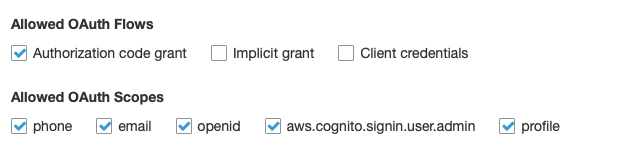
And added Callback URL(s) the redirect to the app.
Now using Auth.federatedSignIn({provider: 'SignInWithApple'}) directly open the browser with the login:

The strange thing is that now null appears to me instead of the name of the app.
Then when entering my password it does not redirect
mezalejandro
on 3 Jun 2020
This seems related to an existing open issue we have: https://github.com/aws-amplify/amplify-js/issues/4580
amhinson
on 4 Jun 2020
That is the expected behavior. Identity Pool Federation is a way to get "AWS credentials directly from Cognito Federated Identities and not use User Pool federation."
Awesome this seems to work. But when I add an api with amplify add api do I use Amazon Cognito User Pool as authorization type or OpenID Connect?
 melvinmt
on 12 Jun 2020
melvinmt
on 12 Jun 2020
@mezalejandro After looking a bit further, there seem to be 2 options for you to integrate "Sign In With Apple" in your app.
The first is using the OAuth Hosted UI, where the user will be taken to a browser to authenticate. In this case, you don't need to use that 3rd party library to get the Apple token, as Cognito will handle that behind the scenes. In this case, you can just use
Auth.federatedSignIn({provider: 'SignInWithApple'}).The other option is using Identity Pool Federation, where you will have to manage all of the tokens via the client & the 3rd party library you're currently using.
There are some intricacies with this approach, however. Here's how I got a working example:
- Add your app bundle id in the "Apple Services ID" field for the Identity Pool:
_Cognito -> Manage Identity Pools -> (select identity pool) -> Edit identity pool -> Authentication Providers -> Apple_import appleAuth, { AppleButton, AppleAuthRequestOperation, AppleAuthRequestScope, } from '@invertase/react-native-apple-authentication'; // async function onAppleButtonPress() { const result = await appleAuth.performRequest({ requestedOperation: AppleAuthRequestOperation.LOGIN, requestedScopes: [ AppleAuthRequestScope.EMAIL, AppleAuthRequestScope.FULL_NAME, ], }); const decoded = jwt_decode(result.identityToken); const credentials = await Auth.federatedSignIn( 'appleid.apple.com', { token: result.identityToken, expires_at: decoded.exp * 1000 + new Date().getTime(), }, { name: `${result.fullName.givenName} ${result.fullName.familyName}`, email: decoded.email, }, ); console.log(credentials); } // <AppleButton buttonStyle={AppleButton.Style.WHITE} buttonType={AppleButton.Type.SIGN_IN} style={{ width: 160, height: 45, }} onPress={() => onAppleButtonPress()} />
@amhinson thanks so much for sharing this, your code for Identity Pool Federation is like the only thing that works for me (I've been at this for 5+ days...). The big question is: what to do with the credentials? How do you authenticate against the GraphQL API (or other AWS APIs) with just the credentials? I'm only seeing examples for OAuth Hosted UI but that frankly doesn't work for me.
When I call
console.log(await Auth.currentSession())
right after I get the credentials, I get the no current user error. And that's also why this API call isn't working:
const listUsers = await API.graphql({
    query: queries.listUsers
  }).catch(err => {
    console.log(err)
  });
PS: Amplify is starting to become a disappointment, I am spending days cobbling together bits and pieces of information from all over the internet, just to be able to authenticate my user against an API, that's not a great experience for a supposedly "out of the box" solution...
melvinmt
on 15 Jun 2020
Awesome this seems to work. But when I add an api with
amplify add apido I useAmazon Cognito User Poolas authorization type orOpenID Connect?
@melvinmt What did you end up using here? That could be related to why API.graphql() isn't working as expected.
amhinson
on 16 Jun 2020
Hello everyone, I have this error while redirecting to appleid.apple.com
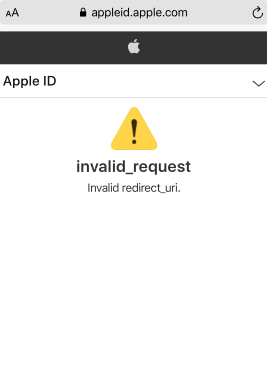
Amplify.configure({
    Auth: {
        mandatorySignIn: true,
        region: 'us-east-1',
        userPoolId: 'us-east-1_xxxx,
        identityPoolId: 'us-east-1:xxxx-xxxx-xxx-xxxx-xxxxxx',
        userPoolWebClientId: '6kesnacc8bdk569jij9gri0lq1',
        oauth : {
            domain : 'xxxx.auth.us-east-1.amazoncognito.com',
            scope : ['phone', 'email', 'profile', 'openid','aws.cognito.signin.user.admin'],
            redirectSignIn: 'myapp://oauth/',
            redirectSignOut: 'myapp://signout/',
            responseType: 'code',
        },
    }
})
mezalejandro
on 17 Jun 2020
@mezalejandro Do you think you could create a new issue for what you are seeing? This seems to be related but separate from the original issue you posted, so it would be easier to track in a new issue since this one is already pretty long.
amhinson
on 17 Jun 2020
@amhinson
Awesome this seems to work. But when I add an api with
amplify add apido I useAmazon Cognito User Poolas authorization type orOpenID Connect?@melvinmt What did you end up using here? That could be related to why
API.graphql()isn't working as expected.
I actually just ended up allowing the following 3 authorization types: API key, Amazon Cognito User Pool, OpenID Connect. It still didn't work until I passed the configuration to the AWSAppSyncClient directly:
This works:
import { Auth } from 'aws-amplify';
import awsconfig from './../aws-exports';
import AWSAppSyncClient, { AUTH_TYPE } from 'aws-appsync';

const client = new AWSAppSyncClient({
    url: awsconfig.aws_appsync_graphqlEndpoint,
    region: awsconfig.aws_appsync_region,
    auth: {
        type: AUTH_TYPE.AWS_IAM,
        credentials: () => Auth.currentCredentials(),
    },
    disableOffline: true
  });
And then I came across 401 errors, which I resolved by adjusting the IAM authrole to give access to appsync:GraphQL.
That worked. Now... I'm running into another issue. After doing all this, I now find out that the @auth owner directives only work with Cognito User Pools and IDPT tokens, not with the AWS_IAM tokens... and I need the @auth owner directive to secure my API properly.
So now back to the beginning: how can I create a Cognito User Pool authentication with my AWS_IAM credentials? (I can't use the Hosted UI because that doesn't work well for Sign in with Apple flow, at least not for me). Or is it better to turn my Sign in with Apple tokens into a OpenID Connect token?
melvinmt
on 19 Jun 2020
@melvinmt This seems to be steering away from the original issue that was opened. Do you think you could create a new issue for what you are seeing so we can get more focused attention on it?
With that said, when you run amplify add auth or amplify update auth, there are options to do a manual configuration, which might be what you're looking for.
amhinson
on 19 Jun 2020
Ok i close this issue and open a new one
mezalejandro
on 22 Jun 2020
Related issues
 simon998yang
·
3Comments
simon998yang
·
3Comments
 ddemoll
·
3Comments
ddemoll
·
3Comments
 leantide
·
3Comments
leantide
·
3Comments
 DougWoodCDS
·
3Comments
DougWoodCDS
·
3Comments
 callmekatootie
·
3Comments
callmekatootie
·
3Comments
Most helpful comment
@mezalejandro After looking a bit further, there seem to be 2 options for you to integrate "Sign In With Apple" in your app.
The first is using the OAuth Hosted UI, where the user will be taken to a browser to authenticate. In this case, you don't need to use that 3rd party library to get the Apple token, as Cognito will handle that behind the scenes. In this case, you can just use
Auth.federatedSignIn({provider: 'SignInWithApple'}).The other option is using Identity Pool Federation, where you will have to manage all of the tokens via the client & the 3rd party library you're currently using.
There are some intricacies with this approach, however. Here's how I got a working example:
_Cognito -> Manage Identity Pools -> (select identity pool) -> Edit identity pool -> Authentication Providers -> Apple_