Amplify-js: Cognito User Pool Hosted UI: minimal code grant sign in example from a React web app
Which Category is your question related to?
Auth
What AWS Services are you utilizing?
Cognito User Pools Hosted UI
Provide additional details e.g. code snippets
Can you please provide an absolute bare minimum 'manual' implementation example for using the OAuth code flow with the Cognito User Pools Hosted UI within a React app.
I've spent literal hours upon hours trying everything mentioned i the docs, api docs, reading both open/closed issues here, workarounds, the source code, etc and am still failing.
I want a simple, standalone, 'no-magic' example. Where I can take a standard <button>, get redirected to the hosted UI, login, get redirected back, and have the code exchanged for my tokens. Ideally no Higher Order Component wrappers, no React component wrappers, no obtuse 'aws-exports' file, etc.
Ideally, being able to explain how this will work in the 'new world' as per these refactors/RFCs as well:
- #3365: RFC: Amplify Library Modularization and Bundle Size Improvement
- #3279 RFC: Amplify UI Component Library Refactor
With my Cognito User Pool / User Pool Client configured:

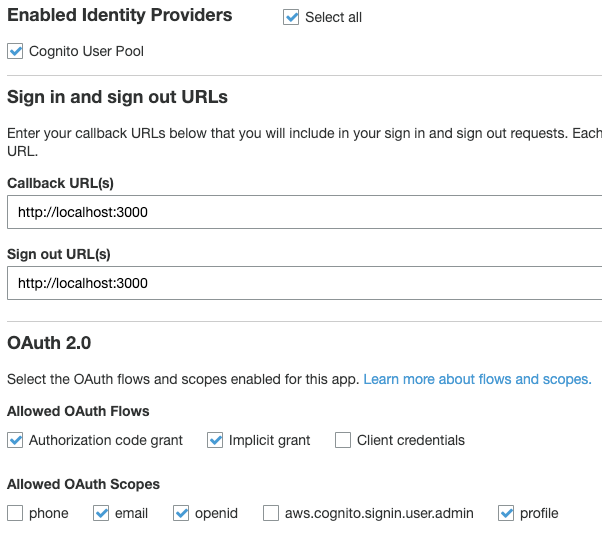
Theoretically according to everything I have read, I should be able to do this:
import { Auth } from 'aws-amplify'

// https://aws-amplify.github.io/docs/js/authentication#manual-setup
Auth.configure({
  region: process.env.REACT_APP_AUTH_REGION,
  userPoolId: process.env.REACT_APP_AUTH_USER_POOL_ID,
  userPoolWebClientId: process.env.REACT_APP_AUTH_USER_POOL_CLIENT_ID,

  // Cognito Hosted UI configuration
  oauth: {
    domain: process.env.REACT_APP_AUTH_DOMAIN,
    scope: ['email', 'profile', 'openid'],
    redirectSignIn: document.location.href,
    redirectSignOut: document.location.href,
    responseType: 'code',
  },
})

const App = () => {
  return (
  <div>
    <button onClick={() => Auth.federatedSignIn()}>SignIn</button>
  </div>
  )
}
As best as I can determine from reading everything, that should be sufficient. Yet when I click that button and get redirected to the Cognito User Pools Hosted UI, it just gives me a meaningless error message (no console output/useful errors)l:
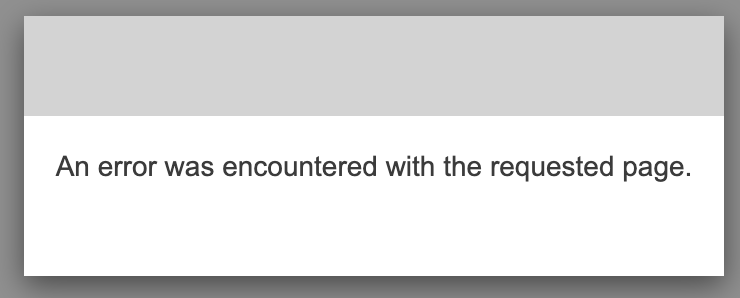
Digging into the network requests, before being redirected to that error page, we are trying to access:
Parsed:
redirect_uri: http://localhost:3000/
response_type: code
client_id: ABC123REDACTED
identity_provider: COGNITO
scopes: email,profile,openid
state: BBBREDACTED
code_challenge: AAAAREDACTED
code_challenge_method: S256
If I access the Cognito User Pool Hosted UI from the link in the AWS Console User Pool it takes me to the following URL:
- https://auth.customdomain.example.com/login?client_id=ABC123REDACTED&response_type=code&scope=email+openid+profile&redirect_uri=http://localhost:3000
So it seems like even though basically all of the docs/etc say I should be using Auth.federatedSignIn(), I just actually shouldn't be.. and it appears it is just downright broken as far as the Cognito Hosted UI is concerned..
Ok, so lets say I manually use that URL in my app, I log in, get redirected to a URL such as this:
- http://localhost:3000/?code=ABC12345-AAA-BBB-AAA-12345678901
And in my console, errors such as the following:
Failed to load resource: the server responded with a status of 400 () auth.customdomain.example.com/oauth2/token

index.js:1 [ERROR] 03:59.106 OAuth - Error handling auth response. Error: invalid_grant
    at OAuth.<anonymous> (OAuth.ts:164)
    at step (OAuth.ts:1)
    at Object.next (OAuth.ts:1)
    at fulfilled (OAuth.ts:1)
Looking at the network request for that 400 failure, the response is:
{"error":"unauthorized_client"}
The request it attempted to make was to:
Form data:
grant_type=authorization_code&code=ABC12345-AAA-BBB-AAA-12345678901&client_id=ABC123REDACTED&redirect_uri=http%3A%2F%2Flocalhost%3A3000%2F%3Fcode%3DABC12345-AAA-BBB-AAA-12345678901
Parsed:
grant_type: authorization_code
code: ABC12345-AAA-BBB-AAA-12345678901
client_id: ABC123REDACTED
redirect_uri: http://localhost:3000/?code=ABC12345-AAA-BBB-AAA-12345678901
I checked my REACT_APP_AUTH_USER_POOL_CLIENT_ID against the ID in the AWS Console for the User Pool, it's the same.
POST /oauth2/token
The /oauth2/token endpoint only supports HTTPS POST. The user pool client makes requests to this endpoint directly and not through the system browser. If the client was issued a secret, the client must pass its client_id and client_secret in the authorization header through Basic HTTP authorization.
So basically... as a frontend react web app, we should never be trying to hit that endpoint? How are we meant to use the code flow then..?
GET /oauth2/authorize
The /oauth2/authorize endpoint only supports HTTPS GET. The user pool client typically makes this request through a browser. Web browsers include Chrome or Firefox.
Maybe that's what we should be hitting...?
- https://docs.aws.amazon.com/cognito/latest/developerguide/authorization-endpoint.html#sample-authorization-code-grant-with-pkce
Sample request:
GET https://mydomain.auth.us-east-1.amazoncognito.com/oauth2/authorize?
response_type=code&
client_id=ad398u21ijw3s9w3939&
redirect_uri=https://YOUR_APP/redirect_uri&
state=STATE&
scope=aws.cognito.signin.user.admin&
code_challenge_method=S256&
code_challenge=CODE_CHALLENGE
Ok.. sounds promising... but how can we generate the code_challenge..?
Proof Key for Code Exchange by OAuth Public Clients
Abstract
OAuth 2.0 public clients utilizing the Authorization Code Grant are
susceptible to the authorization code interception attack. This
specification describes the attack as well as a technique to mitigate
against the threat through the use of Proof Key for Code Exchange
(PKCE, pronounced "pixy").
4.1. Client Creates a Code Verifier
4.2. Client Creates the Code Challenge
Click to expand...
4.  Protocol

4.1.  Client Creates a Code Verifier

   The client first creates a code verifier, "code_verifier", for each
   OAuth 2.0 [RFC6749] Authorization Request, in the following manner:

   code_verifier = high-entropy cryptographic random STRING using the
   unreserved characters [A-Z] / [a-z] / [0-9] / "-" / "." / "_" / "~"
   from Section 2.3 of [RFC3986], with a minimum length of 43 characters
   and a maximum length of 128 characters.

   ABNF for "code_verifier" is as follows.

   code-verifier = 43*128unreserved
   unreserved = ALPHA / DIGIT / "-" / "." / "_" / "~"
   ALPHA = %x41-5A / %x61-7A
   DIGIT = %x30-39

   NOTE: The code verifier SHOULD have enough entropy to make it
   impractical to guess the value.  It is RECOMMENDED that the output of
   a suitable random number generator be used to create a 32-octet
   sequence.  The octet sequence is then base64url-encoded to produce a
   43-octet URL safe string to use as the code verifier.

4.2.  Client Creates the Code Challenge

   The client then creates a code challenge derived from the code
   verifier by using one of the following transformations on the code
   verifier:

   plain
      code_challenge = code_verifier

   S256
      code_challenge = BASE64URL-ENCODE(SHA256(ASCII(code_verifier)))

   If the client is capable of using "S256", it MUST use "S256", as
   "S256" is Mandatory To Implement (MTI) on the server.  Clients are
   permitted to use "plain" only if they cannot support "S256" for some
   technical reason and know via out-of-band configuration that the
   server supports "plain".

   The plain transformation is for compatibility with existing
   deployments and for constrained environments that can't use the S256
   transformation.
The oAuth code that was getting the error appears to be here:
https://github.com/aws-amplify/amplify-js/blob/master/packages/auth/src/OAuth/OAuth.ts#L102-L172
See code
private async _handleCodeFlow(currentUrl: string) {
        /* Convert URL into an object with parameters as keys
    { redirect_uri: 'http://localhost:3000/', response_type: 'code', ...} */
        const { code } = (parse(currentUrl).query || '')
            .split('&')
            .map(pairings => pairings.split('='))
            .reduce((accum, [k, v]) => ({ ...accum, [k]: v }), { code: undefined });

        if (!code) {
            return;
        }

        const oAuthTokenEndpoint =
            'https://' + this._config.domain + '/oauth2/token';

        dispatchAuthEvent(
            'codeFlow',
            {},
            `Retrieving tokens from ${oAuthTokenEndpoint}`
        );

        const client_id = isCognitoHostedOpts(this._config)
            ? this._cognitoClientId
            : this._config.clientID;

        const redirect_uri = isCognitoHostedOpts(this._config)
            ? this._config.redirectSignIn
            : this._config.redirectUri;

        const code_verifier = oAuthStorage.getPKCE();

        const oAuthTokenBody = {
            grant_type: 'authorization_code',
            code,
            client_id,
            redirect_uri,
            ...(code_verifier ? { code_verifier } : {}),
        };

        logger.debug(
            `Calling token endpoint: ${oAuthTokenEndpoint} with`,
            oAuthTokenBody
        );

        const body = Object.entries(oAuthTokenBody)
            .map(([k, v]) => `${encodeURIComponent(k)}=${encodeURIComponent(v)}`)
            .join('&');

        const {
            access_token,
            refresh_token,
            id_token,
            error,
        } = await ((await fetch(oAuthTokenEndpoint, {
            method: 'POST',
            headers: {
                'Content-Type': 'application/x-www-form-urlencoded',
            },
            body,
        })) as any).json();

        if (error) {
            throw new Error(error);
        }

        return {
            accessToken: access_token,
            refreshToken: refresh_token,
            idToken: id_token,
        };
    }
Just above that there is the oauthSignIn method, which appears to have code to create the code_challenge, and construct the URL:
const generatedState = this._generateState(32);
const state = customState
  ? `${generatedState}-${customState}`
  : generatedState;

oAuthStorage.setState(encodeURIComponent(state));

const pkce_key = this._generateRandom(128);
oAuthStorage.setPKCE(pkce_key);

const code_challenge = this._generateChallenge(pkce_key);
const code_challenge_method = 'S256';
Click to see full code...
  public oauthSignIn(
    responseType = 'code',
    domain: string,
    redirectSignIn: string,
    clientId: string,
    provider:
      | CognitoHostedUIIdentityProvider
      | string = CognitoHostedUIIdentityProvider.Cognito,
    customState?: string
  ) {
    const generatedState = this._generateState(32);
    const state = customState
      ? `${generatedState}-${customState}`
      : generatedState;

    oAuthStorage.setState(encodeURIComponent(state));

    const pkce_key = this._generateRandom(128);
    oAuthStorage.setPKCE(pkce_key);

    const code_challenge = this._generateChallenge(pkce_key);
    const code_challenge_method = 'S256';

    const queryString = Object.entries({
      redirect_uri: redirectSignIn,
      response_type: responseType,
      client_id: clientId,
      identity_provider: provider,
      scopes: this._scopes,
      state,
      ...(responseType === 'code' ? { code_challenge } : {}),
      ...(responseType === 'code' ? { code_challenge_method } : {}),
    })
      .map(([k, v]) => `${encodeURIComponent(k)}=${encodeURIComponent(v)}`)
      .join('&');

    const URL = `https://${domain}/oauth2/authorize?${queryString}`;
    logger.debug(`Redirecting to ${URL}`);
    this._urlOpener(URL, redirectSignIn);
  }
So maybe if we can just use that as our signin function.. everything will work...? Maybe?
Since that's such a pain to access, I went to @aws-amplify/auth:
It has a constructor/types like:
constructor({ config, cognitoClientId, scopes, }: {
        scopes: string[];
        config: OAuthOpts;
        cognitoClientId: string;
    });

export type OAuthOpts = AwsCognitoOAuthOpts | Auth0OAuthOpts;

export interface AwsCognitoOAuthOpts {
    domain: string;
    scope: Array<string>;
    redirectSignIn: string;
    redirectSignOut: string;
    responseType: string;
    options?: object;
    urlOpener?: (url: string, redirectUrl: string) => Promise<any>;
}

export interface Auth0OAuthOpts {
    domain: string;
    clientID: string;
    scope: string;
    redirectUri: string;
    audience: string;
    responseType: string;
    returnTo: string;
    urlOpener?: (url: string, redirectUrl: string) => Promise<any>;
}

export enum CognitoHostedUIIdentityProvider {
    Cognito = 'COGNITO',
    Google = 'Google',
    Facebook = 'Facebook',
    Amazon = 'LoginWithAmazon',
}
So as a minimal example of constructing this using AwsCognitoOAuthOpts:
import OAuth from '@aws-amplify/auth/lib/OAuth/OAuth'

const oauth = new OAuth({
  config: {
    domain: process.env.REACT_APP_AUTH_DOMAIN,
    clientID: process.env.REACT_APP_AUTH_USER_POOL_CLIENT_ID,
    scope: 'fooscope',
    redirectUri: 'http://localhost:1234/redirecturi',
    audience: 'fooaudience',
    responseType: 'fooresponsetype',
    returnTo: 'fooreturnto',
    urlOpener: (url, redirectUrl) =>
      console.log('urlOpener', { url, redirectUrl }),
  },
  cognitoClientId: process.env.REACT_APP_AUTH_USER_POOL_CLIENT_ID,
  scopes: ['email', 'profile', 'openid'],
})

const responseType = '2fooresponsetype2'
const domain = '2foodomain'
const redirectSignIn = '2fooredirectsignin'
const clientId = '2fooclientid'
const provider = 'COGNITO'
const customState = '2customstate'

oauth.oauthSignIn(responseType, domain, redirectSignIn, clientId, provider, customState)
At this point, it all blows up again, and my frustration levels increase further:
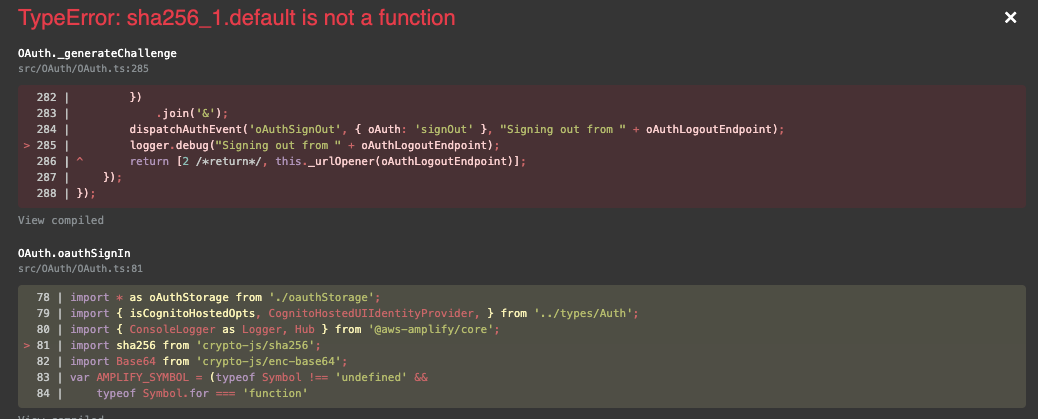
It seems to be in ``:
import sha256 from 'crypto-js/sha256';
import Base64 from 'crypto-js/enc-base64';

// ... snip ...

private _generateChallenge(code: string) {
  return this._base64URL(sha256(code));
}
Since all of that is overly complex and annoying, let's just copy out the code and rework it to be more standalone (note: a couple of probably important functions are commented out at the moment):
import sha256 from 'crypto-js/sha256'
import Base64 from 'crypto-js/enc-base64'

const _base64URL = string =>
  string
    .toString(Base64)
    .replace(/=/g, '')
    .replace(/\+/g, '-')
    .replace(/\//g, '_')

const _bufferToString = buffer => {
  const CHARSET =
    'ABCDEFGHIJKLMNOPQRSTUVWXYZabcdefghijklmnopqrstuvwxyz0123456789'
  const state = []
  for (let i = 0; i < buffer.byteLength; i += 1) {
    const index = buffer[i] % CHARSET.length
    state.push(CHARSET[index])
  }
  return state.join('')
}

const _generateRandom = size => {
  const CHARSET =
    'ABCDEFGHIJKLMNOPQRSTUVWXYZabcdefghijklmnopqrstuvwxyz0123456789-._~'
  const buffer = new Uint8Array(size)
  if (typeof window !== 'undefined' && !!window.crypto) {
    window.crypto.getRandomValues(buffer)
  } else {
    for (let i = 0; i < size; i += 1) {
      buffer[i] = (Math.random() * CHARSET.length) | 0
    }
  }
  return _bufferToString(buffer)
}

const _generateState = length => {
  let result = ''
  let i = length
  const chars = '0123456789abcdefghijklmnopqrstuvwxyzABCDEFGHIJKLMNOPQRSTUVWXYZ'
  for (; i > 0; --i)
    result += chars[Math.round(Math.random() * (chars.length - 1))]
  return result
}

const _generateChallenge = code => _base64URL(sha256(code))

const oauthSignIn = ({
  responseType = 'code',
  domain, // string
  redirectSignIn, // string
  clientId, // string,
  provider, // CognitoHostedUIIdentityProvider | string = CognitoHostedUIIdentityProvider.Cognito,
  customState, //?: string
  scopes = [],
}) => {
  const generatedState = _generateState(32)
  const state = customState
    ? `${generatedState}-${customState}`
    : generatedState

  // oAuthStorage.setState(encodeURIComponent(state))

  const pkce_key = _generateRandom(128)
  // oAuthStorage.setPKCE(pkce_key)

  const code_challenge = _generateChallenge(pkce_key)
  const code_challenge_method = 'S256'

  const queryString = Object.entries({
    redirect_uri: redirectSignIn,
    response_type: responseType,
    client_id: clientId,
    identity_provider: provider,
    scopes,
    state,
    ...(responseType === 'code' ? { code_challenge } : {}),
    ...(responseType === 'code' ? { code_challenge_method } : {}),
  })
    .map(([k, v]) => `${encodeURIComponent(k)}=${encodeURIComponent(v)}`)
    .join('&')

  const URL = `https://${domain}/oauth2/authorize?${queryString}`
  console.error(`Redirecting to ${URL}`)
  // this._urlOpener(URL, redirectSignIn)
}
Now if we call it like this:
const responseType = '2fooresponsetype2'
const domain = '2foodomain'
const redirectSignIn = '2fooredirectsignin'
const clientId = '2fooclientid'
const provider = 'COGNITO'
const customState = '2customstate'
const scopes = []

oauthSignIn({
  responseType,
  domain,
  redirectSignIn,
  clientId,
  provider,
  customState,
  scopes,
})
We get a URL output in our console!
Redirecting to https://2foodomain/oauth2/authorize?redirect_uri=2fooredirectsignin&response_type=2fooresponsetype2&client_id=2fooclientid&identity_provider=COGNITO&scopes=&state=5ZcRzz4CWT3Hd3SHm2X4J0sSJKR4VoWr-2customstate
Now if we use our actual values:
const responseType = 'code'
const domain = process.env.REACT_APP_AUTH_DOMAIN
const redirectSignIn = document.location.href
const clientId = process.env.REACT_APP_AUTH_USER_POOL_CLIENT_ID
const provider = 'COGNITO'
const customState = undefined
const scopes = ['email', 'profile', 'openid']

oauthSignIn({
  responseType,
  domain,
  redirectSignIn,
  clientId,
  provider,
  customState,
  scopes,
})
We get a URL we can use:
For some reason it doesn't look as though our scopes are actually being added to that URL though..
It loads though, and logging in with valid credentials lands us an actual error on the hosted UI for once!

This StackOverflow comment provides a potential lead:
I have seen this issue before. When making the request to Cognito, please take a close look at the redirect URL/ Call back URL you are specifying. If I remember correctly, I have seen this issue if you have a trailing '/' or a missing '/' in the redirect URL depending on what you have specified in the App Client Settings.
Looking at our redirect url above.. that seems to be the issues: ?redirect_uri=http%3A%2F%2Flocalhost%3A3000%2F, so we can drop that trailing slash (%2F) and make it ?redirect_uri=http%3A%2F%2Flocalhost%3A3000
Changing our document.location.href to document.location.origin in the config we passed into `` will solve this properly:
const responseType = 'code'
const domain = process.env.REACT_APP_AUTH_DOMAIN
const redirectSignIn = document.location.origin
const clientId = process.env.REACT_APP_AUTH_USER_POOL_CLIENT_ID
const provider = 'COGNITO'
const customState = undefined
const scopes = ['email', 'profile', 'openid']

oauthSignIn({
  responseType,
  domain,
  redirectSignIn,
  clientId,
  provider,
  customState
})
Now we grab the URL again, sign in with valid credentials, and....... WE GET REDIRECTED BACK TO OUR WEBAPP!
http://localhost:3000/?code=ABC12345-AAAA-AAAA-AAAA-cceb56a48162&state=gGJNKt367uIyjR7T0ScY3IR7POMsjULa
Since we commented out the oauthStorage bits in the code we copied out, I don't think the auto validation code will be able to pick it up the code and validate/etc it..
// oAuthStorage.setState(encodeURIComponent(state))

// oAuthStorage.setPKCE(pkce_key)
And in any case, we hit the same error we were having before..

Back to:
- https://docs.aws.amazon.com/cognito/latest/developerguide/token-endpoint.html#post-token-positive-exchanging-authorization-code-for-tokens
Authorization
If the client was issued a secret, the client must pass its client_id and client_secret in the authorization header through Basic HTTP authorization. The secret is Basic Base64Encode(client_id:client_secret).
So ideally we don't have a secret generated, so we don't need to use that..
Sample Request

POST https://mydomain.auth.us-east-1.amazoncognito.com/oauth2/token&
Content-Type='application/x-www-form-urlencoded'&

grant_type=authorization_code&
client_id=djc98u3jiedmi283eu928&
code=AUTHORIZATION_CODE&
redirect_uri=com.myclientapp://myclient/redirect
At this stage it really feels like Amplify has been rolling it's own auth things.. maybe we don't need any of this and we could just go use a standard well tested OAuth library instead, or at least use some more standard things?
- https://auth0.com/docs/api-auth/tutorials/authorization-code-grant-pkce
- https://developer.okta.com/blog/2019/08/22/okta-authjs-pkce (further reading + flow diagrams)
- https://medium.com/passportjs/pkce-support-for-oauth-2-0-e3a77013b278
- https://github.com/jaredhanson/passport-oauth2#usage
- https://github.com/brix/crypto-js/issues/189#issuecomment-499448107
Following the auth0 tutorial above, I ended up with this following minimal code to redirect to the Cognito User Pool Hosted UI to sign in, and to handle exchanging the code for tokens from the frontend:
import sha256 from 'crypto-js/sha256'
import Base64 from 'crypto-js/enc-base64'
import Utf8 from 'crypto-js/enc-utf8'

// Config
const domain = process.env.REACT_APP_AUTH_DOMAIN
const scope = ['email', 'profile', 'openid'].join('+')
const clientId = process.env.REACT_APP_AUTH_USER_POOL_CLIENT_ID
const redirectUrl = window.location.origin

const currentUrl = new URL(window.location)
if (currentUrl.searchParams.has('code')) {
  // Exchange code for our tokens
  const verifier = sessionStorage.getItem('oAuthVerifier')

  const formData = new URLSearchParams()
  formData.append('client_id', clientId)
  formData.append('grant_type', 'authorization_code')
  formData.append('code_verifier', verifier)
  formData.append('code', currentUrl.searchParams.get('code'))
  formData.append('redirect_uri', redirectUrl)

  window.foo = fetch(`https://${domain}/oauth/token`, {
    method: 'POST',
    mode: 'no-cors',
    // headers: {
    //   'Content-Type': 'application/x-www-form-urlencoded',
    // },
    body: formData,
  })
    .then(result => console.log('oauthCodeExchange', result))
    .catch(err => console.error('oauthCodeExchange ERROR', err))
} else {
  // Request a code
  const base64URLEncode = str =>
    Base64.stringify(Utf8.parse(str))
      .replace(/\+/g, '-')
      .replace(/\//g, '_')
      .replace(/=/g, '')

  const randomBytes = crypto.getRandomValues(new Uint32Array(32))
  const verifier = base64URLEncode(randomBytes)
  sessionStorage.setItem('oAuthVerifier', verifier)

  const challenge = base64URLEncode(sha256(verifier))

  const codeRequestUrl = `https://${domain}/authorize?client_id=${clientId}&response_type=code&code_challenge=${challenge}&code_challenge_method=S256&scope=${scope}&redirect_uri=${redirectUrl}`

  // console.error('codeRequestUrl', codeRequestUrl)
  window.location.href = codeRequestUrl
}
But I appear to be getting a 405 error back from the token endpoint when I try to exchange my code for tokens.. which I have no idea why..
Found this issue that seems related, but the solution appears to just be "it works now":
(earlier debug rabbithole that may not be relevant anymore...)
Allowed OAuth Flows
The Authorization code grant flow initiates a code grant flow, which provides an authorization code as the response. This code can be exchanged for access tokens with the TOKEN Endpoint. Because the tokens are never exposed directly to an end user, they are less likely to become compromised. However, a custom application is required on the backend to exchange the authorization code for user pool tokens.Note
For security reasons, we highly recommend that you use only the Authorization code grant flow, together with PKCE, for mobile apps.
Looking at the linked OAuth.ts code from the above error...
Click to see code

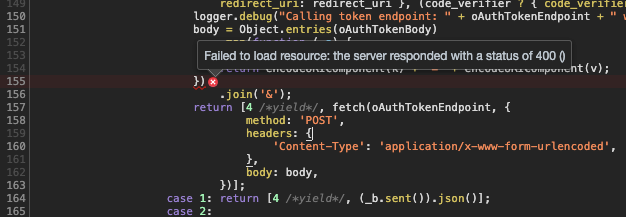
    OAuth.prototype._handleCodeFlow = function (currentUrl) {
        return __awaiter(this, void 0, void 0, function () {
            var code, oAuthTokenEndpoint, client_id, redirect_uri, code_verifier, oAuthTokenBody, body, _a, access_token, refresh_token, id_token, error;
            return __generator(this, function (_b) {
                switch (_b.label) {
                    case 0:
                        code = (parse(currentUrl).query || '')
                            .split('&')
                            .map(function (pairings) { return pairings.split('='); })
                            .reduce(function (accum, _a) {
                            var _b;
                            var _c = __read(_a, 2), k = _c[0], v = _c[1];
                            return (__assign(__assign({}, accum), (_b = {}, _b[k] = v, _b)));
                        }, { code: undefined }).code;
                        if (!code) {
                            return [2 /*return*/];
                        }
                        oAuthTokenEndpoint = 'https://' + this._config.domain + '/oauth2/token';
                        dispatchAuthEvent('codeFlow', {}, "Retrieving tokens from " + oAuthTokenEndpoint);
                        client_id = isCognitoHostedOpts(this._config)
                            ? this._cognitoClientId
                            : this._config.clientID;
                        redirect_uri = isCognitoHostedOpts(this._config)
                            ? this._config.redirectSignIn
                            : this._config.redirectUri;
                        code_verifier = oAuthStorage.getPKCE();
                        oAuthTokenBody = __assign({ grant_type: 'authorization_code', code: code,
                            client_id: client_id,
                            redirect_uri: redirect_uri }, (code_verifier ? { code_verifier: code_verifier } : {}));
                        logger.debug("Calling token endpoint: " + oAuthTokenEndpoint + " with", oAuthTokenBody);
                        body = Object.entries(oAuthTokenBody)
                            .map(function (_a) {
                            var _b = __read(_a, 2), k = _b[0], v = _b[1];
                            return encodeURIComponent(k) + "=" + encodeURIComponent(v);
                        })
                            .join('&');
                        return [4 /*yield*/, fetch(oAuthTokenEndpoint, {
                                method: 'POST',
                                headers: {
                                    'Content-Type': 'application/x-www-form-urlencoded',
                                },
                                body: body,
                            })];
                    case 1: return [4 /*yield*/, (_b.sent()).json()];
                    case 2:
                        _a = _b.sent(), access_token = _a.access_token, refresh_token = _a.refresh_token, id_token = _a.id_token, error = _a.error;
                        if (error) {
                            throw new Error(error);
                        }
                        return [2 /*return*/, {
                                accessToken: access_token,
                                refreshToken: refresh_token,
                                idToken: id_token,
                            }];
                }
            });
        });
    };
So that seems to imply we don't want to use Auth.federatedSignIn either.. instead we might want to try using some form of oAuth helper methods?
This section of the docs page has a rather obscured example of using withOAuth to wrap a button:
Here are the other with* functions that appear to be exported:

import { withOAuth } from 'aws-amplify-react';

class OAuthButton extends Component {
  render() {
    return (
      <button onClick={this.props.OAuthSignIn}>
        Sign in with AWS
      </button>
    )
  }
}

export default withOAuth(OAuthButton);
Looking at that HoC's file:
// packages/remdr-react/node_modules/aws-amplify-react/src/Auth/Provider/withOAuth.tsx

import * as React from 'react';

import { I18n } from '@aws-amplify/core';
import { Auth } from '@aws-amplify/auth';
import AmplifyTheme from '../../Amplify-UI/Amplify-UI-Theme';
import { oAuthSignInButton } from '@aws-amplify/ui';
import {
    SignInButton,
    SignInButtonContent,
} from '../../Amplify-UI/Amplify-UI-Components-React';

export function withOAuth(Comp) {
    return class extends React.Component<any, any> {
        constructor(props: any) {
            super(props);
            this.signIn = this.signIn.bind(this);
        }

        signIn(_e, provider) {
            Auth.federatedSignIn({ provider });
        }

        render() {
            return <Comp {...this.props} OAuthSignIn={this.signIn} />;
        }
    };
}

const Button = (props: any) => (
    <SignInButton
        id={oAuthSignInButton}
        onClick={() => props.OAuthSignIn()}
        theme={props.theme || AmplifyTheme}
        variant={'oAuthSignInButton'}
    >
        <SignInButtonContent theme={props.theme || AmplifyTheme}>
            {I18n.get(props.label || 'Sign in with AWS')}
        </SignInButtonContent>
    </SignInButton>
);

export const OAuthButton = withOAuth(Button);

/**
 * @deprecated use named import
 */
export default withOAuth;
So we're basically back to supposedly using Auth.federatedSignIn, which as we saw earlier apparently just doesn't work..:
signIn(_e, provider) {
  Auth.federatedSignIn({ provider });
}
So... who knows how you're actually meant to generate that URL from the library.. but we can do it manually I suppose..
 0xdevalias
All 21 comments
Honestly i'm at my wits end at this stage and am considering that switching away from Cognito User Pool to Auth0 is going to be a way less painful experience in the long run..
0xdevalias
on 3 Apr 2020
Hey @0xdevalias! I was facing the exact same problem and something really weird worked out for me: add a slash at the end of Callback URL(s) and Sign out URL(s), like http://localhost:3000/. Can you try it?
 thiagozf
on 3 Apr 2020
thiagozf
on 3 Apr 2020
@thiagozf Just tried that out, seems still no luck :(
These are the details of the failing 405 request to exchange the code for the token:
General:
Request URL: https://auth.example.com/oauth/token
Request Method: POST
Status Code: 405
Remote Address: REDACTED
Referrer Policy: no-referrer-when-downgrade
Response Headers:
allow: GET
cache-control: no-cache, no-store, max-age=0, must-revalidate
content-length: 0
date: Fri, 03 Apr 2020 21:18:12 GMT
expires: 0
pragma: no-cache
server: Server
set-cookie: XSRF-TOKEN=REDACTED; Path=/; Secure; HttpOnly; SameSite=Lax
status: 405
strict-transport-security: max-age=31536000 ; includeSubDomains
via: 1.1 REDACTED.cloudfront.net (CloudFront)
x-amz-cf-id: REDACTED
x-amz-cf-pop: SYD4-C1
x-amz-cognito-request-id: 680332af-3245-4835-a52b-cc1a2aa7bfc5
x-application-context: application:prod:8443
x-cache: Error from cloudfront
x-content-type-options: nosniff
x-frame-options: DENY
x-xss-protection: 1; mode=block
Request Headers:
authority: auth.example.com
:method: POST
:path: /oauth/token
:scheme: https
accept: */*
accept-encoding: gzip, deflate, br
accept-language: en-AU,en-GB;q=0.9,en;q=0.8
cache-control: no-cache
content-length: 631
content-type: application/x-www-form-urlencoded
origin: http://localhost:3000
pragma: no-cache
referer: http://localhost:3000/?code=ABC12345-1111-2222-3333-444444444444
sec-fetch-dest: empty
sec-fetch-mode: no-cors
sec-fetch-site: cross-site
user-agent: Mozilla/5.0 (Macintosh; Intel Mac OS X 10_15_3) AppleWebKit/537.36 (KHTML, like Gecko) Chrome/80.0.3987.162 Safari/537.36
I have a custom domain configured for the User Pool, i'm starting to wonder if maybe it's a CloudFront blocking it thing, and if I didn't have a custom domain set if it would #JustWork?
Also starting to wonder if I can just avoid all of this headache by calling into these directly, which presumably would involve not using the Hosted UI (which was meant to avoid me having to go and implement things to save time... heh....):
0xdevalias
on 3 Apr 2020
@0xdevalias Yes, CloudFront could be blocking something here. The 405 code is very suspicious. Have you setup a CORS policy? The Default Root Object property in the distribution settings also should be blank for it to work. I would give it a try without the custom domain and see what happens. If it works, def indicates it is a CloudFront configuration problem.
Also, Amplify makes things a lot easier. If you go to direct API calls, it is probably going to be worse.
thiagozf
on 3 Apr 2020
@thiagozf I don't control anything in CloudFront for the Cognito Hosted UI. I get to set a custom domain name, that's all. And then it magically sets up some CloudFront resources in some other account presumably owned/operated by AWS that I don't have access to.
I'll see if I can disable it and check if that works.
Amplify doesn't make things easier because it doesn't work. I'm here trying to solve this natively because Amplify is utterly broken, and has horrible implementation patterns that break good web design. And besides, the code I have ended up using is effectively equivalent to what Amplify is doing, just without the insane amount of bloat and unneeded abstraction surrounding it.
0xdevalias
on 4 Apr 2020
@0xdevalias I don't have any experience setting up a custom domain for the hosted UI. I supposed Cognito created a distribution on CF and you could tweak it :(
Yes, your code should be equivalent. But like you said, Amplify does some strange things behind the scenes. I have a working code that is pretty much your starting point, calling Auth.federatedSignIn() directly, and it works. The only differences I can think of are the slashes (which gave me a big headache to figure out) and the custom domain.
I'm going to try to create a minimal working example and share with you.
thiagozf
on 4 Apr 2020
Just tried adding a 'domain prefix' url to access it as well: https://my-foo.auth.us-east-1.amazoncognito.com/oauth/token
Unfortunately, still seems to be getting the 405 on the token exchange request.
0xdevalias
on 4 Apr 2020
@0xdevalias Hey! Created a quick example, check out this repo. You might want to tweak it and create a button with onClick={() => Auth.federatedSignIn()}.
EDIT: spotted a possible mistake. redirectSignIn should not use window.location.href, but something like '${window.location.origin}/'.
thiagozf
on 4 Apr 2020
@thiagozf Amazing! I will check it out a little later today and see if it works for me (and then from there reverse engineer why my setup is so broken). Thank you for chiming in and being so helpful! I screamed into the void (of the internet), and the internet provided! <3
0xdevalias
on 4 Apr 2020
So I just put my env vars into your minimal project and it seems to have worked, and retrieved the refresh token and such! So, awesome! It can work!! That's far less hassle than having to rip everything out and transition to a different provider.
Skimming the code, the thing that stands out to me the most that I don't believe I ended up trying was this bit:
<button
  type="button"
  onClick={() =>
    Auth.federatedSignIn({
      provider: CognitoHostedUIIdentityProvider.Cognito
    })
  }
>
  Federated sign in
</button>
In particular, from memory my previous attempts used Auth.federatedSignIn() without specifying a provider at all (which I believe is how the docs told me to do it)
Eyeballing the differences in the request made from your version and mine.. i'm gonna cry if this was the only thing causing me so much pain, but the endpoint it's hitting is /oauth2/token rather than /oauth/token
Which, technically is correct based on the docs.. and I used in a different bit of code I tried..
Though fixing that in my code example still hits the 405 error.. so I wonder what else is different between them..
0xdevalias
on 4 Apr 2020
Ok.. so it seems you need to have cors mode enabled with fetch (I had it originally, then disabled it during debugging as i was having issues). I didn't have state in my original code sample either, not sure if that's required (it shouldn't be.. but who knows..)
Using a combination of the following sources as references, along with @thiagozf sample + encouragement to not give up, here is a plain JS implementation that appears to correctly complete the flows!
- https://auth0.com/docs/api-auth/tutorials/authorization-code-grant-pkce#4-exchange-the-authorization-code-for-an-access-token
- https://github.com/aaronpk/pkce-vanilla-js/blob/master/index.html
The code currently uses sessionStorage, but the localStorage equivalent is also there for reference. It doesn't have support for using a client secret (as it's recommended not to use them with OAuth PKCE flows on frontend/'public' applications), but there is a TODO comment on the line where you would need to add it.
This is the main config/'calling code', you could adjust it however you want to use the 2 main functions, this is just a basic example:
import { generatePkceAuthUrl, exchangeAuthCodeForTokens } from './oauthPkce'

// Config
const requested_scopes = [
  'email',
  'profile',
  'openid',
  // 'aws.cognito.signin.user.admin',
]
const client_id = process.env.REACT_APP_AUTH_USER_POOL_CLIENT_ID
const redirect_uri = window.location.origin
const domain = process.env.REACT_APP_AUTH_DOMAIN

// https://docs.aws.amazon.com/cognito/latest/developerguide/authorization-endpoint.html
const authorization_endpoint = `https://${domain}/oauth2/authorize`

// https://docs.aws.amazon.com/cognito/latest/developerguide/token-endpoint.html
const token_endpoint = `https://${domain}/oauth2/token`

const currentUrl = new URL(window.location)
if (currentUrl.searchParams.has('code')) {
  // Retrieve tokens
  exchangeAuthCodeForTokens({
    token_endpoint,
    client_id,
    redirect_uri,
  }).then(tokens => console.log('OAuth PKCE Retrieved Tokens:', tokens))
} else {
  // Generate auth URL + redirect
  generatePkceAuthUrl({
    authorization_endpoint,
    client_id,
    redirect_uri,
    requested_scopes,
  }).then(url => {
    console.log('OAuth PKCE Auth Url:', url)
    window.location.href = url
  })
}
oauthPkce.js
export const generatePkceAuthUrl = async ({
  authorization_endpoint,
  client_id,
  requested_scopes = [],
  redirect_uri,
}) => {
  // Create and store a random "state" value
  const state = generateRandomString()
  // localStorage.setItem('pkce_state', state)
  sessionStorage.setItem('pkce_state', state)

  // Create and store a new PKCE code_verifier (the plaintext random secret)
  const code_verifier = generateRandomString()
  // localStorage.setItem('pkce_code_verifier', code_verifier)
  sessionStorage.setItem('pkce_code_verifier', code_verifier)

  // Hash and base64-urlencode the secret to use as the challenge
  const code_challenge = await pkceChallengeFromVerifier(code_verifier)

  const params = new URLSearchParams()
  params.append('response_type', 'code')
  params.append('client_id', client_id)
  params.append('state', state)
  params.append('scope', requested_scopes.join(' '))
  params.append('redirect_uri', redirect_uri)
  params.append('code_challenge', code_challenge)
  params.append('code_challenge_method', 'S256')

  // Build the authorization URL
  return `${authorization_endpoint}?${params}`
}

export const exchangeAuthCodeForTokens = async ({
  token_endpoint,
  client_id,
  redirect_uri,
}) => {
  // const currentUrl = new URL(window.location)
  // const params = currentUrl.searchParams
  const params = new URLSearchParams(window.location.search)

  const state = sessionStorage.getItem('pkce_state')
  const code_verifier = sessionStorage.getItem('pkce_code_verifier')

  if (params.has('error')) {
    const error = params.get('error')
    throw new Error(`Error returned from authorization server: ${error}`)
  }

  // Exchange code for our tokens
  if (params.has('code')) {
    if (params.get('state') !== state) {
      throw new Error(`Invalid state`)
    }

    const code = params.get('code')

    const formData = new URLSearchParams()
    formData.append('grant_type', 'authorization_code')
    formData.append('client_id', client_id)
    formData.append('code_verifier', code_verifier)
    formData.append('code', code)
    formData.append('redirect_uri', redirect_uri)

    const tokens = await fetch(token_endpoint, {
      method: 'POST',
      mode: 'cors',
      headers: {
        // TODO: if you have a client secret you can add this, but you should just not use a client secret on the frontend..
        // Authorization: `Basic ${btoa(`${clientId}:${clientSecret}`)}`,
        Accept: '*/*',
        'Content-Type': 'application/x-www-form-urlencoded',
      },
      body: formData,
    }).then(result => result.json())

    // Clean these up since we don't need them anymore
    // localStorage.removeItem('pkce_state')
    // localStorage.removeItem('pkce_code_verifier')
    sessionStorage.removeItem('pkce_state')
    sessionStorage.removeItem('pkce_code_verifier')

    return tokens
  }
}

//////////////////////////////////////////////////////////////////////
// PKCE HELPER FUNCTIONS
//////////////////////////////////////////////////////////////////////

// Generate a secure random string using the browser crypto functions
export const generateRandomString = () => {
  var array = new Uint32Array(28)
  window.crypto.getRandomValues(array)
  return Array.from(array, dec => ('0' + dec.toString(16)).substr(-2)).join('')
}

// Calculate the SHA256 hash of the input text.
// Returns a promise that resolves to an ArrayBuffer
export const sha256 = plain => {
  const encoder = new TextEncoder()
  const data = encoder.encode(plain)
  return window.crypto.subtle.digest('SHA-256', data)
}

// Base64-urlencodes the input string
export const base64urlencode = str => {
  // Convert the ArrayBuffer to string using Uint8 array to conver to what btoa accepts.
  // btoa accepts chars only within ascii 0-255 and base64 encodes them.
  // Then convert the base64 encoded to base64url encoded
  //   (replace + with -, replace / with _, trim trailing =)
  return btoa(String.fromCharCode.apply(null, new Uint8Array(str)))
    .replace(/\+/g, '-')
    .replace(/\//g, '_')
    .replace(/=+$/, '')
}

// Return the base64-urlencoded sha256 hash for the PKCE challenge
export const pkceChallengeFromVerifier = async verifier => {
  return base64urlencode(await sha256(verifier))
}
So now that I proved to myself it can be done without needing to rely on external libraries, or the depths/complexities of Amplify.. and @thiagozf has shown me how to properly use the Amplify functions, I think I will just use Amplify ;p (but at least if anyone needs to pick it apart and understand the inner workings, this reference is here now..)
Config + some debug logging:
index.js
// https://aws-amplify.github.io/docs/js/hub
Hub.listen(/.*/, ({ channel, payload }) =>
  console.debug(`[hub::${channel}::${payload.event}]`, payload)
)

// https://aws-amplify.github.io/docs/js/authentication#manual-setup
Auth.configure({
  region: process.env.REACT_APP_AUTH_REGION,
  userPoolId: process.env.REACT_APP_AUTH_USER_POOL_ID,
  userPoolWebClientId: process.env.REACT_APP_AUTH_USER_POOL_CLIENT_ID,

  // Cognito Hosted UI configuration
  oauth: {
    domain: process.env.REACT_APP_AUTH_DOMAIN,
    scope: ['email', 'profile', 'openid'],
    redirectSignIn: document.location.origin,
    redirectSignOut: document.location.origin,
    responseType: 'code',
  },
})
And as a bonus, the React hook I put together to wrap my usage of Amplify Auth up neatly:
useAuthentication.js
import React, { useCallback, useEffect, useLayoutEffect, useState } from 'react'

import { Auth, Hub } from 'aws-amplify'
import { signInButton, signInButtonContent } from '@aws-amplify/ui'

/**
 * Handle user authentication and related features.
 *
 * @returns {{
 *   isAuthenticated: boolean,
 *   user: CognitoUser,
 *   error: any,
 *   signIn: function,
 *   signOut: function,
 *   SignInButton: React.Component,
 * }}
 *
 * @see https://aws-amplify.github.io/amplify-js/api/classes/authclass.html
 * @see https://aws-amplify.github.io/amplify-js/api/classes/hubclass.html
 * @see https://aws-amplify.github.io/docs/js/hub#listening-authentication-events
 * @see https://github.com/aws-amplify/amplify-js/blob/master/packages/amazon-cognito-identity-js/src/CognitoUser.js
 */
const useAuthentication = () => {
  const [user, setUser] = useState(null)
  const [isAuthenticated, setIsAuthenticated] = useState(false)
  const [error, setError] = useState(false)
  const [isLoading, setIsLoading] = useState(false)

  const refreshState = useCallback(() => {
    setIsLoading(true)

    Auth.currentAuthenticatedUser()
      .then(user => {
        setUser(user)
        setIsAuthenticated(_isAuthenticated(user))
        setError(null)
        setIsLoading(false)
      })
      .catch(err => {
        setUser(null)
        setIsAuthenticated(false)
        if (err === 'not authenticated') {
          setError(null)
        } else {
          setError(err)
        }
        setIsLoading(false)
      })
  }, [])

  // Make sure our state is loaded before first render
  useLayoutEffect(() => {
    refreshState()
  }, [refreshState])

  // Subscribe to auth events
  useEffect(() => {
    const handler = ({ payload }) => {
      switch (payload.event) {
        case 'configured':
        case 'signIn':
        case 'signIn_failure':
        case 'signOut':
          refreshState()
          break

        default:
          break
      }
    }

    Hub.listen('auth', handler)

    return () => {
      Hub.remove('auth', handler)
    }
  }, [refreshState])

  const signIn = useCallback(() => {
    Auth.federatedSignIn({ provider: 'COGNITO' }).catch(err => {
      setError(err)
    })
  }, [])

  const signOut = useCallback(() => {
    Auth.signOut()
      .then(_ => refreshState())
      .catch(err => {
        setError(err)
      })
  }, [refreshState])

  const CognitoSignInButton = useCallback(
    ({ label = 'Sign In' }) => (
      <button className={signInButton} onClick={signIn}>
        <span className={signInButtonContent}>{label}</span>
      </button>
    ),
    [signIn]
  )

  return {
    isAuthenticated,
    isLoading,
    user,
    error,
    signIn,
    signOut,
    SignInButton: CognitoSignInButton,
  }
}

const _isAuthenticated = user => {
  if (
    !user ||
    !user.signInUserSession ||
    !user.signInUserSession.isValid ||
    !user.signInUserSession.accessToken ||
    !user.signInUserSession.accessToken.getExpiration
  ) {
    return false
  }

  const session = user.signInUserSession
  const isValid = session.isValid() || false

  const sessionExpiry = new Date(session.accessToken.getExpiration() * 1000)
  const isExpired = new Date() > sessionExpiry

  return isValid && !isExpired
}

export default useAuthentication
@0xdevalias Thanks so much for posting this example!! I've been struggling with integrating Cognito Facebook login into my Next.js app using the Hosted UI.
I'm using your useAuthentication hook example, and additionally have Auth.Configure(...) outside my App function component within _app.js.
The issue I'm running into is:
Although I can redirect to Facebook, login, and then come back with to the app with Cognito and XSRF cookies set, the hook never returns a user.
Additionally, the Hub fires the following events:
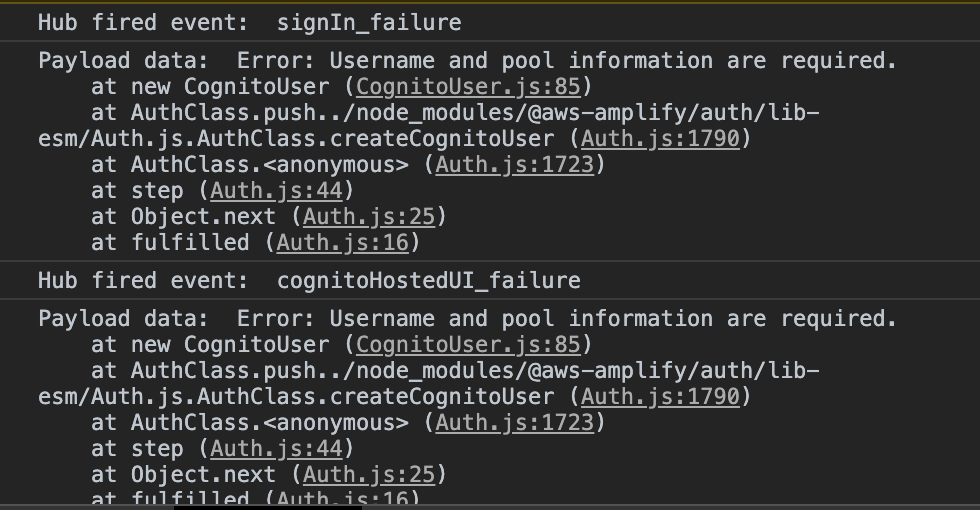
The error is Error: Username and pool information are required.
Did you run into this when you were implementing Amplify in your app? Maybe it's related to Next using SSR? I'm at my wits end trying to figure this out.
 rachelgould
on 11 Apr 2020
rachelgould
on 11 Apr 2020
@rachelgould Sorry to hear you’re having trouble with it too :( I don’t believe I ever saw that error.
My Auth.configure is one of the first things in my index.js, so it’s guaranteed to run before I render React (and thus before any of my hook code will be run) Is yours in a similar position in the app? Also, what keys are you passing through to it? Are you able to post a redacted example of your configure call?
0xdevalias
on 12 Apr 2020
@0xdevalias Thanks for such a quick reply! I made a separate issue here: https://github.com/aws-amplify/amplify-js/issues/5374
rachelgould
on 12 Apr 2020
Hey everyone -- looks like you were able to figure this out, so will close out. I've flagged both the repo @thiagozf created and the code snippet @0xdevalias wrote. Will try to get this into the docs or similar.
Will also look into issue #5374
 mauerbac
on 15 Apr 2020
mauerbac
on 15 Apr 2020
Are there any examples for doing the above using Vue.js?
 mrichman
on 17 Apr 2020
mrichman
on 17 Apr 2020
@0xdevalias @thiagozf thanks so much for this detailed issue and for the solution. No words to describe how bad the Amplify documentation is for such critical features and how much time is wasted trying all kinds of possibilities to find a solution. I got it working only because of the sample code that @thiagozf provided.
 jayachandranm
on 10 Jun 2020
jayachandranm
on 10 Jun 2020
Thank you @0xdevalias!
I think the _isAuthenticated can be simplified as the isValid function already contains the expiration check (including clock drifting logic)
const _isAuthenticated = user => {
  if (
    !user ||
    !user.signInUserSession ||
    !user.signInUserSession.isValid ||
    !user.signInUserSession.accessToken ||
    !user.signInUserSession.accessToken.getExpiration
  ) {
    return false
  }

  const session = user.signInUserSession
  return session.isValid()
}
isValid implementation
var now = Math.floor(new Date() / 1000);
var adjusted = now - this.clockDrift;
return adjusted < this.accessToken.getExpiration() && adjusted < this.idToken.getExpiration();
 ttamminen
on 5 Aug 2020
ttamminen
on 5 Aug 2020
If I may, no need to run the isValid token expiration twice, and because of CognitoUserSession constructor validating accessToken as not null the function should just be:
const _isAuthenticated = user => {
  if (
    !user ||
    !user.signInUserSession ||
    !user.signInUserSession.isValid
  ) {
    return false
  }
  return true;
}
CognitoUserSession constructor is (accessToken is immutable)
function CognitoUserSession(_temp) {
    var _ref = _temp === void 0 ? {} : _temp,
        IdToken = _ref.IdToken,
        RefreshToken = _ref.RefreshToken,
        AccessToken = _ref.AccessToken,
        ClockDrift = _ref.ClockDrift;

    if (AccessToken == null || IdToken == null) {
      throw new Error('Id token and Access Token must be present.');
    }

    this.idToken = IdToken;
    this.refreshToken = RefreshToken;
    this.accessToken = AccessToken;
    this.clockDrift = ClockDrift === undefined ? this.calculateClockDrift() : ClockDrift;
  }
 xavierraffin
on 30 Sep 2020
xavierraffin
on 30 Sep 2020
Honestly i'm at my wits end at this stage and am considering that switching away from Cognito User Pool to Auth0 is going to be a way less painful experience in the long run..
I'm just switching from Auth0 to Cognito because they've raised prices on me, and I get 4 days notice (over a weekend) of "upgrades" occurring and I have to make changes immediately to ensure everything still works properly.
 camhart
on 19 Nov 2020
camhart
on 19 Nov 2020
Related issues
 ldgarcia
·
3Comments
ldgarcia
·
3Comments
 josoroma
·
3Comments
josoroma
·
3Comments
 epicfaace
·
3Comments
epicfaace
·
3Comments
 cosmosof
·
3Comments
cosmosof
·
3Comments
 leantide
·
3Comments
leantide
·
3Comments
Most helpful comment
@0xdevalias @thiagozf thanks so much for this detailed issue and for the solution. No words to describe how bad the Amplify documentation is for such critical features and how much time is wasted trying all kinds of possibilities to find a solution. I got it working only because of the sample code that @thiagozf provided.