Amplify-js: How to use Amplify AppSync API in other project
I have a project made with Amplify, in this, I have integrated AppSync, Storage, Cognito, etc. I want to use the AppSync api in other React project. So I checked the Getting Started page and it gave this:
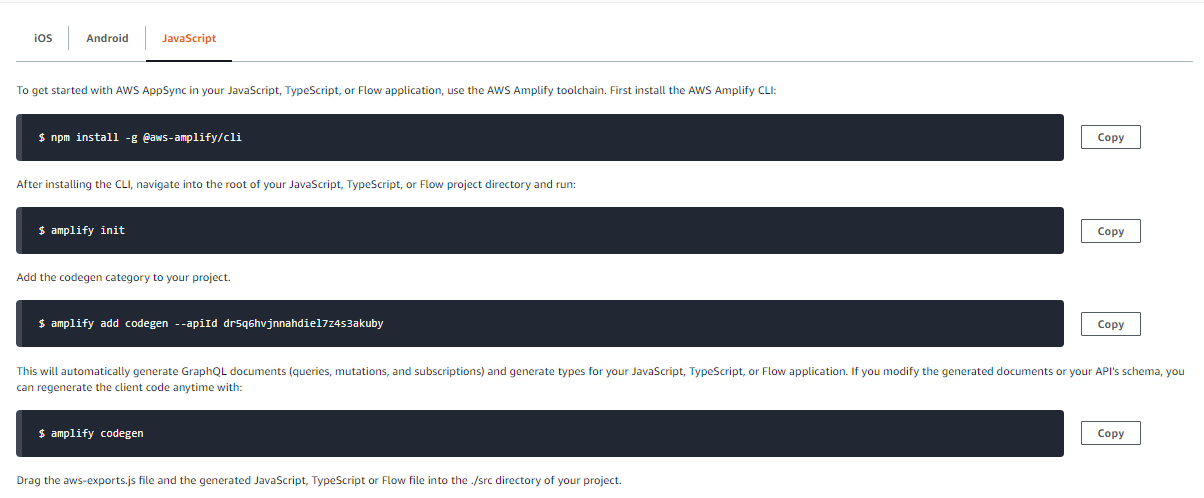
I executed the command init, like this:
? Enter a name for the project change-website // the new react project, this is its name
? Enter a name for the environment master
? Choose your default editor: Visual Studio Code
? Choose the type of app that you're building javascript
Please tell us about your project
? What javascript framework are you using react
? Source Directory Path:  src
? Distribution Directory Path: out
? Build Command:  npm run-script build
? Start Command: npm run-script start
Using default provider  awscloudformation

For more information on AWS Profiles, see:
https://docs.aws.amazon.com/cli/latest/userguide/cli-multiple-profiles.html

? Do you want to use an AWS profile? Yes
? Please choose the profile you want to use shooter-app // this is the user from the main app.
It works well, then I executed the command amplify add codegen --apiId dr5q6hvjnnahdiel7z4s3akuby to add the AppSync api to my new project, like this:
? Choose the code generation language target typescript
? Enter the file name pattern of graphql queries, mutations and subscriptions src/graphql/**/*.ts
? Do you want to generate/update all possible GraphQL operations - queries, mutations and subscriptions Yes
? Enter maximum statement depth [increase from default if your schema is deeply nested] 2
? Enter the file name for the generated code src/API.ts
? Do you want to generate code for your newly created GraphQL API Yes
and then amplify codegen. After this, I thought it would work well and the aws-exports.js is this one:
// WARNING: DO NOT EDIT. This file is automatically generated by AWS Amplify. It will be overwritten.

const awsmobile = {
    "aws_project_region": "us-east-2",
    "aws_appsync_graphqlEndpoint": "https://xjagyx2frbfq7a2nsunylgjede.appsync-api.us-east-2.amazonaws.com/graphql",
    "aws_appsync_region": "us-east-2",
    "aws_appsync_authenticationType": "AMAZON_COGNITO_USER_POOLS"
};


export default awsmobile;
So, I tried to consume this api, in my project, like this:
import React, { useEffect } from "react";
import Amplify, { API, graphqlOperation } from "aws-amplify";

import awsconfig from "../../src/aws-exports";

Amplify.configure(awsconfig);

const query = `
  {
    listSections {
      items {
        id
      }
    }
  }
`;

const projects = () => {
  useEffect(() => {
    getData();
  });

  async function getData() {
    const data = await API.graphql(graphqlOperation(query));

    console.log(data);
  }

  return (
    <>

    </>
  );
};

export default projects;
But I get this error in the console:
Uncaught (in promise) undefined
What can I do, I'm using Next.js?
 MontoyaAndres
All 2 comments
It looks like you have the authentication type for the API set to AMAZON_COGNITO_USER_POOLS, unless a user is signed in this will not work. You need to have an alternate auth type, either IAM or API key and use that as the auth type for this to work.
 dabit3
on 24 Mar 2020
dabit3
on 24 Mar 2020
Yeah! That's the problem! Thanks!
MontoyaAndres
on 24 Mar 2020
Related issues
 oste
·
3Comments
oste
·
3Comments
 DougWoodCDS
·
3Comments
DougWoodCDS
·
3Comments
 ldgarcia
·
3Comments
ldgarcia
·
3Comments
 rayhaanq
·
3Comments
rayhaanq
·
3Comments
 lucasmike
·
3Comments
lucasmike
·
3Comments
Most helpful comment
It looks like you have the authentication type for the API set to
AMAZON_COGNITO_USER_POOLS, unless a user is signed in this will not work. You need to have an alternate auth type, eitherIAMorAPI keyand use that as the auth type for this to work.