Amplify-js: Auth.forgotPassword() does not throw proper exception if user does not exist
* Which Category is your question related to? *
Auth
* What AWS Services are you utilizing? *
Cognito.
* Provide additional details e.g. code snippets *
Using https://www.npmjs.com/package/aws-amplify
Auth.forgotPassword("[email protected]").then((data) => {
     // process if success (it sends success even if email does not exist)
})
.catch((err) => {
      //handle exception
});
Is there any way to check if user does not exist?
 MihirGosai
All 7 comments
Hi @MihirGosai
I understand this has implications for the UX, but I think this is intentional in the Cognito Service, it is a best practice to not make that kind of information available as it can be used to attack apps.
e.g. take a look at the OWASP Authentication cheat sheet
Using any of the authentication mechanisms (login, password reset or password recovery) an application must respond with a generic error message regardless of whether:
The user ID or password was incorrect.
The account does not exist.
The account is locked or disabled.
I hope this helps in understanding why that information is not available when calling Auth.forgotPassword
 manueliglesias
on 15 Jan 2020
manueliglesias
on 15 Jan 2020
@MihirGosai, can you share your aws_exports file which is auto-generated by Amplify CLI (please obfuscate any AWS account or other sensitive information)
 Amplifiyer
on 15 Jan 2020
Amplifiyer
on 15 Jan 2020
@MihirGosai
@Amplifiyer and I tried your code on a brand new app and couldn't get the behavior you mention.
And regarding my previous comment, the advice is sound, but please note that Cognito DOES return a non-generic message for the scenario you describe and you should be getting an exception when calling Auth.forgotPassword:
{
  "__type":"UserNotFoundException",
  "message":"Username/client id combination not found."
}
We might need more information, or even better, a codesandbox or similar showing the problem.
manueliglesias
on 16 Jan 2020
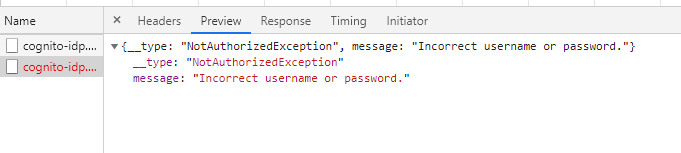
This is what I get on passing non-existent username to Auth.forgot
MihirGosai
on 16 Jan 2020
@MihirGosai, we are not seeing this behavior based on the reproduction steps you mentioned. As Manuel asked, can you provide a very minimal sample repo or a codesandbox where we can easily reproduce the exact issue you are seeing?
Amplifiyer
on 21 Jan 2020
This issue has been automatically closed because of inactivity. Please open a new issue if are still encountering problems.
![stale[bot] picture](https://avatars.githubusercontent.com/in/1724?v=4&s=40) stale[bot]
on 28 Jan 2020
stale[bot]
on 28 Jan 2020
You probably have Prevent User Existence Errors turned to Enabled.
Read more about it here
https://docs.aws.amazon.com/cognito/latest/developerguide/cognito-user-pool-managing-errors.html
change it to legacy if you want Cognito to throw an error if its not found.
 joetancy
on 2 Jul 2020
joetancy
on 2 Jul 2020
Related issues
 DougWoodCDS
·
3Comments
DougWoodCDS
·
3Comments
 cosmosof
·
3Comments
cosmosof
·
3Comments
 guanzo
·
3Comments
guanzo
·
3Comments
 benevolentprof
·
3Comments
benevolentprof
·
3Comments
 leantide
·
3Comments
leantide
·
3Comments
Most helpful comment
Hi @MihirGosai
I understand this has implications for the UX, but I think this is intentional in the Cognito Service, it is a best practice to not make that kind of information available as it can be used to attack apps.
e.g. take a look at the OWASP Authentication cheat sheet
I hope this helps in understanding why that information is not available when calling
Auth.forgotPassword