Amplify-js: AppSync Subscriptions returns error at MqttOverWSProvider.js:280
Description of the bug
When I use AppSync subscriptions in React app (.tsx file), following the instructions of Amplify API, it always returns "Uncaught TypeError: Cannot read property 'clientId' of null" at MqttOverWSProvider.js:280.
To Reproduce
Steps to reproduce the behavior:
- Follow the instructions of AppSync subscriptions on https://aws-amplify.github.io/docs/js/api
- Instead of getting todoData, you will see the following error:
Uncaught TypeError: Cannot read property 'clientId' of null
    at AWSAppSyncProvider.MqttOverWSProvider [as constructor] (MqttOverWSProvider.js:280)
    at new AWSAppSyncProvider (AWSAppSyncProvider.js:187)
    at PubSub.get [as awsAppSyncProvider] (PubSub.js:188)
    at PubSub.getProviderByName (PubSub.js:251)
    at PubSub.getProviders (PubSub.js:270)
    at PubSub.subscribe (PubSub.js:293)
    at APIClass.<anonymous> (API.js:1035)
    at step (API.js:134)
    at Object.next (API.js:65)
    at fulfilled (API.js:17)
And obviously, subscriptions do not work; queries and mutations are still working.
Expected behavior
In the case of the sample code, todoData returns.
Screenshots
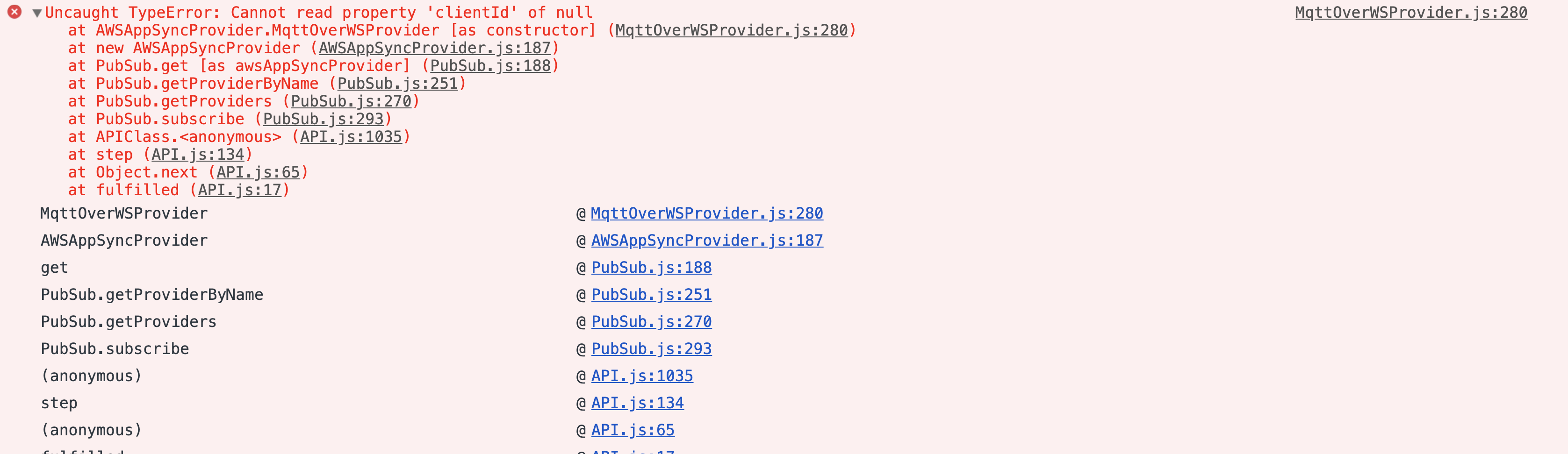
Desktop (please complete the following information):
- OS: MacBook Pro 2018
- Browser: Chrome
- Version: 77.0.3865.90
Sample code
import Amplify, { API, graphqlOperation } from 'aws-amplify';
import * as subscriptions from './graphql/subscriptions';

// Subscribe to creation of Todo
const subscription = API.graphql(
    graphqlOperation(subscriptions.onCreateTodo)
).subscribe({
    next: (todoData) => console.log(todoData)
});
 y-yeah
All 10 comments
Hi @y-yeah
Do you see requests to the /graphql endpoint in your network tab when doing the subscription? If so, are these requests successful?? (e.g. http status 200 and data in the response)
 manueliglesias
on 26 Sep 2019
manueliglesias
on 26 Sep 2019
Hi @y-yeah
Do you see requests to the
/graphqlendpoint in your network tab when doing the subscription? If so, are these requests successful?? (e.g. http status 200 and data in the response)
Hi @manueliglesias
I saw all the graphql working with status 200, but I think all of which come from queries and mutations.
y-yeah
on 26 Sep 2019
I think all of which come from queries and mutations.
This is strange, can you double check if any of those requests are for subscriptions? also, take a close look at the response tab, there should be some data in there
manueliglesias
on 26 Sep 2019
@manueliglesias
Oh sorry, I found subscription. Its state was 200.
As for the data, it was something like this:
{
"extensions": {
"subscription": {
"mqttConnections": [
{
"url": "...",
"topics": [
".../.../onCreateChat/"
],
"client": "..."
}
],
"newSubscriptions": {
"onCreateChat": {
"topic": ".../.../onCreateChat/",
"expireTime": 1569639675000
}
}
}
},
"data": {
"onCreateChat": null
}
}
Thank you @y-yeah , that response looks correct.
What version of amplify are you using?
manueliglesias
on 27 Sep 2019
@manueliglesias
Here are the dependencies I'm using regarding AWS.
"amazon-cognito-identity-js": "^3.0.11",
"aws-amplify": "^1.1.28",
"aws-amplify-react": "^2.3.8",
"aws-sdk": "^2.441.0",
Ok I fixed this problem, but this still may be a bug of Amplify:
aws-exports.js auto-generated by amplify init does not have aws_appsync_apikey in my React app, so I had to add this manually when configuring Amplify.
Below is my configuration:
import awsmobile from "./aws-exports";
import { aws_appsync_apiKey } from "./config.json";
Amplify.configure({
aws_appsync_apiKey,
});
Auth.configure(awsmobile.default);
Analytics.configure(awsmobile.default);
API.configure(awsmobile.default);
It is strange that I did not have to add the other variables regarding AppSync such as aws_appsync_graphqlEndpoint in Amplify.configure (although they are defined in awsmobile). Hope this solution will be helpful for those who struggle with the same issue anyways.
y-yeah
on 6 Oct 2019
I also had similar issue
The solution is:
import { API, PubSub } from "aws-amplify";
import config from "./src/aws-exports";
API.configure(config);
PubSub.configure(config);
Configure PubSub to subscribe
 alkurop
on 12 Oct 2019
alkurop
on 12 Oct 2019
@y-yeah Does the above solution work for you? Please let us know.
 sammartinez
on 18 Feb 2020
sammartinez
on 18 Feb 2020
This issue has been automatically closed because of inactivity. Please open a new issue if are still encountering problems.
![stale[bot] picture](https://avatars.githubusercontent.com/in/1724?v=4&s=40) stale[bot]
on 25 Feb 2020
stale[bot]
on 25 Feb 2020
Related issues
 benevolentprof
·
3Comments
benevolentprof
·
3Comments
 epicfaace
·
3Comments
epicfaace
·
3Comments
 oste
·
3Comments
oste
·
3Comments
 DougWoodCDS
·
3Comments
DougWoodCDS
·
3Comments
 TheRealRed7
·
3Comments
TheRealRed7
·
3Comments
Most helpful comment
I also had similar issue
The solution is:
Configure PubSub to subscribe